Exact Path Login: Student Login, Edmentum Access & Password Help
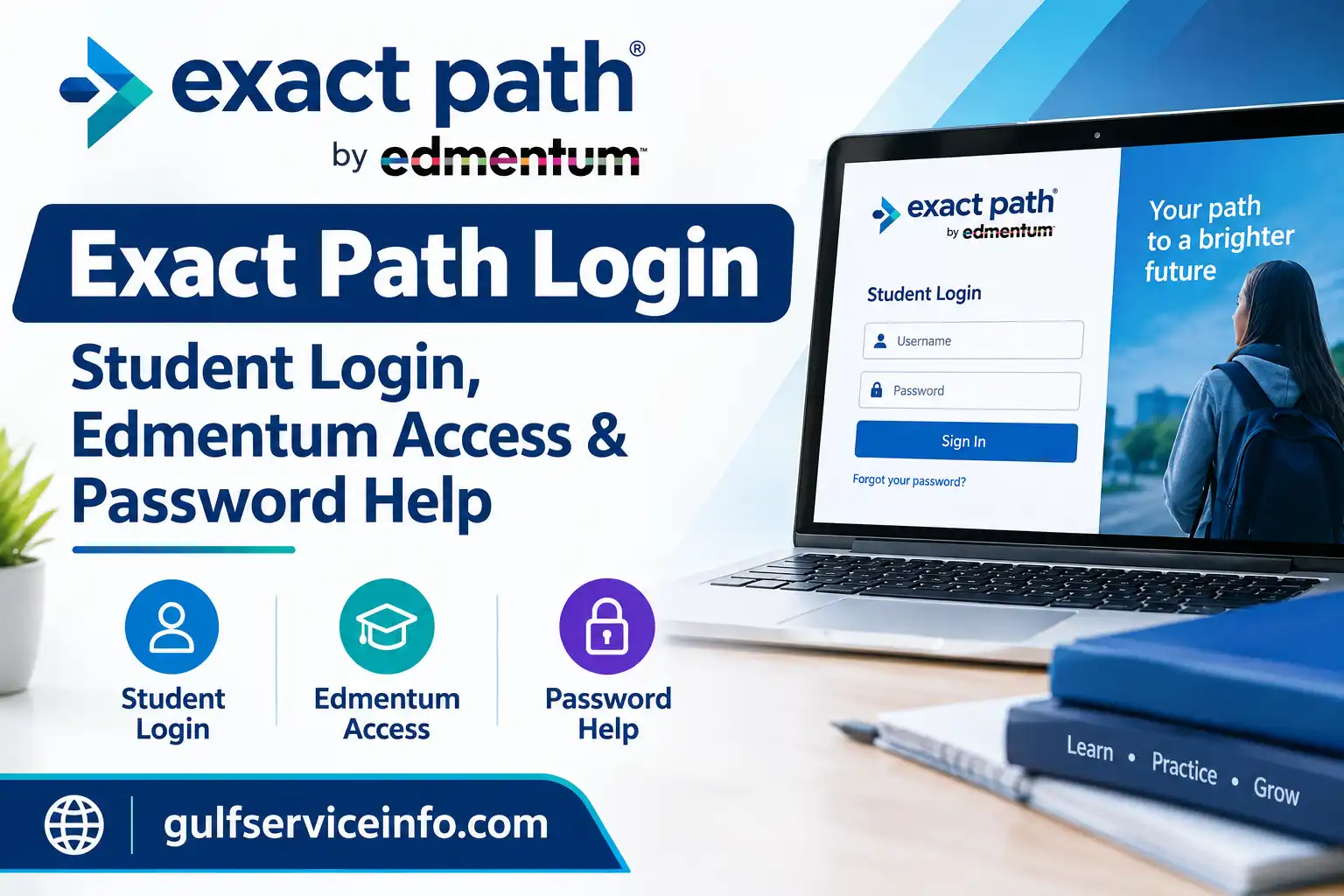
Getting into Exact Path comes down to two things: having the right school-issued details and knowing which sign-in page your district wants you to use. Edmentum Exact Path is a personalised learning platform. It helps students build academic skills, and it gives teachers a clear view of how each learner is getting on.
Your route in depends on how your school has set up your account, so the Exact Path login steps can differ slightly from one district to the next. For the official overview, see Edmentum Exact Path. If you already have an account, you can go straight to the Edmentum login portal.
For more step-by-step guides on online portals, account access, and government and educational services, visit GulfServiceInfo.com.
What Is Exact Path by Edmentum?
Edmentum built Exact Path for K–12 schools. It starts by assessing what a student already knows. It then uses those results to suggest what they should learn next in mathematics, reading and language arts.
This is the main difference from a one-size-fits-all programme. Two students in the same class can follow different learning paths because Exact Path responds to each one’s assessment results. Teachers and school leaders can use the same information to track progress and decide where support is needed. Students, for their part, work through assigned activities at a level that suits them.
| What Exact Path does | What it means in practice |
|---|---|
| Personalised learning | Activities match a student’s assessed needs |
| Diagnostic assessment | Shows existing knowledge and areas that need support |
| Skill development | Practice in maths, reading and language arts |
| Progress monitoring | Educators can review performance and growth |
You can check current programme details on the official Exact Path website.
Exact Path Login: How to Access Your Account
Begin with the address your school or district gave you. Some schools send everyone to the Edmentum Exact Path login portal. Others use their own student portal or a different sign-in method.
Quick checklist:
If your school has provided its own portal, use that one. It may have extra instructions or security checks that the general Edmentum page doesn’t show.
Important: Schools and educational organisations usually arrange Exact Path access. If you don’t have login details, ask your teacher or school administrator. Guessing usernames and passwords won’t help.
Exact Path Student Login: Step-by-Step Guide
Before you start, find out which sign-in method your school expects. It might be the Edmentum portal, a school learning system or another approved option. Your teacher can tell you.
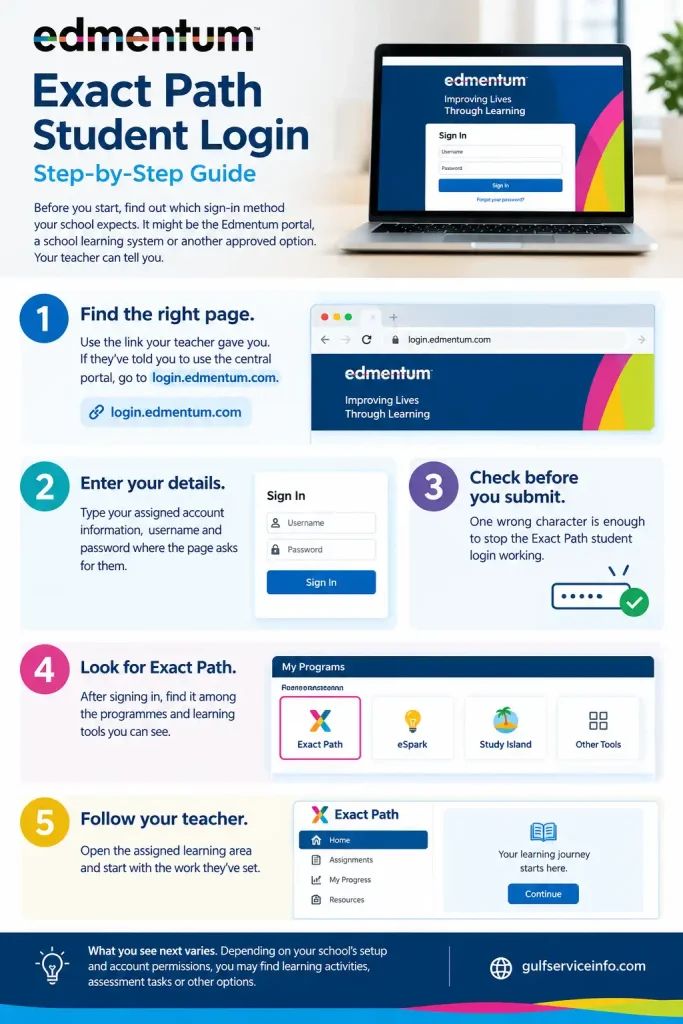
What you see next varies. Depending on your school’s setup and account permissions, you may find learning activities, assessment tasks or other options.
Not working? Check for typing errors first, then make sure you’re on the correct school portal. Don’t create a new account unless your school tells you to.
Can’t see Exact Path at all? Ask your teacher whether it’s been assigned to you. Being able to log in to the general Edmentum portal doesn’t mean every programme will appear automatically.
Edmentum Exact Path Login for Teachers
A teacher account gives you more than a student account does. Depending on your permissions, you may have classroom management tools and student information that learners can’t see. Teachers use these to plan instruction, spot learning needs and follow academic progress.
Edmentum’s Exact Path Teacher Quick Start Guide describes the teacher sign-in. It uses the Edmentum login portal and asks for an account name, a username and a password.
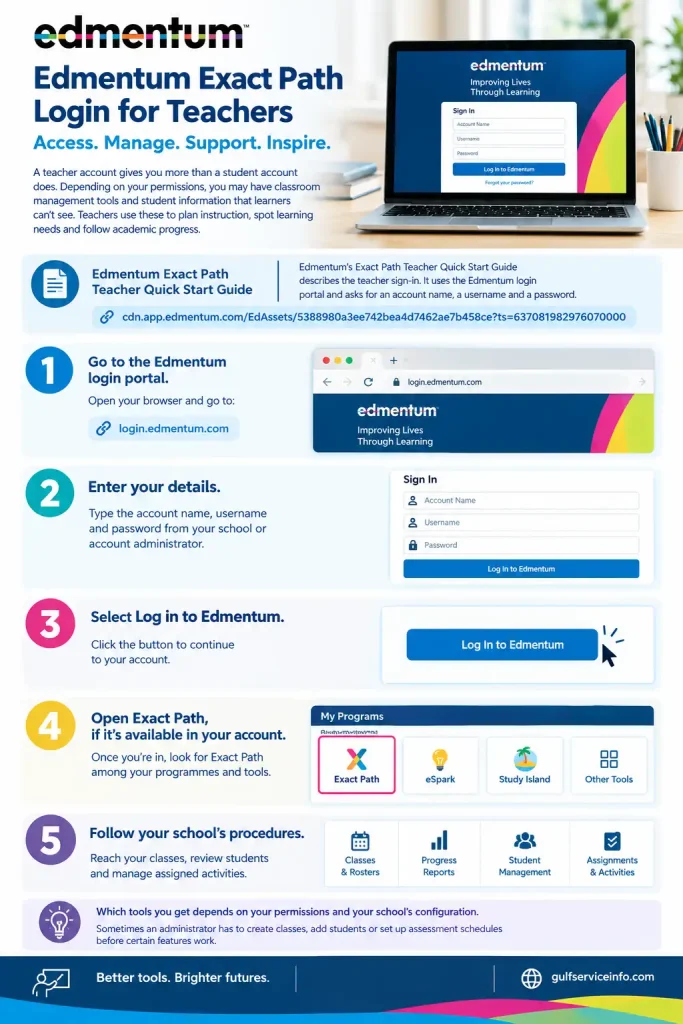
Which tools you get depends on your permissions and your school’s configuration. Sometimes an administrator has to create classes, add students or set up assessment schedules before certain features work.
If Exact Path doesn’t appear on your dashboard, contact your school’s Edmentum administrator and ask them to check your access. And don’t borrow a student login to get in. Student and teacher accounts carry different permissions, so it won’t give you the teacher tools.
Exact Path Login Password: How to Reset or Recover It
A forgotten password, or one typed wrongly a few times, will keep you out of Exact Path. How you get back in depends on how your school set up your account and what your sign-in page offers.
Here’s the usual route:
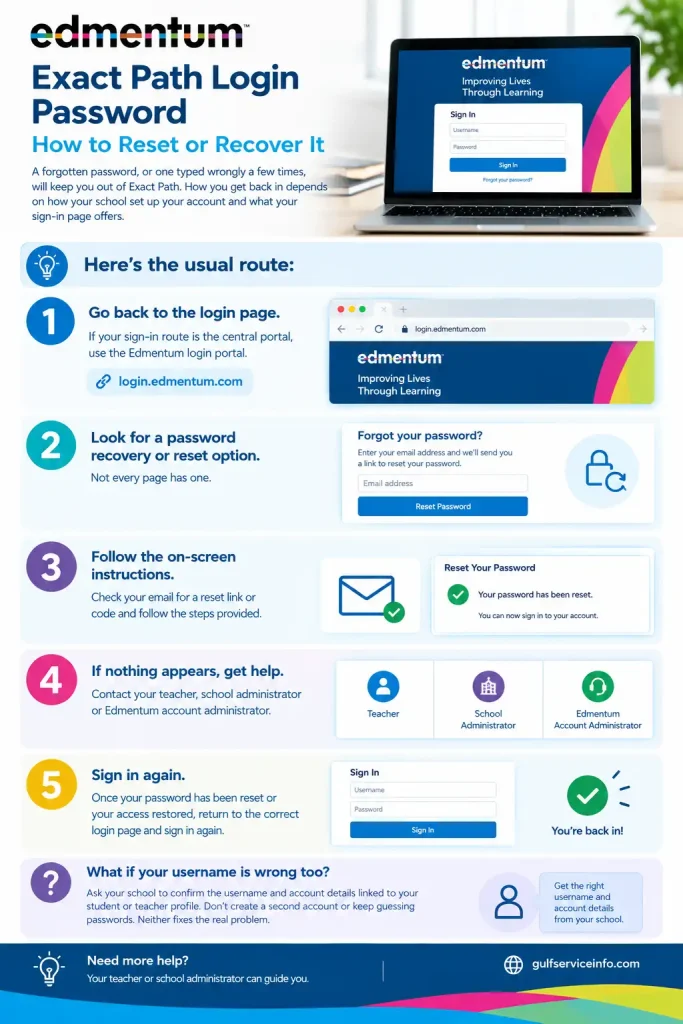
What if your username is wrong too? Ask your school to confirm the username and account details linked to your student or teacher profile. Don’t create a second account or keep guessing passwords. Neither fixes the real problem.
Your school administrator is the best person to ask for account-specific recovery steps. For general product information, see the official Edmentum Exact Path page.
Exact Path Sign Up: How to Get Started
Exact Path isn’t a public website where anyone can register alone. Schools and educational organisations usually manage the accounts and decide which programmes each user can see. So “signing up” normally means getting your school to set you up.
Students: Ask your teacher or school administrator whether you’ve been enrolled in Exact Path. You may need a username, a password or a school-specific login link before you can start.
Teachers: Contact your school’s Edmentum administrator to confirm your account has the right permissions. Depending on your school’s arrangements, they may need to set up classes, assign students or switch on the relevant learning tools.
Schools: If your school wants to use the platform, review the official Exact Path product information and use the contact or quotation options there.
Before you try to sign up, check:
Answering these first saves time. It also stops you confusing creating a new account with signing in to an existing one.
Exact Path App: How to Access Exact Path on Your Device
You may want Exact Path on a computer, Chromebook, tablet or phone. Start with your school’s access instructions, because the experience can vary with your device, browser, school configuration and sign-in method.
If your school uses the central route, open the Edmentum login portal in a supported web browser. Sign in with your assigned details, then look for Exact Path among your programmes. On a school-issued device, your school may have set up a learning portal or shortcut that takes you straight to the right page. Follow those instructions if they differ from the general steps.
| Check | Why it matters |
|---|---|
| Use the correct portal | Your school may require its own link |
| Update your browser | An old browser can stop the page loading properly |
| Try another supported browser | Useful if the page still won’t load |
| Allow pop-ups | Edmentum’s Teacher Quick Start Guide says student devices must allow pop-ups for Exact Path to work in the documented setup |
Expert tip: Don’t assume you need to download a separate Exact Path app. Check the official product information and your school’s instructions first, and verify any app or device requirements from official sources before installing anything. Current details are on the Edmentum Exact Path page.
Exact Path Math: Features and Learning Tools
Exact Path Math links assessment results to teaching that suits each student. Its aim is to help educators spot skill gaps and point learners towards what they’re ready to learn next.
It usually begins with a diagnostic assessment, which shows what a student already knows. Using those results and the school’s programme setup, the platform can direct the learner to suitable maths instruction and practice.
What you’ll find in Exact Path Math:
For students, the best approach is to take assessments carefully and work through the activities in your learning path. Guessing just to finish faster makes it harder to see which skills need attention.
For teachers, the assessment and progress data can support classroom teaching and help you respond to individual needs. The exact activities and reporting tools depend on the programme and account configuration.
To check the current maths offering, visit the official Exact Path product page.
How to Use the Exact Path Student Dashboard
Once your Exact Path login works, spend a minute looking around your account. What you see depends on your school’s setup and the programme assigned to you, so your dashboard may not match a classmate’s.
Start here:
Then take your time. Read each question carefully, answer honestly and look over any feedback you’re given. Rushing through only hides the skills you still need to practise.
Teachers see more. Their accounts can include student progress data and learning reports. These help them spot where a learner needs a fresh explanation or extra practice.
Can’t find an assigned activity? Ask your teacher to confirm it has been made available to your account.
Common Exact Path Login Problems and Solutions
Most login trouble comes from one of four things: wrong credentials, an outdated link, browser settings or account permissions. Working out which one it is beats signing in again and again.
| Problem | What to try |
|---|---|
| Username or password rejected | Check what you typed, then confirm your details with your school |
| Login page won’t open | Check the web address and your internet connection |
| Exact Path isn’t showing | Ask your teacher or administrator to confirm programme access |
| Page loads badly | Update your browser or try another supported one |
| Activity won’t open | Re-read the instructions and check your pop-up settings |
| No access to your account | Contact your school’s administrator |
Expert tip: Change one thing at a time. That way you’ll know which fix worked. And never post your password in a public forum or share it with anyone who isn’t authorised to help with your account.
How to Fix Edmentum Exact Path Login Errors
When the normal sign-in fails, work through the problem in this order. It narrows things down quickly.
1. Check the address. Make sure you’re on the portal your school gave you. If your school uses the general route, the Edmentum login page is the place to look.
2. Check your details. Look for stray spaces, typos and wrong capital letters. Not sure of your username or password? Ask your school to confirm them.
3. Check your browser and connection. Refresh the page and make sure your internet is working. If that doesn’t help, try another supported browser. Should an assigned activity seem stuck, check that pop-ups are allowed on your device.
4. Contact your administrator. If you’re still locked out, tell them the exact error message and what you’ve already tried. Don’t send your password.
For product information, use the official Edmentum Exact Path page.
Exact Path Login Requirements for Students and Teachers
A little preparation prevents most sign-in headaches. Before you try to log in, gather the following.
| You’ll need | Why |
|---|---|
| A school-approved login link | Takes you to the right sign-in page |
| Assigned account details | Identifies your student or teacher account |
| An internet connection | Lets your browser reach the online platform |
| A compatible browser and device | Helps the platform load and run properly |
| School-authorised access | Decides which learning tools you can use |
Students: Get your login details from your teacher or school administrator.
Teachers: Check that your account has the right permissions and that any class setup is finished.
Requirements differ between schools. Follow the instructions you’ve been given instead of assuming every account works the same way.
Is Exact Path Free for Students?
It depends on the school. Edmentum designed Exact Path for K–12 educators and educational organisations, and access normally comes through participating schools or districts. Whether a student pays anything directly is down to those arrangements.
If your school already provides Exact Path, you’ll probably just need your assigned credentials, not a personal subscription. Ask your school whether it’s part of your learning programme.
Families looking for access on their own should read the official Edmentum Exact Path page and contact Edmentum about current availability and pricing.
Worth remembering: Don’t assume there’s a free public sign-up, or that every school offers the same features.
Frequently Asked Questions About Exact Path Login
Final Tips for Successful Exact Path Access
Good Exact Path access starts with two things: the correct school portal and valid account details. Once you’re in, work through your assigned activities regularly, and ask your teacher whenever a task or instruction isn’t clear.
If an error appears, check your credentials, confirm the sign-in address and review your browser settings before you contact your administrator. For programme information, stick with the official Edmentum Exact Path website and avoid unofficial login pages.
Read More: Explore our related Gulf government service guides for more step-by-step information and helpful updates.
MOHRE Enquiry UAE: Login, Services, App & Status Check Guide
HMH Login: Student, Teacher & Ed Login Complete Guide
SEWA Bill Check: Online Payment, Login, NOC & Customer Care
EVG Fine Check UAE: Traffic Fines, Inquiry, Payment & Complete Guide