SIS AOU KW: Login, LMS, Student Portal & Complete Guide

For students at Arab Open University Kuwait, SIS AOU KW and LMS AOU are two important online platforms, but they are used for different purposes. SIS is primarily associated with student administration and academic services, while LMS is centred on online learning, course materials and coursework. Knowing which system handles a particular task can save you time when you need to register for a course, review academic information, study online or submit an assignment.
The official SIS AOU KW portal is available through sis.aou.edu.kw, while AOU Kuwait also provides dedicated student pages for its Student Information System (SIS) and Learning Management System (LMS).
This guide covers SIS AOU KW login, student services, LMS AOU Kuwait login, the difference between SIS and LMS, basic access troubleshooting, password-related issues, mobile access and common questions.
For more Kuwait-related guides, online services, and helpful step-by-step resources, visit the GulfServiceInfo homepage
Quick answer: Use SIS AOU KW for student and academic administration, including course registration and selected student services. Use LMS AOU for online learning activities, course resources, forums, assessments and coursework.
Understanding SIS AOU KW
SIS AOU KW is the Student Information System used by Arab Open University Kuwait. It provides an online environment for a range of student and academic administration functions.
The current AOU Kuwait SIS page identifies services such as accessing courses, printing a final sheet for payment, and adding or withdrawing registered courses. Students can also reach the SIS login through the university’s official student section.
AOU documentation describes the wider SIS platform as a central system covering areas such as student information, financial services, academic advising and online registration. Depending on the service and applicable process, the system may also support course registration, online payment, timetables, academic plans and examination results.
In simple terms, SIS AOU KW is the administrative side of your student account.
You may use it for tasks such as:
AOU student documentation also refers to SIS-related services involving certificates, transcripts, academic schedules and other student transactions.
Official SIS AOU KW Portal
For security, begin with the official AOU Kuwait SIS portal:
SIS AOU KW
You can also access SIS through the official AOU Kuwait student website, where the university provides its Student Information System (SIS) section and login option.
Security tip: Save the official SIS address in your browser instead of using unfamiliar login pages from search results. This helps reduce the risk of entering your student credentials on an unofficial website.
SIS AOU Kuwait Login: Before You Sign In
The SIS AOU Kuwait login gives students access to their available student information and online services. AOU’s official website currently provides a direct route to SIS through its Student Information System section.
Before signing in, make sure you have the following ready:
If the page fails to load or the login does not work, don’t immediately assume that you need a new account. The problem could be related to your browser, network, credentials or a temporary issue with the portal.
How to Access SIS AOU KW
The basic SIS AOU KW login process involves opening the university portal, entering your authorised credentials and selecting the service you need.
1. Open the official SIS portal
The address belongs to the AOU Kuwait SIS domain and currently redirects into the university’s SIS environment.
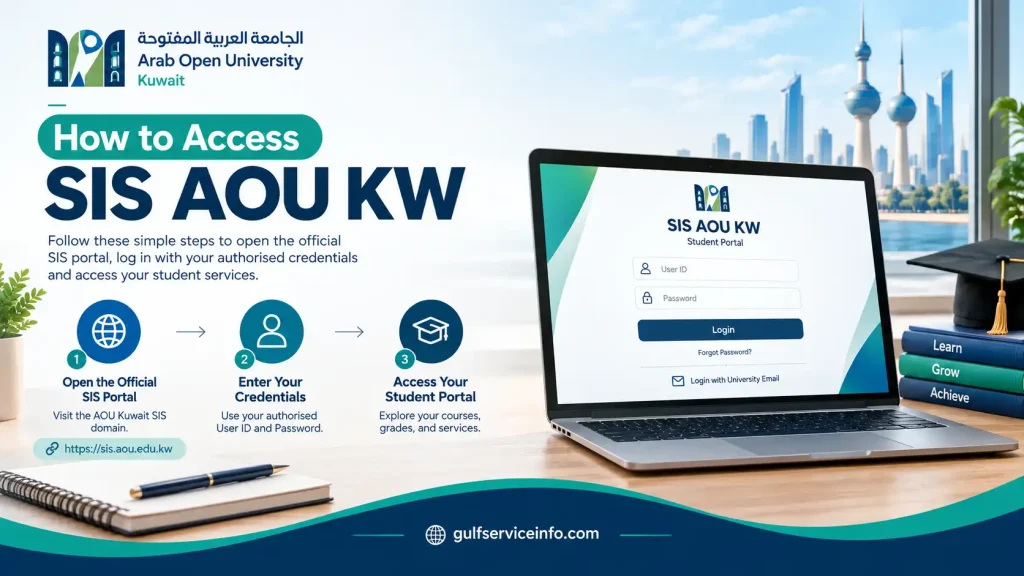
2. Enter your student credentials
Use the login information associated with your AOU student account.
Enter each detail carefully. University systems may treat usernames and passwords as case-sensitive. If you have recently changed your password, make sure you are using the latest credentials rather than an older password saved by your browser.

3. Submit the login form
After entering your details, submit the login form and allow the SIS dashboard or relevant student-services area to load.
The options available after signing in can vary according to your student status and the services enabled for your account.

4. Open the service you need
Once your SIS AOU KW login is successful, select the appropriate student service from the available options.
For example, SIS may provide access to functions involving courses, registration changes and payment-related information.

SIS Login Not Working?
If you’re unsure about your password, avoid repeatedly entering different credentials. Check these basics first:
If the problem remains, use AOU’s official student support or university contact channels. AOU Kuwait provides branch contact information and student resources through its official website.
What Can You Do Through SIS AOU KW?
The main purpose of SIS AOU KW is to bring several university-related administrative tasks together in an online environment.
AOU’s current SIS information specifically identifies functions such as accessing courses, printing a final payment sheet, and adding or withdrawing registered courses. Other university documentation describes a broader set of student and academic services.
Course Registration and Course Changes
SIS plays an important role in course registration. AOU documentation states that students can use the system to register for courses and, where the applicable process allows it, add or withdraw courses.
This can make SIS particularly relevant during registration periods.
Before making a course change, check AOU’s current academic calendar, registration instructions and programme-specific requirements. The rules that apply to one registration period may not necessarily apply to another.
Academic Information
SIS can also provide access to different types of academic information. AOU documentation refers to services such as academic schedules, academic plans and examination results.
As a result, SIS AOU KW can be useful beyond course registration when you need to review information connected with your academic progress.
Payment-Related Services
Financial functions are also part of the wider SIS environment. AOU documentation mentions online payment and related student services, while the current Kuwait SIS page specifically identifies the option to print a final sheet for payment.
Payment procedures can change, so follow the instructions currently displayed by AOU rather than relying on an old screenshot or an unofficial explanation.
Certificates, Transcripts and Other Student Requests
AOU student documentation also describes electronic services through SIS for requesting signed copies of certain certificates and statements, including academic records and schedules.
The exact options shown after login may differ depending on your student status, programme and the services currently available to your account.
Student Support Services
SIS can also serve as an access point for some electronic support processes. AOU, for example, states that its online appeals and complaints system can be accessed through a student’s SIS account.
That makes the SIS AOU KW student portal more than a registration page. It can act as a central entry point for several administrative services during your time at the university.
AOU Kuwait Student Portal: How SIS Connects to Other Services
Students may use terms such as AOU Kuwait student portal, SIS AOU KW and AOU student login interchangeably. Although these services are connected, they do not necessarily refer to the same platform.
The AOU Kuwait student section works as a broader online hub where students can find links to SIS, LMS, student guides and other university resources.
AOU’s official student pages currently provide dedicated access to:
If you’re unsure where to start, the official AOU Kuwait student section is a useful first stop:
From there, you can select the university service that matches what you need to do.
LMS AOU: Arab Open University’s Online Learning System
SIS AOU KW and LMS AOU have different primary roles. SIS focuses mainly on student administration, while LMS is designed around teaching and online learning.
AOU Kuwait states that registered students can access course materials through its Learning Management System (LMS). The university explains that courses can include online materials, assessment components, participants and tutors through the LMS, depending on the course and its delivery mode.
The official AOU LMS information lists functions such as:
AOU’s academic documentation also describes LMS as a university-wide learning environment based on Moodle. Depending on the course, it can support resources, quizzes, discussions, assignments, e-books, announcements and other online learning activities.
A useful way to remember the distinction is:
Need to study, access course material or submit coursework? Start with LMS.
Need to manage student or academic administration? SIS is generally the relevant starting point.
LMS AOU Kuwait Login
The LMS AOU KW login is separate from the main SIS login process.
AOU Kuwait’s official LMS page provides access to its online learning environment, where students can sign in and begin accessing their courses and learning activities.
An earlier official AOU Kuwait announcement also instructed new users to access LMS directly rather than entering it through SIS. That announcement provided the Kuwait LMS address and described the login credentials and initial password-change process applicable at that time.
Because university login procedures can be updated, students should follow the current credentials and instructions supplied by AOU rather than assuming that older LMS instructions remain unchanged.
What Can You Access After LMS Login?
Depending on the course and its delivery format, your LMS account may provide access to:
AOU notes that the exact components available online depend on the individual course and its delivery mode.
Important: An LMS access problem is not necessarily an SIS access problem. These are separate systems, so start troubleshooting within the platform you are actually trying to use.
SIS AOU KW vs LMS AOU: What’s the Difference?
The easiest way to distinguish the two systems is to look at what you are trying to accomplish.
| System | Main role | Typical uses |
|---|---|---|
| SIS AOU KW | Student administration | Registration, courses, academic information and selected student services |
| LMS AOU | Online learning | Course materials, forums, assignments, activities and other learning functions |
| AOU Student Website | Student information hub | Finding SIS, LMS, guides, announcements and support resources |
AOU’s documentation supports this general distinction: SIS is associated with student information and administrative functions, while LMS provides the online learning environment and course-related activities.
A Simple Way to Choose the Right Portal
If you’re unsure which platform to open, consider the task first:
Accessing your university account should be straightforward, but problems with SIS AOU KW login can sometimes interrupt your studies or prevent you from completing important academic tasks. Incorrect login details, browser errors, unstable internet connections and temporary portal issues are among the possible causes.
Before contacting university support, a few basic troubleshooting steps may help you identify the problem and restore access.
Common SIS AOU KW Login Problems and Solutions
Different login errors require different solutions. Identifying what is preventing access can save time and help you avoid unnecessary password changes or repeated login attempts.
| Login problem | What you can do |
|---|---|
| Incorrect password | Re-enter your password and check Caps Lock |
| Wrong username or student ID | Verify the credentials assigned to your AOU account |
| Outdated saved password | Remove the old saved password and enter your current one |
| SIS page not loading | Refresh the page or try another browser |
| Login works on another device | Check your browser settings, cookies and internet connection |
| Forgotten password | Look for the official password-recovery option |
| Account-related issue | Contact AOU Kuwait through its official student-support channels |
Always troubleshoot through the official SIS AOU KW portal. Avoid unfamiliar websites that claim to offer alternative access to your student account.
Fix Browser-Related Login Errors
Sometimes, the SIS website opens correctly, but the login page behaves unexpectedly. This may be related to cached information, browser extensions or outdated browser settings.
Try opening the portal in another modern browser. You can also use a private or incognito window to check whether saved browsing data or extensions are interfering with the login process.
If the portal works in private browsing mode, clearing the relevant browser cache and cookies may resolve the issue.
Check Your Internet Connection
A slow or unstable connection can interrupt the sign-in process or prevent the student dashboard from appearing after login.
Try these simple checks:
If the main AOU Kuwait website is also inaccessible, the issue may involve your connection or a temporary service interruption rather than your individual student account.
How to Reset Your SIS AOU KW Password
Forgotten login details can prevent you from accessing your academic information and student services. If you cannot remember your SIS AOU KW password, first check whether the official login page provides a password-reset or account-recovery option.
Avoid following password-reset instructions from unofficial websites unless the university has confirmed them.
Password Recovery: What to Prepare
Before starting the recovery process, make sure you have access to the information that may be required:
Steps to Recover Your SIS Password
Important security reminder
If the official portal does not offer password recovery or you cannot access the required verification details, contact AOU Kuwait through its official student-support channels. Never share your password with anyone claiming to help you recover your account.
Accessing SIS AOU KW on a Mobile Phone
You can use SIS AOU KW on your mobile phone or tablet through a web browser. A separate mobile application should not be assumed to exist unless AOU officially provides and supports one.
For direct access, open the official website
Mobile Login Process
The mobile sign-in process follows the same general sequence as desktop access:
Open your browser → Visit the official SIS portal → Enter your credentials → Sign in → Choose a student service
Mobile access is convenient when you need to check student information away from your computer. However, some documents, forms and portal functions may be easier to view or operate on a larger screen.
Tips for a Better Mobile Login Experience
For smoother SIS AOU KW login access on your phone:
If a page or student service does not display correctly on your phone, try accessing the same function from a laptop or desktop computer.
How to Keep Your AOU Student Account Secure
Your student account may contain academic and personal information, making basic account security an important part of using SIS.
Always Use Official AOU Websites
When signing in, use the university’s verified online resources.
- Official SIS AOU Kuwait Portal: https://sis.aou.edu.kw/
- Arab Open University Kuwait: https://www.aou.edu.kw/
The official AOU student section also provides links to SIS, LMS and other university resources.
Keep Your Login Credentials Private
Your student username and password should remain confidential. Avoid sharing them in student groups, public forums or social-media messages.
If someone asks you to provide your password to fix an SIS issue, use the university’s official support channels instead.
Manage Saved Passwords Carefully
Saving your login details can make access more convenient on a personal device. However, this is not recommended on shared computers.
If you use a university computer, library workstation or another device that other people can access, avoid saving your SIS credentials. Sign out when you finish using the portal.
SIS and LMS Login Issues: How to Identify the Right Problem
Not every access problem involving AOU’s online systems is related to SIS. The university uses separate platforms for student administration and online learning, so identifying the affected system is an important first step.
For example, you may be able to sign in to SIS AOU KW but encounter an error when opening a course in LMS. In that situation, the problem may be related to LMS access rather than your SIS account.
Similarly, if LMS works normally but SIS rejects your credentials, focus on troubleshooting the SIS portal.
A Quick Troubleshooting Guide
- Can you open the official website?If not, check your internet connection and consider whether the service may be temporarily unavailable.
- Can you reach the login page but cannot sign in?Verify your username and password. If necessary, check the official password-recovery options.
- Can you sign in but cannot see a particular course or service?Check whether the course or service should currently be available to your student account.
- Does SIS work while LMS remains inaccessible?Treat this as a possible LMS access issue instead of repeatedly resetting your SIS password.
This simple distinction helps prevent unnecessary changes to the wrong account and makes it easier to identify what kind of support you may need.
SIS AOU KW vs LMS AOU: Choosing the Right Platform
Although both platforms are part of the AOU student experience, their main functions are different. SIS handles administration, while LMS supports online learning.
When to Use SIS AOU KW
SIS is generally the appropriate platform for student administration and related academic services, including:
AOU’s current SIS information specifically mentions course access, registration changes and printing a final payment sheet.
When to Use LMS AOU
LMS is designed for online study and course-related activities. Depending on your course, you may use it for:
The university’s LMS information identifies these types of learning functions and explains how students access course materials through the platform.
Quick Portal Selection Guide
| What you need to do | Platform |
|---|---|
| Register for a course | SIS |
| Access online course materials | LMS |
| Manage a student service | SIS |
| Submit an online learning activity | LMS |
| Find official university links | AOU Kuwait Student Section |
During registration and assessment periods, knowing which platform to use can make it easier to move between administrative tasks and online study.
Official AOU Kuwait Student Portal and Useful Links
The official AOU Kuwait student section is a central resource for students who need access to university systems, learning information and student support materials.
Keeping the main university website and SIS portal bookmarked can save time and reduce the risk of using outdated or unofficial login pages.
| Official resource | Website | Main purpose |
|---|---|---|
| SIS AOU KW | sis.aou.edu.kw | Student Information System |
| AOU Kuwait | aou.edu.kw | Main university website |
| AOU Student Section | Student Resources | Student information and university resources |
| AOU SIS Information | Student Information System | SIS information and access |
| AOU LMS Information | Learning Management System | LMS information and learning access |
If you’re uncertain about a particular service, the university’s dedicated student pages are a useful place to find the appropriate system and its instructions.
Common SIS AOU KW Login Mistakes to Avoid
A few avoidable mistakes can make SIS AOU KW login problems more difficult to resolve. Being aware of them can help you troubleshoot more efficiently.
1. Opening the Wrong Portal
SIS and LMS serve different purposes. Trying to complete an administrative task through the learning platform, or looking for course materials in SIS, can lead to confusion.
Check which service you need before signing in.
2. Repeatedly Entering an Incorrect Password
Entering an uncertain password again and again is not a useful troubleshooting strategy. First check your credentials and use the official recovery process if you’ve forgotten your password.
3. Following Outdated Login Instructions
University websites and login procedures can change over time. Old screenshots, student guides and social-media posts may no longer reflect the current process.
For the latest available instructions, refer to AOU’s official website.
4. Sharing Your Password With Others
Your account credentials should remain private. Avoid sending your password to other students or posting it in public groups, even when you need assistance.
5. Treating Every Access Error as an SIS Problem
If you can sign in to SIS but cannot access your course through LMS, changing your SIS password may not solve the problem.
Identify which platform is affected before making account changes.
What to Prepare Before Contacting AOU Support
If you have tried the basic troubleshooting steps and still cannot access SIS AOU KW, gathering a few details before contacting the university can make it easier to explain the issue.
Prepare the following information:
Keep your password out of screenshots and support messages.
Providing these details can help the appropriate university team understand the problem and identify the next steps.
Frequently Asked Questions About SIS AOU KW
Final Thoughts
Understanding the difference between SIS AOU KW and LMS AOU can make everyday university tasks easier to manage. SIS is the main starting point for student administration, registration and selected academic services, while LMS is where students access online learning resources and course activities.
If you encounter a login issue, check your credentials, browser and internet connection before contacting support. When the problem continues, use the official AOU Kuwait resources rather than relying on unofficial login pages or outdated instructions.
For direct student-system access, visit SIS AOU KW. If you need help finding the right service, start with the AOU Kuwait Student Section.
Read More: Explore our related Gulf government service guides for more step-by-step information and helpful updates.
STC Pay Kuwait: Payment, Quick Pay, Recharge & Complete Guide
Kuwait Medical Report Check Online: Status, Results & Complete Guide
مدرستي الكويتية (Kuwait Madrasati): Login, Book Solutions & Complete Guide
AUM Portal: Login, Moodle, Banner & Complete Student Guide
CBK Online Login: Registration, Services, App & Complete Guide