Metrash Qatar Login, Registration, Services & Complete Guide
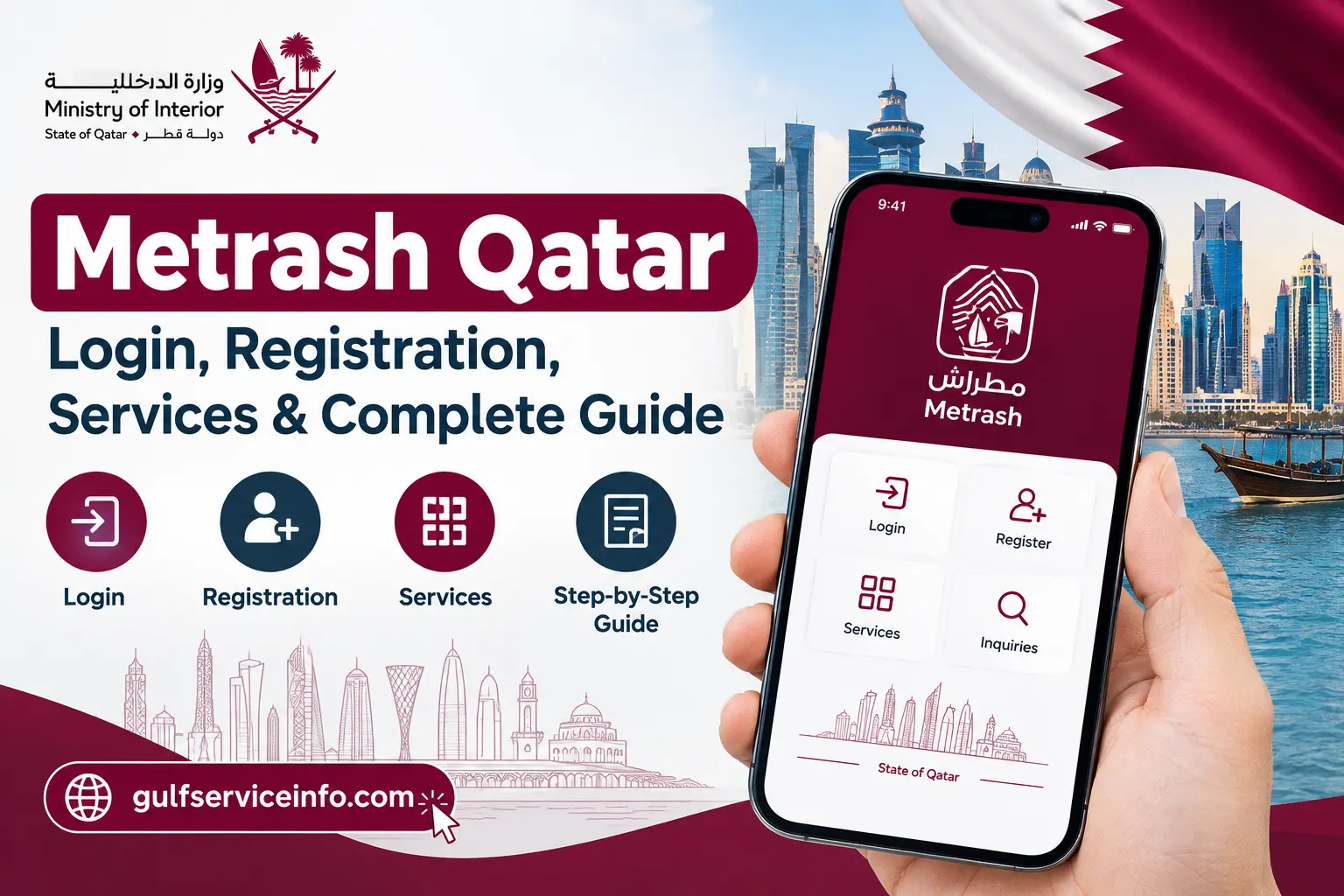
Need to access Qatar Ministry of Interior services from your phone? Metrash Qatar provides a digital route for handling and following up on a wide range of government services, including traffic, vehicles, residency, immigration and other MOI-related transactions. For many users, it reduces the need to visit a government office for routine services.
There is an important distinction to make when looking for a Metrash Qatar login. Metrash is not simply a standard website account that works like an ordinary online portal. It is part of Qatar’s Ministry of Interior electronic service system, with access and available features depending on the user and the service involved.
For registration, login access and government transactions, always begin with the official MOI platforms rather than third-party websites or unofficial applications.
For more helpful government service guides and updates, visit our Gulf Service Info homepage.
What Is Metrash Qatar?
Metrash Qatar is a Ministry of Interior digital service channel that helps eligible users access government services and receive related notifications electronically. The MOI describes Metrash Qatar as an SMS notification and service-delivery channel, while its wider digital service environment supports a much broader selection of government transactions.
The practical benefit is convenience. Depending on the user’s eligibility and the service available, Metrash can be used for tasks involving traffic, vehicles, residency, immigration and other Ministry of Interior services without relying entirely on face-to-face visits.
The Ministry also continues to operate and introduce electronic services through its digital platforms. Some registration and government procedures may therefore be available directly through the Metrash application or another official MOI electronic channel.
Quick answer: If you’re searching for Metrash Qatar login, registration or a specific government transaction, use the official Ministry of Interior website or the current official Metrash application. Avoid entering your QID, password, mobile number or verification code on unofficial websites.
Metrash Qatar Login
An existing subscriber can use the Metrash Qatar login process to reach the services available to their account. Depending on the service and the current MOI platform, authentication may take place through the Metrash mobile application or through the relevant electronic service provided by the Ministry.
If your Metrash Qatar account is already active, open the official application and follow the sign-in or authentication method shown on your device. Keeping your registered mobile number active is particularly important because Metrash services can rely on mobile-based verification and notifications.
The wider MOI website should not be treated as one single login page for every service. Its electronic-services environment includes separate areas for matters such as traffic inquiries, visa services, residence permit inquiries, exit and entry services and Metrash-related functions.
Before signing in: check the website or application carefully and make sure you are using an official Ministry of Interior service before providing personal information.
How to Access Your Metrash Account
Already registered with Metrash? The basic access process generally follows this sequence:
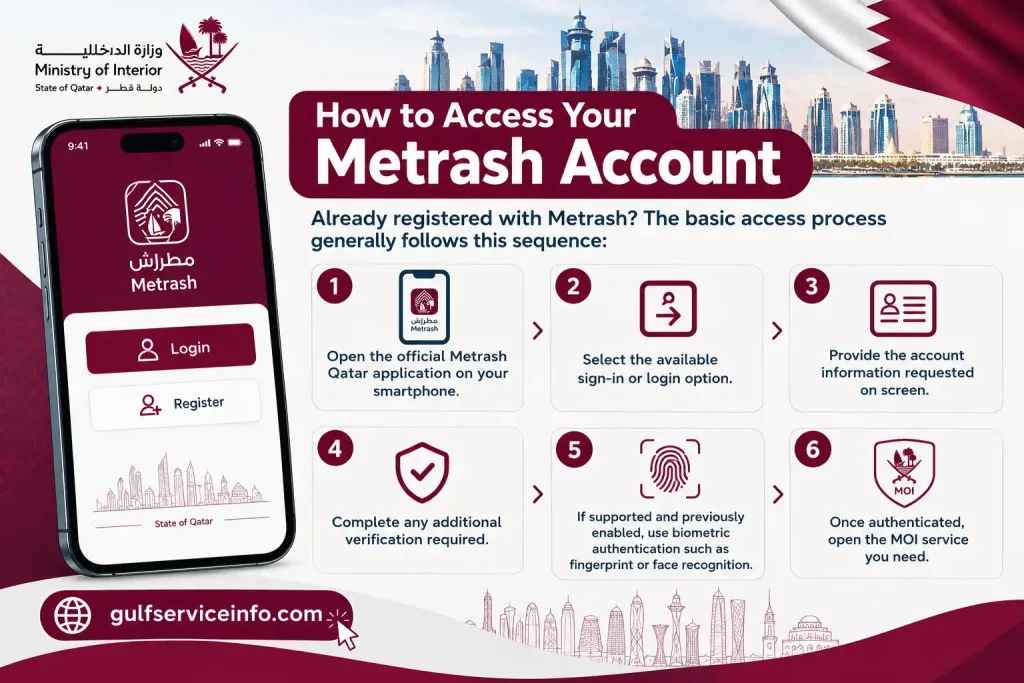
The exact interface may change when the Ministry updates its digital platforms. For that reason, follow the current instructions displayed in the official application rather than relying on older screenshots or third-party tutorials.
Metrash has also supported security features such as fingerprint and face identification on compatible devices, giving eligible users another way to authenticate more conveniently.
Metrash Registration: What New Users Need
You must complete the relevant Metrash Qatar registration process before using the service as a new subscriber. The official MOI portal provides different registration options, including individual registration, establishment registration and registration of an additional number for receiving Metrash messages.
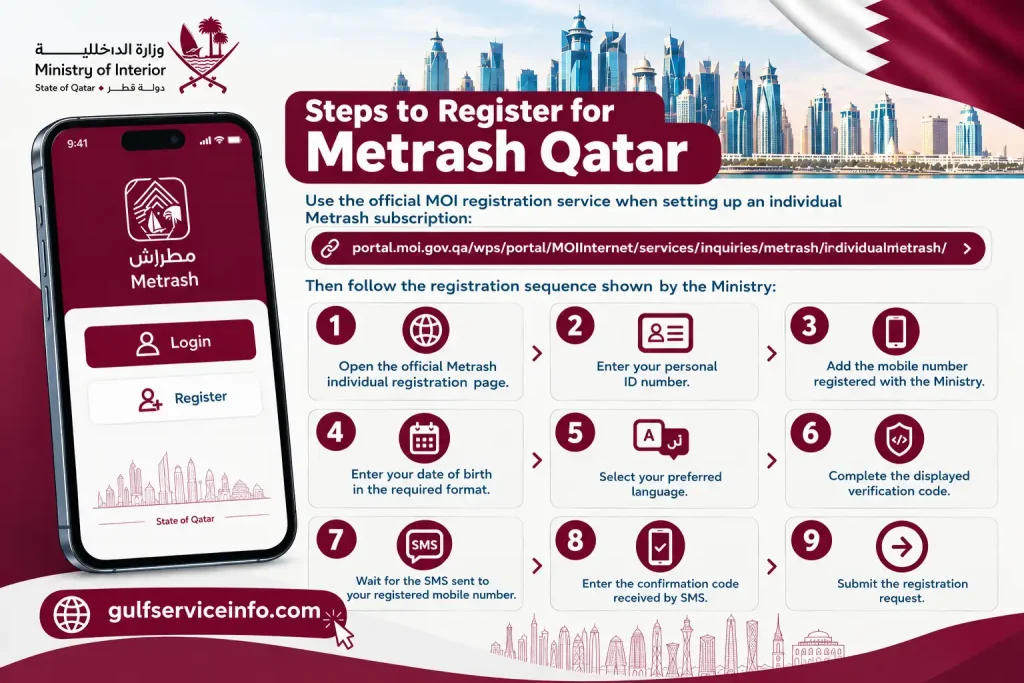
For individual registration, the official service requests information such as:

The mobile verification stage is important because the Ministry sends a confirmation code to the mobile number registered with its records. After the required verification is completed, the Metrash subscription can be activated.
Steps to Register for Metrash Qatar
Use the official MOI registration service when setting up an individual Metrash Qatar subscription:
Then follow the registration sequence shown by the Ministry:
The official Metrash Qatar service also includes options related to changing a registered number and managing Metrash subscriptions.
What If Metrash Registration Does Not Work?
A mismatch between your mobile number and the information held in the Ministry’s records can prevent registration from proceeding as expected. If this happens, check your official MOI information and use the Ministry’s official support channels rather than repeatedly submitting incorrect details.
Important: Your registered mobile number should match the information required by the Ministry for the Metrash service. Always follow the current requirements displayed on the official registration page.
What Services Can You Use Through Metrash Qatar?
The Metrash Qatar services cover several areas of everyday government administration. What appears in an individual’s account can vary according to eligibility, account type and the services currently enabled by the Ministry.
| Service area | Examples |
|---|---|
| Traffic | Traffic inquiries and vehicle-related transactions |
| Residency | Residence permit-related services and inquiries |
| Visa | Visa and immigration-related services |
| Exit & Entry | Entry permits and leave-related transactions |
| General MOI services | Other electronic Ministry services |
| Notifications | SMS and electronic service notifications |
| Establishments | Selected services for companies and establishments |

The wider Ministry of Interior electronic portal also provides access to categories such as traffic inquiries, visa services, exit and entry permits, residence permit inquiries and Metrash-related services.
This means Metrash should not be viewed as merely a Metrash Qatar login screen. It forms part of the wider MOI digital-service environment, allowing eligible users to access supported services through their mobile devices while the official MOI website remains an important source for online inquiries, registration options and government information.
Key Point for Metrash Users
The safest approach is to start with the official MOI platform, identify the service you actually need and then follow the authentication or registration instructions displayed there. Because digital-service screens and available options can change, current official instructions should take priority over older screenshots or unofficial guides.
Metrash Traffic Services for Vehicles and Drivers
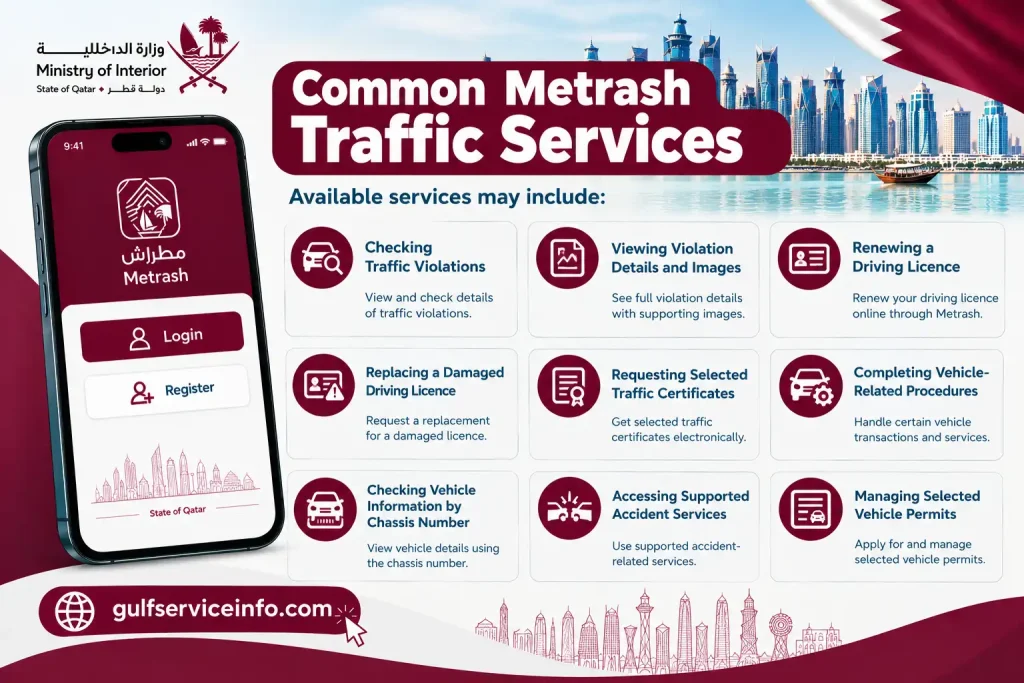
For motorists, Metrash Qatar brings several routine traffic and vehicle services into Qatar’s digital government system. Depending on the services enabled for your account, you may be able to deal with traffic violations, driving licences, vehicle procedures, certificates and accident-related matters without visiting a traffic centre for every request.
The available options can include checking violations, viewing violation details or images, renewing or replacing a driving licence, requesting certain traffic certificates and handling selected vehicle procedures. Some services may also allow users to check vehicle information through a chassis number or manage specific permits.
Common Metrash Qatar Traffic Services
Available services may include:
The Ministry can change or expand its electronic-service menu, so the options shown in your current account may differ from older guides. For an important transaction, use the current Metrash application or the official MOI website as your reference.
Official source: Qatar Ministry of Interior Traffic Services
Residency, QID and Personal Services Through Metrash
Metrash is also useful for residents who need to keep track of residency and personal-document services. Instead of waiting for a paper notice or making an unnecessary visit to an MOI office, users can receive electronic updates and access supported services through the Ministry’s digital channels.
One useful feature is the notification system. Official Metrash information includes alerts relating to matters such as residence permit expiry, driving licence expiry and vehicle registration expiry. These reminders can help users notice approaching deadlines before an important document becomes overdue.
Depending on the services available to your account, the system may include options connected with:
Don’t Rely on Notifications Alone
A Metrash message is useful, but it should not be treated as a replacement for checking your official government records. The MOI describes Metrash Qatar as a notification service, which means users should not assume that a delayed or missing SMS means that an obligation or expiry date has changed.
If a residency, QID or other government deadline is important, verify the current status through the appropriate official MOI service rather than relying solely on an SMS alert.
Metrash Visa and Immigration Services
Visa and immigration matters are another important part of Qatar’s Ministry of Interior electronic-service system. The official MOI portal places visa services alongside areas such as traffic enquiries, exit and entry permits, residency permit enquiries and Metrash.
For eligible users, digital access can make it easier to follow an immigration-related transaction and receive relevant government notifications. The exact options, however, depend on the service and the user’s circumstances.
You may encounter services relating to:
Check the Service Before Submitting Information
Visa transactions should be handled carefully because different procedures can require different documents, reference numbers or eligibility conditions. Before submitting your details, make sure the selected service matches the transaction you actually need.
For official visa and immigration information, use the Ministry’s own electronic-services portal rather than an unofficial website claiming to provide Metrash Qatar access.
Official Qatar MOI Electronic Services
Metrash National Address Service
Address information is another area connected with Qatar’s electronic government services. The Metrash service has included an Address Query option alongside other general services, giving users a digital way to access address-related information where the feature is available.
Your national address can matter when completing government transactions or maintaining accurate official records. If an address service appears in your Metrash account, review the information carefully before confirming or submitting it.
This is particularly important when address details are being used as part of an official application. A small error in an address field can create problems later, so take a moment to verify the information shown on screen.
The Metrash menu can change as the Ministry updates its electronic services. If the current application looks different from an older tutorial, follow the current interface rather than attempting to reproduce outdated steps.
How to Report a Minor Road Accident Through Metrash
Metrash also has a role in certain accident-related procedures. It is important, however, to distinguish between reporting an eligible minor accident and searching for historical accident records.
The Ministry of Interior has published a process for reporting certain minor road accidents involving two vehicles through the Metrash2 mobile service. Where the situation meets the requirements of the service, the report can be submitted electronically instead of requiring the parties to visit traffic investigation services in person.
Steps for a Supported Minor Accident Report
If the accident falls within the circumstances covered by the official service, prepare the required information and follow this sequence:
After the report is submitted, the Ministry states that an SMS notification is sent and traffic investigators review the submitted accident photographs. Further instructions may then be provided concerning the insurance company or approval for vehicle repairs.
Can Metrash Show Previous Accident Records?
If you are trying to find previous accident information, rather than report a new minor accident, check the Traffic Services and enquiry options currently available in your Metrash account.
Do not assume that an older online guide shows the exact menu or format currently used by the Ministry. Government applications are updated, and service names or locations can change.
For current accident-related services, begin with the official MOI Traffic Department:
Open the Official MOI Traffic Department
Safety note: The minor-accident process is intended for situations covered by the MOI service. If an accident involves injuries, serious damage or an emergency, use the appropriate emergency and official traffic channels instead of relying on Metrash Qatar as a substitute for urgent assistance.
Metrash Online Services for Individuals and Establishments
Metrash online services are part of the wider electronic-service system operated by Qatar’s Ministry of Interior. The official Metrash service provides different subscription routes, including individual subscriptions, company or establishment subscriptions and secondary subscriptions.
For individuals, the service can provide notifications and access to supported government transactions. Businesses and establishments have a separate registration route with its own information requirements.
Company and Establishment Metrash Registration
The official company registration service can request details such as:
The official service also provides functions for managing the subscription, including changing an email address and unsubscribing.
Businesses should therefore use the appropriate establishment registration route rather than attempting to register through an individual Metrash subscription.
Additional Metrash Number
The Ministry also provides a secondary Metrash subscription option. This allows an additional number to receive Metrash messages, subject to the information and verification required by the official service.
This can be useful when another authorised person needs to receive relevant notifications associated with the Metrash subscription.
Because registration requirements and available options can change, use the current MOI service page when setting up or modifying a subscription.
Metrash Qatar App
The Metrash Qatar app is the mobile route for accessing supported Ministry of Interior services. It can be particularly convenient for people who regularly deal with traffic, residency, immigration or other MOI transactions and prefer to manage them from a smartphone.
MOI material has referred to the Metrash2 mobile application when describing traffic services and other electronic transactions. This explains why users searching for the Metrash app may encounter both names online.
Before Installing the Metrash App
Use the official application source associated with the Ministry rather than downloading an APK or modified application from an unknown website.
Before entering your QID, mobile number or other government-service information, check that:
Keeping the application updated is also worthwhile because government apps can change their authentication methods, menus and available services.
Security tip: If you search for “Metrash Qatar app download”, don’t install the first APK or third-party file you find. Verify the official application before entering any personal or government-service information.
Metrash vs Metrash2: Are They the Same?
The terms Metrash and Metrash2 can be confusing because both appear in official and third-party information about Qatar’s Ministry of Interior digital services.
Metrash2 is the name used by the Ministry in older material for its mobile electronic-service platform. Some existing MOI pages and documents continue to use the term, particularly when explaining traffic and mobile services.
At the same time, newer MOI service pages may simply refer to the platform as Metrash. The difference is therefore often a matter of terminology and the age of the material being referenced.
For example, the MOI’s published instructions for reporting certain minor road accidents refer specifically to the Metrash2 mobile application, while the current general service area uses the shorter Metrash name.
Which Metrash Name Should You Search For?
If you’re looking for a Metrash Qatar login, app or government service, focus on the current official MOI platform rather than the name used in an older article.
An outdated guide may show a different button, menu or login screen. The safest approach is to open the current official Ministry website or official application and follow the instructions displayed there.
This is especially important for registration, authentication and traffic services, where the available options may change as the Ministry updates its digital platforms.
Metrash Contact Number and Customer Care
If you’re having trouble with Metrash Qatar login, registration, SMS verification, traffic services or another Ministry of Interior transaction, use the official MOI support channels for assistance. Before contacting customer care, identify exactly where the problem occurs so you can explain the issue clearly and avoid unnecessary troubleshooting.
Have the relevant details available when you contact support. Depending on the problem, you may need your QID, registered mobile number, vehicle number, transaction reference or a screenshot showing the error. Never provide your password, OTP or other confidential authentication details to another person.
For general Ministry of Interior enquiries, check the current contact information published on the official MOI website.
Official Qatar Ministry of Interior Contact Page
When describing a Metrash problem, be specific. For example, tell support whether the issue occurs while registering, receiving an SMS code, signing in, completing a traffic transaction or using another particular service.
Before Contacting Metrash Support
A few basic checks can resolve common problems before you need to contact customer care:
Having this information ready can also help customer support understand the problem more quickly.
Metrash Website
Searching for the Metrash website can be confusing because Metrash isn’t simply one standalone website containing every available service. Instead, it operates within Qatar’s wider Ministry of Interior electronic-service environment.
For Metrash information, registration and related government transactions, the official MOI website is the appropriate starting point.
Visit the Official Qatar MOI Website
Rather than looking for one generic Metrash Qatar login page, use the relevant service category on the official portal. Depending on your requirement, this may include traffic services, visa enquiries, residency services, exit and entry services or other Ministry functions.
The official Metrash section also provides dedicated options for different subscription types, including individual registration, company registration and secondary-number registration.
Official Metrash Services
Why Use the Official Metrash Website?
Government digital services can change, so using an official source is particularly important. Third-party websites may continue displaying old screenshots, outdated instructions or links that no longer lead to the correct service.
Before entering information for Metrash Qatar services, check the website address and make sure you’re using the official Ministry of Interior domain.
The official portal is especially useful when:
Common Metrash Login Problems
A Metrash Qatar login failure can have several causes and doesn’t automatically mean that your account has been blocked. Incorrect information, an outdated app, internet problems and verification issues can all interfere with access.
Before assuming there is an account problem, work through the most likely causes below.
Incorrect Login Details
Start by checking the information you’ve entered before attempting to sign in repeatedly. Even a minor mistake in your account details can cause authentication to fail.
If you’ve forgotten relevant account information, use the recovery or support option provided by the official service. Avoid repeatedly entering guessed information, as this is unlikely to resolve the problem.
SMS Verification Not Received
Some Metrash procedures depend on mobile verification. The official individual registration process, for example, uses an SMS confirmation code to verify the registered mobile number.
If your verification code doesn’t arrive:
If the code still doesn’t arrive after these checks, use the official MOI support channels for further assistance.
Mobile Number Does Not Match
A mobile-number mismatch is an important issue to check during Metrash registration. The official individual registration process requires your personal ID and mobile number before sending an SMS confirmation code.
If the number stored in the Ministry’s records doesn’t match the number you’re entering, the registration may not be completed successfully.
Check that you’re using the correct registered mobile number before trying again.
Application Not Working
If the Metrash application opens but a particular service fails to load or respond, first check whether an application update is available. Restarting the app and confirming your internet connection may also resolve temporary problems.
Pay attention to whether the entire application is affected or only one service. If other Metrash features work normally while one transaction remains unavailable, the issue may be limited to that particular government service.
Old Metrash2 Instructions
Older Metrash2 tutorials can also create confusion. The Ministry has published Metrash2 instructions for services such as traffic procedures and minor accident reporting, but the current application may use different menus, labels or screens.
When an older guide doesn’t match what you see, don’t assume you’ve opened the wrong service. Compare the instructions with the latest information on the official MOI website and follow the current platform.
Frequently Asked Questions About Metrash
Final Thoughts on Metrash Qatar
Metrash Qatar brings a wide range of Ministry of Interior services and notifications into Qatar’s digital government environment. It is more useful to think of Metrash as a broader electronic-service platform rather than simply a page used for logging in.
Whether you’re looking for Metrash Qatar login, registration, traffic services, vehicle information, residency services, visa information or accident procedures, start with the current official MOI information. This helps you avoid outdated instructions and ensures that you’re using the correct government service.
For registration, check that your personal details and registered mobile number are correct. For traffic and accident-related transactions, follow the specific instructions shown by the current application. If a problem persists, use official MOI customer-care channels instead of relying on unverified troubleshooting advice.
Read More: Explore our related Gulf government service guides for more step-by-step information and helpful updates.