SEWA Bill Check: Online Payment, Login, NOC & Customer Care
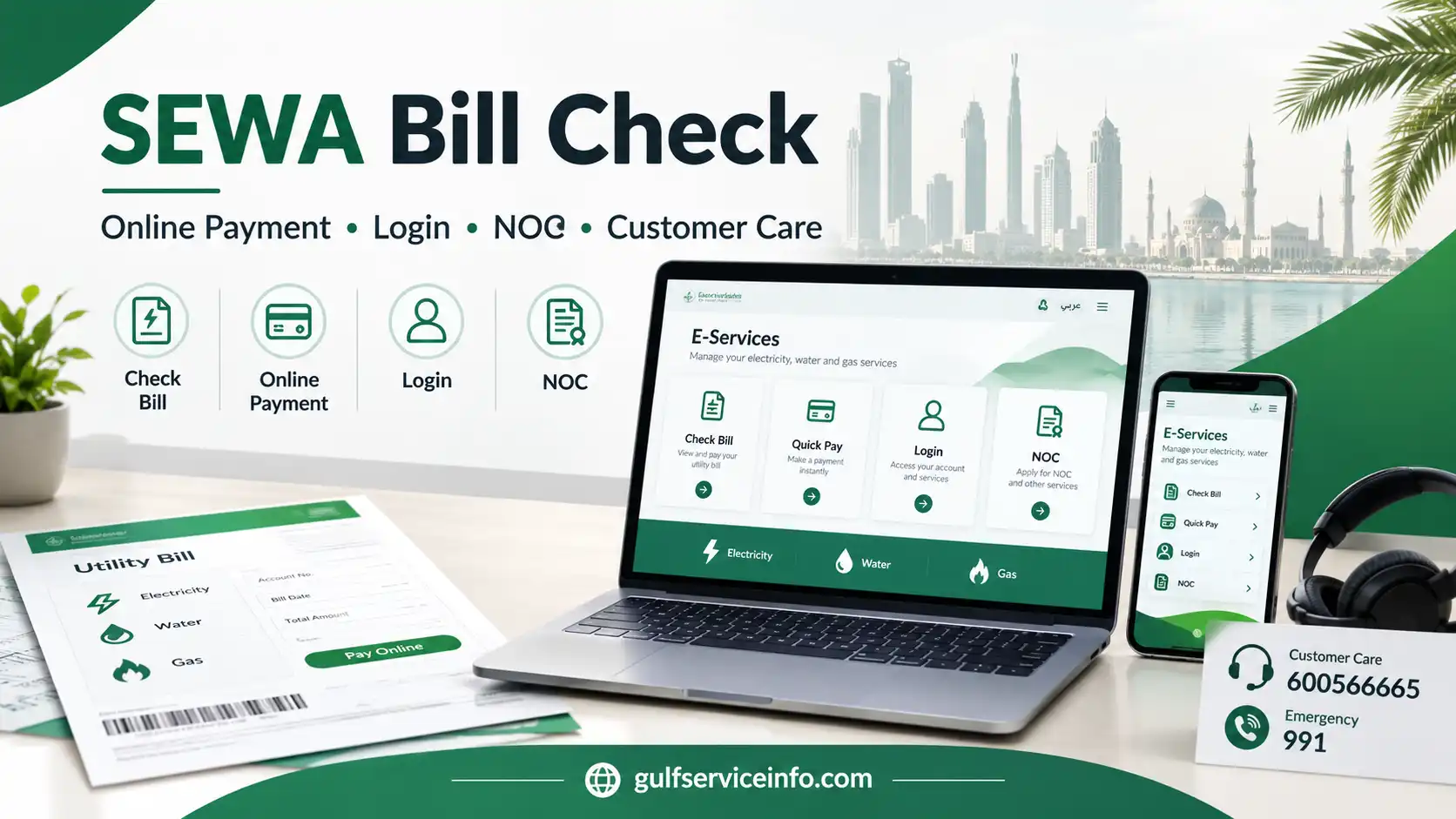
Managing electricity, water or gas services in Sharjah is easier through the official SEWA digital services. Customers can use the Sharjah Electricity, Water and Gas Authority website to check outstanding bills, make online payments, use Quick Pay and access other account services without relying on third-party platforms.
The right option depends on what you need to do. If you simply want to see your current utility charges, the bill-check service may be enough. If you only need to settle an amount due, the online payment or Quick Pay route can be more convenient, while customers who regularly manage their utility account may prefer the full SEWA e-services portal.
For more useful guides on government services, online portals, bills, and official procedures, visit the GulfServiceInfo homepage to explore our latest service guides.
What Does SEWA Do?
SEWA, or the Sharjah Electricity, Water and Gas Authority, provides essential electricity, water and gas services throughout the Emirate of Sharjah. Its official online platform brings together information, customer support and digital services for different types of users, including residents, businesses and other customers.
Through SEWA’s electronic services, users can carry out routine tasks such as checking bills, paying outstanding amounts, managing utility accounts and submitting service-related requests. The e-services environment also provides different access routes for categories such as consumers, owners and consultants.
For an ordinary customer, it helps to understand the difference between three common options:
Useful tip: If your only goal is to pay a current SEWA bill, using the dedicated payment service can save time compared with entering the full account-management area.
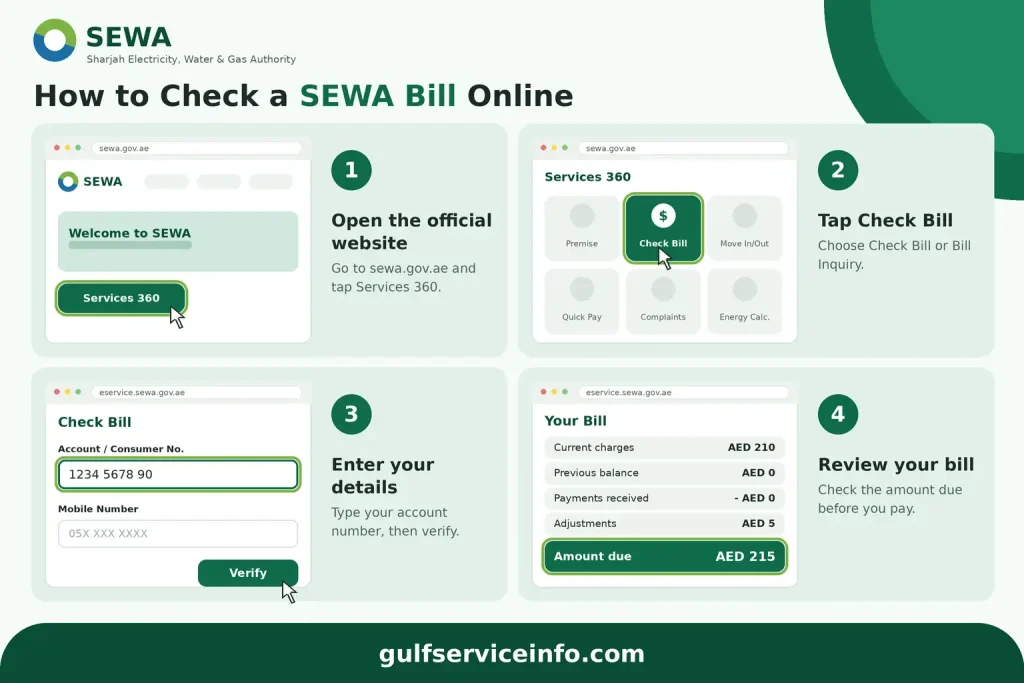
How to Check a SEWA Bill Online
A SEWA bill check lets you review your current utility charges before making a payment. The official SEWA website includes a Check Bill service, while account-based services are available through the SEWA electronic services environment.
Start from the Official SEWA Website
Go directly to https://www.sewa.gov.ae/ and open the online services section. The SEWA website lists Check Bill within its Services 360 options, making it the appropriate starting point for a bill inquiry.
Open the Bill Inquiry Service
Select the relevant Check Bill or bill inquiry option. Depending on the current service interface, SEWA may take you to its electronic services environment to continue the process.
Enter Your SEWA Details
Have your SEWA account or consumer information ready before proceeding. Enter the requested information exactly as it appears in your SEWA records and complete any additional verification requested by the system.
Review the Bill Information
After your details have been accepted, the available bill information should be displayed. Review the amount due along with any previous balance, recorded payments, adjustments and current utility charges before deciding whether to make a payment.
A SEWA bill may include several types of charges. An official SEWA bill example shows entries relating to electricity, water, gas and other charges, together with information such as arrears, receipts, current amounts and adjustments.
Details to Verify Before Paying
Take a moment to compare the information on the bill with your account records. In particular, check:
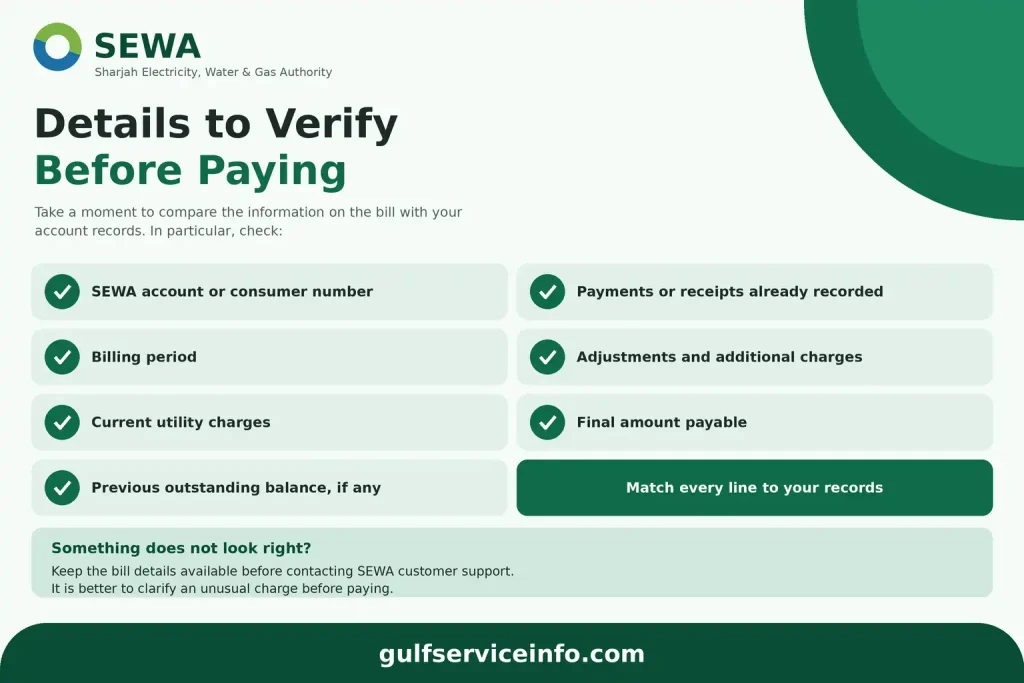
If an amount does not look right, keep the bill details available before contacting SEWA customer support. It is better to clarify an unusual charge than to rely only on the final total.
Paying a SEWA Bill Online
Once your SEWA bill check is complete, you can use the official online payment service to settle the amount due. The payment page follows a straightforward sequence covering account verification, payment details and final confirmation.
SEWA Online Payment Steps
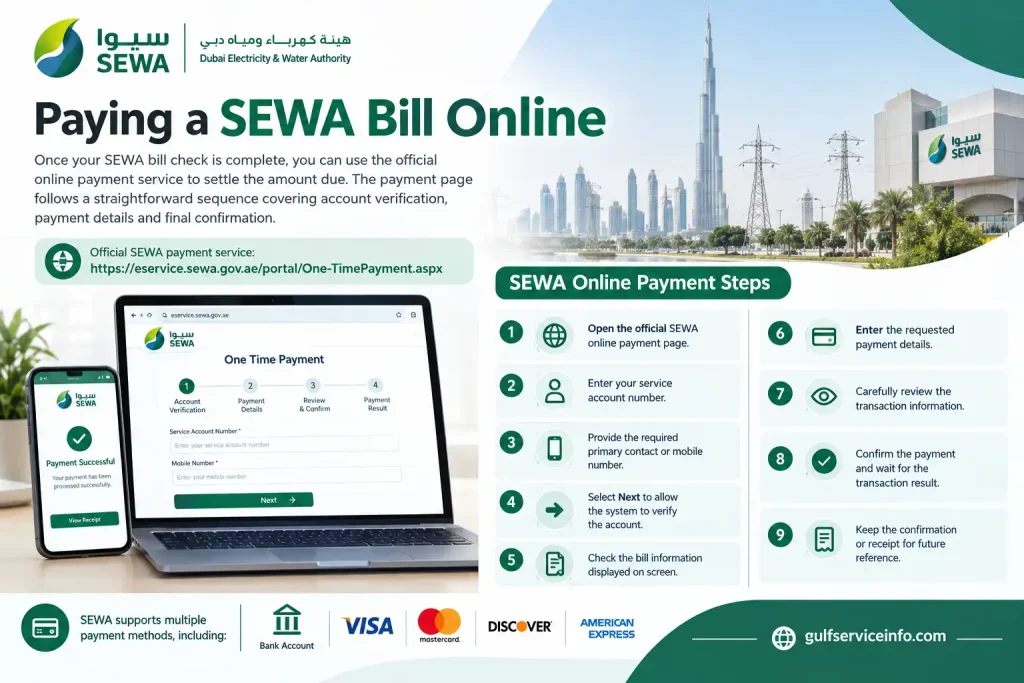
SEWA’s official payment service supports several payment methods. Depending on the options presented during the transaction, customers may be able to pay using a bank account or major cards such as Visa, Mastercard, Discover and American Express.
Check These Details Before Confirming
The most important step before submitting a payment is verifying the account number and payment amount. A small error at this stage can cause unnecessary problems.
It is also worth keeping a copy of the payment confirmation. This can help if the transaction remains pending, the amount is deducted but the SEWA account does not immediately reflect the payment, or you need to discuss the transaction with customer support.
SEWA Quick Pay: When Is It Useful?
SEWA Quick Pay is intended for customers who want to make a payment without going through the wider account-management experience. The official payment service allows the service account to be verified using the account and contact information requested by the system before the payment details are entered.
This option is particularly useful when you already know your account information and simply want to settle a bill.
By contrast, the wider SEWA e-services portal is more suitable when you need to manage utility services, review consumption or use additional account functions. SEWA’s consumer and owner account services provide access to electricity and water management as well as bill-payment functions.
Choose the Payment Route That Fits Your Need
Use SEWA Quick Pay or the dedicated payment service when:
Use the main SEWA account portal when:
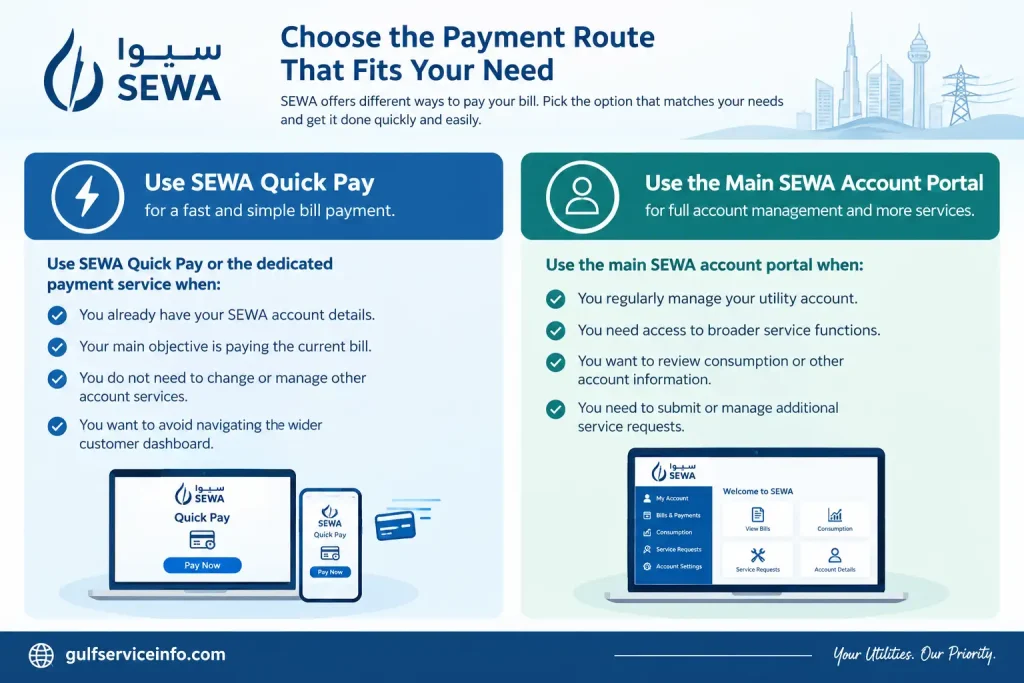
For a one-off payment, the dedicated payment route is usually the more direct choice. If you frequently interact with your SEWA account, signing in to the main e-services environment can give you access to a wider range of functions.
SEWA Login: Access Your Online Account
A SEWA login is useful when you need to do more than simply check an outstanding bill. Once authenticated through the official e-services portal, registered users can manage electricity and water services, make payments, review consumption and access other account-specific functions.
SEWA provides different portal access levels for Consumer, Owner, Consultant, Supplier, Government, Job Seeker and Student users. The services available after signing in depend on the role attached to the account.
Steps to Sign In to SEWA
Use the official e-services portal and follow the sign-in sequence below:
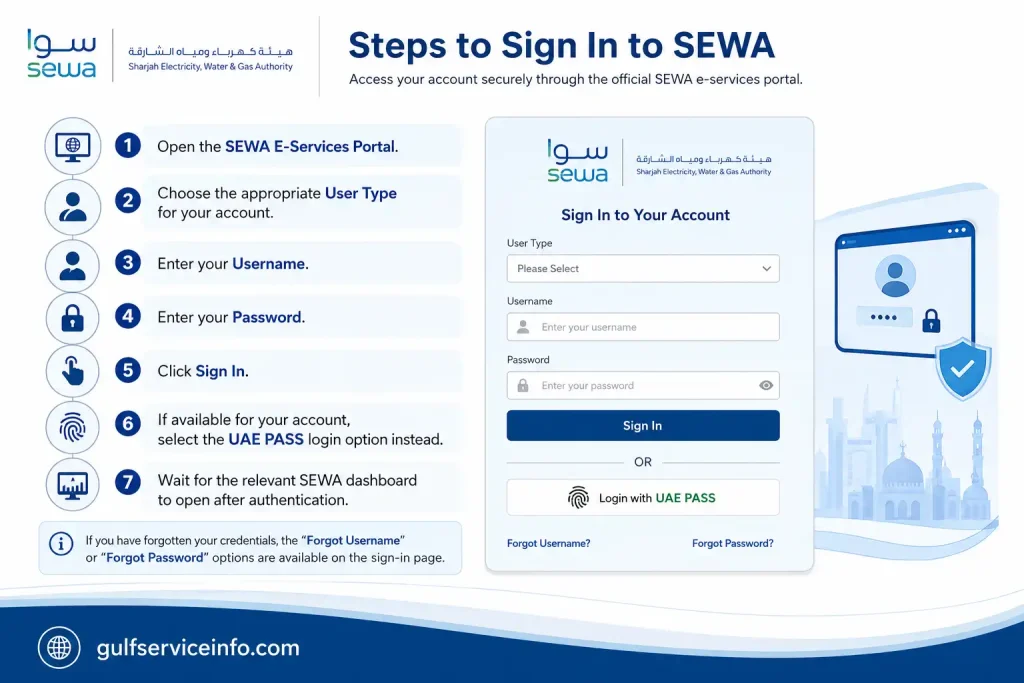
If you have forgotten your credentials, the portal provides options including Forgot Username, Forgot Password and Problems Signing In.
Tip: Selecting the correct user category matters. A consumer account does not necessarily show the same services or functions available to a consultant account.
Creating a New SEWA Account
New users should register through SEWA’s official digital platform rather than using a third-party registration website. The SEWA website provides a Register Now option, while the e-services portal also offers a Don’t have an account? Sign up link.
The information requested during registration can vary depending on the type of account or service. Before starting, keep your relevant SEWA account or consumer details and the contact information connected with your utility account available.
SEWA Registration Steps
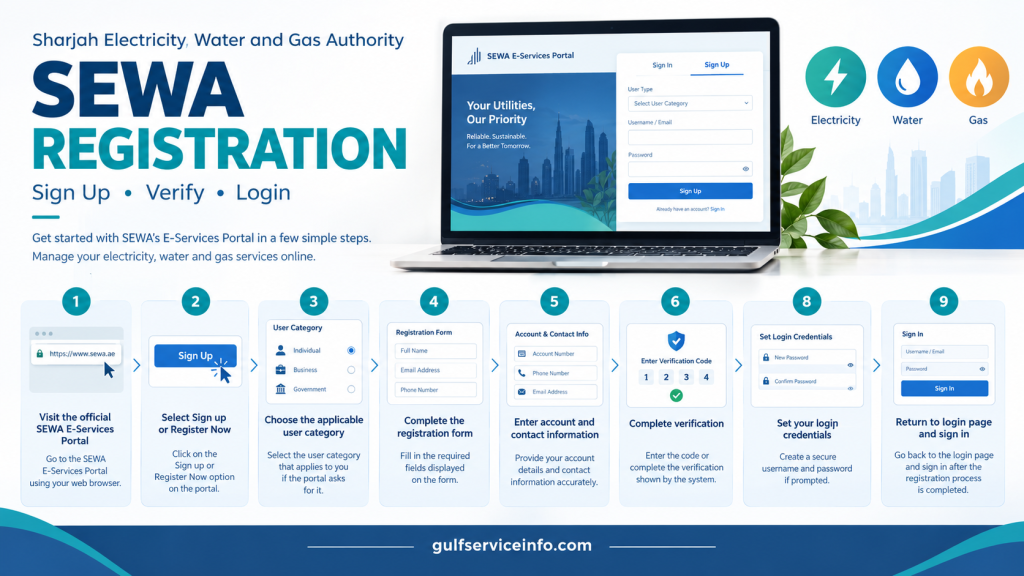
Your dashboard will depend on the user category selected during registration. For example, SEWA describes consumer and owner access as providing functions for managing electricity and water supply and paying bills.
Understanding the SEWA NOC Service
A SEWA NOC, or No Objection Certificate, is associated with certain electricity, water and network-related requirements. The SEWA e-services portal specifically provides a Consultant role for users dealing with NOCs and connections to electricity and water networks.
The exact NOC requirements depend on the service being requested. SEWA’s published information includes an NOC service related to an additional meter, additional load or change of meter, where the certificate is issued to the relevant authorities for electricity, water and gas matters.
Supporting documents may also be required. For the particular NOC service described by SEWA, examples include an approved drawing plan and a copy of the plot map. These should not be treated as a universal document list because another NOC service may have different requirements.
Who Can Use SEWA NOC Services?
SEWA’s NOC and network-related services are particularly relevant to consultants and authorised users handling project, connection or network applications. The portal identifies Consultant as a dedicated user category for NOCs and electricity and water network connections.
For a standard residential customer dealing with an unpaid bill or routine account enquiry, an NOC is a different type of service from a SEWA bill check, bill payment or ordinary account-management request.
How to Submit a SEWA NOC Application Online
The application route depends on the specific NOC and the applicant’s role. Rather than uploading documents through an unofficial website, start with the official SEWA e-services portal and select the service that matches your requirement.
1. Enter the SEWA E-Services Portal
Open the official SEWA E-Services Portal and access the appropriate account area.
2. Choose the Correct User Type
If you are applying as a consultant for an NOC or network connection, select the Consultant role. SEWA specifically associates this role with NOCs and electricity and water network connections.
3. Sign In
Enter your SEWA username and password and complete the authentication process available for your account.
4. Locate the Appropriate NOC Service
Find the NOC or connection service that matches your project. Avoid choosing a service simply because its title contains the term NOC, as individual services can have different conditions and document requirements.
5. Complete the Application
Enter the project, property, account and other information requested by the selected service. Review each field before continuing.
6. Add the Required Documents
Upload the supporting documents specified for your particular application. For the SEWA NOC service covering an additional meter, additional load or meter change, the published requirements include an approved Sharjah Municipality drawing plan and a copy of the plot map.
7. Check Everything Before Submission
Review the property information, application details and attachments. Missing documents or incorrect information can affect how the request is processed.
8. Submit the Request
Send the completed NOC application through the SEWA portal. Keep any acknowledgement, reference number or confirmation produced by the system.
9. Monitor the Request
Where the relevant service provides a follow-up or status facility, use it to track the application. If you need clarification about a particular NOC, SEWA customer support can help direct you to the appropriate service or department.
Important: NOC requirements are specific to the service. The drawing plan and plot map mentioned above relate to the particular NOC service published by SEWA and should not be assumed to apply to every NOC application.
NOC Service Not Showing in Your Account?
Check your user role first. SEWA places NOC and network-connection functions under the Consultant category, so the options visible to a consumer account may be different.
If the required service remains unavailable after checking the account type, contact SEWA before sending documents through another website. This helps ensure that your application reaches the correct service.
SEWA Customer Care and Official Contacts
SEWA customer care can assist with billing questions, account-access problems, online-service issues and other utility enquiries. The official SEWA website lists 600 566665 for enquiries and 991 as the emergency number.
| Enquiry | SEWA contact |
|---|---|
| General enquiries | 600 566665 |
| Billing enquiries | 600 566665 |
| Customer service | 600 566665 |
| Emergency | 991 |
| [email protected] | |
| Natural gas enquiries | 600 566665 |
| Natural gas WhatsApp | 600 566665 |
SEWA’s official contact information also provides details for customer-care services, billing enquiries, departments and service centres.
When Should You Contact SEWA?
Customer support may be appropriate when:
For an actual electricity, water or gas emergency, use 991 rather than treating the situation as a normal billing enquiry.
What Can You Do Through SEWA Online Services?
The SEWA digital platform covers much more than SEWA bill check and online payment. Depending on your account type, the website and e-services portal provide access to different utility, property and customer-service functions.
The main SEWA website currently lists services including:
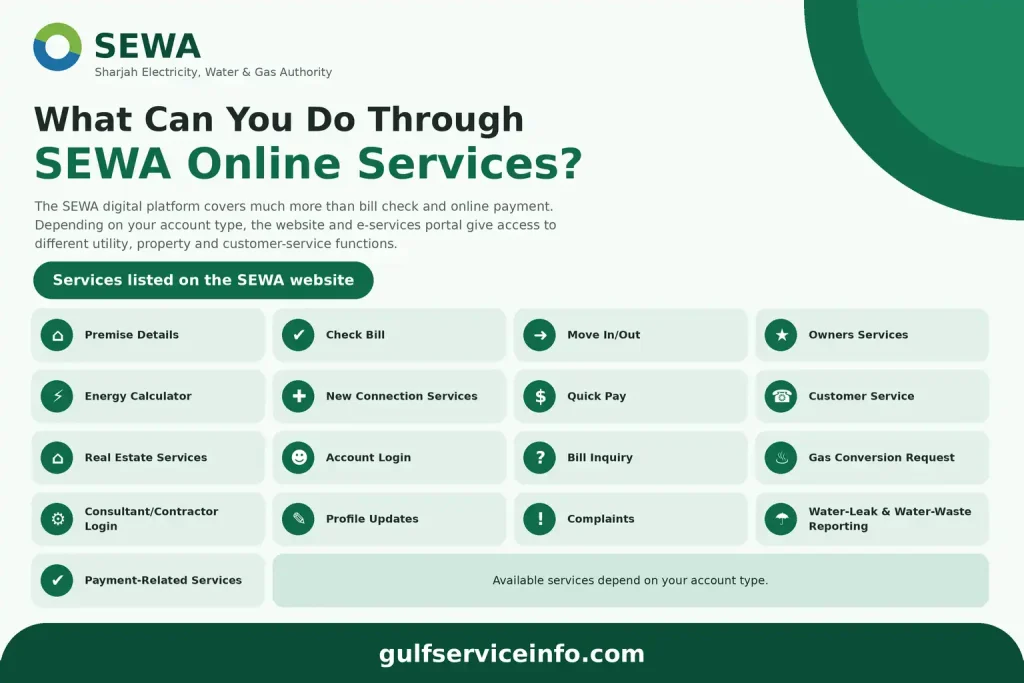
The options displayed after login are not identical for every user. SEWA provides separate access categories for consumers, owners, consultants, suppliers, government users, job seekers and students, so the services available to you depend on the role associated with your account.
SEWA Bill Payment Failed? Here’s What to Check
A failed SEWA bill payment should not automatically be treated as a final rejection. Sometimes the bank, payment provider or SEWA system needs additional time to update the transaction, so check its status before trying to pay the same bill again.
Money Deducted but SEWA Still Shows an Outstanding Bill
If the payment amount has already left your bank account or card but the SEWA account still displays an unpaid balance, avoid making another payment straight away.
Start by checking your bank or card transaction history. Record the payment reference, amount, date and time, then give the transaction some time to update before checking your SEWA bill again.
If the money remains deducted and the bill continues to show as unpaid, contact SEWA customer support and provide the transaction details. Your bank or payment provider may also be able to confirm whether the transaction was completed successfully or subsequently reversed.
Why Was My SEWA Payment Declined?
A declined transaction can have several causes. Incorrect payment information, insufficient funds, a bank security restriction or a temporary issue with the payment system can all prevent a payment from going through.
Before attempting another transaction:
The official SEWA payment page shows the payment methods currently available through its online payment service.
Payment Showing as Pending
A pending SEWA payment should not normally be followed by an immediate second payment. The original transaction may still be processing through your bank or payment provider.
Check your bank or card account first. You can then return to SEWA and carry out another SEWA bill check to see whether the outstanding balance has changed.
If the transaction remains unresolved, keep the payment reference and contact the relevant payment provider or SEWA, depending on where the issue appears to be.
You Paid but Did Not Receive Confirmation
If you completed a payment but no confirmation appeared, first establish whether the money was actually deducted.
Keep the following information available:
If the payment appears successful but SEWA has not provided the expected confirmation, contact customer support and share these details so the transaction can be checked.
When Is It Time to Contact SEWA?
Contact SEWA customer care when a payment remains unresolved after you have checked the status with your bank or payment provider. This is particularly important when your account has been charged but the SEWA bill continues to display an outstanding amount.
SEWA customer care: 600 566665
Official SEWA website: https://www.sewa.gov.ae/
SEWA Bill Check Not Working? Try These Solutions
If your SEWA bill check is not displaying the expected information, the cause could be an account-access problem, incorrect details, a missing bill or a temporary issue with the online service.
Start with the basic checks before contacting customer support.
Cannot Log In to SEWA?
Check that the username and password belong to the correct SEWA account. The official E-Services Portal provides Forgot Username, Forgot Password and Problems Signing In options for users experiencing account-access difficulties.
Use the relevant recovery option rather than repeatedly submitting an incorrect password.
Your Bill Is Not Showing
If you can access your account but the expected bill is missing, first make sure you are viewing the correct account or service.
You should also consider whether the relevant bill information has been updated in the system. If the account details are correct and the bill still cannot be found, contact SEWA with your account information.
Account or Service Number Appears Incorrect
The wrong account or service number can prevent the system from locating the correct bill. Compare the information you enter with previous SEWA documents or account records.
Avoid guessing. An incorrect number may prevent the system from finding your bill or could potentially direct you towards information associated with another account.
SEWA Website or Portal Is Not Responding
A temporary browser, connection or portal issue can sometimes prevent an online service from loading properly. Try these basic troubleshooting steps:
When accessing SEWA’s online services, always begin from the official website rather than an unofficial payment or service page.
Information to Prepare Before Contacting SEWA
Having the right details ready can make it easier for customer support to understand the problem. Prepare:
These details give SEWA enough context to identify the relevant account, bill or transaction.
SEWA Frequently Asked Questions
Final Takeaway
For routine utility tasks, the official SEWA website is the best place to begin. A SEWA bill check is suitable when you want to review the amount due, while the official online payment or Quick Pay route is more convenient when your main objective is settling a bill.
Customers who need wider account functions can use the SEWA login and e-services portal. Meanwhile, consultants and other authorised users dealing with project or network requirements may need the appropriate SEWA NOC service.
If a payment or online service does not work as expected, avoid repeatedly submitting the same transaction. Keep your account, bill or payment details available, check the status carefully and use SEWA’s official customer-support channels when further assistance is required.
Read More: Explore our related Gulf government service guides for more step-by-step information and helpful updates.