منصة مدرستي تسجيل الدخول: Complete Login Guide for Students, Teachers & Parents
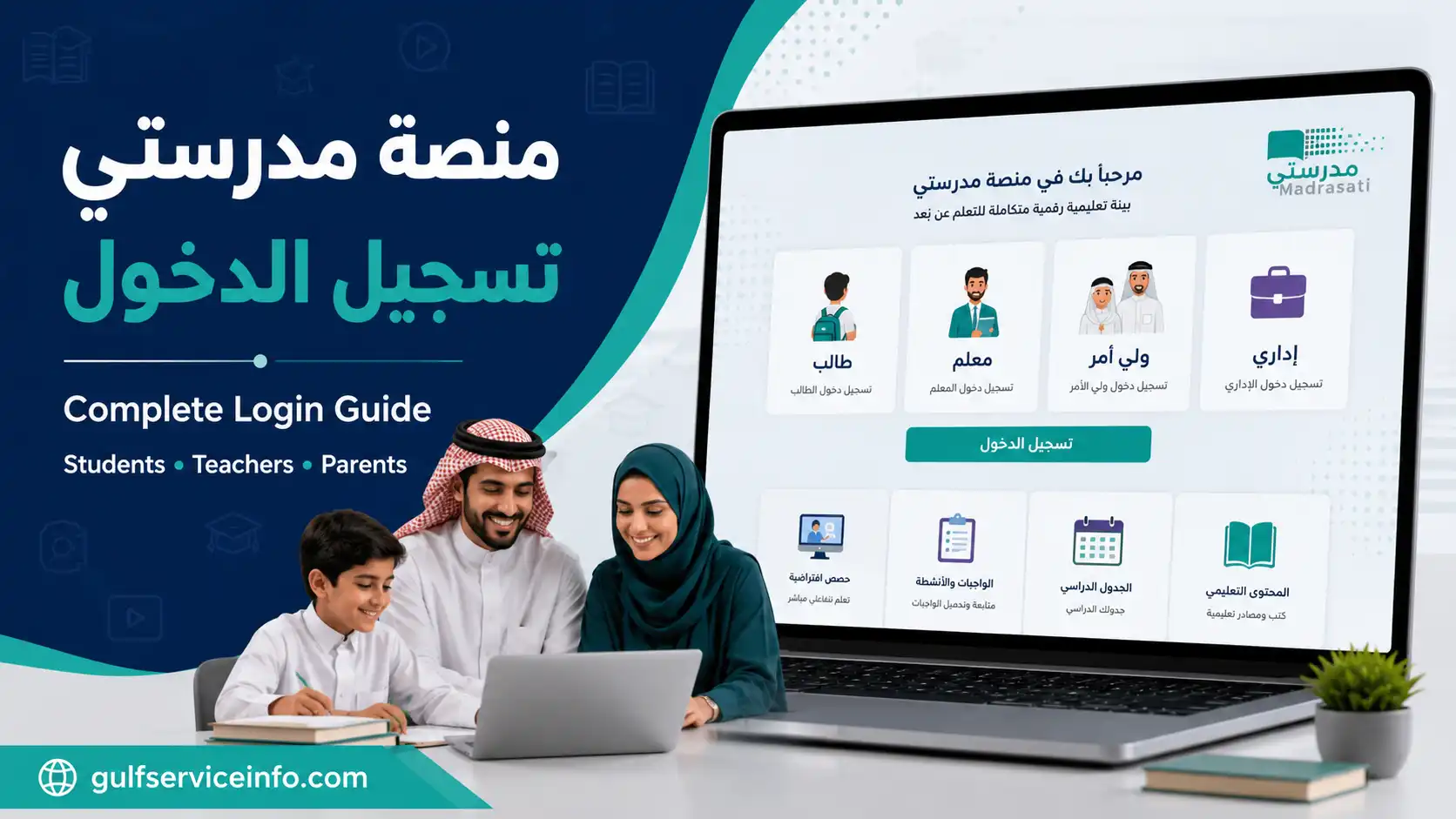
Getting into the Madrasati learning platform is straightforward once you know which sign-in method applies to your account. Students, teachers and parents all use the platform, but their access routes and available educational services can differ.
منصة مدرستي تسجيل الدخول connects Saudi Arabia’s educational community with a range of online learning services provided through the Ministry of Education. Students can access their lessons and homework, teachers can organise educational activities, and parents can follow their children’s academic progress.
Before attempting to sign in, it is worth identifying your account type and preparing the correct login credentials. Using the wrong authentication method can lead to unnecessary login problems.
This article covers the official Madrasati portal, account access for different users, student registration details and essential security precautions.
Explore GulfServiceInfo for more step-by-step guides on government services, online portals, visa procedures, and essential services across the Gulf region.
What Is منصة مدرستي?
Madrasati, known in Arabic as منصة مدرستي, is an electronic education platform developed under Saudi Arabia’s Ministry of Education. It brings together digital learning resources and school-related services in one online environment.
The platform is designed to support everyday educational activities rather than simply provide a page for entering usernames and passwords.
Depending on the permissions associated with an account, users can access services such as:
Parents also have access to relevant educational services that help them stay informed about their children’s school activities.
For information about the platform and its services, refer to the official Saudi Ministry of Education website.
منصة مدرستي تسجيل الدخول – Official Login Portal
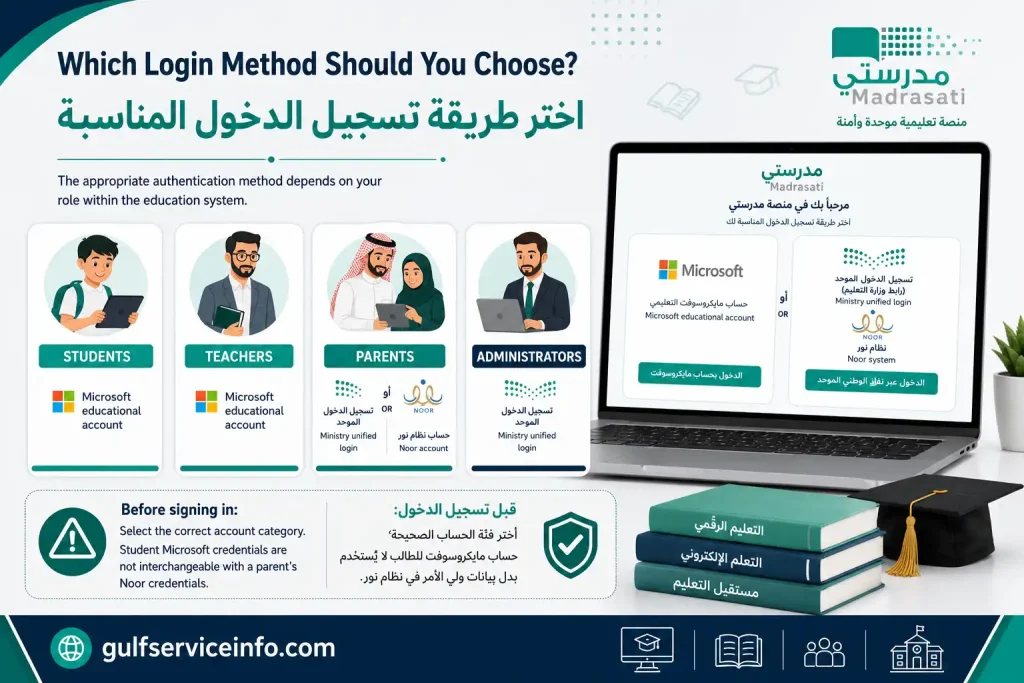
Always begin with the Ministry of Education’s official website or Madrasati portal. Third-party websites may publish login instructions, but they should not be used to collect your educational account credentials.
The following are the official access points provided for this service:
| Official resource | Purpose |
|---|---|
| Madrasati Portal | Main platform access |
| Madrasati Login | Account sign-in |
| Ministry of Education | Official educational information |
| Ministry Regional Websites | Regional Ministry resources |
Which Login Method Should You Choose?
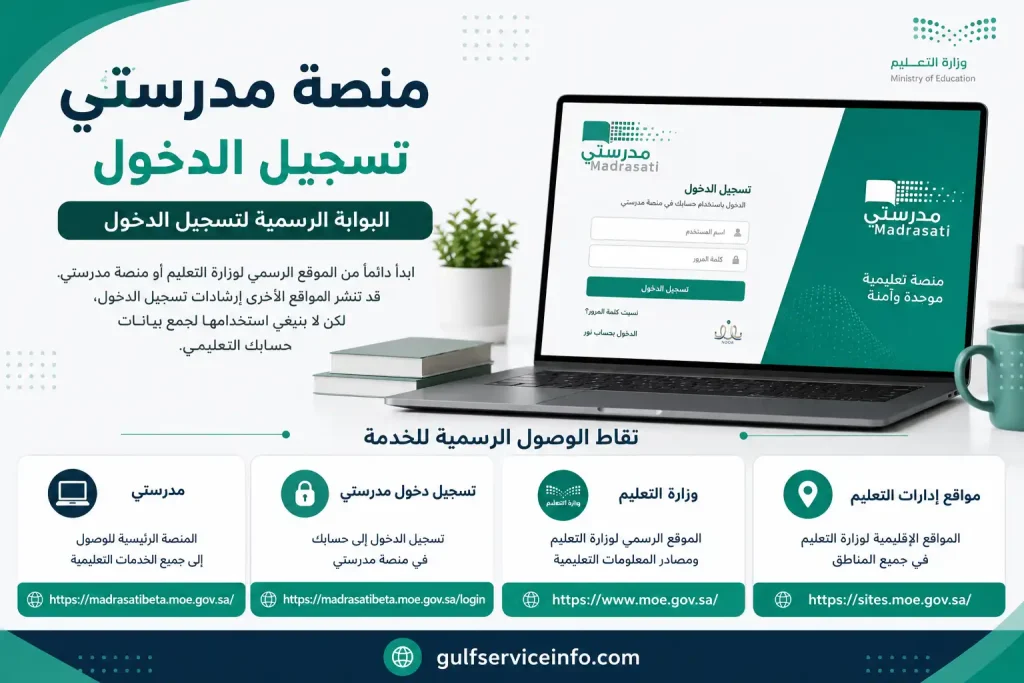
The appropriate authentication method depends on your role within the education system.
| Account category | Sign-in method |
|---|---|
| Students | Microsoft educational account |
| Teachers | Microsoft educational account |
| Parents | Ministry unified login or Noor account |
| Administrators | Ministry unified login |
Before signing in: Check that you have selected the correct account category. A student Microsoft account, for example, is not interchangeable with a parent’s Noor credentials.
How to Complete منصة مدرستي تسجيل الدخول for Students
Students generally use the Microsoft account issued for their educational activities to enter Madrasati. This account provides access to the learning resources and classroom services assigned to them.
Make sure you have the following ready:
Student Login Procedure
Follow this process to access your educational dashboard:
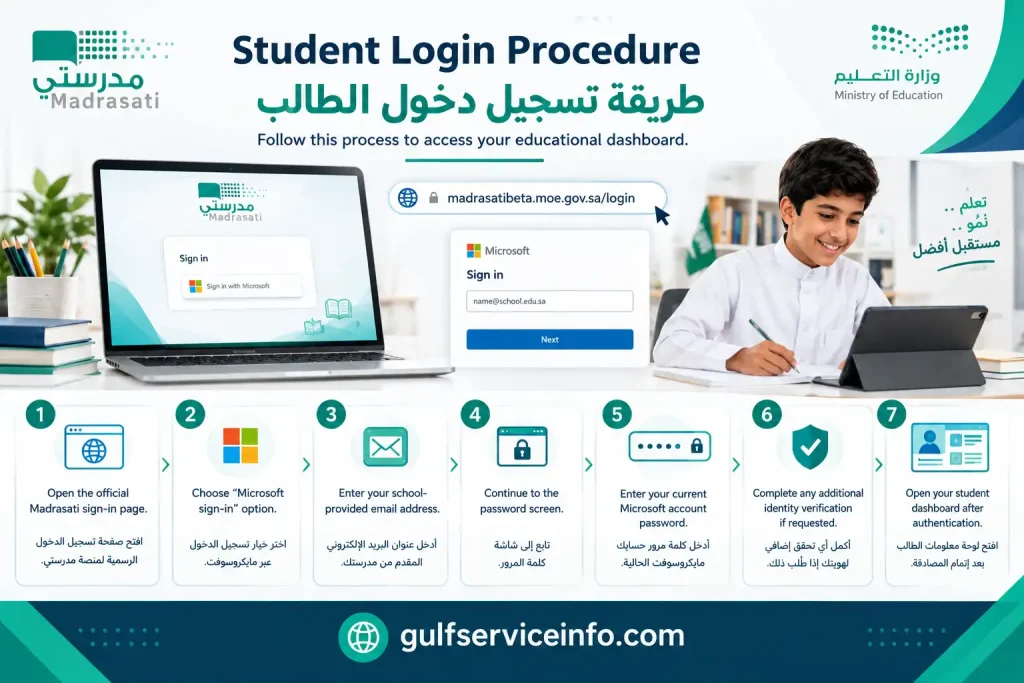
After successful منصة مدرستي تسجيل الدخول, you can explore the educational services available to your account, including courses, homework, class schedules and other learning materials.
How Can New Students Obtain Their Madrasati Credentials?
Students who have not received their login information should check the official Ministry guidance before trying to create another account.
According to the Ministry’s published instructions, eligible students registered in the Noor system can obtain their Madrasati account information through a parent’s Tawakkalna account.
The relevant option is available under the educational services section, where parents can access the Madrasati account information service.
For the official procedure, visit:
Ministry of Education – Student Account on Madrasati
A practical security reminder: Keep your educational username and password in a secure place. Never share your account credentials with classmates or enter them into websites that are not operated by the Ministry of Education.
منصة مدرستي تسجيل دخول الطالب عبر مايكروسوفت
Microsoft authentication is the standard login route for students and teaching staff using Madrasati. It allows users to access their educational accounts without creating a separate personal account for every learning activity.
To complete منصة مدرستي تسجيل دخول الطالب عبر مايكروسوفت, follow these steps:
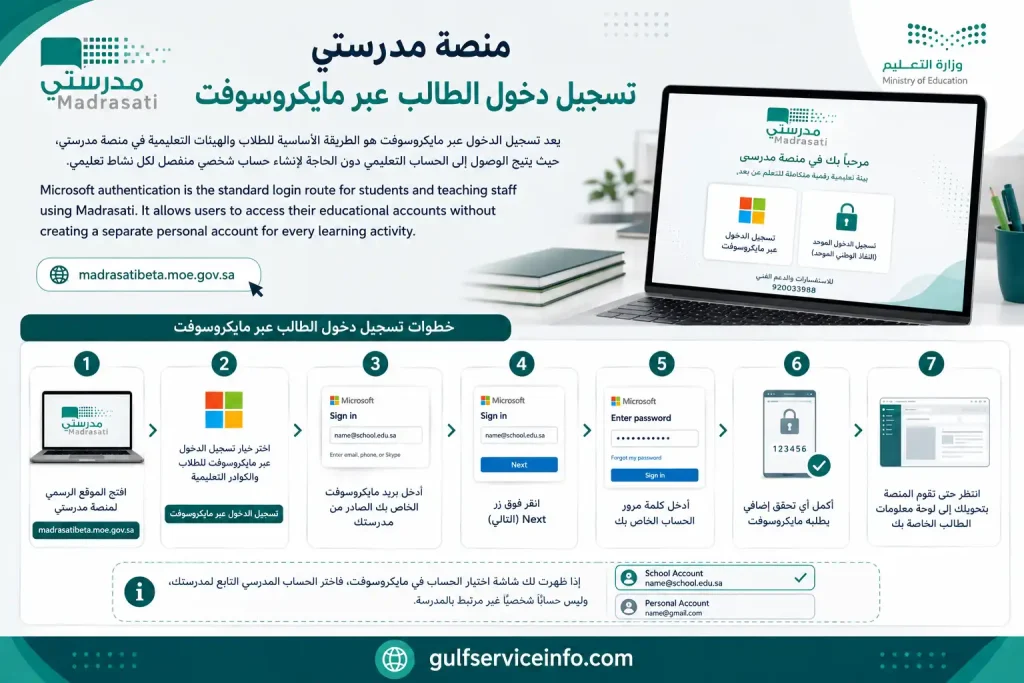
If Microsoft displays an account selection screen, choose the school account rather than an unrelated personal account.
What If You Do Not Know Your Microsoft Username?
Students who cannot find their login credentials should ask their parent or guardian to check the educational account information available through Tawakkalna. They can also contact their school administration for assistance.
The Ministry’s student-account service explains how eligible students receive their usernames and passwords through their parent’s registered account.
منصة مدرستي تسجيل الدخول للمعلمين
Teachers use Madrasati to access educational resources, manage assigned learning activities and communicate with students. Their login process is similar to the student process, although the available dashboard features depend on their professional role and permissions.
Teacher Login Steps
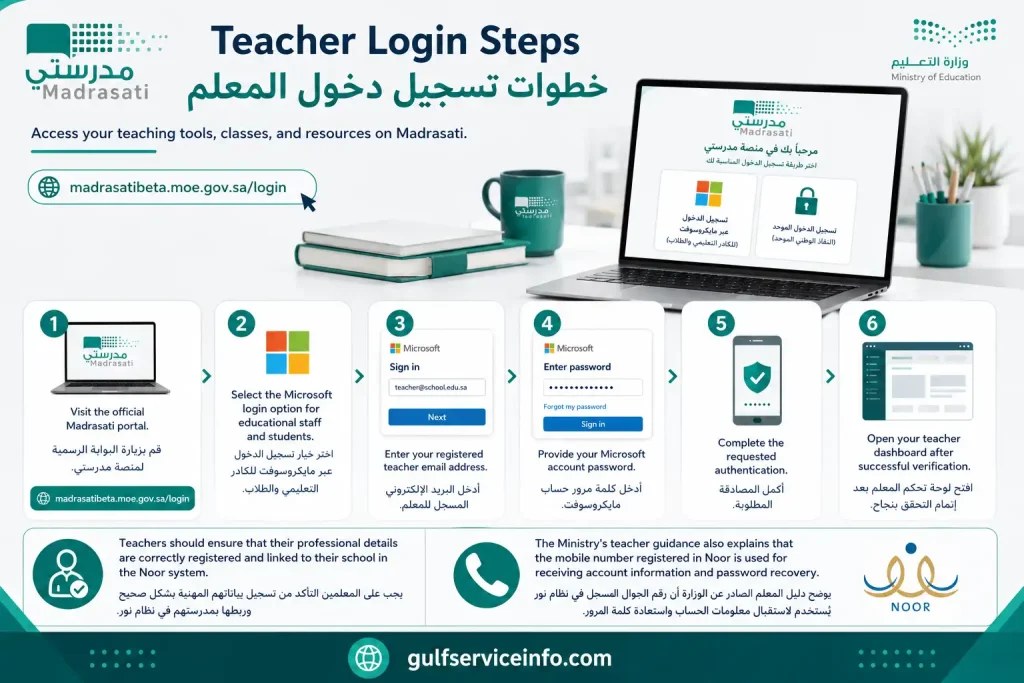
Teachers should ensure that their professional details are correctly registered and linked to their school in the Noor system.
The Ministry’s teacher guidance also explains that the mobile number registered in Noor is used for receiving account information and password recovery.
What Can Teachers Access?
Depending on their assigned permissions, teachers can use Madrasati to:
For detailed instructions, read the official Madrasati Teacher User Guide.
منصة مدرستي تسجيل الدخول لأولياء الأمور
Parents have a separate login route because their responsibilities differ from those of students and teachers. Through their accounts, they can follow their children’s educational activities and access the parent services available through the platform.
The Ministry’s parent user guide identifies the Noor account route for parents.
Parent Login Instructions
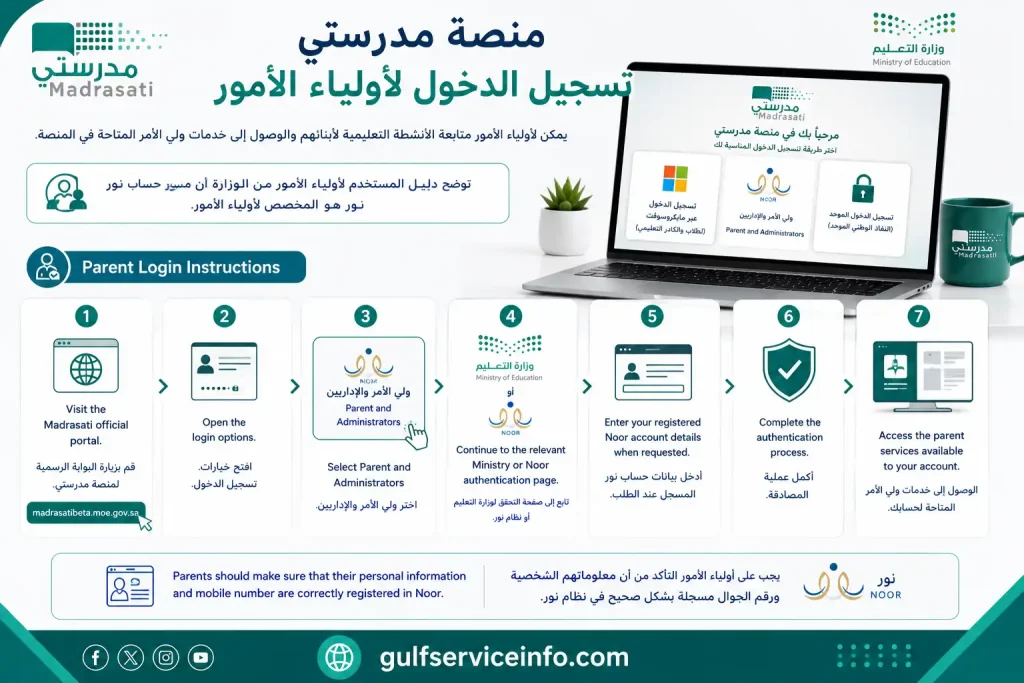
Parents should make sure that their personal information and mobile number are correctly registered in Noor.
What Can Parents Do After Login?
Parents can use the available services to follow their children’s educational activities, check relevant academic information and communicate with the school through supported features.
They can also access their child’s timetable and other educational information according to their account permissions.
For additional guidance, consult the official Ministry of Education website.
منصة مدرستي تسجيل الدخول عبر نفاذ
The Ministry’s unified login route provides an alternative authentication method for eligible users. Depending on the account type and the login options currently displayed, users may be directed towards the National Single Sign-On service or the Noor account system.
To use the Nafath route where it is offered:
Important distinction: Microsoft authentication is intended for students and teaching staff, while the Ministry’s unified login and Noor routes serve other eligible account categories. The exact options depend on the service and account permissions.
Always verify that the authentication request comes from an official government service before approving it.
How to Access الواجبات المدرسية on منصة مدرستي
The homework service is one of the most useful features for students because it allows them to view assigned tasks and follow their academic responsibilities online.
According to the Ministry’s official homework service, users can access assignments through the Courses and Resources (المقررات والمصادر) section.
Steps to Find Your Assignments
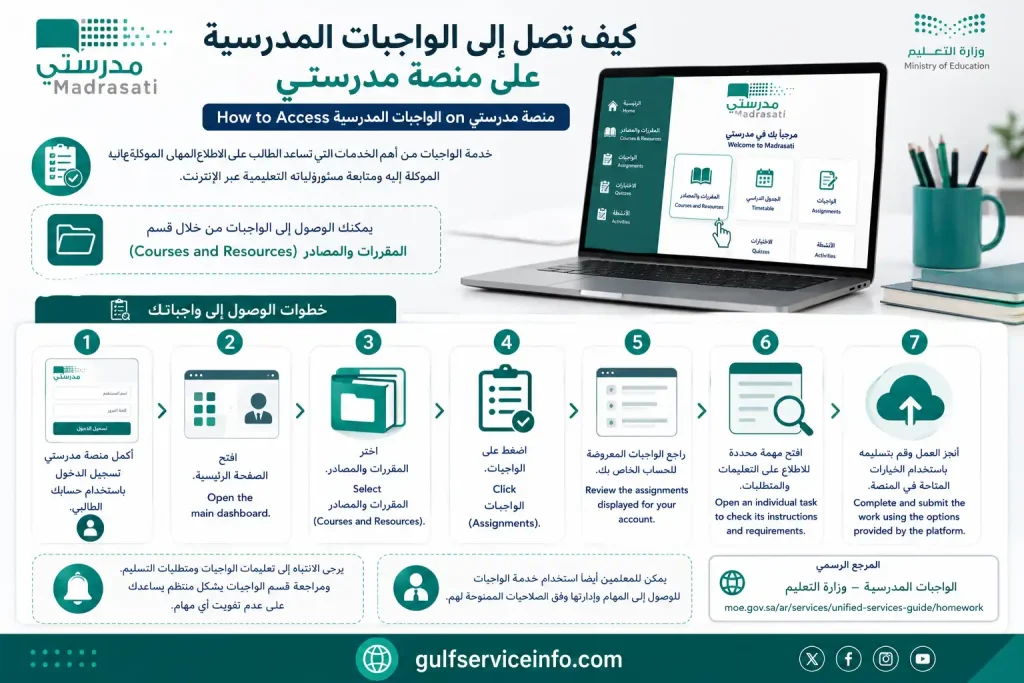
Students should pay attention to assignment instructions and submission requirements. Checking the homework section regularly helps prevent missed tasks.
Teachers can also use the assignments service to access and manage tasks according to their permissions.
Official reference: الواجبات المدرسية – Ministry of Education.
How to Check مدرستي جدولي (Class Timetable)
The timetable feature helps students organise their school day by showing their scheduled lessons and subjects.
After completing منصة مدرستي تسجيل الدخول, students can access the timetable directly from the platform’s main menu.
Steps to View Your School Timetable
Parents can also view their child’s timetable through the appropriate account.
If the timetable appears incorrect or certain lessons are missing, contact the school administration to check the underlying class and scheduling information.
Official reference: عرض الجدول المدرسي – Ministry of Education.
How to Attend Online Classes Through منصة مدرستي
Accessing digital lessons, recovering account credentials and resolving technical errors are all part of using Madrasati. Although the platform brings several educational services together, users may occasionally need guidance to find a particular feature or restore access to their accounts.
منصة مدرستي تسجيل الدخول gives students, teachers and parents access to educational services provided through Saudi Arabia’s Ministry of Education. These include virtual classrooms, homework management, account recovery and technical assistance.
Whether you are preparing to attend an online lesson or trying to resolve a sign-in error, understanding the available options can save time and prevent unnecessary account problems.
Joining Virtual Lessons Through Madrasati
Madrasati supports online education through virtual classroom facilities. Students can use these tools to attend scheduled lessons, interact during educational sessions and participate in activities organised by their teachers.
Microsoft Teams is among the communication tools integrated into the platform for virtual learning.
خطوات حضور الحصص الافتراضية عبر منصة مدرستي
Students can follow this process to enter an online classroom:
Once connected, follow your teacher’s guidance and participate using the available classroom features.
What if the classroom link is missing?
Check whether the lesson has been scheduled and whether the teacher has made the virtual session available. If the joining option does not appear, contact your teacher or school administration for assistance.
It is also worth checking the timetable and platform notifications regularly. This helps students stay informed about lesson times and any changes to scheduled sessions.
Recovering Your Account: How to Reset a Madrasati Password
A forgotten password can prevent access to educational resources, but it does not necessarily mean that an account has been lost. Eligible users can use the official Madrasati password recovery service to verify their identity and establish new login credentials.
Password Reset Procedure
If you cannot remember your current password, use the following instructions:
The verification process may differ depending on the account type.
For example, the Ministry’s teacher guidance describes a recovery procedure involving information registered in Noor and a verification code delivered to the registered mobile number.
<row align=”center” gap={2}> <icon name=”key-round” color=”secondary” size=”lg”/> **Official password recovery resource** </row>
Madrasati Password Recovery Service
Password Safety Recommendations
Before attempting another login, check the following:
A secure password helps protect your educational account and the information associated with it.
Common Login Errors and How to Resolve Them
Not every problem with منصة مدرستي تسجيل الدخول is caused by an incorrect password. Account registration, Microsoft authentication, internet connectivity and browser settings can also affect access.
The following troubleshooting reference covers some common situations and the actions users can take.
| Problem | What to do |
|---|---|
| Incorrect password | Use the official password recovery service. |
| Forgotten username | Check the relevant school or Tawakkalna account information. |
| Microsoft authentication failure | Confirm that you are using your educational Microsoft account. |
| Account not recognised | Ask your school administration to verify your registration. |
| Verification code not received | Check your registered mobile number and try again. |
| Incorrect school timetable | Contact the school administration. |
| Virtual classroom unavailable | Review your timetable and speak to your teacher. |
| Repeated sign-in errors | Try another browser or clear the existing browser cache. |
Further Steps When Madrasati Login Still Fails
If the usual solutions do not restore access, try a few additional checks before contacting technical support.
1. Test your internet connection
An unstable connection may interrupt authentication or prevent the dashboard from loading properly.
2. Check your account category
Students, teachers and parents do not necessarily use the same sign-in method. Return to the official login page and confirm that you have selected the correct option.
3. Update your browser
An outdated browser can sometimes cause compatibility problems. Install the latest available version and reopen the portal.
4. Try private browsing
Open the Madrasati website in a private or incognito window. This can help identify problems caused by stored cookies or browser extensions.
5. Check for account changes
Students and teachers who have moved to another school may need their educational Microsoft account information updated by the relevant school administration.
If these measures do not help, contact the Ministry’s technical support service rather than repeatedly attempting to sign in.
Contacting the Madrasati Technical Support Team
Some account problems require assistance from the Ministry of Education, particularly when registration information is incorrect or an account cannot be recovered through the available online service.
The Ministry provides a technical support service for users experiencing difficulties with Madrasati.
Official Support Information
| Support channel | Details |
|---|---|
| Unified support telephone | 19996 |
| Technical support | Ministry Technical Support Service |
| Ministry website | Saudi Ministry of Education |
| [email protected] |
What Information Should You Provide?
When requesting assistance, explain the problem in a clear and organised way. Depending on the support request, you may need to provide:
Providing these details can help the support team understand the issue more efficiently.
Security warning: Never disclose your account password or confidential verification codes to anyone claiming to represent technical support.
Frequently Asked Questions About منصة مدرستي تسجيل الدخول
Final Thoughts
Understanding منصة مدرستي تسجيل الدخول makes it easier for students, teachers and parents to access Saudi Arabia’s digital education services. The key is choosing the correct authentication method and keeping your account information up to date.
Students can use Microsoft authentication to reach their courses, assignments and virtual classrooms. Teachers can manage educational activities, while parents can follow their children’s learning through the designated account services.
For a safe experience, always use the official Madrasati portal and refer to the Ministry of Education website whenever you need updated instructions.
Keeping your login details secure and checking your educational dashboard regularly will help you make better use of the services available through Madrasati.