Fahes Report Check: Online Inspection Results, Appointments & Timings
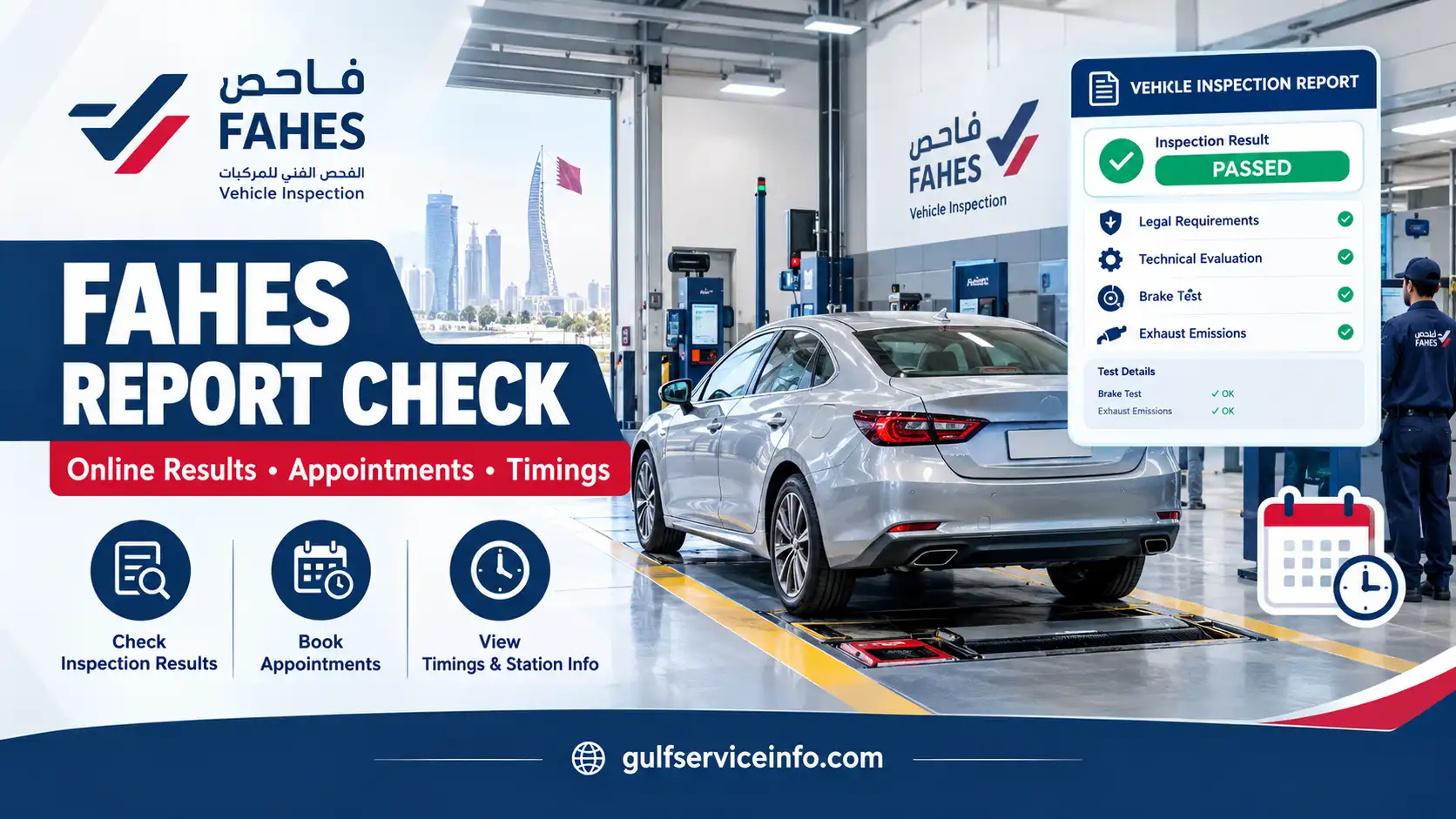
Vehicle inspection is an essential part of maintaining a registered vehicle in Qatar. Whether you own a private car or another type of vehicle, keeping track of its inspection results helps you understand its roadworthiness and avoid delays when dealing with registration-related procedures. One of the most useful documents in this process is the Fahes Report, which records the outcome of your vehicle’s technical inspection.
WOQOD Fahes provides vehicle inspection services through authorised centres across Qatar. Once an inspection is completed, the resulting report helps you identify whether your vehicle has satisfied the applicable requirements or needs repairs before it can pass. Knowing where to find this information, how to interpret the findings and what to do next can make vehicle maintenance considerably easier.
From checking inspection results online to arranging an appointment through the WOQOD mobile application, understanding the available services can save you unnecessary trips. This guide covers the Fahes Report checking process, downloadable records, inspection appointments, operating hours, vehicle preparation and customer support.
For more useful guides on Qatar’s online services, vehicle requirements and government procedures, visit our Gulf Service Info homepage for the latest step-by-step information.
What Is a Fahes Report in Qatar?
A Fahes Report is an official record of the technical inspection carried out on a vehicle at an authorised Fahes inspection centre in Qatar. It documents the inspection findings and indicates whether the vehicle satisfies the applicable technical, legal and safety requirements.
The service is operated by WOQOD (Qatar Fuel Company), which manages vehicle inspection facilities at different locations throughout the country. During an inspection, the vehicle is assessed across several areas to identify defects that could affect its condition, safety or compliance with inspection standards.
For vehicle owners, the report serves several practical purposes:
- Inspection status: Shows whether the vehicle has successfully completed the required inspection.
- Identifying defects: Provides information about technical problems discovered during the assessment.
- Repair planning: Helps owners understand which components need attention before another inspection.
- Registration procedures: Helps vehicle owners keep track of inspection requirements connected with relevant registration services.
- Previous inspection records: Provides a reference for reviewing earlier results when those records are available.
A passing result confirms that the vehicle met the requirements assessed during that particular inspection. A failed result means that one or more issues need to be addressed before the vehicle can satisfy the relevant standards.
Important: A Fahes Report is specifically an inspection document. It is not a general vehicle ownership certificate or a replacement for vehicle registration. Also, passing one inspection does not guarantee that the vehicle will receive the same result during a future assessment.
How to Check Fahes Report Online in Qatar
Checking your Fahes Report online can save you a return visit to the inspection centre, particularly when you only need to review the latest inspection outcome. WOQOD Fahes provides an official online platform where customers can access available vehicle inspection information.
Start with the official website:
Follow this process to find your inspection result:
Step 1. Open the official Fahes website
Visit official Fahes website using a mobile browser or computer. Make sure the website address is correct before entering any personal or vehicle information.
Step 2. Find the online services section
Explore the website for options relating to vehicle inspections, customer services or inspection reports.
Step 3. Open the relevant report service
Select the inspection-result option if it is available through the official platform.
Step 4. Provide your vehicle information
Enter the registration number or other identifying details requested by the system.
Step 5. Review the information
Check that the details you have entered are accurate before submitting your request.
Step 6. Retrieve your inspection result
Submit the form and wait for the system to display the available vehicle inspection record.
Step 7. Keep a copy for reference
If the platform offers a download, print or save function, use it to retain your inspection information.
The information requested and the available functions may change as WOQOD updates its online services. Therefore, follow the instructions displayed on the official platform rather than relying on outdated tutorials.
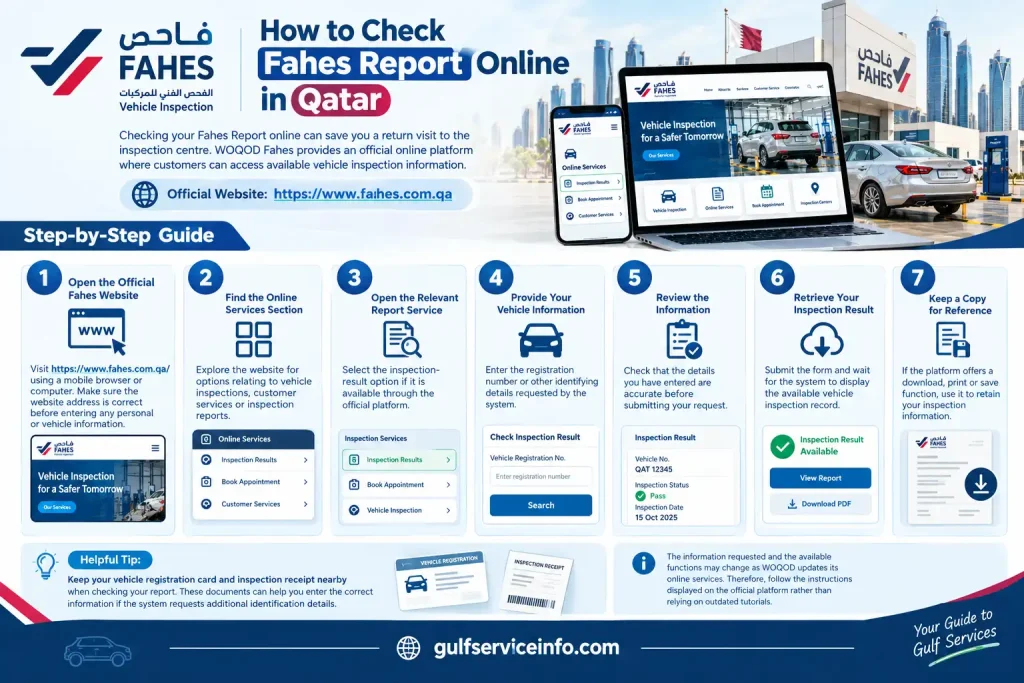
Helpful tip: Keep your vehicle registration card and inspection receipt nearby when checking your report. These documents can help you enter the correct information if the system requests additional identification details.
If you cannot locate the online report-checking facility, consult the customer-service information on the official Fahes website. This is a safer way to confirm how to obtain your inspection record than entering vehicle details into an unfamiliar third-party website.
How to Download Fahes Inspection Report
Keeping a digital copy of your Fahes inspection report makes it easier to refer to previous findings, discuss repair requirements with a mechanic or maintain your vehicle records. Once you have retrieved the inspection result, check whether the official platform provides a document download option.
The available download process depends on the functions currently supported by the Fahes online service.
If the system provides a downloadable report, follow these instructions:
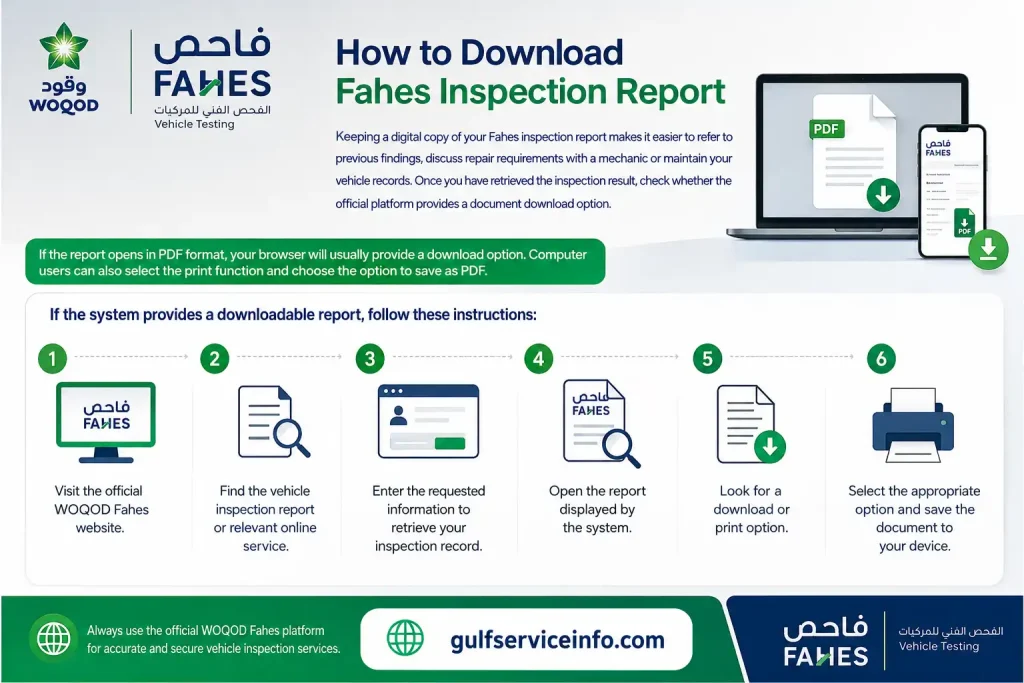
If the report opens in PDF format, your browser will usually provide a download option. Computer users can also select the print function and choose the option to save the document as a PDF.
What if there is no download button?
Some online services allow users to view information without offering a direct PDF download. If you can access your inspection result but cannot find a saving option, check whether printing is available.
If neither option appears, contact Fahes customer support and ask how to obtain an official copy of the inspection record.
Remember that a screenshot may be useful for personal reference, but it should not be considered a substitute for an official document when an authorised service specifically requests one.
How to Understand Fahes Inspection Results
After retrieving your Fahes Report, take time to review the inspection status and the findings recorded by the inspection centre. The document contains information about different aspects of the vehicle’s condition and compliance.
You can access the official inspection-result service through the Fahes website.
Look for the vehicle inspection report checking facility on the official portal.
The report may contain several important details:
| Report detail | What it tells you |
|---|---|
| Inspection Number | The reference number assigned to the inspection |
| Inspected On | The date the vehicle was examined |
| Plate Number | The vehicle’s registered number |
| Plate Type | The category of the registration plate |
| QID | Identification information associated with the inspection record |
| Chassis Number | The vehicle’s identification details |
| Mileage | The mileage recorded during inspection |
| Legal Requirements | Findings from the legal compliance checks |
| Technical Evaluation | Results of the vehicle’s technical assessment |
| Inspection Validity | Validity information recorded on the report |
Depending on the inspection, the findings may cover legal compliance, visual defects, mechanical or technical problems, exhaust emissions and brake performance.
Understanding the main results
The inspection result helps you determine whether further action is required.
Do not rely on a single result category when assessing the overall condition of your vehicle. Review both the legal requirements and technical evaluation sections to understand the complete inspection outcome.
What to Do If Your Vehicle Fails Fahes Inspection
Receiving a failed Fahes Report can be frustrating, but it does not automatically mean your vehicle has a serious mechanical problem. The result simply indicates that the inspection identified one or more issues that must be corrected before the vehicle can meet the required standards.
Your report is the best starting point for understanding what went wrong. Instead of arranging repairs without checking the findings, review each recorded defect and discuss the necessary work with a qualified mechanic.
Here is how to proceed after an unsuccessful inspection:
- Examine the inspection report: Read all the findings carefully, including any problems listed under legal requirements and visual or technical faults.
- Identify the affected components: Determine whether the defects concern tyres, brakes, lights, emissions, chassis parts or another inspected area.
- Consult a qualified workshop: Show the report to a mechanic who can assess the identified problems and recommend suitable repairs.
- Confirm that the repairs are complete: Before returning to Fahes, make sure every recorded defect has been addressed rather than concentrating on only one visible issue.
- Visit a Fahes inspection centre again: Arrange the required re-inspection at an appropriate location.
- Check the latest result: Retrieve the updated inspection report to confirm whether the vehicle has now passed.
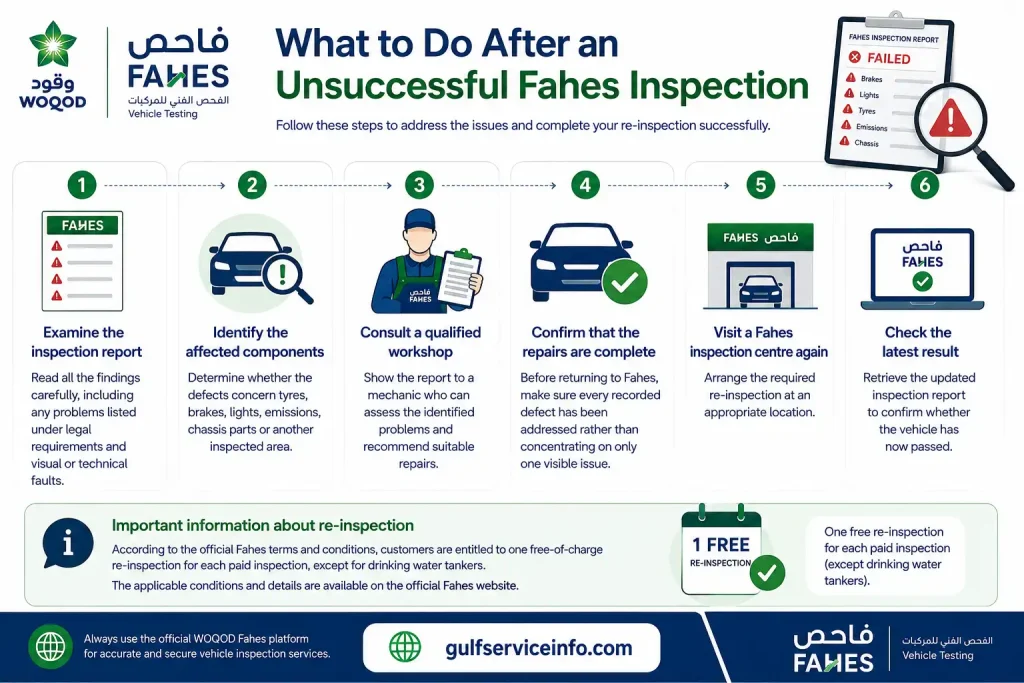
Important information about re-inspection: According to the official Fahes terms and conditions, customers are entitled to one free-of-charge re-inspection for each paid inspection, except for drinking water tankers. The applicable conditions and validity requirements should be confirmed with Fahes before returning.
WOQOD also provides specific guidance about identifying certain defective components. Parts under the chassis and tyres that require attention are marked with yellow paint. When preparing repaired components for re-inspection, do not apply sealant to those parts.
For further clarification, consult the official Fahes inspection report terms and conditions.
How to Book a Fahes Appointment Online
WOQOD Fahes offers an appointment-booking facility through its mobile application at selected inspection stations. This option allows vehicle owners to organise their visits in advance instead of relying entirely on walk-in arrangements.
According to the official Fahes website, mobile-app appointment booking has been announced for these inspection locations:
- Wadi Al Banat
- Mesaimeer
- Al-Wakra
The general booking procedure involves the following steps:
- Install the WOQOD mobile application: Download the official application from your device’s recognised app store.
- Locate the Fahes service: Open the application and look for the vehicle inspection or appointment-booking section.
- Enter the required details: Provide the customer and vehicle information requested by the application.
- Choose an inspection centre: Select a station that currently supports appointment reservations.
- Select a suitable date and time: Review the available booking slots and choose an appropriate appointment.
- Confirm your reservation: Follow the instructions shown in the application, including any applicable payment requirements.
- Keep your confirmation: Save the appointment information so you can refer to the selected station, date and time when visiting.
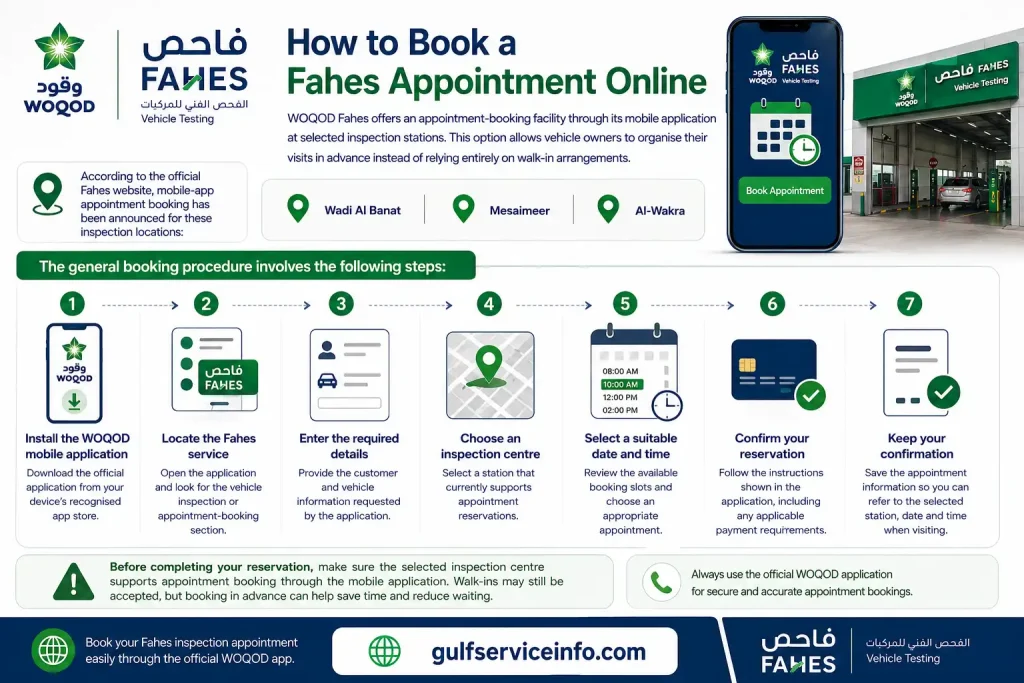
Before completing your reservation, make sure the chosen station offers the particular inspection service your vehicle requires. Service availability can differ between locations.
You can also consult the official Fahes vehicle inspection booking announcement for additional information.
Can you visit Fahes without an appointment?
Appointment requirements depend on the inspection station and the service being requested. Some locations offer appointment-based arrangements, while others may accept customers through their usual inspection process.
It is best to check the latest station-specific instructions before travelling. Do not assume that every Fahes centre follows the same booking procedure.
How to Book WOQOD Fahes Appointment
The WOQOD mobile application provides a convenient way to access selected vehicle inspection services digitally. Customers can use the available Fahes features to arrange an inspection visit and manage related service requirements.
The booking process generally follows this sequence:
Having your vehicle registration information available can make the process easier because the application may request identifying details before displaying the available services.
After booking, check the confirmation carefully. Make sure the appointment date, selected time and inspection centre are correct before travelling.
For the latest booking information and service availability, refer to the official WOQOD Fahes website.
WOQOD Fahes Appointment App
The WOQOD mobile application brings several Qatar Fuel Company services together in one place, including selected features related to Fahes vehicle inspections.
According to WOQOD’s published information, the application introduced facilities for booking technical inspections, paying inspection fees and accessing vehicle inspection reports.
What can you use the application for?
Depending on the application version and the services currently available, customers may be able to use it for:
The available features may differ depending on the application version and service location. Check the options displayed on your device before making arrangements.
How to get the WOQOD app
You can find the official WOQOD application through either of the main mobile application stores:
Search for the WOQOD application and check the developer information before installation. This helps ensure that you download the genuine application rather than an unofficial alternative.
Official reference: WOQOD Fahes mobile application announcement.
Tip: If you cannot see the Fahes appointment option after opening the application, check whether an update is available. You can also visit the official Fahes website to confirm which inspection centres currently support online reservations.
Fahes Inspection Timings in Qatar
Knowing the operating hours of your chosen Fahes inspection centre can help you plan your visit and avoid unnecessary delays. However, working hours are not necessarily identical across all locations, and individual services may have different closing times.
The official Fahes website provides a station directory where customers can review inspection-centre locations, contact information, working days and available service timings.
Fahes station working hours
The following operating hours are displayed in the official station information:
| Inspection station | Displayed operating hours |
|---|---|
| Wadi Al Banat | 6:00 AM – 8:30 PM |
| Mesaimeer | 6:00 AM – 8:30 PM |
| Al-Wakra | 6:00 AM – 5:45 PM |
| Industrial Area | 6:00 AM – 5:30 PM |
| External Inspection | 6:00 AM – 2:30 PM |
| Al Mazrouah | 6:00 AM – 5:45 PM |
| Al Wukair | 6:00 AM – 5:45 PM |
| Al Shahaniya | 6:00 AM – 5:45 PM |
| Al Egda | 6:00 AM – 5:45 PM |
| Madinat Al Shamal Mobile Station | 7:00 AM – 1:45 PM |
These are the displayed station operating hours and should not be interpreted as confirmation that every inspection service is available throughout the entire period.
Working days, service availability and closing times may change. Before leaving home, consult the official Fahes station directory for the latest information.
You can find the relevant details under Fahes Stations, Timings and Services Offered on the official website.
What is the best time to visit Fahes?
Choosing the right time can make your inspection visit more convenient, particularly during busy periods.
According to Fahes inspection guidance, customer traffic is generally higher between 8:00 AM and 12:00 PM. This is especially noticeable at the beginning and end of the month.
For customers who want to avoid some of the morning rush, Fahes recommends visiting between 12:00 PM and 3:00 PM on working days during the middle of the month.
Consider these suggestions when planning your visit:
A little preparation can help you avoid arriving when the relevant service has already stopped accepting vehicles.
Fahes Vehicle Inspection Requirements
Preparing your vehicle before visiting a Fahes centre can make the inspection process more straightforward. It is worth checking the required documents and the general condition of your vehicle in advance, as missing paperwork or visible defects may result in additional delays.
The exact requirements can vary according to the vehicle category and the type of inspection being carried out.
Documents to bring
According to the official Fahes inspection guidance, vehicle owners should prepare the following documents where applicable:
- Original vehicle registration card (Istamara): Bring the original registration document, preferably.
- Registration card photocopy: Keep a clear copy of both sides if requested.
- Traffic Department documents: Carry relevant official paperwork containing the vehicle’s identification details.
- Import and customs documents: These may be necessary for vehicles imported into Qatar.
- Doha Municipality approval: Vehicles displaying advertising stickers or graphics may require valid written approval from Doha Municipality.
The documents needed can differ depending on your vehicle and inspection circumstances. Checking the applicable requirements beforehand is better than discovering that additional paperwork is needed after arriving.
Prepare your vehicle before inspection
Along with the documents, examine the basic condition of your vehicle before taking it to the inspection centre.
| Vehicle component | What to check |
|---|---|
| Tyres | General condition, visible damage and roadworthiness |
| Brakes | Correct operation and unusual noises |
| Lights | Headlights, indicators and brake lights |
| Windscreen | Clear visibility and obvious damage |
| Exhaust | Unusual smoke or potential emissions problems |
| Chassis | Visible damage and unsafe modifications |
| Registration | Availability and accuracy of vehicle documents |
Vehicles carrying advertisements, aftermarket graphics, stickers or decorative strips may need official written approval from Doha Municipality to satisfy the legal inspection requirements.
Important: Passing the technical inspection does not automatically complete every vehicle registration requirement. The relevant insurance and registration conditions must also be satisfied.
Fahes advises completing registration renewal within 30 days of the passing report date or the registration validity, as applicable. Check the information on your inspection report and confirm the relevant Traffic Department requirements before proceeding.
For additional preparation advice, consult the official Fahes Vehicle Inspection Tips.
How to Check Previous Fahes Inspection Reports
There may be situations where you need to review an earlier Fahes inspection rather than simply checking the latest result. For example, you might want to compare previous defects, confirm whether a particular repair was recorded or review the outcome of an earlier inspection.
The official inspection-report portal provides a search facility that uses vehicle and owner identification information to retrieve available records.
To search for a previous inspection:
Available information may include the inspection reference number, date, plate details, chassis number and technical evaluation.
Can you access every previous inspection?
Not necessarily. The availability of older inspection records depends on the information stored in the Fahes system and the search facilities provided by the online portal.
You should not assume that the website offers unlimited access to every inspection a vehicle has undergone.
If an older report does not appear in the search results, contact Fahes or the relevant inspection centre. Ask whether the particular record can be retrieved or provided through another official method.
Common Fahes Report Check Problems and Solutions
Occasionally, vehicle owners experience difficulties when trying to retrieve their Fahes Report online. Even if the inspection has been completed, the online search may not display the expected information.
This can happen because of incorrect registration details, identification errors, CAPTCHA problems or temporary website issues.
The following table outlines some common difficulties and the steps worth trying.
| Problem | Possible solution |
|---|---|
| Report not found | Verify the plate number and selected plate type |
| Incorrect QID details | Check and re-enter the correct identification information |
| CAPTCHA error | Refresh the page and enter the newly displayed characters |
| Old report unavailable | Contact Fahes to enquire about historical inspection records |
| Website not loading | Try another browser or internet connection |
| Report details look incorrect | Contact Fahes and provide the inspection reference number |
| Download option unavailable | Check for a print facility or request customer support |
What if your Fahes Report is not showing online?
If your inspection result does not appear, first make sure you are using the official Fahes inspection-report portal. A mistake in the vehicle registration number, plate category or QID information can prevent the system from finding the correct record.
Review the information entered into the search form and submit the request again.
If the report is still unavailable, check your inspection receipt or any SMS received after the inspection. These may contain useful information for identifying your transaction.
Should the issue continue, contact Fahes customer support and explain that your inspection result cannot be retrieved through the online service.
What if you receive no inspection SMS?
According to the official Fahes periodic-inspection service information, the inspection report is sent to the customer through SMS after the inspection process has been completed.
If you do not receive the message, begin by checking whether the mobile number associated with your inspection is correct. You can also ask the inspection centre to verify the contact details and assist you with retrieving the result.
Another option is to use the official online inspection-report portal to check whether your record is available there.
Fahes Contact Information and Customer Support
If you encounter problems with your inspection report, appointment reservation or vehicle inspection, contacting WOQOD Fahes directly is the most reliable way to obtain service-specific information.
The official website provides details about inspection stations and customer support facilities. Use these channels when you need help with an unavailable report, incorrect inspection information or booking-related questions.
Official Website
Website: https://www.fahes.com.qa/
Visit the official website to find inspection services, station information, online facilities and the latest announcements.
Fahes Station Contact
Main number displayed for several stations: 40217777
For station-specific enquiries, check the contact information listed in the official Fahes directory.
Station Locations
Use the Fahes station directory to find inspection centres across Qatar and review their available services and operating hours.
When contacting customer support, prepare the following information:
Providing these details can help the support team identify your inspection record and understand what assistance you need.
Frequently Asked Questions About Fahes Report
Final Words
Keeping track of your Fahes Report helps you stay informed about your vehicle’s inspection status and identify any repairs that may be needed. Through the official WOQOD Fahes online facilities, vehicle owners can retrieve available inspection records, review technical findings and understand the next steps after receiving their results.
If your vehicle needs another inspection, the WOQOD mobile application may also help you arrange an appointment at participating centres. Before visiting, check the station’s operating hours, available services and document requirements to avoid unnecessary delays.
Most importantly, use the official Fahes website for inspection information and report-related services. This ensures that you are following the instructions provided by the authorised service provider and using the appropriate channels for your vehicle inspection needs.