نظام نور جديد: Login, Student Registration & Results Check Guide
The نظام نور جديد provides a central online environment for managing educational services across Saudi Arabia. Instead of requiring parents, students and school employees to deal with different systems for routine academic tasks, the platform brings relevant school information and administrative functions together in one place. Parents can use their accounts to keep track of their children’s academic progress, review available school records and submit admission requests when registration is open. Students have access to the educational services assigned to them, while teachers and authorised school employees use separate account permissions to carry out their responsibilities.
Knowing how to access the platform is particularly useful when you need to complete نظام نور تسجيل الدخول, establish a parent account, submit a نظام نور تسجيل طالب جديد request or view examination results. Using the correct login page and following the appropriate registration procedure can help prevent unnecessary delays.
Official website: Noor Education System – Saudi Ministry of Education
Explore Gulf Service Info for more helpful guides on Saudi Arabia and Gulf government services, online portals, registrations, and essential public services.
What Is نظام نور جديد?
Operated by the Saudi Ministry of Education, نظام نور جديد is a central educational information system that connects schools, students, families and educational authorities through a shared digital environment. It handles different types of school information, including student details, examination records, attendance data and academic activities.
The platform supports both educational and administrative work. For example, parents can access information about their children, whereas authorised school employees can manage student records and perform other assigned school operations. The available functions depend on the account category and the permissions granted to each user.
The Ministry’s official platform identifies several user groups, including students, parents, teachers, school principals, educational supervisors and Ministry employees. Its homepage also highlights a service network containing more than 400 main system services.
Main Features and Services
Different users rely on نظام نور جديد for different educational requirements. Its services cover student information, academic monitoring, school administration and online registration.
Here are some of the main facilities available through the system:
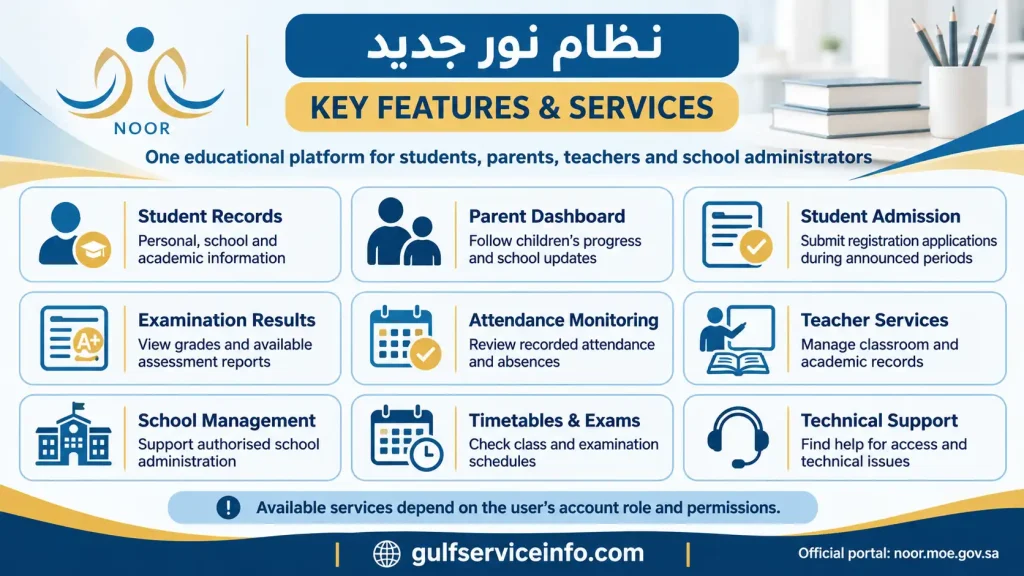
Access to these facilities varies according to the user’s role. A parent, for instance, can view information connected to their children, while a student may have a different set of academic options within their dashboard.
Who Can Use the Platform?
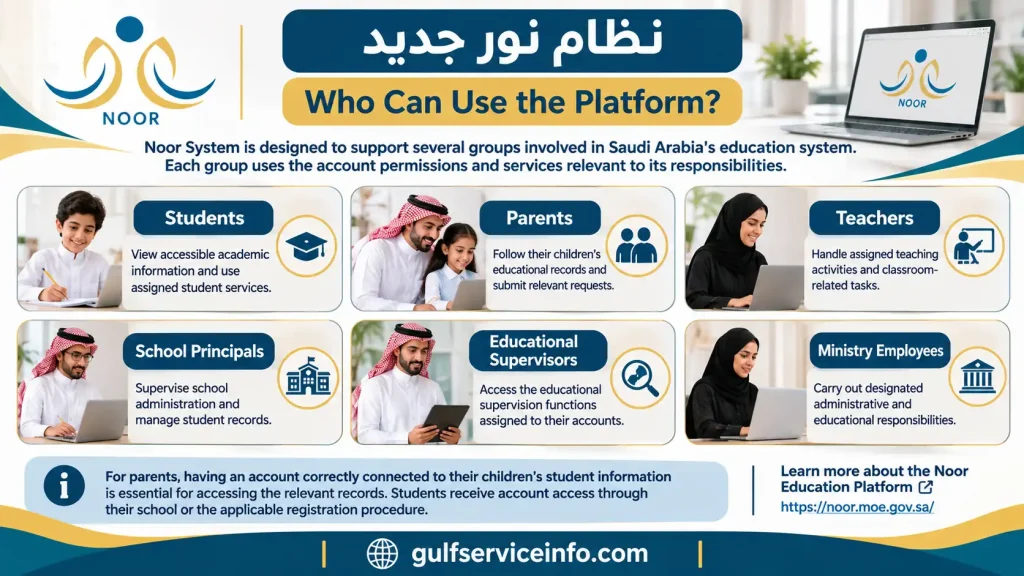
نظام نور جديد is designed to support several groups involved in Saudi Arabia’s education system. Each group uses the account permissions and services relevant to its responsibilities.
| User category | Available purpose and responsibilities |
|---|---|
| Students | View accessible academic information and use assigned student services. |
| Parents | Follow their children’s educational records and submit relevant registration requests. |
| Teachers | Handle assigned teaching activities and classroom-related educational tasks. |
| School principals | Supervise school administration and manage authorised student records. |
| Educational supervisors | Access the educational supervision functions assigned to their accounts. |
| Ministry employees | Carry out designated administrative and educational responsibilities. |
For parents, having an account correctly connected to their children’s student information is essential for accessing the relevant records. Students, on the other hand, receive account access through the arrangements established by their school or the applicable registration procedure.
Official reference: About the Noor Education Platform.
How to Access نظام نور جديد
The first step towards using Noor’s educational services is visiting the Ministry of Education’s official portal. You will need an internet connection and valid account credentials to access the services associated with your user profile.
The platform contains personal and academic information, so checking the website address before entering your login details is an essential security precaution. Avoid using unofficial websites that imitate the Noor login page.
Official Noor login portal
Access the educational system directly through the Saudi Ministry of Education.Open the official نظام نور website
Official domain: noor.moe.gov.sa
Step-by-Step Login Process
You can access your Noor account by following the login procedure displayed on the official website.
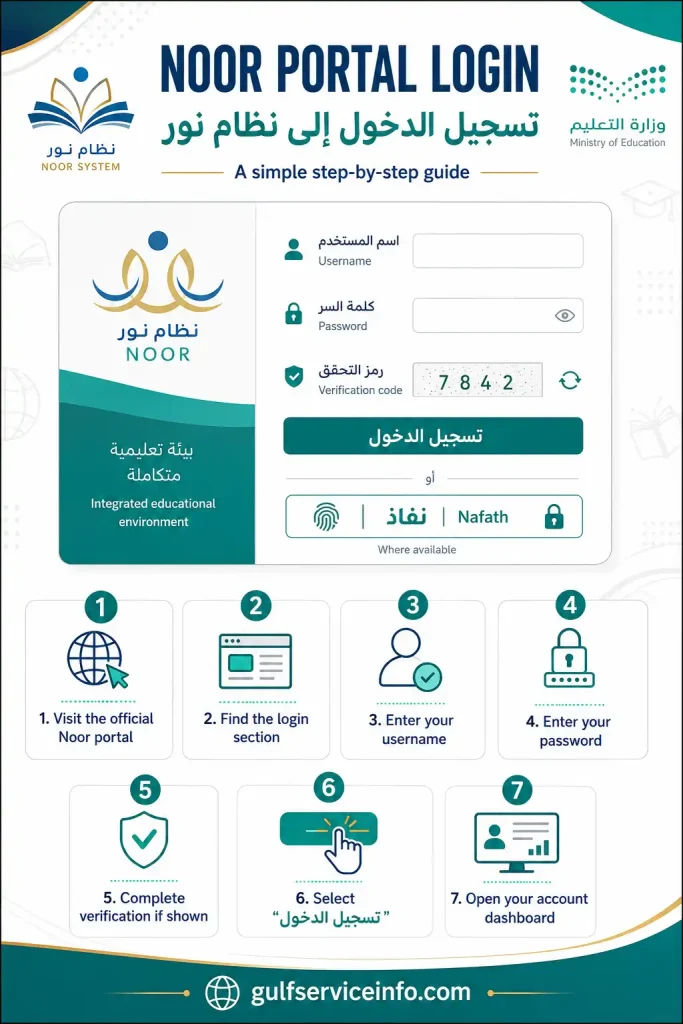
Depending on the login options currently provided, eligible users may also be able to authenticate through the National Unified Access service (نفاذ).
Security reminder: Before submitting your username or password, confirm that the browser address begins with the official noor.moe.gov.sa domain. Never share your account credentials with unauthorised individuals.
How to Create an Account
Parents who have not previously registered with the platform can look for the رابط التسجيل لولي أمر جديد option on the official Noor website. Its availability depends on the registration settings enabled by the authorised system administrator.
The registration process generally requires parents to provide identification details and other requested information before the account can be established.
Parent registration procedure:
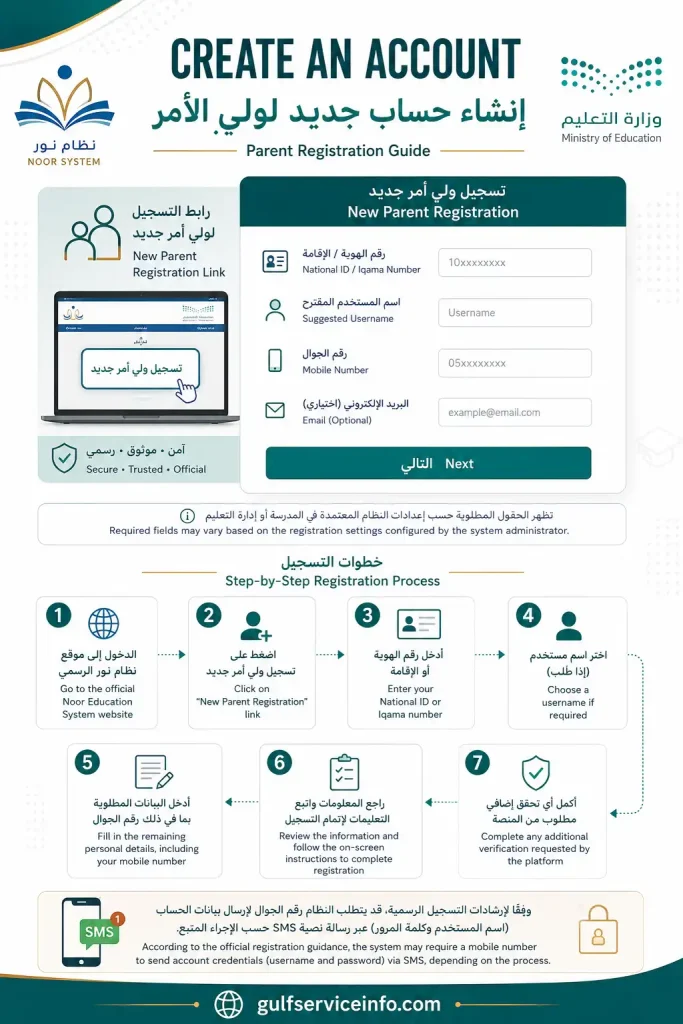
According to the official registration guidance, the process may involve providing a mobile number so that the system can send account credentials through SMS, depending on the applicable registration procedure.
What if the new-parent registration option is missing?
Its absence does not necessarily indicate a technical problem with the Noor website. Registration availability can depend on settings controlled by the authorised administrator.
If you cannot find the registration facility, contact your child’s school and ask for guidance on creating or activating your parent account.
Official registration guidance: Noor User Guides and Registration Instructions
نظام نور تسجيل الدخول
Access to نظام نور تسجيل الدخول depends on the type of account you hold. Students, parents and teachers all use the same official Noor portal, but each group is directed to the services and information associated with its assigned permissions.
Before signing in, keep your registered username and password ready. Parents who manage the academic information of several children should use their existing parent account, provided the relevant student records are linked to it.
Student Login
A student account provides access to the educational information and online services assigned by the school and the Ministry of Education. Once authenticated, students can use their dashboard to check available academic records and other school-related details.
Use the following login procedure:
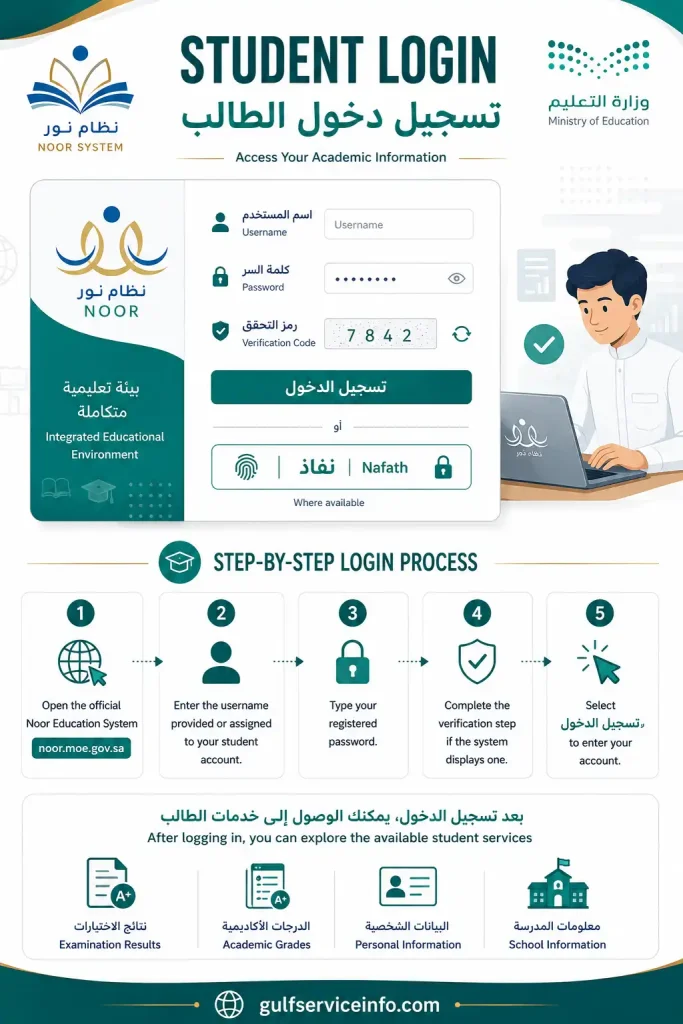
After logging in, you can explore the available student services, including examination results, academic grades and relevant school information.
If the system rejects your credentials, check for typing mistakes and confirm that you are using the correct account details. Where independent account recovery is not possible, contact your school’s administration for help.
Parent Login
The نظام نور ولي الأمر login facility gives parents access to educational information associated with their children. It allows authorised users to follow academic progress and use the parent services available through their accounts.
To access the parent dashboard:
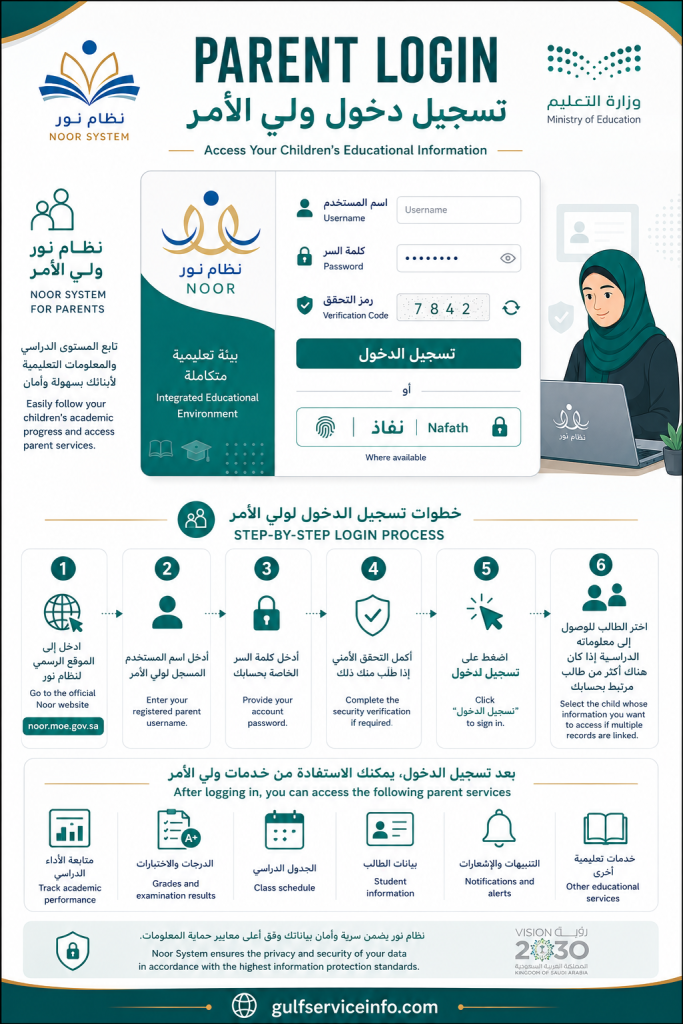
Once inside, parents can review the student information and academic services available to their accounts.
Make sure the children’s records are correctly connected to your parent profile. If a particular child is missing from the dashboard, contact the school to verify the registration details and account association.
Teacher Login
Teachers access Noor through accounts authorised for their educational roles. Their dashboards provide access to the school-related functions assigned to them, which may cover attendance, student information, academic assessments and classroom responsibilities.
The usual sign-in procedure involves these steps:
Teachers should always use their official school-issued credentials. If the account has not been activated, or the available services do not match their assigned responsibilities, they should contact the relevant school administrator.
Remember: Noor uses different account permissions for students, parents and teachers. Each user can only access the services assigned to their particular account, even when everyone signs in through the same portal.
نظام نور برقم الهوية ورمز التحقق
Many users searching for نظام نور برقم الهوية ورمز التحقق want to know whether their National ID can be used to access the platform without entering the usual account credentials.
The available authentication methods depend on the current Noor login interface and the user’s account. In particular, users may encounter National ID-based account recovery options or the National Unified Access service (نفاذ).
These methods serve different purposes. Entering an ID number to recover account information does not necessarily mean that the number can replace a registered username during a standard login.
Login Using National ID
If the official login page provides a Nafath or National Unified Access option, eligible users can follow that authentication route instead of relying solely on traditional account credentials.
The general procedure is as follows:
Official Nafath authentication
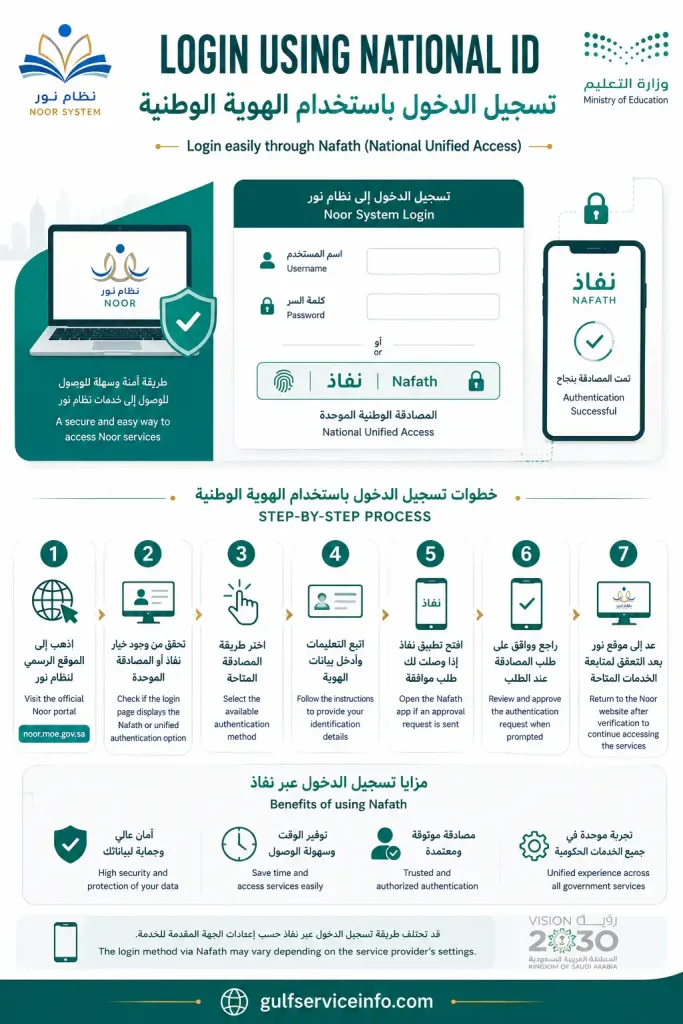
The Saudi National Unified Access service provides an authorised digital identity authentication facility.Visit the Nafath website
The exact steps may differ depending on the authentication method currently supported by Noor. Never share an authentication approval request, security code or personal login information with another person.
Entering the Verification Code
The verification code is an additional security check that may appear during account access or recovery. It helps the system verify the submitted request before allowing the user to proceed.
If Noor displays a verification image or requests a security code, follow these instructions:
Sometimes the displayed characters are difficult to recognise. If a refresh option is available, use it to generate a different verification code before trying again.
What to Do If the Verification Code Doesn’t Work
An unsuccessful verification attempt does not always indicate a problem with your Noor account. The code may have been entered incorrectly, expired or failed to load properly because of a temporary browser issue.
The following table outlines practical solutions for common verification problems.
| Problem | What to try |
|---|---|
| Incorrect verification code | Refresh the displayed code and enter the new characters. |
| Verification image is unclear | Generate another code using the refresh option, if available. |
| Login page stops responding | Reload the Noor website and try again. |
| Verification repeatedly fails | Clear the browser cache or access the portal through another browser. |
| Login returns to the same page | Recheck your account credentials and retry after a short interval. |
Avoid submitting random verification codes repeatedly. If the issue continues after trying these steps, use the official support facilities or contact your school for assistance.
نظام نور ولي الأمر
Parents play an important role in following their children’s educational development, and نظام نور ولي الأمر provides an online way to access relevant school information. Through an authorised parent account, families can review available academic records without relying entirely on printed reports or visiting the school for routine enquiries.
The platform is particularly useful for parents with more than one school-going child. When the relevant records are linked correctly, they may be able to access information about multiple children through a single parent profile.
Parent Account Access
A valid parent account and correctly associated student records are the main requirements for using the Noor parent services.
Once your account is ready, you can access the dashboard using the following process:
First-time users should check whether the new-parent registration facility is available before proceeding. Parents who already have an active account should normally continue using their existing credentials rather than creating duplicate profiles.
Checking Children’s Academic Performance
Keeping track of academic progress is one of the main reasons parents use the Noor platform. The parent dashboard can provide access to examination results, grades and other educational information once the relevant details have been published by the school.
Depending on the account permissions and available services, parents may be able to review:
Checking these records regularly can help parents identify areas where their children may need additional academic support.
If an expected grade is missing or a report appears incomplete, contact the school to verify the information. Results may not become visible until the relevant school or educational authority has published them.
Viewing Attendance and School Reports
Academic performance is only one part of a child’s educational record. Attendance information also helps parents understand their children’s participation in school activities.
Where the school has recorded and published the relevant information, نظام نور جديد can provide access to attendance and absence records through the parent account.
Parents can periodically review:
If you find an absence entry that does not match your child’s actual attendance, contact the school for verification. The school is responsible for reviewing the original record and making any authorised corrections.
Advice for parents
Do not wait until examination results are released to access your Noor account. Checking academic reports and attendance information throughout the school year makes it easier to identify missing records and discuss any concerns with teachers at an early stage.
نظام نور تسجيل طالب جديد
The نظام نور تسجيل طالب جديد service enables parents to submit electronic admission applications for children who meet the applicable school registration requirements. Through this facility, parents can enter the required student details, provide registration information and follow the progress of their applications.
The Saudi Ministry of Education provides online registration for eligible children entering kindergarten and the first year of primary school. However, admission eligibility, age limits and registration dates depend on the academic year and the categories announced by the Ministry.
One detail parents should check before starting is the active registration period. An application may not be accepted if registration for the relevant category has not opened or has already closed.
New Student Registration Process
Parents can submit an admission application through their Noor account when the relevant student registration service is available.
The application generally follows this sequence:
After submission, Noor displays a confirmation message when the application has been successfully recorded. However, submitting a request should not be confused with receiving final admission approval.
The Ministry’s electronic registration process may also use information from connected government databases, including the registered National Address, to support school allocation. Placement follows the applicable admission rules and allocation arrangements, rather than being determined simply by which parent submits an application first.
Registration Requirements
Before starting the online admission process, parents should check whether their child and account meet the requirements for the selected registration category.
The main considerations include:
An important distinction: Kindergarten admission and first-grade primary admission do not necessarily follow identical age requirements. Parents should consult the official registration announcement for the relevant academic year rather than relying on age information from an earlier admission cycle.
Documents Required for Enrollment
The supporting information required for student admission can vary according to nationality, educational stage, age and registration category. Some details may be retrieved electronically through connected government systems, while other applications may require additional documents.
Parents should have the following information available where applicable:
| Document or information | Why it may be required |
|---|---|
| Student National ID or Iqama | To identify the child. |
| Parent National ID or Iqama | To verify the parent or legal guardian. |
| Birth certificate | To confirm the child’s date of birth. |
| National Address | To support the school allocation process. |
| Parent mobile number | To receive registration updates and notifications. |
| Medical fitness examination | To meet applicable admission requirements. |
| Previous academic records | To provide educational history when requested. |
Not every applicant will need to submit all these documents. The online application displays the specific information, supporting documents and declarations required for the selected admission category.
How to Track Registration Status
Submitting a student registration application is only one stage of the admission process. Parents should also monitor the request to see whether it has been reviewed and whether any further action is required.
You can check the application through your Noor parent account:
The application may need to be reviewed by the relevant school or educational authority. Depending on the admission process, its status may indicate acceptance, rejection or that the request is still being considered.
According to the Ministry’s service information, parents receive an acceptance or rejection notification after the relevant review. Where applicable, updates may also be delivered through SMS or email.
Keep your contact details up to date
Leave your registered mobile number active after submitting the application. Registration updates and admission notifications may be sent using the contact details associated with your account.
نظام نور للطلاب
The نظام نور للطلاب service gives students an online route to their educational information and the school services assigned to their accounts. It allows them to follow available academic records and check information published by their schools through a central dashboard.
The student interface may contain examination results, grades, personal educational details, school reports and other relevant facilities. What appears on the dashboard depends on the student’s educational stage, account permissions and the services activated by the school.
Student Dashboard
After completing نظام نور تسجيل الدخول, students can use their dashboard to navigate the academic services available through their accounts.
The dashboard brings together relevant student information, making it easier to locate academic details without having to search through separate school records.
Depending on the available functions, students may find:
Students using Noor for the first time should explore the available dashboard menus to understand where different services are located. Menu names and available options may vary with changes to the platform interface.
Checking Grades and Results
Students can use their Noor accounts to view examination grades once the relevant results have been published by their school or the responsible educational authority.
The process is straightforward:
If the results section does not display your grades, first check whether the school has released the examination results. Not every missing result indicates an error in the student’s record.
For incomplete information, missing subjects or grades that appear incorrect, contact the school administration so the relevant records can be checked.
Viewing Academic Schedules
Academic timetables help students keep track of their lessons and prepare for upcoming examinations. Where these services are enabled, Noor may provide access to relevant class schedules and examination information.
When reviewing the available schedule, students should pay attention to:
Make a habit of checking your schedule, especially before examination periods. Schools may issue updates or announcements separately, so students should also follow official school communications rather than relying exclusively on the information displayed in Noor.
Official student guidance: Noor Student Services and User Guidance
How to Check Results Through نظام نور جديد
Checking examination results is one of the main services available through نظام نور جديد. Students and parents can sign in to their authorised accounts to view academic grades after the school or relevant education authority has officially released them.
The platform allows families to access available student records online, making it easier to review academic performance without relying solely on printed report cards. The information and result options displayed may vary depending on the student’s grade level, academic term and the services made available by the school.
Step-by-Step Results Checking
Follow these steps to view a student’s examination results through the Noor platform:
OFFICIAL WEBSITE
Check Student Results Through Noor
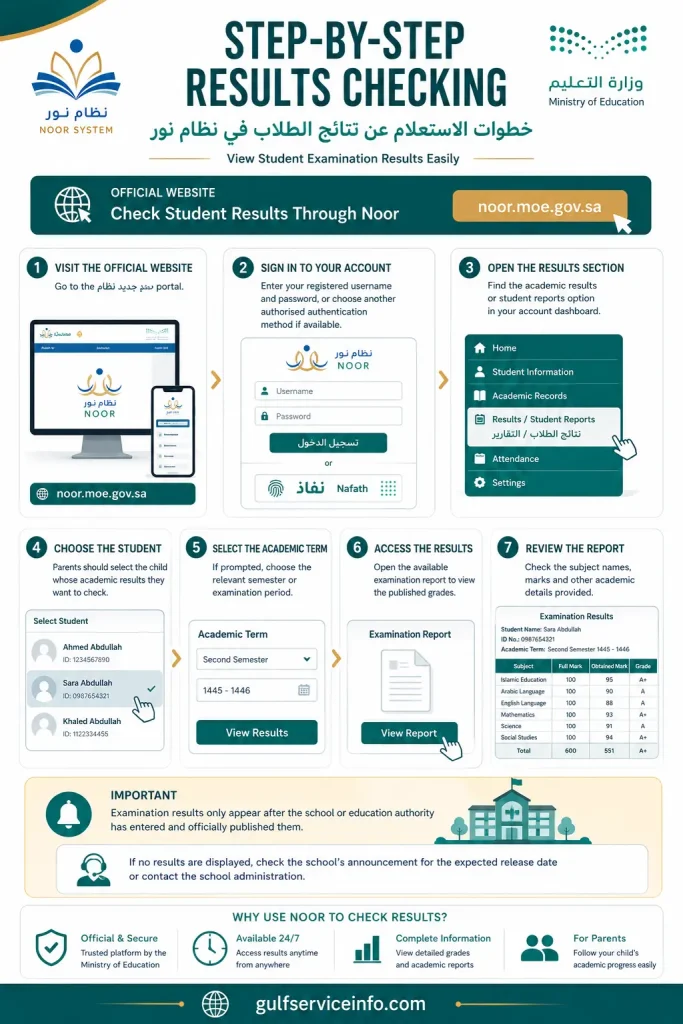
Important: Examination results only appear after the school or education authority has entered and officially published them. If no results are displayed, check the school’s announcement for the expected release date or contact the school administration.
Downloading Academic Results
After an academic report has been published, students and parents may be able to download a digital copy for their records.
To save an available report, follow these steps:
The report format and available download options may vary depending on the current Noor interface.
Parents should store downloaded reports securely, as these documents may contain personal information about their children.
Common نظام نور Login Problems and Solutions
Although نظام نور جديد brings several educational services together in one online platform, users may sometimes experience difficulties when signing in. These can include incorrect login details, forgotten passwords, verification errors or temporary website issues.
Many common problems can be resolved by checking the information entered, confirming registered contact details or following the platform’s official account-recovery process.
Before trying different login methods or requesting several verification codes, identify the issue you are experiencing. This can help you avoid unnecessary account changes and repeated authentication attempts.
1. Forgot Password
Forgetting a Noor password is a common problem, especially among parents who only sign in occasionally to check their children’s academic information.
The platform provides an account-recovery facility that eligible users can use to reset their passwords through their registered mobile number or email address.
How to recover your password:
OFFICIAL PASSWORD RECOVERY
Noor Password Reset Page
The mobile number or email address used during recovery must match the contact details registered with the platform. If your information is missing or outdated, contact your school administrator and request an update.
2. Account Not Found
An account-not-found message generally appears when the details entered do not match an active or recognised Noor account.
If you encounter this message, check the following:
For newly registered students, the school may still need to complete the account creation or activation process.
Parents who cannot see their child’s information should also check whether the student has been correctly linked to their account. The official parent guidance includes instructions for connecting children’s records to a parent’s profile.
3. Website Not Opening
The Noor website may occasionally fail to load because of browser issues, an unstable internet connection or a temporary interruption to the service.
Try the following solutions based on the problem you encounter:
| Issue | What to do |
|---|---|
| Blank website page | Reload the official Noor website |
| Slow loading | Check your internet connection |
| Login page not displaying | Try another updated browser |
| Repeated loading errors | Clear your browser’s cache and cookies |
| Website unavailable | Wait for a while and try again |
| Mobile display problems | Use an updated browser or switch to desktop view |
Always open the portal through the official Ministry of Education domain. Avoid third-party websites that claim to offer direct access to Noor accounts.
4. Verification Code Errors
Verification errors can stop users from completing the login process or resetting their account passwords.
If the platform rejects your verification code, check these points:
If the issue continues, contact the authorised support service rather than repeatedly attempting to verify your account.
Need additional help? The Ministry of Education offers a unified beneficiary support service through its official contact centre at 19996. The service is available 24 hours a day, seven days a week.
Frequently Asked Questions About نظام نور جديد
Final Thoughts on نظام نور جديد
The نظام نور جديد platform provides a central online service that connects students, parents, teachers and schools across Saudi Arabia. It brings together a range of educational services, including access to student records, examination results and new student registration applications.
Through نظام نور ولي الأمر, parents can follow their children’s academic progress, review available school reports and check the status of registration applications. Students can use their accounts to access their educational information, while teachers and authorised school staff can manage the services related to their roles.
For a smoother experience, always use the official Ministry of Education website, keep your registered contact information up to date and protect your login credentials. If a service is temporarily unavailable or an application needs further review, refer to the official Noor guidance or contact the relevant school administration for assistance.
Read More: Explore our related Gulf government service guides for more step-by-step information and helpful updates.
موقع كتبي: Complete Guide to School Books, Textbook Solutions & Online Learning
منصة مدرستي تسجيل الدخول: Complete Login Guide for Students, Teachers & Parents