The MOI Qatar Visa Check lets applicants and residents verify their MOI Qatar Visa details and check the current status of an application through the Ministry of Interior’s online services. Using the official electronic system, you can review available visa information and understand what your status means. This section covers the information required for a MOI Qatar Visa check, how to check your visa status, and what to do if no record appears or the result requires further clarification.
Looking for more Qatar government service guides? Visit our website.
What Is MOI Qatar Visa?
MOI Qatar Visa Check refers to the visa services provided online by Qatar’s Ministry of Interior, allowing applicants and sponsors to access and check information related to work and visit visa applications. Through the MOI Visa Services section, users can track visa approvals, make visa enquiries, print issued visa documents, and access other available visa-related services without necessarily visiting an immigration office.
Key services available through the MOI Qatar Visa system include:
By entering the required details, applicants and sponsors can use the MOI Qatar Visa Check enquiry service to access relevant visa information online. This makes it easier to monitor an application or verify an issued visa without relying solely on in-person immigration enquiries.
Why MOI Qatar Visa Check Online Is Important
Checking your MOI Qatar Visa Status online is an important step before travelling to Qatar and while managing your stay. A quick status check can help you confirm that your visa remains valid, identify potential issues, and avoid problems at immigration or during your return journey.
Here are the main reasons to check your visa status online:
How to Check MOI Qatar Visa Status Online
You can check your Qatar Visa Check status online through official government and government-authorised services. These platforms provide a more reliable way to view visa information, track applications, and confirm the latest available status than unofficial websites, which may display outdated or inaccurate details. The following section covers the recognised online methods and explains how to use each one step by step.
Method 1: MOI Qatar Visa Check Status via the Official MOI Portal
The MOI Qatar portal is a primary online option for checking visa information directly through the Ministry of Interior. To check your status, open the official MOI website, access the visa enquiry service, and provide the required identification details.
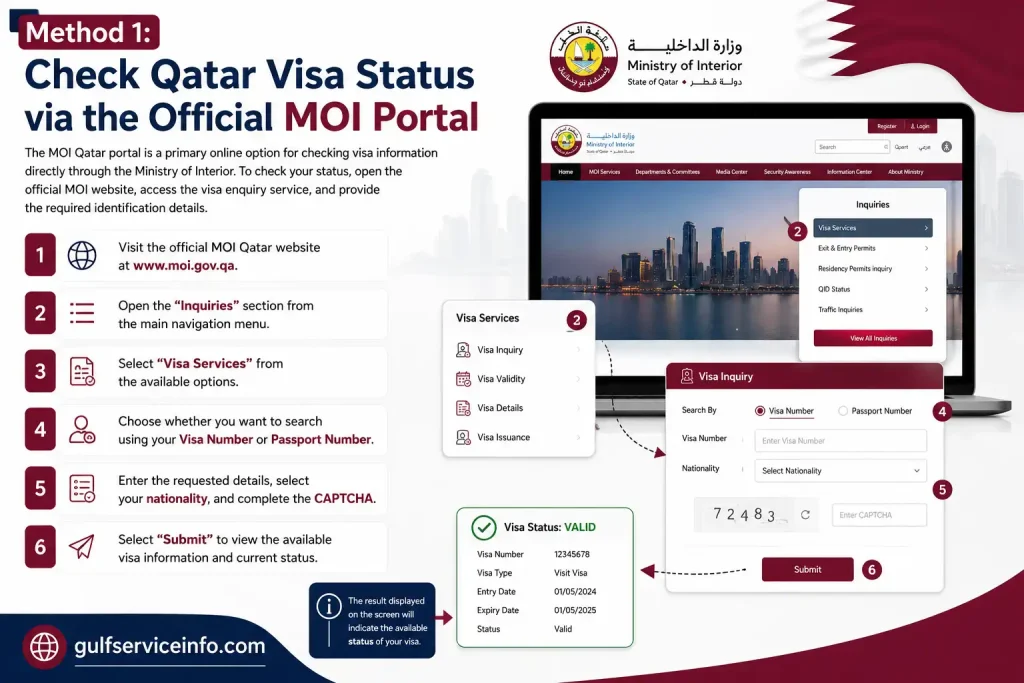
The result displayed on the screen will indicate the available status of your visa. The different status messages can then be understood using the explanations provided later in this guide.
Method 2: MOI Qatar Visa Check Status via the Metrash2 App
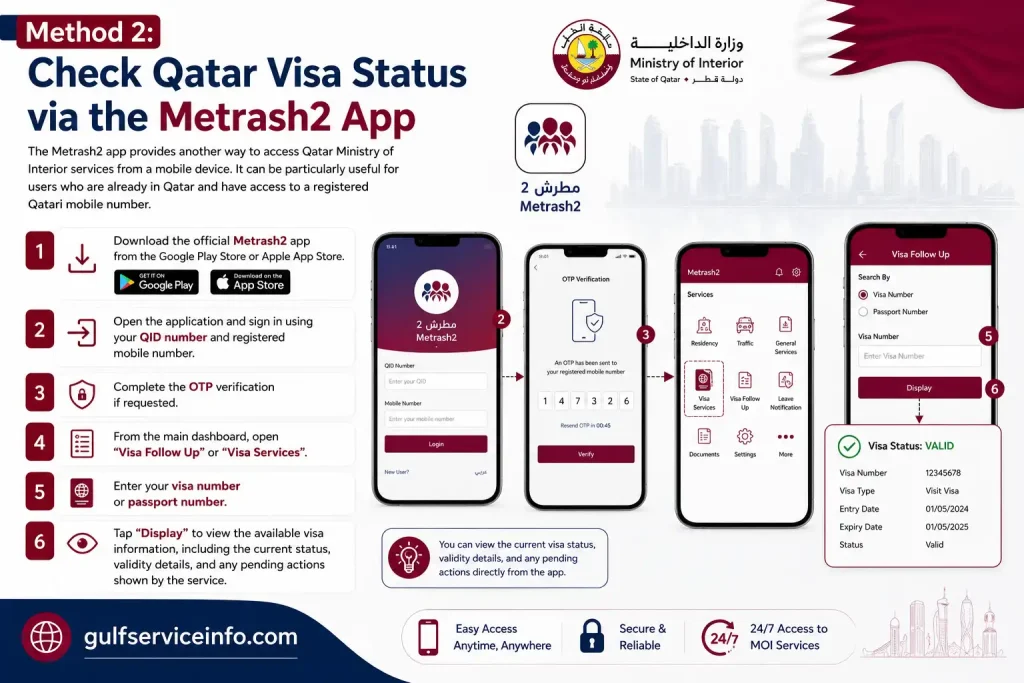
The Metrash2 app provides another way to access Qatar Ministry of Interior services from a mobile device. It can be particularly useful for users who are already in Qatar and have access to a registered Qatari mobile number.
To check your visa information through the app:
Method 3: Qatar Visa Check Status via the Qatar Visa Center (QVC) Website
Applicants from Pakistan, India, Nepal, Bangladesh, and other eligible countries may use the Qatar Visa Center (QVC) website to follow the progress of their visa application. The QVC system can provide updates related to stages such as medical examinations, biometric enrolment, and visa processing, making it particularly useful for applicants who are still outside Qatar.
Depending on the stage of your application, the QVC status may provide information about:
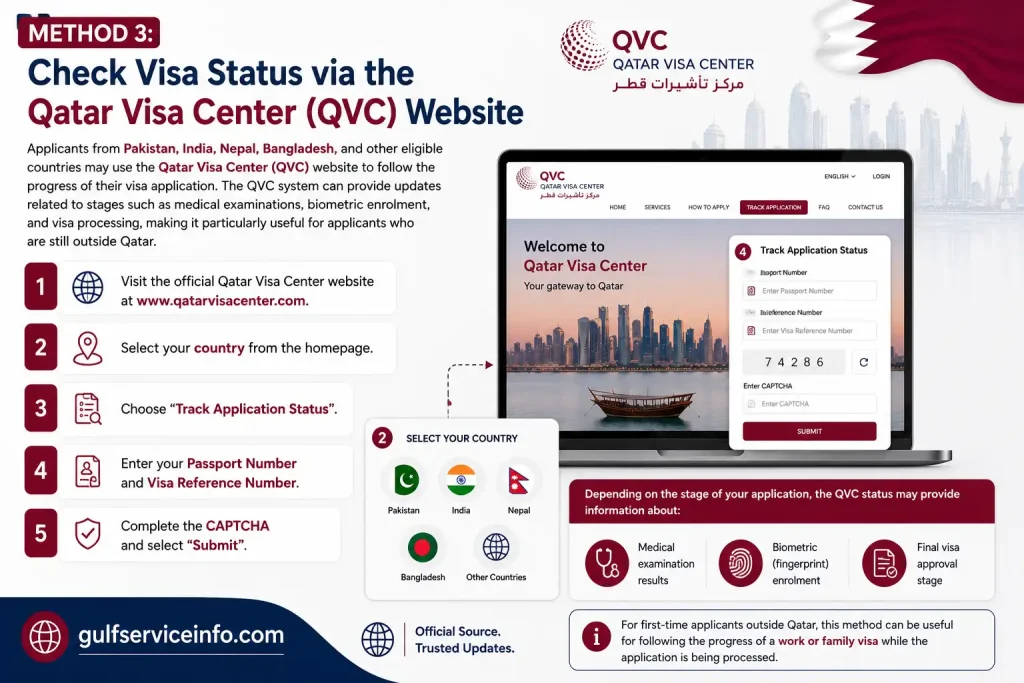
For first-time applicants outside Qatar, this method can be useful for following the progress of a work or family visa while the application is being processed.
Method 4: Check MOI Qatar Visa Status by Passport Number
You can check your MOI Qatar Visa Check using your passport number even if you do not have the visa number available. This option is particularly useful for first-time travellers or applicants whose visa was arranged through an agency. The MOI online enquiry service allows you to search for the available visa information by entering your passport details.
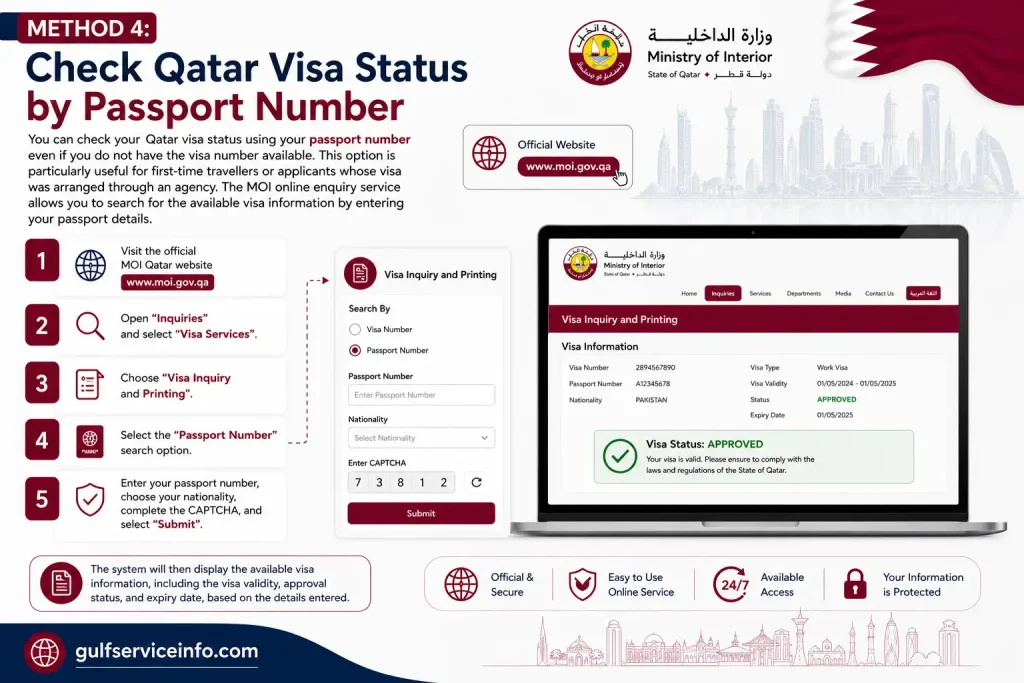
The system will then display the available visa information, including the visa validity, approval status, and expiry date, based on the details entered.
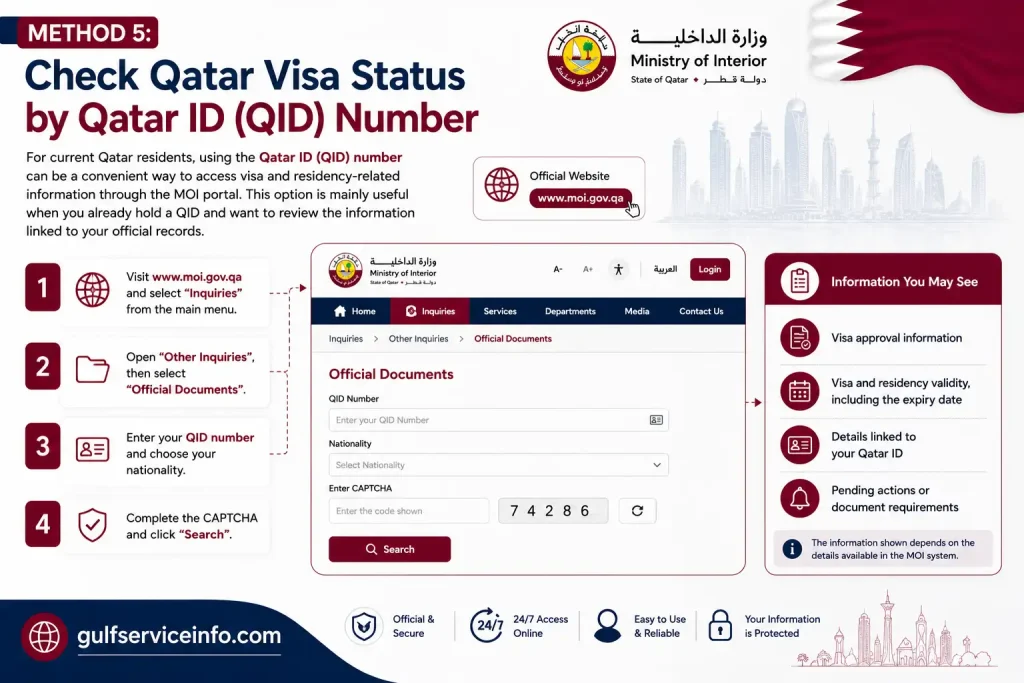
Method 5: Qatar Visa Check Status by Qatar ID (QID) Number
For current Qatar residents, using the Qatar ID (QID) number can be a convenient way to access visa and residency-related information through the MOI portal. This option is mainly useful when you already hold a QID and want to review the information linked to your official records. Follow these steps to check the available details:
Depending on the information available in the system, the portal may show:
If your QID is nearing its expiry date, it’s a good idea to review the renewal requirements and available official services in advance. You can also check your Qatar ID (QID) status, validity, and renewal details in our complete MOI Qatar ID Check Online 2026 guide.
How to Print Your Qatar Visa Online – MOI Visa Print
Once your MOI Qatar Visa Status Check shows an approved or print-ready result, you can access the available visa document through the MOI Qatar online service. The process is straightforward and allows you to obtain a digital copy without needing to visit an immigration office.
To print your Qatar visa online:
If the option is available in the Metrash2 app, you can also access your visa through Visa Services → Visa Follow Up, select the relevant visa, and use the available download option.
Ministry of Interior Qatar
The Ministry of Interior Qatar (MOI Qatar) portal provides access to a range of government services online, including MOI Qatar Visa Check Status, traffic violation enquiries, vehicle-related services, and residency permit information. Using the official online platform can help residents, visitors, and applicants access relevant services without needing to visit a government office for every enquiry.
MOI Qatar Portal
The MOI Qatar Portal is the official online platform of Qatar’s Ministry of Interior for accessing a range of government services digitally. Visitors and residents can use the portal to check visa information, follow application-related services, and access other electronic services from one secure platform. It provides a convenient way to manage essential MOI services online without having to visit a government office for every enquiry.
Metrash2 Portal
The Metrash2 Portal provides digital access to a range of Ministry of Interior services in Qatar. Residents and visitors can use the platform to access available visa information, review traffic violations, and manage vehicle-related services through a convenient online system. It offers a practical way to handle common MOI services digitally without needing to visit a government office for every enquiry.
How to Check MOI Qatar Visa Status Offline
If you’re unable to use the online services, you can check your MOI Qatar Visa Status through an official in-person channel. Before visiting, confirm that the relevant office handles visa enquiries and whether appointments or walk-in visits are available.
Types of MOI Qatar Visas You Can Check
The MOI Qatar visa inquiry system may display different Qatar visa types, depending on the purpose of travel, eligibility, and the application details. Knowing the main categories can make a Qatar visa status check easier and help you understand what type of visa you are tracking. The table below summarises the common visa categories covered in the source material.
Main Qatar Visa Types and Their Details
| Qatar Visa Type | Purpose | Validity Range | Related Keywords |
|---|---|---|---|
| Qatar Work Visa | Employment under a company | 1–3 years | work permit, Qatar work permit, Qatar work visa status |
| Qatar Visit Visa | Short-term family or business visits | 30–90 days | Qatar visit visa, visit visa extension |
| Qatar Tourist Visa | Tourism and leisure travel | Up to 30 days | Qatar tourist visa, visa on arrival |
| Family Residence Visa | Long-term stay with family members | Long-term | Qatar family visa, Qatar ID check |
| Hayya Visa (A1 Visa) | Event-based entry | Temporary | Hayya Card, Hayya A1 visa, Hayya Card validity |
When checking a visa through the MOI Qatar visa inquiry service, use the visa category and application details relevant to your situation. Validity and eligibility can vary according to the specific visa and applicable rules.
Key Features of Each Visa Type
Each MOI Qatar visa category has its own set of details that can help users understand the information shown in MOI visa check results. Reviewing these fields makes it easier to confirm the visa type, identify the associated sponsor, and check whether the visa remains valid. The main details to look for include:
Checking these details carefully supports a more accurate MOI Qatar Visa status check online and helps users stay aware of the conditions associated with their visa.
MOI Qatar Visa Validity and Expiry Rules
MOI Qatar visa validity determines how long a visa remains usable and when it expires, depending on its category and the applicable immigration requirements. Checking the validity period and expiry date through a Qatar visa status check online helps users keep track of their authorised stay and avoid issues associated with an expired visa.
Qatar Visa Validity by Visa Type
Different MOI Qatar Visa categories come with different validity periods and extension arrangements. The table below summarises the validity ranges and extension options described for the main visa types.
| Visa Type | Validity Period | Extension Option | Related Keywords |
|---|---|---|---|
| Qatar Work Visa | 1–3 years | Renewable through employer | Qatar work permit, work visa status |
| Qatar Visit Visa | 30–90 days | Extendable, subject to conditions | Qatar visit visa, visa extension |
| Qatar Tourist Visa | Up to 30 days | Limited extension | Qatar tourist visa, visa on arrival |
| Family Residence Visa | Long-term | Renewable | Qatar family visa, Qatar ID check |
| Hayya Visa (A1 Visa) | Event-based duration | Not extendable in most cases | Hayya Card validity, Hayya visa |
Visa Expiry and Overstay Rules
A visa reaches its expiry when its permitted validity period ends without an applicable renewal or extension. Remaining in Qatar after the permitted period may lead to daily fines or other legal consequences under the applicable immigration rules. To reduce the risk of an expired visa, users should:
How to Check Qatar Visa Validity Online?
You can check Qatar visa validity through the available MOI Qatar visa enquiry and printing service or, where supported, through the Metrash2 app for visa-related status information. The available record can show key details such as the visa issue date, expiry date, and validity information, helping applicants and residents keep track of their MOI Qatar Visa status.
Common Issues During Qatar Visa Check
Problems during a Qatar visa check online are often linked to incorrect information, processing delays, or temporary issues with MOI Qatar services. Knowing the likely cause of an error can help you complete a visa enquiry, check your application status, or verify QID-related information more accurately.
Common Qatar Visa Check Issues and Solutions
The following table highlights common problems users may encounter when using the MOI visa inquiry system and the practical response for each one.
| Issue | Possible Cause | Recommended Solution |
|---|---|---|
| No Record Found | Incorrect passport number or visa number | Recheck the details and enter the correct information |
| Invalid Data Error | Mismatch in nationality or personal information | Verify all information before submitting the enquiry again |
| System Not Responding | High traffic on the MOI Qatar portal | Wait and try the service again later |
| Delayed Status Update | The application is still being processed | Check again after the expected 24–72 hour processing window |
| Visa Not Approved Yet | The application remains under review | Wait for the final decision before taking further action |
Why Do Qatar Visa Check Errors Occur?
Most Qatar visa status check errors mentioned in this context can be traced to a few common situations:
How to Avoid Errors When Checking Visa Status
For more reliable Qatar visa inquiry results, make sure the information you enter matches your official documents. It is also advisable to use the recognised MOI Qatar or Metrash2 platforms and allow sufficient time for an application to be processed before checking its status again.
These steps can reduce avoidable errors and make Qatar visa tracking and status verification more straightforward.
Qatar Visa Status Check for Pakistan, India, Nepal and Bangladesh
If you are applying for a MOI Qatar visa from Pakistan, India, Nepal or Bangladesh, there is an additional step to understand before checking your final visa status. For applicants from these countries, the Qatar Visa Center (QVC) handles key pre-approval requirements before the application moves through the final approval process with Qatar’s Ministry of Interior (MOI).
Where Are the Qatar Visa Centers Located?
QVC services are available in the following locations:
| Country | QVC Locations |
|---|---|
| Pakistan | Karachi, Lahore, Islamabad |
| India | Mumbai, Delhi, Chennai, Hyderabad, Kolkata |
| Nepal | Kathmandu |
| Bangladesh | Dhaka |
Step-by-Step QVC Process
Once your employer or sponsor in Qatar provides your visa reference number, you can begin the QVC process. The main steps are:
- Get your visa reference number
Your Qatar-based employer or sponsor provides the reference number needed to proceed. - Schedule a QVC appointment
Book an appointment through the MOI Qatar Visa Center website: www.qatarvisacenter.com. - Complete biometric registration
At the QVC centre, you will normally provide your fingerprints and facial scan. - Attend the medical examination
The required medical checks may include basic health assessments and laboratory tests. - Submit your documents
Take your passport, visa reference details and appointment slip, along with any other required documents. - Check your visa status
After completing the QVC requirements, you can monitor the application using your passport number through the QVC portal or the MOI portal.
How Long Does the QVC Process Take?
Many applicants receive a status update within 3–7 working days after completing the QVC process. Processing times can vary, so an application remaining under process does not necessarily mean there is a problem.
Qatar Visa Status Meanings in Urdu and Hindi
When checking your application, the status may appear in English. These common meanings can help applicants understand what the result indicates:
| English Status | Urdu / Hindi Reference |
|---|---|
| Approved | منظور — Manzoor |
| Under Process | زیر کارروائی — Zer-e-Karrawai |
| Rejected | مسترد — Mastard |
| Expired | میعاد ختم — Miyad Khatam |
| On Hold | روکا ہوا — Roka Hua |
| Cancelled | منسوخ — Mansookh |
Tip: Keep your passport number and visa reference number available when checking your application. These details can make it easier to track the status through the relevant portal.
Source basis: your uploaded dynamic SEO rewriting prompt, which instructs the rewrite to preserve factual meaning while rebuilding the wording and structure rather than paraphrasing line-by-line.
Common Reasons for Qatar Visa Rejection and How to Avoid Them
A Qatar visa application can be refused for several reasons, from incorrect personal details to incomplete documents or problems with the sponsor. Understanding the common issues before submitting an application can help reduce avoidable mistakes.
| Common Rejection Reason | What It Means | How to Avoid It |
|---|---|---|
| Incorrect or missing information | Errors in details such as your passport number, name spelling or nationality can affect the application. | Check every field carefully and make sure all information matches your official documents. |
| Incomplete documentation | Required documents may be missing, such as accommodation proof, a return ticket or a sponsor letter. | Prepare a document checklist and confirm that all required paperwork is ready before applying. |
| Eligibility requirements not met | Different Qatar visa categories have different eligibility conditions. An application may be refused if those requirements are not satisfied. | Check the requirements for your specific visa category before submitting the application. |
| Previous immigration violations | A previous visa overstay or other immigration violation may affect the chances of approval. | Provide your immigration history accurately and seek advice from an authorised agent if you are unsure about your situation. |
| Medical or biometric issues | Problems identified during required medical or biometric procedures may lead to a visa denial. | Attend the required QVC appointment, complete all checks and provide accurate information. |
| Sponsor or employer problems | Issues such as an incorrect job title, an inactive sponsor QID or a company-related restriction can affect the application. | Verify the sponsor’s details and employment information before the visa application is submitted. |
Required Documents for Qatar Visa Application
Having your paperwork ready before submitting a Qatar visa application can help prevent avoidable delays. The exact documents can vary by visa category, but applicants should prepare the following where applicable.
Qatar Visa Document Checklist
Frequently Asked Questions (FAQs)
Conclusion
Knowing how to Qatar Visa Check status online can help you avoid unnecessary delays and travel problems, whether you are travelling to Qatar for tourism, work, or a family visit. Use the official MOI Qatar and Qatar Visa Center (QVC) services to confirm that your visa is approved, valid, and has not expired, and check your status before travelling or before your visa expiry date so you can identify potential issues early, prepare the required documents, and make sure your travel plans comply with Qatar’s immigration requirements.