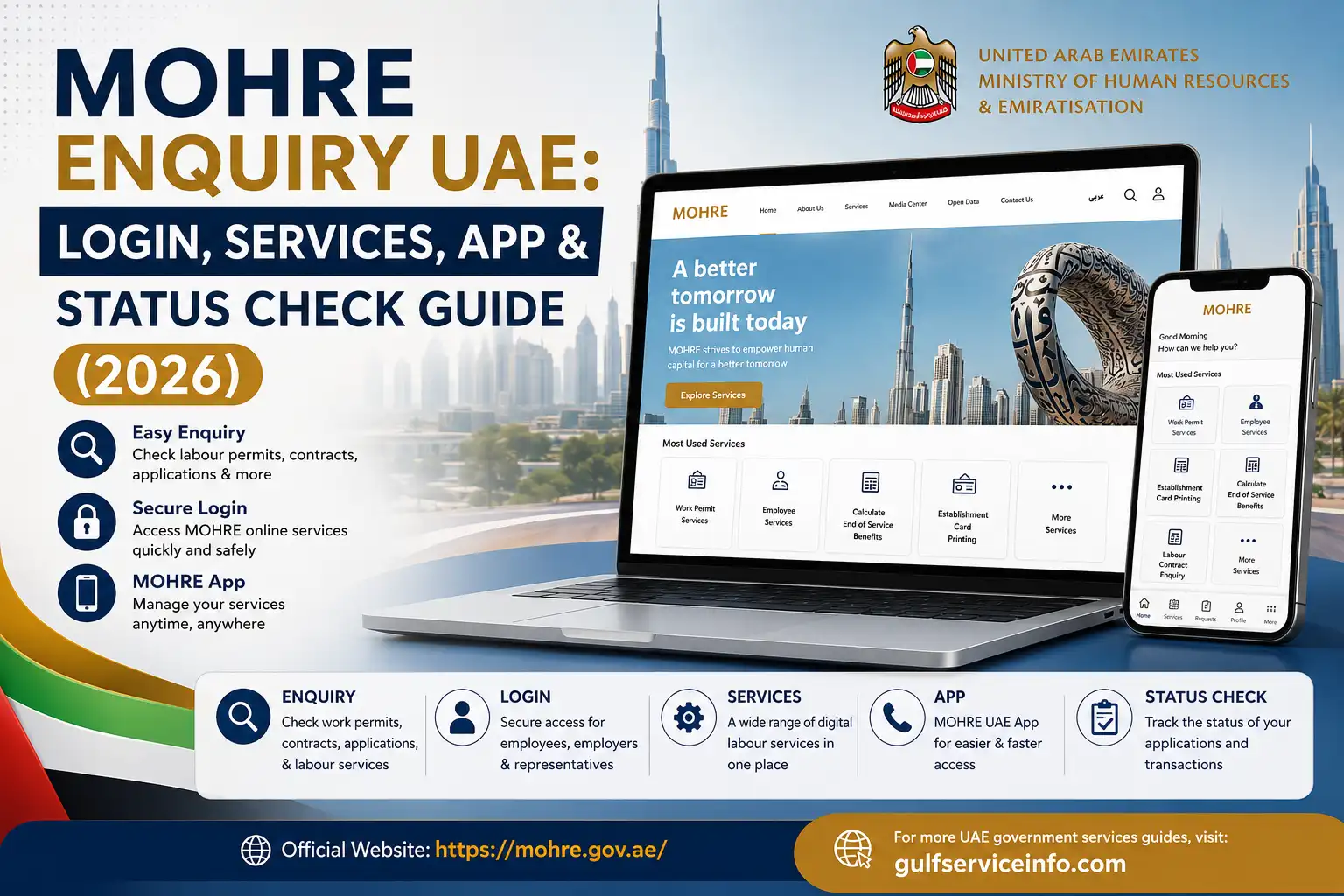
If you need to check an employment contract, follow a labour transaction, manage work permits, or contact the UAE labour authority, the MOHRE UAE portal is an important official digital channel. MOHRE (Ministry of Human Resources and Emiratisation) provides services for employees, employers, domestic workers, and other users. Through the official website, users can access MOHRE Enquiry UAE, enquiry MOHRE, MOHRE login, MOHRE enquiry services, and MOHRE enquiry status tools, while the MOHRE Enquiry UAE app provides convenient mobile access.
For more UAE government services, guides, and online enquiry tutorials, visit our homepage to explore the latest updates and step-by-step guides.
What Is MOHRE Enquiry UAE?
MOHRE Enquiry UAE refers to the online enquiry and information services provided by the UAE Ministry of Human Resources and Emiratisation.
These services are particularly useful for people who want to check information related to employment and labour transactions. The exact information required depends on the enquiry you are making.
For example, an employee may need to check an employment contract, while an employer may need to follow a work permit or establishment-related transaction.
MOHRE Enquiry UAE also provides dedicated online systems for specific enquiries. For employment offers and contracts, its official enquiry service can request details such as a transaction number, passport number, nationality and date of birth, depending on the selected service.
What Can You Check Through MOHRE?
Depending on the service available for your transaction, MOHRE online services can help with areas such as:
The information and login requirements are not identical for every service, so it is better to use the specific MOHRE service rather than entering personal information into an unrelated enquiry page.
Quick Tip: Keep your transaction number, work permit details, passport information or Emirates ID available before starting a MOHRE Enquiry UAE. The required information varies according to the service.
MOHRE Login UAE: How to Access Online Services
A common reason people search for MOHRE login UAE is to access services that require user authentication.
Start from the official MOHRE website rather than relying on unofficial websites or third-party pages:
From there, look for the relevant digital service or enquiry option. MOHRE operates several service channels, so the exact login screen can differ depending on whether you are an employee, employer, company representative or another type of customer.
Before You Log In
Have the following information ready where applicable:
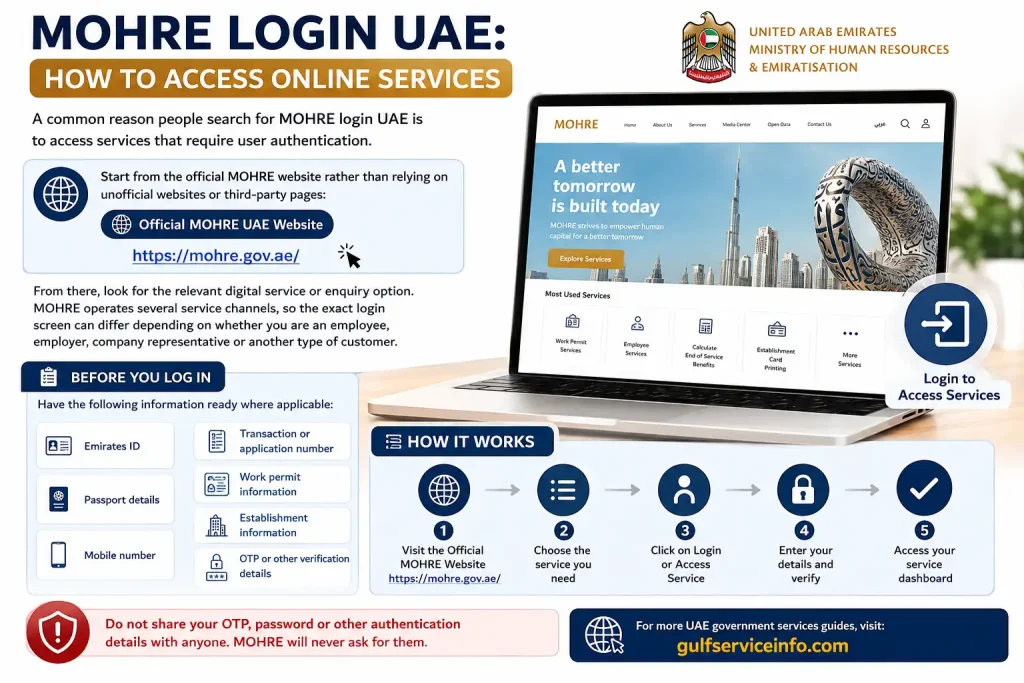
Do not share your OTP, password or other authentication information with another person.
How to Perform a MOHRE Enquiry UAE
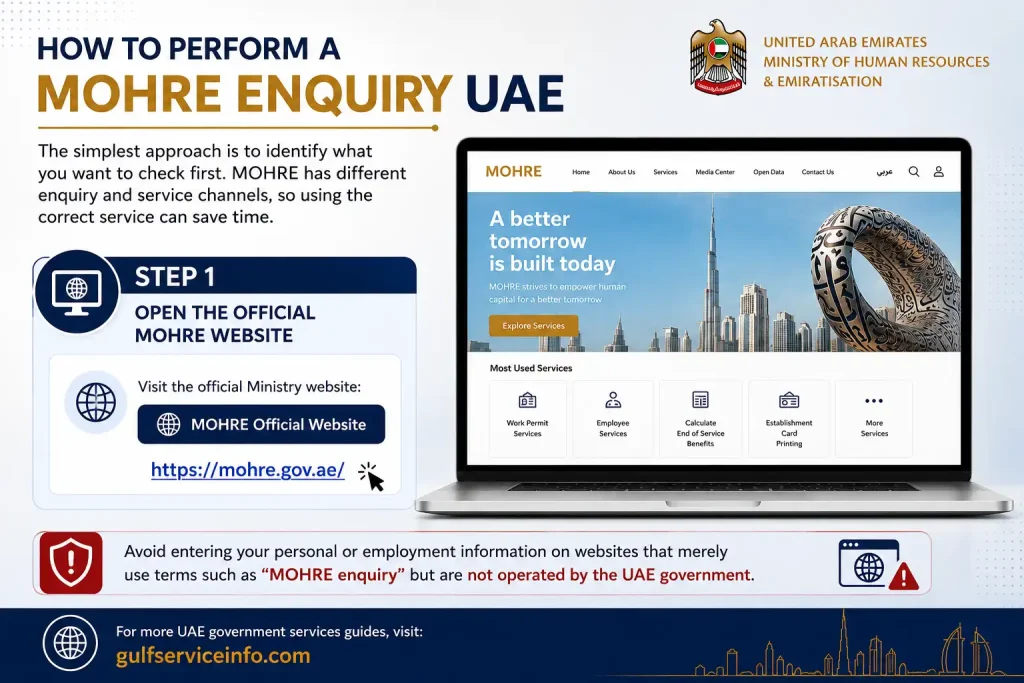
The simplest approach is to identify what you want to check first. MOHRE Enquiry has different enquiry and service channels, so using the correct service can save time.
Step 1: Open the Official MOHRE Website
Visit the official Ministry website:
Avoid entering your personal or employment information on websites that merely use terms such as “MOHRE enquiry” but are not operated by the UAE government.
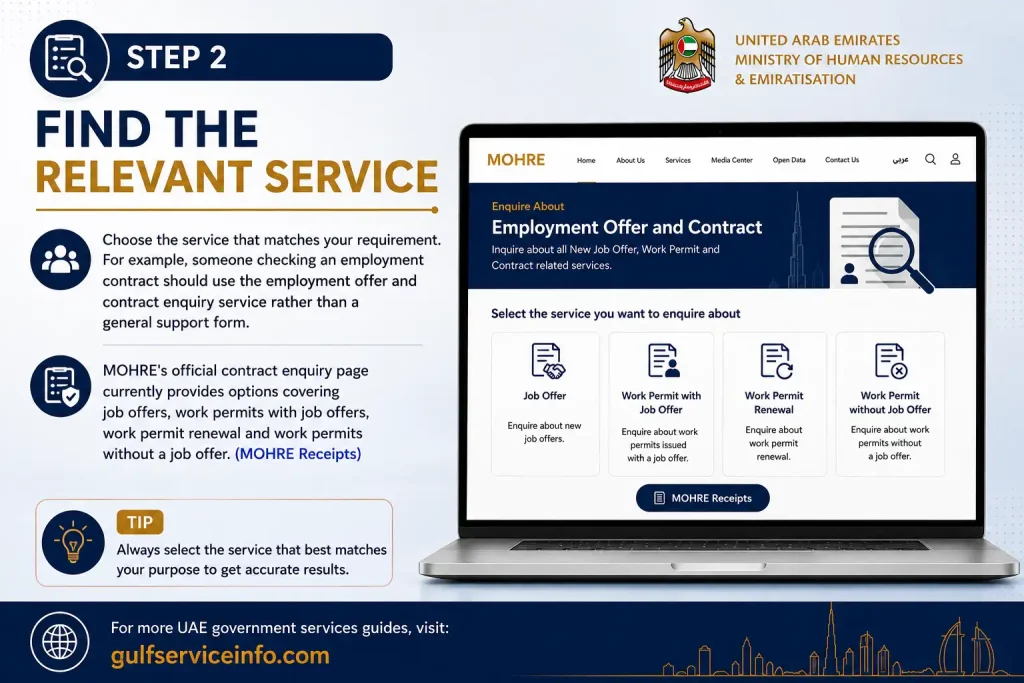
Step 2: Find the Relevant Service
Choose the service that matches your requirement. For example, someone checking an employment contract should use the employment offer and contract enquiry service rather than a general support form.
MOHRE’s official contract enquiry page currently provides options covering job offers, work permits with job offers, work permit renewal and work permits without a job offer. (MOHRE Receipts)
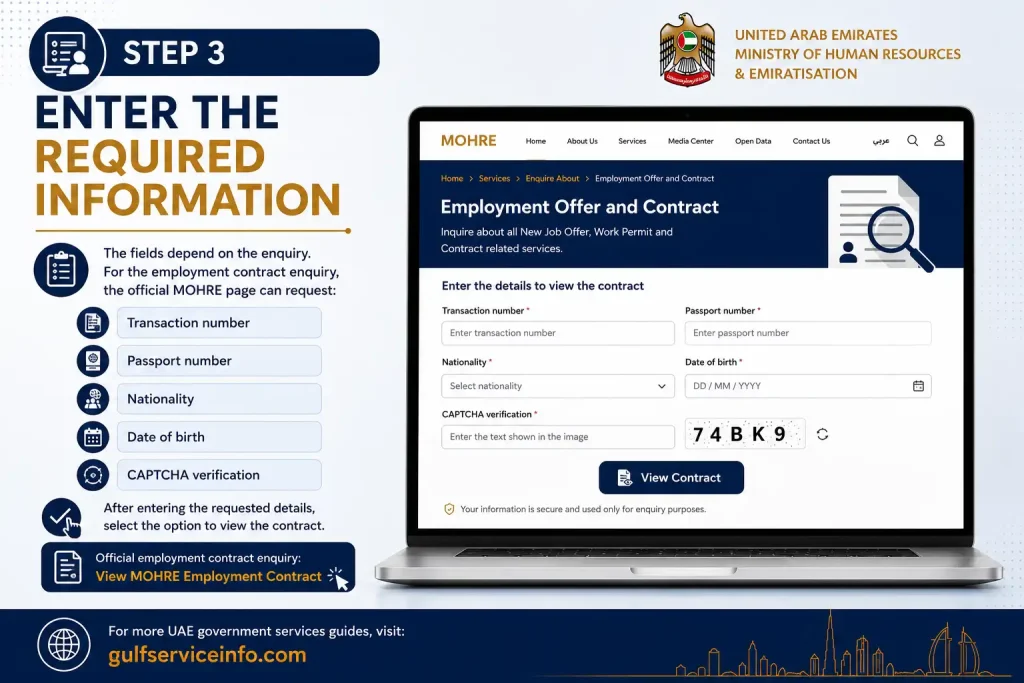
Step 3: Enter the Required Information
The fields depend on the enquiry.
For the employment contract enquiry, the official MOHRE page can request:
- Transaction number
- Passport number
- Nationality
- Date of birth
- CAPTCHA verification
After entering the requested details, select the option to view the contract.
Official employment contract enquiry: View MOHRE Employment Contract
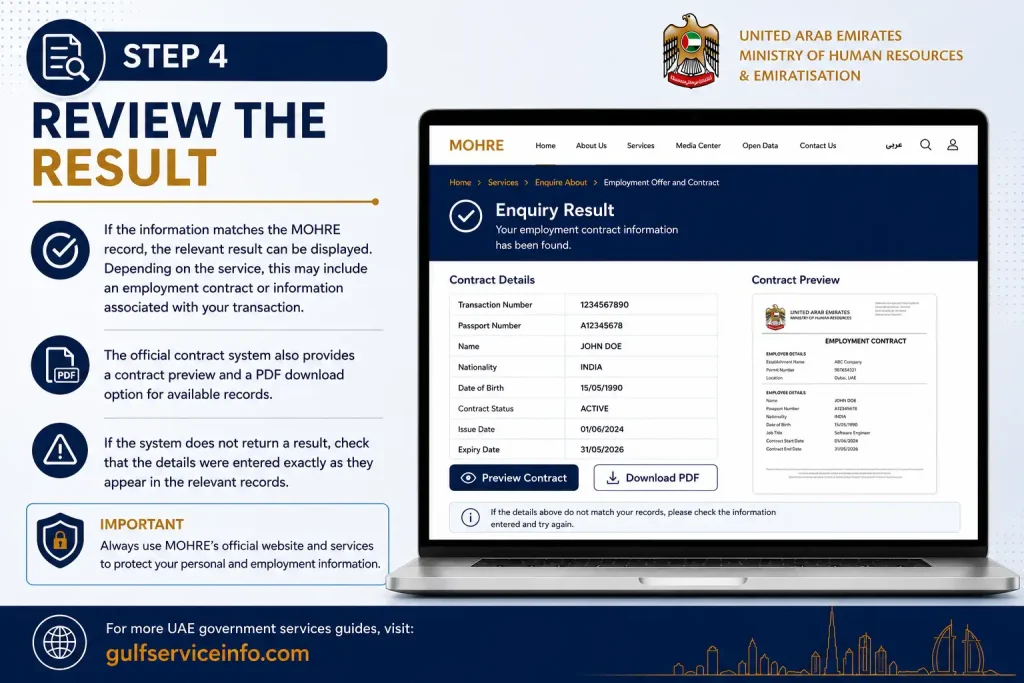
Step 4: Review the Result
If the information matches the MOHRE Enquiry UAE record, the relevant result can be displayed. Depending on the service, this may include an employment contract or information associated with your transaction.
The official contract system also provides a contract preview and a PDF download option for available records.
If the system does not return a result, check that the details were entered exactly as they appear in the relevant records.
MOHRE Status Check: How to Track an Application
A MOHRE status check is useful when you have already submitted a labour-related transaction and want to know whether it is still being processed, approved, returned or requires another action.
The information required depends on the transaction. Before starting, keep the reference or transaction details provided when the application was submitted.
For support-related requests, MOHRE’s official system allows customers to search using a request number and verification code. The results can show information such as the creation date, processing date and request status.
What You Need for a Status Check
Depending on the type of request, you may need:
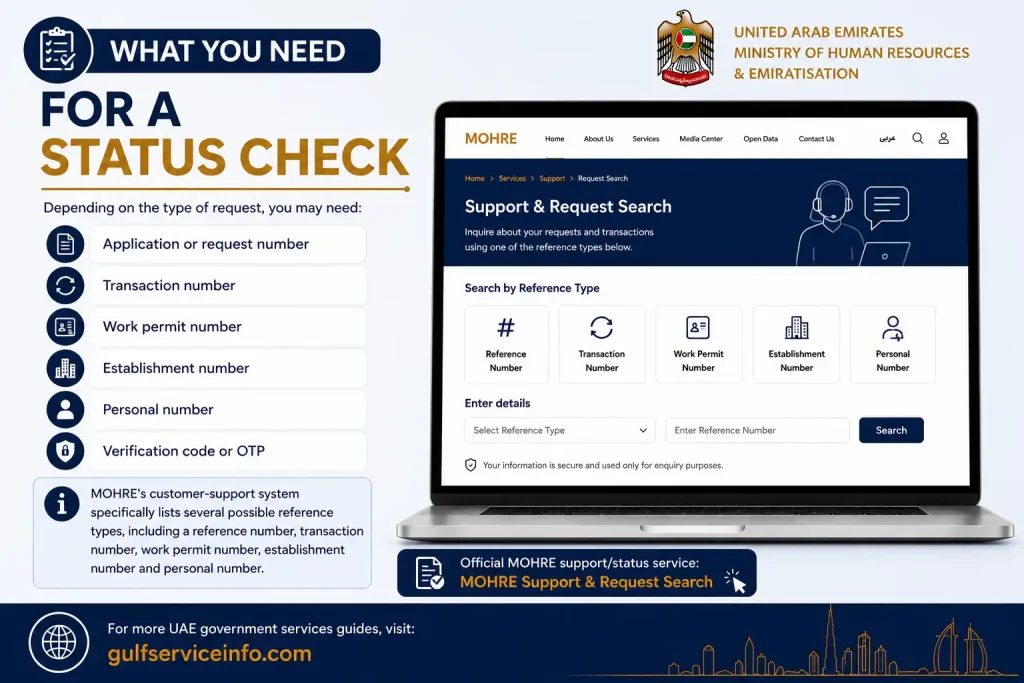
MOHRE’s customer-support system specifically lists several possible reference types, including a reference number, transaction number, work permit number, establishment number and personal number.
Official MOHRE support/status service: MOHRE Support & Request Search
MOHRE App: Mobile Access to Services
The MOHRE app provides another way to access Ministry services from a mobile device. MOHRE’s official information identifies its mobile application as one of the channels available to business owners and employees in the UAE.
The mobile option can be useful when you regularly need to access labour-related services without opening the website on a computer.
However, always obtain the application through an official app-store listing or a link provided by the MOHRE website. Avoid downloading APK files or applications from unknown websites.
MOHRE Website vs MOHRE App
| Option | Best for |
|---|---|
| MOHRE Website | Detailed online services and enquiries |
| MOHRE App | Mobile access to MOHRE services |
| MOHRE Support | Technical problems and customer requests |
| Approved Service Centres | Customers who need assisted or in-person processing |
MOHRE also uses approved service channels such as service centres, smart applications and Tawseel among its service-delivery options.
MOHRE Services UAE: What You Can Do Online
The MOHRE Enquiry UAE system is only one part of the Ministry’s digital services. MOHRE provides a broad range of online services for employees, employers, domestic workers, companies and other customers dealing with UAE labour matters.
The service you need depends on your situation. If you are an employee, you may be interested in checking your employment information or following a labour transaction. Employers, meanwhile, can use MOHRE’s digital channels for work permits, contracts, establishment services and other workforce-related procedures.
Common MOHRE Services
Some of the main areas you may encounter include:
Because MOHRE Enquiry UAE services can change or be updated, use the Ministry’s official website as your starting point rather than relying on outdated instructions from third-party websites.
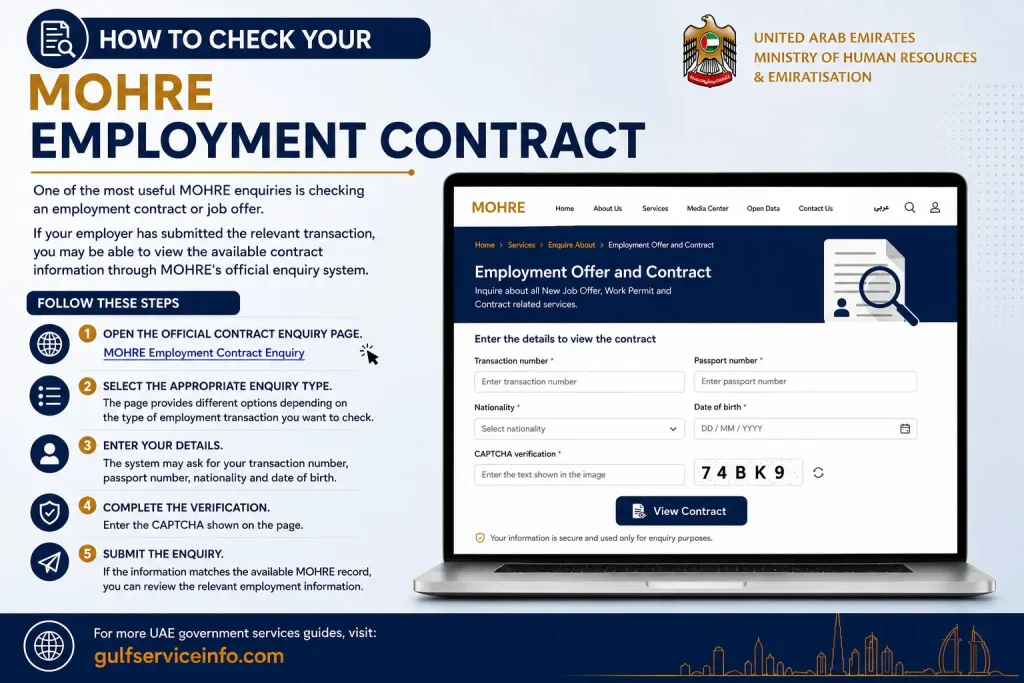
How to Check Your MOHRE Employment Contract
One of the most useful MOHRE enquiries is checking an employment contract or job offer.
If your employer has submitted the relevant transaction, you may be able to view the available contract information through MOHRE’s official enquiry system.
Follow These Steps
1. Open the official contract enquiry page.
MOHRE Employment Contract Enquiry
2. Select the appropriate enquiry type.
The page provides different options depending on the type of employment transaction you want to check.
3. Enter your details.
The system may ask for your transaction number, passport number, nationality and date of birth.
4. Complete the verification.
Enter the CAPTCHA shown on the page.
5. Submit the enquiry.
If the information matches the available MOHRE record, you can review the relevant employment information.
Why Check Your Contract?
Checking your contract online can help you confirm that the information recorded for your employment transaction is correct. It is particularly useful when you want to verify details before relying on information provided verbally by an employer or another party.
If something appears incorrect, do not simply assume that the online result is wrong. Compare it with your official documents and contact MOHRE Enquiry through an approved support channel if clarification is needed.
MOHRE Work Permit Enquiry
A MOHRE work permit enquiry is another common reason people visit the Ministry’s digital services.
Work permits are connected with employment and employer transactions, so the information available to you can depend on the type of permit and your role in the transaction.
Employers may have access to different services from individual employees. For this reason, there is no single enquiry form that works for every work-permit situation.
Before Checking a Work Permit
Keep any relevant information available, such as:
Enter the information carefully. A small difference in a number or personal detail can prevent the system from finding the relevant transaction.
Important: Use the official MOHRE website or an official MOHRE service page when checking employment or work-permit information. Avoid giving passport, Emirates ID or account details to unofficial enquiry websites.
MOHRE Complaint and Support Services
Sometimes a status enquiry does not solve the problem. For example, your transaction may appear delayed, you may have difficulty accessing an online service, or you may need assistance with a labour-related matter.
In such cases, MOHRE Enquiry UAE provides customer support channels through its official systems.
The MOHRE support portal includes a facility for searching customer requests using reference information. This can be useful when you have already submitted a request and need to follow its progress.
How to Search a MOHRE Support Request
If you have a request reference, the general process is:
The exact fields can vary depending on the request and the service used.
MOHRE Services Available Online
The MOHRE website brings together several categories of labour-related services. The services available to you depend on your role and the transaction involved.
Employment Services
Employees can use relevant MOHRE services to access information connected with their employment relationship.
This can include enquiries relating to employment offers and contracts. MOHRE’s official employment offer enquiry service provides options for checking different types of employment-related transactions.
Work Permit Services
Employers and authorised users can access services related to UAE work permits.
Depending on the situation, this can involve applying for or managing work-permit-related transactions. The required documents, eligibility conditions and fees depend on the specific permit service.
Labour Complaints
MOHRE also provides channels for employees and employers dealing with labour disputes.
If you have a workplace dispute, use the appropriate official MOHRE Enquiry UAE complaint channel rather than relying on a private website claiming to submit the complaint on your behalf.
Domestic Worker Services
MOHRE also handles services connected with domestic workers and their employment arrangements.
Sponsors and other eligible users should select the specific domestic-worker service applicable to their situation.
Enquiry and Tracking Services
Enquiry tools are particularly useful when you want information about an existing transaction rather than starting an entirely new application.
This is where the MOHRE status check becomes important.
MOHRE Enquiry for Employees
Employees often use MOHRE Enquiry UAE services to answer practical questions about their employment records and transactions.
For example, you might need to:
The most important point is to identify the transaction before starting the enquiry. If you know what document, application or service you are trying to check, it becomes much easier to select the appropriate MOHRE Enquiry UAE channel.
What If Your MOHRE Status Has Not Changed?
A common concern after submitting an application is seeing the same status for longer than expected.
First, confirm that you are checking the correct transaction. If you have several applications or requests, it is easy to enter the wrong reference number.
Then check the following:
Reference number: Make sure the transaction or request number is correct.
Personal details: Verify that the information entered matches the official record.
Application type: Make sure you are using the enquiry service associated with the transaction.
Supporting requirements: Some transactions may require additional information, documents or action before they can progress.
Official support: If you cannot determine what is holding up the request, use MOHRE’s official support channels rather than repeatedly submitting the same application.
A Useful MOHRE Status Check Routine
When following an application, keep a small record of:
| Information | Why it helps |
|---|---|
| Transaction number | Identifies the application |
| Submission date | Helps you track when it was started |
| Service name | Ensures you use the correct enquiry |
| Employer/establishment details | Helps identify business transactions |
| Current status | Shows the latest available progress |
| Support reference | Useful if you contact MOHRE Enquiry UAE |
This simple record can save time if you need to contact customer support later.
MOHRE App or Website: Which Should You Use?
Both channels can be useful, but your choice depends on what you are trying to accomplish.
The MOHRE website is generally the better starting point when you need to locate a specific enquiry, read service instructions or access a detailed online service.
The MOHRE app can be more convenient when you regularly use Ministry services from your phone.
For an occasional MOHRE Enquiry UAE, starting with the official website is usually the easiest approach because you can identify the relevant service before proceeding.
Here is Part 3, continuing directly from Part 2 and completing the guide with troubleshooting, practical tips, FAQs, metadata and the final takeaway.
Common MOHRE Enquiry UAE Problems and Solutions
Sometimes a MOHRE Enquiry UAE does not immediately return the information you expect. This does not necessarily mean that your application or employment record is missing.
Before contacting support, check the basic details you entered and make sure you are using the correct MOHRE service.
1. MOHRE Cannot Find My Transaction
If your transaction does not appear, check:
If the information is correct but the record still cannot be found, use an official MOHRE support channel for further assistance.
2. My MOHRE Status Has Not Updated
A status that has not changed does not automatically mean that the application has been rejected.
The best approach is to keep your transaction reference and check the relevant official service again. If the issue continues, contact MOHRE Enquiry support and provide the reference number so the request can be identified more easily.
3. I Cannot Log In to MOHRE
If you are having trouble with MOHRE login UAE, first make sure you are using the official website or application.
Then check whether:
Avoid repeatedly creating new accounts when the problem may simply be related to an existing profile or verification process.
4. My Employment Contract Information Looks Wrong
If the information shown through a MOHRE contract enquiry does not match your documents, compare the details carefully before taking action.
Check names, dates, passport information and other employment details. If there is a genuine discrepancy, use MOHRE’s official support channels to ask how it should be corrected.
Do not rely solely on screenshots or information provided by another person when dealing with an official employment record.
How to Contact MOHRE for Help
When an online MOHRE Enquiry UAE does not answer your question, the next step is to use an official MOHRE support channel.
The Ministry provides customer support through its official digital channels, including its support portal.
MOHRE Customer Support
Before contacting support, prepare the information connected with your request. Having the correct reference number can make it easier for the support team to identify the transaction.
Keep These Details Ready
Depending on your issue, you may need:
Only provide personal information through an official MOHRE channel.
Important Tips Before Using MOHRE Online Services
A few simple precautions can make the process easier and safer.
Use the Official Website
Always begin with the official MOHRE domain:
mohre.gov.ae
Be careful with websites that copy government branding or use phrases such as “MOHRE enquiry” without being an official UAE government service.
Keep Your Reference Number
If you submit an application or support request, save the reference number. You may need it later for a MOHRE status check.
A screenshot, PDF or written record can also help you remember the transaction details.
Check Information Before Submitting
Incorrect personal information can make an enquiry difficult to complete. Before selecting the submit or search button, check every number carefully.
Don’t Share OTPs or Passwords
MOHRE Enquiry UAE can involve identity verification. Never give your password, OTP or authentication information to someone simply because they claim to be helping with your application.
Use Updated Official Information
Government portals can change their layouts, service names and digital procedures. If an older guide conflicts with the current MOHRE website, treat the current official service information as the more relevant source.
MOHRE Enquiry UAE: Quick Comparison of Main Options
| Requirement | Best MOHRE option |
|---|---|
| Check employment contract | Official contract enquiry |
| Check a submitted request | MOHRE support/request search |
| Access online labour services | MOHRE website |
| Use services from a mobile device | Official MOHRE app |
| Employer-related transactions | MOHRE employer/business services |
| Need help with an online request | MOHRE support |
The important point is that MOHRE Enquiry UAE is not a single form covering every Ministry service. Different transactions can have different enquiry methods and information requirements.
Frequently Asked Questions About MOHRE Enquiry UAE
Final Thoughts
A MOHRE enquiry UAE is a convenient way to access important labour and employment-related information through the UAE Ministry of Human Resources and Emiratisation. Whether you need to check an employment contract, track an application, review a work-permit transaction, access MOHRE services, or use the MOHRE app, the official portal provides a reliable starting point. For accurate and secure results, always use the official MOHRE website, select the correct enquiry service, keep your transaction and identification details ready, and follow the instructions provided by the system. If you face any issue with login, status checks, contracts, or other services, use MOHRE’s official support channels instead of relying on unofficial websites.