Sending money from Qatar is straightforward when you know which Western Union service to use, where to find an agent, and how to check your transfer after payment. Western Union Qatar provides several ways to send and receive international money, including online transfers, the Western Union app and in-person transactions through agent locations. For online and app services in Qatar, Western Union states that these services are offered through Alfardan Exchange. You can create an online profile, verify your identity, choose a destination and payout method, then pay using an eligible Qatar-issued debit card or at an agent location.
This guide covers Western Union Qatar login, transfer tracking, the remittance tracker, locations in Doha, exchange rates, the app, customer service and the main steps for sending money.
If you are also looking for other online services in Qatar, check our Qatar government services guide for useful information about accessing important digital services.
What Is Western Union Qatar?
Western Union Qatar is the Qatar-based service through which customers can send and receive international money transfers. Depending on the destination and available service, money can be sent for cash collection, bank-account delivery or other supported payout methods.
Western Union’s Qatar website offers both digital and in-person options. Customers who prefer online banking-style transfers can use the website or app, while those who want face-to-face assistance can visit a Western Union agent.
The service supports transfers to 200+ countries and territories, although available payout methods, currencies, fees and delivery times depend on the destination.
Main Western Union Qatar services
| Service | What you can do |
|---|---|
| Online transfer | Send money through the website |
| Mobile app | Start and manage transfers from your phone |
| Agent transfer | Send money in person |
| Cash pickup | Receiver collects money from an agent |
| Bank transfer | Send directly to eligible bank accounts |
| Transfer tracking | Check progress using the MTCN |
| Exchange-rate checking | View applicable rate and fees before sending |
| Customer support | Get assistance with Western Union services |

Important: Fees, exchange rates, delivery times and available payout methods can change according to the destination country, payment method and transfer details. Western Union advises customers to review the applicable information before confirming a transaction.
Western Union Qatar Login
The Western Union Qatar login page allows registered customers to access their online profile and manage eligible money-transfer services.
The official Qatar login page currently asks for a mobile number or email address and password. The Qatar mobile number field requires an eight-digit number beginning with 3, 5, 6 or 7.
How to log in to Western Union Qatar
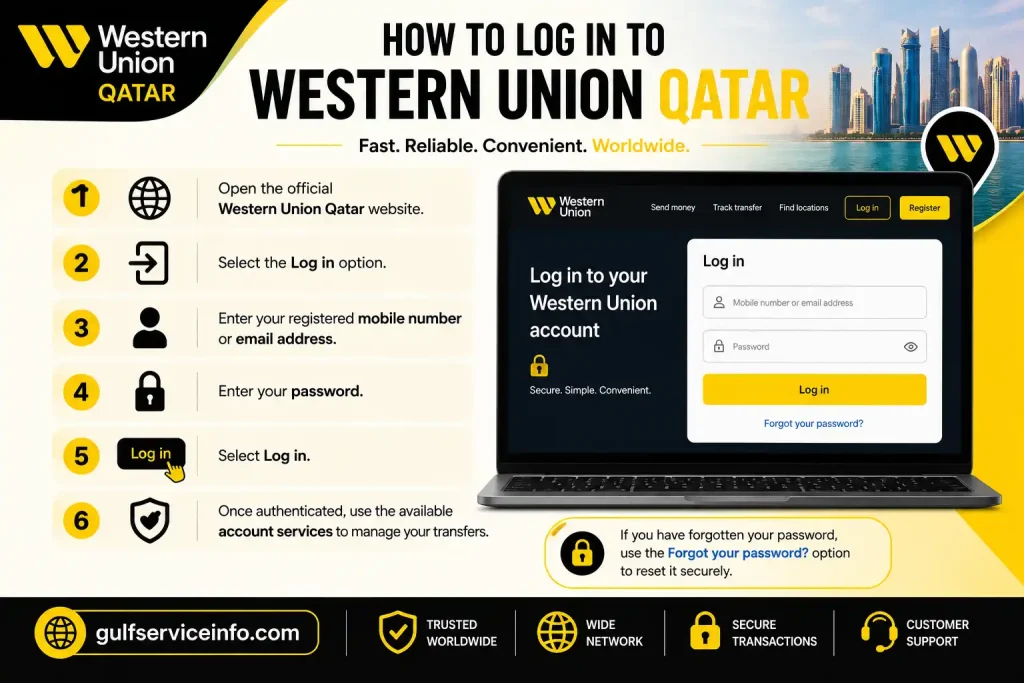
If you have forgotten your password, use the Forgot your password? option on the official login page rather than entering your details into an unofficial website.
New to Western Union?
If you don’t already have an online profile, select Register on the official login page. Western Union Qatar states that identity verification may be completed online or in person at an Alfardan Exchange location after creating your profile.
Security tip: Always check that you’re using the official Western Union website before entering your email, mobile number or password.
How to Send Money Online With Western Union
One of the main advantages of Western Union Qatar is the ability to start a transfer online instead of visiting an agent for every transaction.
The exact options displayed can depend on your chosen destination and payout method. Western Union’s Qatar service allows customers to select a receiving country, enter the amount, choose an available delivery method and review the applicable costs before confirming.
Step-by-step online transfer
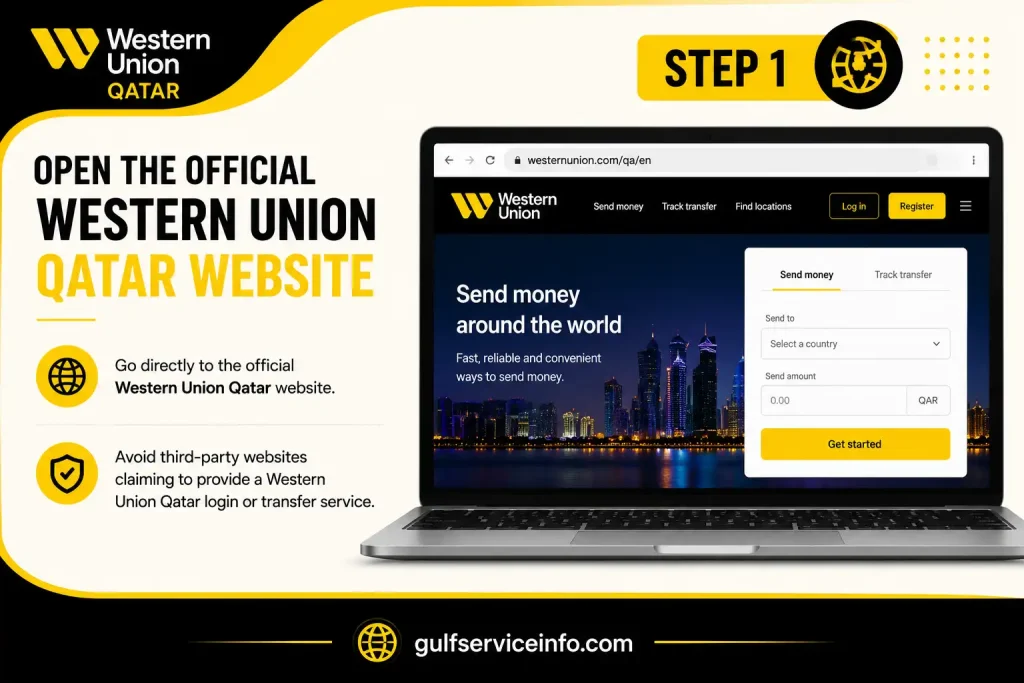
Step 1: Open the official Western Union Qatar website
Go directly to the Qatar website:
Avoid third-party websites claiming to provide a Western Union Qatar login or transfer service.
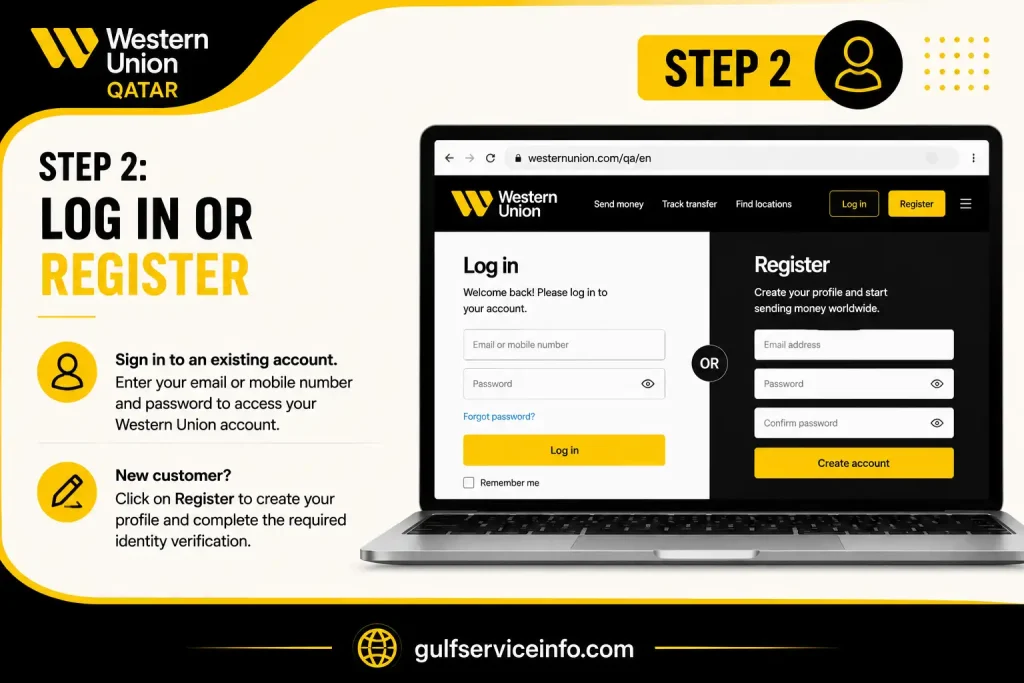
Step 2: Log in or register
Sign in to an existing account. If you’re a new customer, create a profile and complete the required identity verification.
Step 3: Select the receiving country
Choose the country where your recipient will receive the money. The official send-money page currently lists destinations including India, Pakistan, Egypt, the Philippines, Jordan, Morocco and many others.

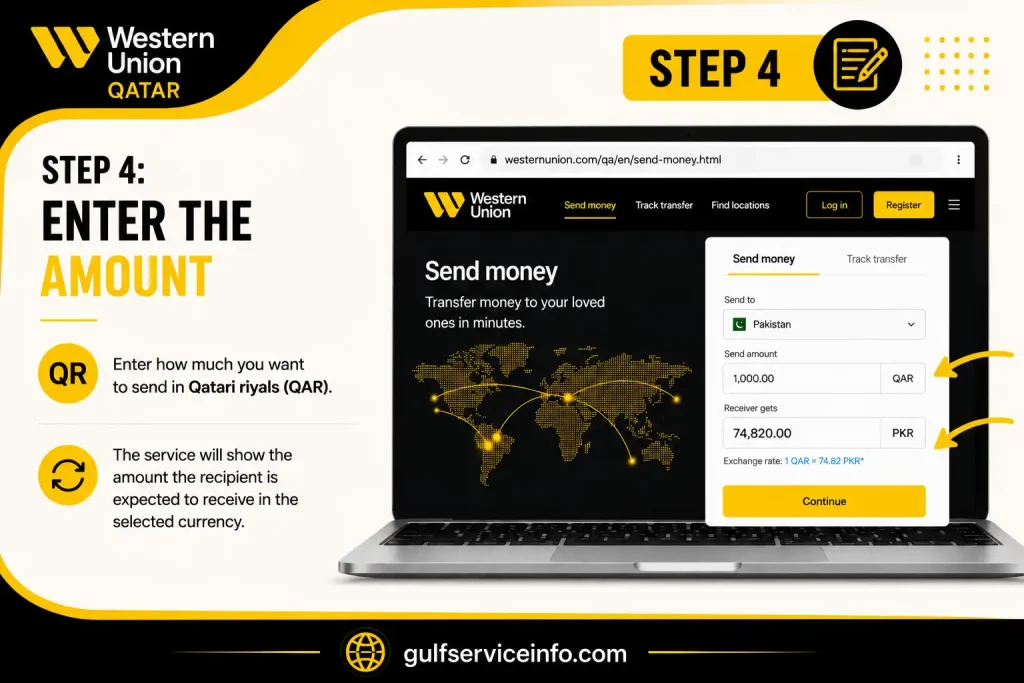
Step 4: Enter the amount
Enter how much you want to send in Qatari riyals. The service will show the amount the recipient is expected to receive in the selected currency.
Step 5: Choose the payout method
Depending on the destination, you may be able to select options such as:
Not every option is available for every country.

Step 6: Enter the recipient’s information
For a bank transfer, Western Union may require details such as the recipient’s bank name, bank code and account number. Requirements vary by country.
Make sure the recipient’s name matches the identification they will use to collect the money where cash pickup applies.

Step 7: Review the transfer
Before paying, carefully check:

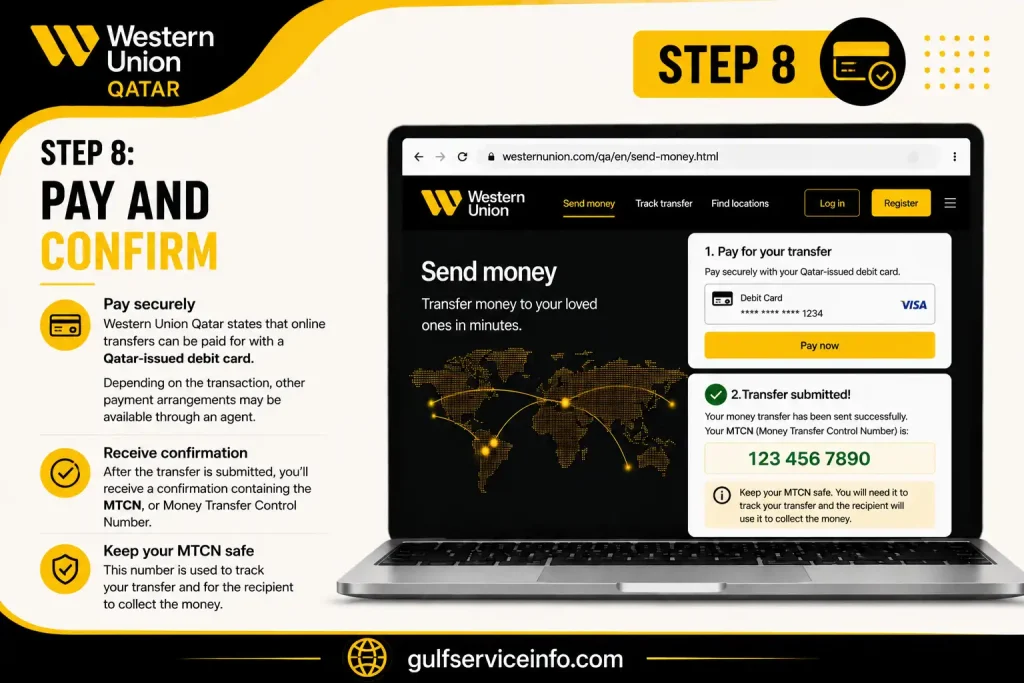
Step 8: Pay and confirm
Western Union Qatar states that online transfers can be paid for with a Qatar-issued debit card. Depending on the transaction, other payment arrangements may be available through an agent.
After the transfer is submitted, you’ll receive a confirmation containing the MTCN, or Money Transfer Control Number. Keep this number safe because it is used to track the transfer.
Can I send money in person?
Yes. If you’d rather visit an agent, Western Union Qatar also supports in-person transfers.
At the agent, you’ll generally need your valid Qatar Civil ID and the recipient’s required information. Western Union says its Qatar network has numerous agent locations, although the exact number presented on the website can depend on the network data being referenced.
How to Track a Western Union Transfer
After sending money, the next question is usually: Where is my Western Union transfer?
That’s where the Western Union Qatar tracking service becomes useful. The official tracker allows you to enter your 10-digit MTCN and check the current transfer status.
Track your transfer with the MTCN
The MTCN normally appears on your transfer confirmation or receipt. If you sent the money through an agent, check the receipt you received after payment.
What if I don’t have the MTCN?
The official Western Union Qatar tracker also displays an option to track without MTCN. If you’ve logged into your account, you can also use your account information to view recent transfers.
This is useful if you’ve misplaced the transaction number but still have access to your Western Union profile.
Western Union Remittance Tracker
The Western Union remittance tracker is essentially the transfer-status tool used to follow an international money transfer.
The most important number is the MTCN, a 10-digit tracking number assigned to the transaction. Western Union recommends using the MTCN to check whether a transfer is still being processed or is available to the recipient.
What information should you keep?
After sending money, save:
Do not publicly share your MTCN or transaction details. Give tracking information only to the intended recipient or a trusted person who genuinely needs it.
Transfer status can vary
A transfer isn’t necessarily delayed just because the recipient hasn’t collected it yet. Delivery can depend on the destination, payment method, identification checks, regulatory requirements, currency availability, agent hours and other transaction conditions.
For that reason, the tracker is more reliable than estimating an arrival time yourself.
Western Union Qatar Locations
Finding a Western Union Qatar location is useful when you need to send money in person, collect cash, complete identity verification or get assistance from an agent.
Western Union’s Qatar website provides a location-finder option for customers looking for nearby agents. The company also states that customers creating an online profile may need to complete identity verification at an Alfardan Exchange location.
What to take to an agent
If you’re sending money in person, prepare your valid identification and the recipient’s details before visiting.
Western Union’s Qatar instructions specifically mention a valid Qatar Civil ID for in-person sending. You should also provide the recipient’s first name and surname as they appear on the identification they will use for collection, along with the destination country and amount.
Tip: Check the official location finder before travelling because opening hours and available services can vary between agents.
Western Union Qatar Locations: Doha, Near Me & Agent Services
If you prefer handling your transfer face to face, Western Union Qatar locations provide an alternative to online transfers. Western Union says its Qatar agent network includes exchange service providers and banks, and the official agent locator can be used to find a nearby branch and check its opening hours.
The official Western Union Qatar website currently refers to 360+ locations in Qatar in its sending-money information, while its receiving-money page refers to 100+ agent locations. Because network figures can vary by service and the site’s footnotes date some network data, it is better to use the live locator for the branch nearest you.
What can you do at a Western Union location?
Depending on the individual agent, you may be able to:
Agent locations are independent businesses providing Western Union services, so opening times and available services can differ from one branch to another.
Western Union Doha Locations
For people searching for Western Union Doha locations, the easiest approach is to use the official locator rather than relying on an old list of branches.
Western Union’s Qatar site also lists several Alfardan Exchange branches used for profile verification. These include locations such as Alfardan Centre on Grand Hamad Street, Najma, Old Airport Road, Muaither, Gulf Mall and Mall of Qatar.
If your purpose is online account verification, remember that Western Union specifically directs Qatar customers to Alfardan Exchange locations for in-person verification after registering online. You should take the same government-issued ID that you used when creating your profile.
Before visiting a Doha branch
Check these points first:
This can save you a wasted journey, particularly because individual agent locations set their own operating hours.
Western Union Qatar Near Me
Searching for Western Union Qatar near me usually means you want the closest agent for sending or receiving money.
Rather than using an unofficial directory, open Western Union’s official location finder and allow the site to identify your area or enter your location manually. The locator is the most useful option because branch availability and opening hours can change.
For cash collection, the recipient should also make sure they have the required identification. Western Union’s Qatar receiving instructions state that recipients should provide the sender’s details, including the MTCN, and present a valid Qatari Civil ID or Diplomatic ID.
Practical tip: If you’re collecting money, don’t rely only on the branch name. Check that the location offers Western Union payout services before travelling.
Western Union Exchange Rate in Qatar
The Western Union exchange rate in Qatar is not necessarily a fixed rate throughout the day. The amount your recipient receives depends on the currencies involved, transfer method, payment method and other transaction factors.
Western Union’s official Qatar currency converter displays an estimated exchange rate and warns that exchange rates and fees can vary according to factors such as payment and payout methods. The displayed figures can also change without notice.
Official currency converter: Western Union Qatar Exchange Rate Calculator
If you regularly compare international currencies, our AED to PKR exchange rate guide can also help you understand current currency conversion and exchange-rate calculations.
How to check the current Western Union exchange rate
Instead of using a third-party currency website, check the rate for your actual transfer:
This is important because a money-transfer exchange rate is different from simply looking up a market exchange rate online. Western Union itself notes that it earns money from currency exchange and recommends considering both the transfer fee and exchange rate when comparing services.
Why your final amount may differ
The final amount can change because of:
So, if you’re sending money from Qatar to Pakistan, India, the Philippines, Egypt or another destination, check the rate specifically for that transfer rather than assuming one universal Western Union exchange rate in Qatar.
Western Union App
The Western Union app gives Qatar customers another way to send and manage international transfers without starting from a desktop computer.
Western Union confirms that its mobile app is available for iOS and Android in Qatar. Existing online customers can use their existing login details, while new customers can register through the app or online.
What can you do with the Western Union app?
The Qatar app supports features such as:
The app itself is free to download, although normal mobile data or network charges may apply. Money-transfer fees still apply when you send money.
Official app information: Western Union Qatar Mobile App
New users: identity verification
If you’re registering for the first time, Western Union requires identity verification before you can send money online.
You can generally choose between:
Online verification
In-person verification
Western Union says successful online verification generates confirmation by email and SMS, after which you can start sending money.
Western Union Customer Service
If your Western Union Qatar transfer is delayed, your account is locked, or you have a question about an online transaction, contacting the correct customer-service channel is important.
Western Union separates support for westernunion.com services from other Western Union services in Qatar.
Western Union Qatar contact numbers
| Service | Contact |
|---|---|
| Website and app support | 44537777 |
| Other Western Union services | 00800101217 |
| Online/app support email | [email protected] |
These contact details are published on Western Union’s Qatar contact and service pages.
Forgot your Western Union password?
If you’ve forgotten your password, use the Forgot your password? option on the official login page.
Western Union’s Qatar FAQ says that if a profile becomes locked after repeated incorrect login attempts, you should try again after 30 minutes or contact Customer Care at 44537777.
Can I change my Western Union profile details?
Some profile information can be edited from the Profile Overview area after signing in. However, Western Union says that certain identity details cannot be changed after verification, including your name, last name, date and place of birth, and nationality. For changes to these details, Customer Care should be contacted.
Frequently Asked Questions
Conclusion
Western Union Qatar makes international money transfers more convenient through online services, the mobile app and agent locations across the country. Whether you need to log in, send money, track a transfer with your MTCN, find a Western Union location, check the exchange rate or contact customer service, you can use the official Western Union Qatar services provided through Alfardan Exchange. Before sending money, always review the applicable transfer fee, exchange rate, recipient details and available payout method. For the safest and most accurate information, use the official Western Union Qatar website rather than relying on unofficial websites.