Etisalat Quick Pay 2026: Balance Check, Recharge, Bill Payment & e& UAE App

Published On: August 13, 2026
Follow Us
Etisalat Quick Pay balance check, recharge, bill payment, and customer care guide 2026

If you need to settle an e& UAE payment without going through a full account login, Etisalat Quick Pay offers a convenient option. You can use the official service to pay postpaid mobile bills, home internet charges and TV subscriptions, as well as recharge an e& prepaid number. The Etisalat Quick Pay is designed for anytime access and supports several online payment options, including debit and credit cards, Apple Pay, Google Pay and other methods available on the payment page. This can be useful when you need to make a payment promptly and keep your mobile or home services running.

This guide covers how Etisalat Quick Pay works, the types of payments and recharges available, supported payment methods, common payment problems, troubleshooting steps, security considerations and answers to frequently searched questions from users in the UAE.

Looking for more UAE service guides and useful online resources? Visit Our Homepage

What Is Etisalat Quick Pay?

Etisalat Quick Pay is e& UAE’s online payment option for customers who want to settle a bill or recharge a number without signing in to their e& account. It provides a direct way to access eligible payment services from a phone, tablet or computer.

Depending on the service and account type, Quick Pay can be used for:

  • Postpaid mobile bills
  • eLife home internet bills
  • Landline services
  • TV subscriptions
  • Supported business accounts
  • Prepaid mobile recharges

The service is intended for customers who want a straightforward way to make an e& payment without going through the regular account login process.

Why Choose Etisalat Quick Pay?

For customers who need to make an e& UAE payment without going through a full account login, Etisalat Quick Pay provides a convenient alternative. Its straightforward process makes it useful for both regular payments and urgent bill settlements.

Key advantages include:

  • No account login: Make an eligible payment without signing in.
  • 24/7 access: Use the service whenever you need to make a payment.
  • Payment confirmation: Receive confirmation after a successful transaction.
  • Secure online payments: Transactions are processed through the available payment gateway.
  • Multiple payment options: Use supported debit cards, credit cards and other available methods.
  • Mobile-friendly access: The service can be used from smartphones and other devices.
  • Convenient access: You can use Etisalat Quick Pay wherever the service is available.
  • Reduced risk of service interruption: Paying outstanding bills on time can help prevent services from being suspended.

It can also be useful when paying a bill or recharge for someone else. In many cases, the payment process can be completed within a few minutes.

Services You Can Pay for with Etisalat Quick Pay

Etisalat Quick Pay covers several common e& UAE payment and recharge needs, allowing customers to handle eligible services online without using the standard account login process.

Postpaid Mobile Bills

Use Etisalat Quick Pay to settle your monthly postpaid mobile bill directly online. This is useful when you want to make a payment without accessing your full e& account.

Home Internet and eLife Bills

Customers can use the payment service to clear eligible eLife and home internet charges, including broadband and related home connectivity bills.

Landline Payments

Fixed-line services are also included among the services that can be paid through the Etisalat Quick Pay system, where supported.

TV and Entertainment Services

If your eLife package includes TV or entertainment services, applicable charges can be paid through the online payment process.

Prepaid Mobile Recharge

Etisalat Quick Pay isn’t limited to monthly bills. Prepaid customers can also use the service to top up their mobile balance, making it useful for both prepaid recharges and postpaid payments.
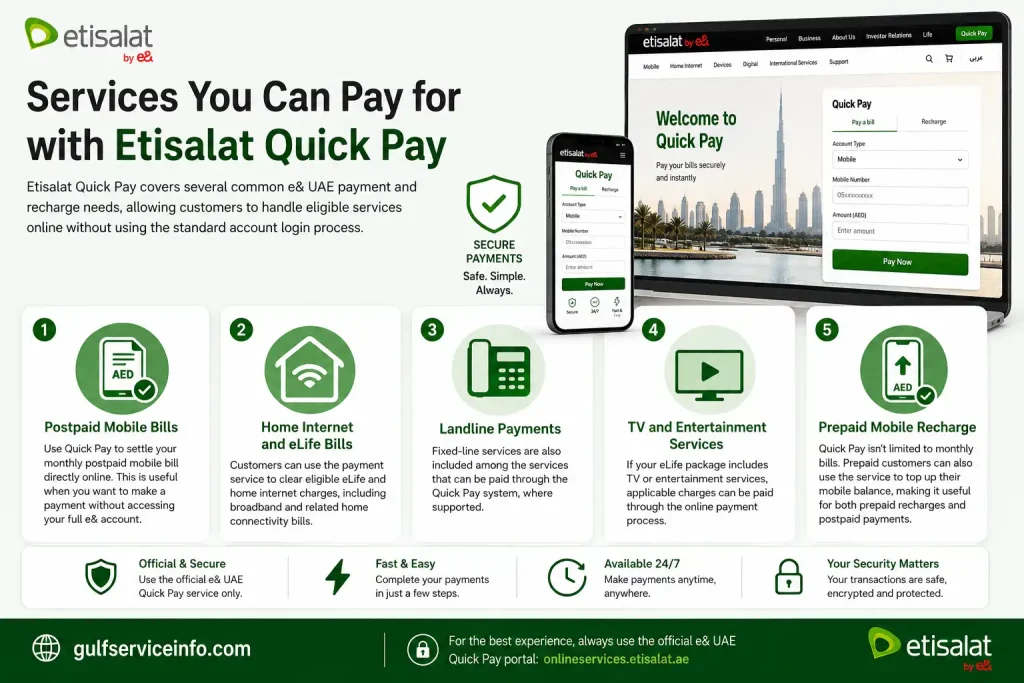
Services you can pay for with Etisalat Quick Pay including mobile bills, eLife, landline, TV and prepaid recharge

How to Use Etisalat Quick Pay

Making an e& UAE payment through Etisalat Quick Pay is a straightforward process. You can complete the transaction online by entering the relevant service details, selecting an available payment method and confirming the payment securely.

Step 1: Open the Official Quick Pay Portal

Start by visiting the official e& UAE Quick Pay page from your web browser.

Use the official e& website rather than third-party payment pages to help protect your account and payment information.
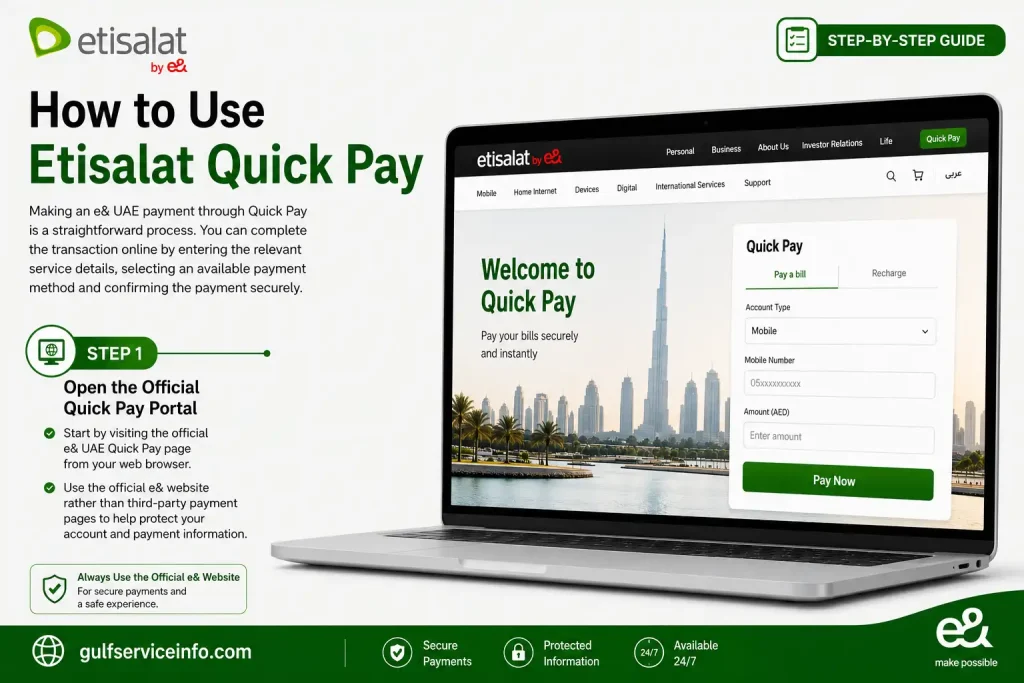
Open the official Etisalat Quick Pay portal for secure e& UAE bill payments and recharge

Step 2: Enter Your Service Details

Depending on the service you’re paying for, enter the required information, such as your:

  • Mobile number
  • Account number
  • Service number

Check the details carefully before continuing so that the payment is applied to the correct service.
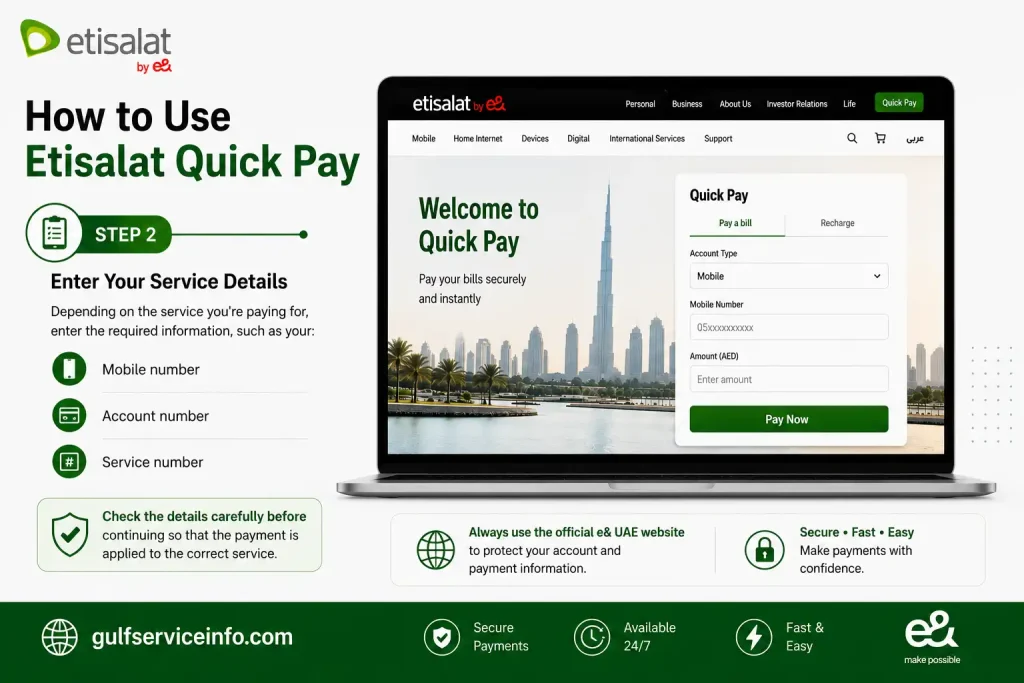
Enter mobile number, account number, or service number in Etisalat Quick Pay

Step 3: Check the Amount Due

Once your details are submitted, the system can display the applicable outstanding amount when the service supports balance retrieval.

For eligible services, a partial payment may also be available.
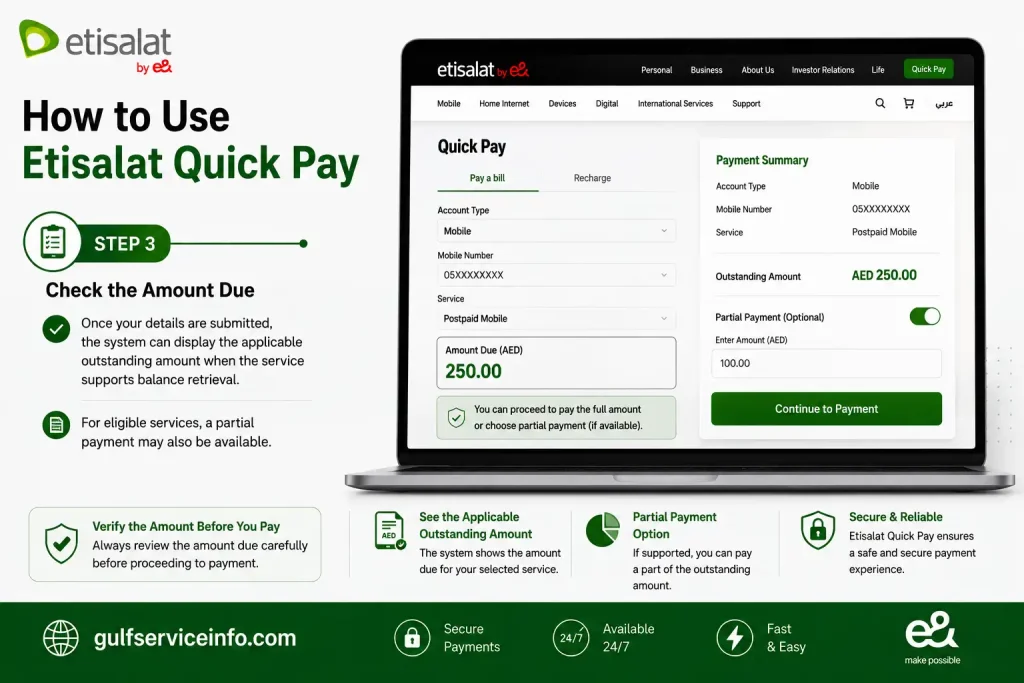
Check the amount due and available partial payment option in Etisalat Quick Pay

Step 4: Select a Payment Option

Choose one of the payment methods shown on the Etisalat Quick Pay page. Available options may include:

  • Visa
  • Mastercard
  • Debit card
  • Credit card
  • Apple Pay
  • Google Pay on supported devices

The options displayed can vary depending on the service, device and current payment configuration.
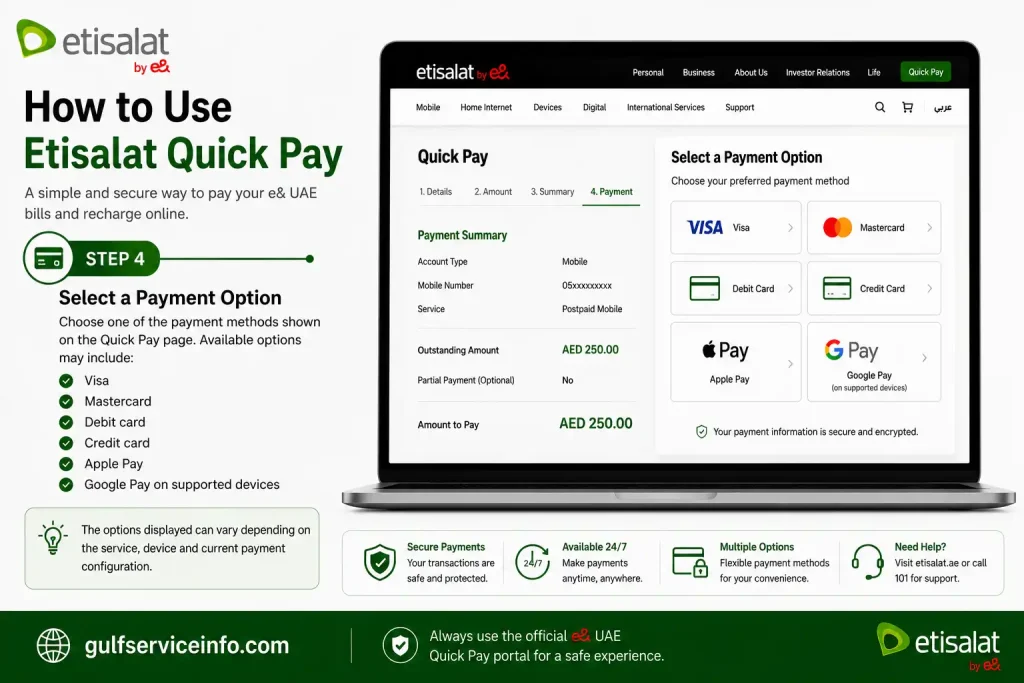
Select a payment option on Etisalat Quick Pay including Visa, Mastercard, debit card, credit card, Apple Pay and Google Pay

Step 5: Confirm the Transaction

Follow the on-screen instructions to authorise your payment. Your bank may require OTP verification or another security check before the transaction is approved.

Never share your OTP with another person, even if someone claims to be contacting you about the payment.
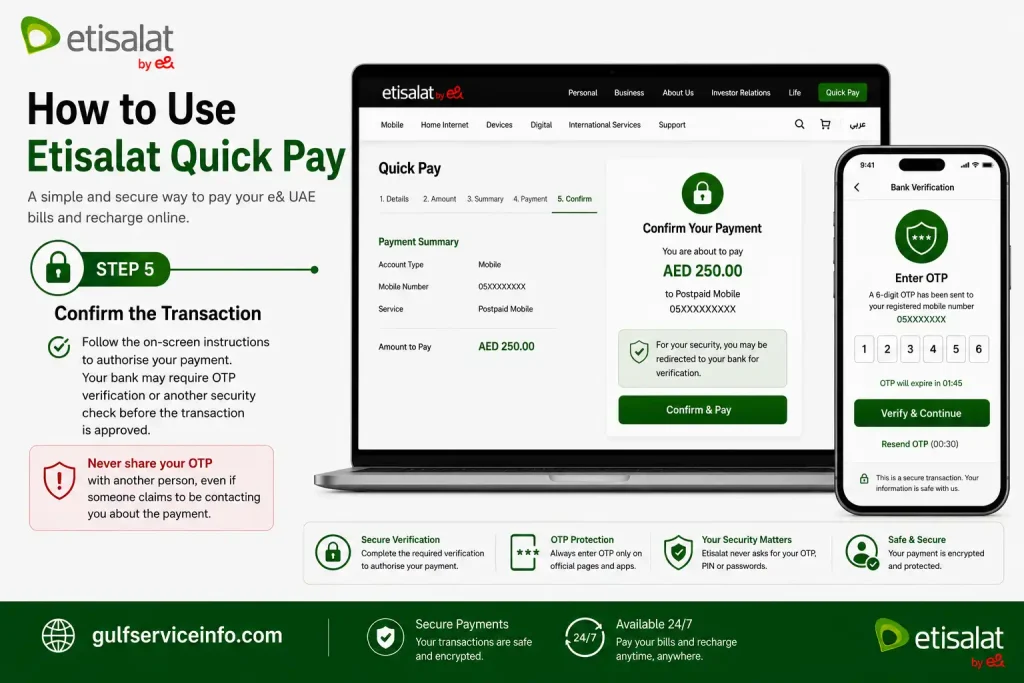
Confirm an Etisalat Quick Pay transaction with OTP verification and secure payment authorization

Step 6: Check Your Payment Confirmation

After a successful transaction, you may see a payment receipt or confirmation on screen. Depending on the service and notification settings, you may also receive:

  • SMS confirmation
  • Email confirmation, where available
  • An updated account balance

Payments are generally processed promptly, although the exact time can depend on the payment method and service.
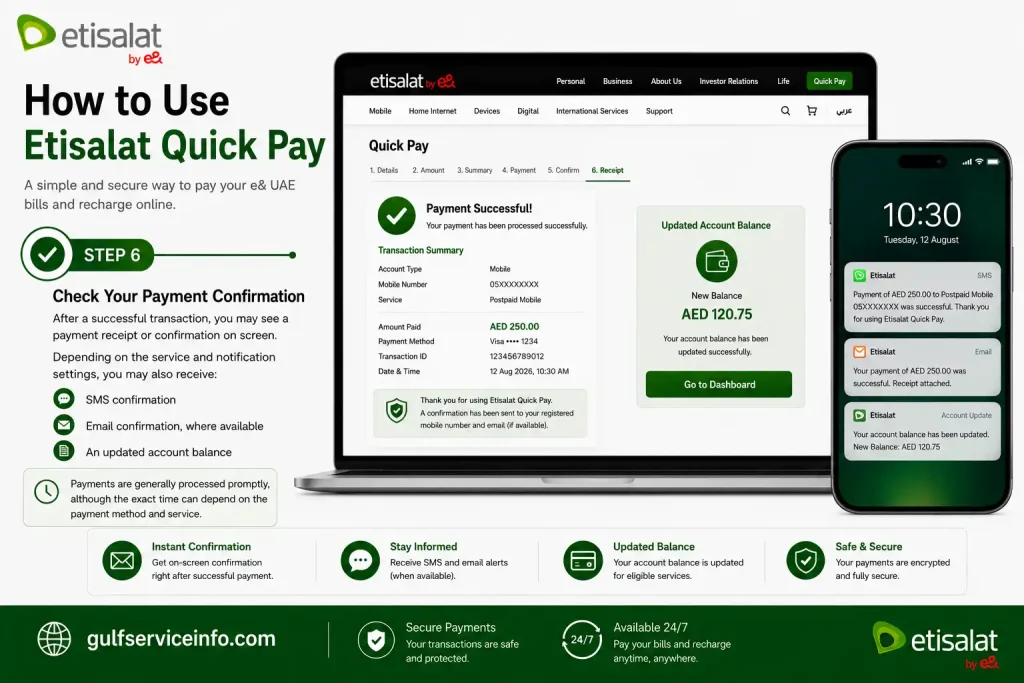
Check payment confirmation, SMS, email receipt and updated balance after Etisalat Quick Pay

Payment Methods Available on Etisalat Quick Pay

Etisalat Quick Pay provides several online payment options, giving e& UAE customers flexibility when settling eligible bills or making payments through the official portal.

Commonly supported methods include:

  • Visa debit cards
  • Visa credit cards
  • Mastercard debit cards
  • Mastercard credit cards
  • Apple Pay on supported Apple devices
  • Google Pay on compatible Android devices

Depending on your bank and the transaction, an additional security check may be required. This can include 3D Secure authentication or a one-time password (OTP) before the payment is authorised.

Always complete any verification step through your bank’s official security process and never disclose your OTP to another person.

Pay Etisalat Bills Without Login

You can use Etisalat Quick Pay to make an eligible e& UAE payment without signing in to your account. This is particularly useful when you need to settle a bill quickly or don’t have access to the e& UAE app.

The process is straightforward:

  1. Open the official e& UAE Quick Pay page.
  2. Enter your mobile number or account number.
  3. Check the outstanding amount shown for the service.
  4. Select an available payment method and complete the transaction securely.

Because no account login is required, Quick Pay can be convenient when using a shared computer, making a payment for a family member, or simply looking for a quicker alternative to the standard account-based payment process.

Using the e& UAE App for Bill Payments

For customers who make payments or manage their e& services regularly, the e& UAE App can be a more practical option than using Etisalat Quick Pay for individual transactions. It brings billing, recharge and account-management features together in one place.

Through the app, you can:

  • Pay mobile bills
  • Recharge prepaid numbers
  • Purchase data bundles
  • Upgrade your current plan
  • Monitor your usage
  • Download invoices
  • Check previous payments
  • Manage multiple mobile numbers
  • Save payment cards for quicker checkout
  • Access available promotions

Etisalat Quick Pay is useful when you simply need to make a payment without signing in, while the app is better suited to customers who want ongoing access to their e& account and services.

How to Pay Through the e& UAE App

If you regularly manage your e& services, you can use the e& UAE App to pay bills directly from your account. The process can be completed in a few steps:

  1. Open the e& UAE App.
  2. Sign in with your registered account.
  3. Select the relevant mobile or home service.
  4. Choose Pay Bill.
  5. Review the outstanding amount.
  6. Select your preferred payment method.
  7. Authorise and complete the payment.
  8. Check the confirmation once the transaction has been processed.

The app is particularly useful for customers who regularly manage more than one e& service or want their billing and payment options available in one place.

Common Etisalat Quick Pay Problems

Most Etisalat Quick Pay transactions are straightforward, but you may occasionally encounter a payment or account-verification issue. The right solution usually depends on what happened during the transaction.

Payment Failed

A Etisalat Quick Pay transaction may fail for several reasons, including:

  • Insufficient funds in the account
  • Incorrect card information
  • The card isn’t enabled for online payments
  • A temporary issue with the bank’s payment system

If the payment doesn’t go through, wait a few minutes and try again. You can also switch to another supported payment method if the problem continues.

Payment Was Deducted but the Bill Hasn’t Updated

In some cases, your bank may approve and deduct the payment before the e& system displays the updated balance. If this happens, give the transaction a few minutes to be reflected.

Try the following:

  • Wait around 5–10 minutes.
  • Refresh your account or payment page.
  • Check your SMS or email for a payment confirmation.
  • Contact e& UAE Customer Care if the payment still isn’t showing.

Keep the payment receipt or transaction confirmation until the payment appears against your bill.

Invalid Account Number

If Quick Pay reports an invalid account or service number, check the information you entered before trying again. Make sure:

  • The mobile number is correct.
  • The account number belongs to the relevant e& UAE service.
  • There are no typing errors or missing digits.

Entering the correct service details is important because the payment needs to be linked to the intended e& account.

Benefits of Using Etisalat Quick Pay

For customers who need a convenient way to settle an e& UAE bill, Etisalat Quick Pay offers several practical advantages. It removes the need for a full account login while providing a straightforward online payment experience.

Key benefits include:

  • No login required: Make eligible payments without signing in to your account.
  • Fast bill payments: Settle your bill online without visiting a service centre.
  • 24/7 availability: Access the payment service whenever you need it.
  • Secure online transactions: Payments are handled through a secure payment gateway.
  • Multiple payment options: Use supported major debit and credit cards and other available methods.
  • Cross-device access: The service can be used from smartphones, tablets and computers.
  • Useful for urgent payments: A convenient option when you need to clear a bill promptly.
  • Helps maintain active services: Paying outstanding bills on time can help reduce the risk of service interruption.
  • Simple interface: The payment process is designed to be straightforward and easy to follow.

Safety Tips When Paying Online

Taking a few precautions can help protect your payment details when using Etisalat Quick Pay. Stick to the official e& UAE payment service and treat requests for sensitive banking information with caution.

Keep these security practices in mind:

  • Use the official website only: Access Quick Pay through the official e& UAE website rather than an unfamiliar third-party page.
  • Protect your OTP: Never disclose a one-time password to another person.
  • Avoid public Wi-Fi: Use a trusted internet connection when entering payment or banking information.
  • Check for HTTPS: Make sure the payment page uses a secure HTTPS connection before entering sensitive details.
  • Keep your receipt: Save the payment confirmation or receipt until the transaction has been successfully reflected.
  • Ignore suspicious requests: Don’t respond to calls, texts or messages asking for your banking password or OTP.

Security reminder: e& UAE will not ask you to disclose your OTP, PIN, CVV or online banking password. Never share these credentials with anyone claiming to be a representative.

Frequently Asked Questions

To pay an Etisalat (e&) bill through Quick Pay, open the official e& UAE Quick Pay page and enter the relevant mobile, landline or eLife/internet account number. After checking the amount due, you can proceed with the online payment without signing in to your e& account.

Steps to Pay Through Quick Pay

  1. Open the official e& UAE Quick Pay portal.
  2. Enter your mobile number, landline number or eLife/internet account number, depending on the service.
  3. Select the option to search for or view the account balance.
  4. Review the total amount due displayed on the payment page.
  5. Enter your eligible UAE or GCC-issued credit or debit card details.
  6. Complete any OTP or additional bank security verification requested to authorise the transaction.

Once the payment has been successfully authorised, keep the confirmation or receipt for your records until the transaction is reflected on your account.

Online Quick Pay services let you settle eligible bills directly through a provider’s website without going through a full account login. The usual process is to open the official payment portal, enter the required service details, check the amount due and complete the transaction using an accepted credit or debit card.

For services such as telecom or utility bills, the provider’s website may offer a dedicated Quick Pay or similar payment option where you can enter your account information directly.

Steps to Complete a Quick Pay Payment

  1. Open the official payment portal: Visit the website of the company or service you want to pay.
  2. Find the Quick Pay option: Look for a Quick Pay, Pay Now or Pay Without Login option, if available.
  3. Enter your service details: Provide the requested account number, phone number, invoice number or other identifier.
  4. Check the billing information: Review the account details and total amount shown before making the payment.
  5. Enter your payment details: Add a valid credit or debit card accepted by the provider.
  6. Confirm and save the receipt: Submit the payment, complete any required verification and keep the transaction confirmation or receipt number for your records.

According to the provided information, Etisalat (e&) gives postpaid customers a 15-day payment period for monthly bills. Bills are generated on the 1st of each month for the previous month’s usage, with the 15th stated as the payment deadline before service interruption or additional charges may apply.

Etisalat Billing and Payment Schedule

Billing detailInformation
Bill generation1st of each month
Payment deadline15th of the month
Stated payment period15 days

What Happens If You Pay After the Due Date?

If a bill remains unpaid after the stated deadline, e& may send reminders or notifications. Continued non-payment can result in temporary service suspension or disconnection.

If a disconnected service needs to be restored, the provided information states that a AED 26.25 reconnection fee, including VAT, may apply.

To avoid potential service interruption, customers can settle eligible bills through the e& UAE App or the Etisalat Quick Pay service before the payment deadline.

There are several ways to check your Etisalat (e& UAE) bill, whether you prefer using the mobile app, a USSD service, your email or the official website. You can also use Quick Pay when you want to view and pay an eligible bill without signing in.

Digital and Mobile Ways to Check Your Bill

  • e& UAE App: Sign in to the app to view your current bill and previous billing information.
  • USSD: Dial *101# and use the Account Management options to check your account details. The provided information also lists *140# for checking a quick balance or due-amount summary.
  • Email invoice: Check the registered email address for your monthly eBill, which is normally sent during the early part of the billing cycle.
  • Official website: You can also access your account and billing information through the e& UAE website.

Check and Pay with Quick Pay

If you don’t want to log in, Etisalat Quick Pay can be used to view and pay eligible bills directly through the online payment service. Enter the required service details, review the amount shown and proceed with payment.

Need Help by Phone?

The provided information lists 101 and 125 as phone support numbers that can be used from an Etisalat line to access account or billing details through the automated system.

Yes, Etisalat (e& UAE) Quick Pay is designed as a secure online payment service. The provided information states that the official platform uses encrypted, PCI-compliant payment gateways to protect card information and does not store sensitive financial details.

The bigger risk for users is choosing a fake payment website instead of the genuine e& UAE service. Lookalike pages can imitate official payment portals and may be created to capture card or banking information.

How to Stay Safe When Using Quick Pay

  • Check the website address: Use the official e& UAE Quick Pay portal or the verified onlineservices.etisalat.ae domain before entering payment information.
  • Be careful with sponsored search results: Don’t assume the first payment-related advertisement in a search engine is an official e& page. Check the destination carefully before proceeding.
  • Never share your OTP: Your bank’s one-time password or payment approval code should remain private. Don’t give it to anyone who contacts you by phone, SMS or another channel.

Security tip: Before entering your card details, always verify that you’re on the genuine e& UAE payment page rather than a lookalike website.

If an Etisalat (e&) bill remains unpaid, services may be restricted progressively, depending on how long the account stays overdue. The provided information also indicates that prolonged unpaid balances can lead to reconnection charges and may affect credit reporting.

What Happens After the Due Date?

e& may send SMS reminders and mini-statements after the payment deadline has passed. If the outstanding amount remains unpaid, service restrictions may follow.

The stated progression includes:

  1. Partial restriction: Video calling features may be blocked first.
  2. Outgoing services blocked: Outgoing voice calls and SMS may then be suspended.
  3. Full service suspension: Continued non-payment may result in incoming calls, mobile data and internet services being suspended.

Are There Reconnection Charges?

If a suspended home internet, TV or telephone service needs to be restored, an additional reconnection charge may apply. The provided information states this is typically around AED 26.25.

Can Unpaid Bills Affect Your Credit Record?

The provided information states that long delays in settling outstanding balances may affect your credit reporting score. For this reason, it’s better to address overdue bills promptly rather than allowing the balance to remain unpaid.

If your service has already been restricted, check the outstanding amount and follow e& UAE’s available payment or reconnection instructions rather than repeatedly submitting new payment requests.

Yes, the provided information describes two possible ways to spread or reduce an Etisalat (e&) bill payment: using an eligible bank’s 0% Easy Payment Plan (EPP) or making a partial/minimum payment through the e& UAE account portal.

Bank Easy Payment Plans (EPP)

Eligible UAE banks may allow qualifying e& bill transactions to be converted into monthly instalments. The information provided lists banks such as FAB, Mashreq, CBD, DIB and RAKBANK.

Typical terms include:

  • Minimum transaction: Usually AED 1,000 or more
  • Available tenures: 3, 6, 9 or 12 months
  • Interest: 0% under the stated EPP arrangement
  • Payment method: An eligible locally issued credit card
  • Conversion: After paying the bill, contact your bank or use its available app/SMS service to request instalment conversion, generally within one week
  • Bank fees: A one-time processing fee may apply

Eligibility, fees and conversion procedures can vary between banks, so check the terms of your card issuer before relying on an instalment option.

Making a Partial or Minimum Payment

The provided information also states that customers may be able to pay a Minimum Amount Due through the e& UAE app or account portal. This can help keep eligible services active while leaving the remaining balance to be carried forward to the next bill.

Before choosing this option, check the amount displayed in your e& account and any applicable payment conditions.

An unpaid Etisalat (e&) bill does not automatically result in a UAE travel ban. However, based on the provided information, a serious or long-standing unpaid debt could potentially lead to legal proceedings, and a travel restriction may become possible if a formal case is registered.

How Could an Unpaid Bill Lead to a Travel Restriction?

The process described in the provided information involves several stages:

  1. Legal action: e& cannot impose a travel ban simply because a bill is unpaid. A formal complaint or legal case would need to be initiated through the relevant authorities.
  2. Case registration: If a financial case or police complaint is formally registered, a travel restriction may potentially be associated with the person’s official identification details.
  3. Resolving the case: The restriction may remain until the underlying debt or legal matter is resolved through the appropriate process.

The exact procedure and legal consequences can depend on the circumstances of the case, so an overdue telecom bill should not be assumed to create a travel ban by itself.

How Can You Check or Resolve the Situation?

If you’re concerned about an outstanding Etisalat bill and possible legal action:

  • Check for an official restriction: Use the relevant UAE government or local authority channels available for checking travel restrictions.
  • Settle the outstanding amount: Contact e& UAE through its official customer service channels or visit an authorised service centre.
  • Obtain confirmation: If a formal case has actually been filed, ask e& or the relevant authority for written confirmation of settlement or case resolution.
  • Verify the restriction is cleared: After resolution, confirm through the appropriate official channel that any associated restriction has been removed.

A normal overdue bill and a formally registered legal case are different situations. If there is an actual court or police case, rely on the relevant UAE authority for confirmation of your legal status rather than assuming that payment alone automatically removes every restriction.

*121*170# is a USSD code for e& UAE (Etisalat) that can be used to check the remaining usage from a transferred data allowance.

By entering the code on your e& UAE mobile line, you can track how much of the transferred data allowance is still available.

Yes. An Etisalat (e&) UAE number can be used outside the UAE through international roaming, with service available across more than 200 destinations according to the provided information. Roaming allows you to make calls, send SMS messages and use mobile data while travelling.

Before leaving the UAE, it’s worth checking your roaming status and choosing a suitable roaming package. Using mobile data without an appropriate roaming pack can result in higher standard charges.

How to Prepare for International Roaming

  • Check roaming activation: International roaming is usually active by default, but you can confirm your status by calling 101 or dialling *177# before travelling.
  • Choose a roaming pack: Daily, weekly and monthly data or combo packages can be purchased through the e& UAE app or by using *177#. The provided information states that unbundled data roaming is blocked by default to help protect customers from unexpected charges.
  • Connect to a roaming partner: After arriving at your destination, restart your phone and select a preferred partner network where necessary for better coverage and connectivity.
  • Use the international format: When calling or messaging a UAE number from abroad, use the international format, such as +971 followed by the UAE number.

Checking the available roaming options before your trip can help you stay connected while keeping roaming costs under control.

Etisalat SmartPay is an instalment option that allows customers to purchase eligible devices without paying the full cost upfront. Depending on the selected plan, the price can be divided into monthly payments over 12, 18, 24 or 36 months.

SmartPay can be used for eligible products such as:

  • Smartphones
  • Tablets
  • Smart TVs
  • Accessories

How Does SmartPay Work?

When placing a SmartPay order, you select the available instalment period that suits you. The first month’s payment is charged immediately, while future instalments are collected automatically through the registered credit card under Etisalat Auto Pay.

Important SmartPay Requirements

There are a few conditions to keep in mind:

  • Card and Emirates ID must match: The name on the payment card should exactly match the name on your Emirates ID. Both may need to be presented when the device is delivered.
  • Order approval is required: Each SmartPay purchase is subject to a profile or eligibility check.
  • If the order isn’t approved: Any advance payment made for the order is returned to the customer’s regular bill, according to the provided information.

Before choosing SmartPay, check the applicable terms and eligibility requirements for the specific device and instalment plan.

Etisalat (e&) bills are issued during the first three days of the month and are officially due on the 15th. This means customers have a stated payment period from the bill’s issue date until the monthly due date. After the deadline, e& may continue sending reminders before service restrictions are applied.

Etisalat Payment Timeline

  • Bill issued: Within the first three days of the month, covering the previous month’s usage.
  • Official due date: The 15th of the month.
  • Reminder period: From around the 16th to the 24th, customers may receive SMS payment reminders.
  • Final warning: A 24-hour warning may be issued before service interruption.
  • Possible service suspension: If the bill remains unpaid, restrictions may begin around 20–25 days after the bill generation date, according to the provided information.
  • Reconnection fee: If service is suspended and later restored, an AED 26.25 reconnection fee, including VAT, may apply.

The period after the 15th should not be treated as a guaranteed grace period. The provided information describes it as an informal window during which services may remain active, but e& can apply restrictions according to its applicable billing and service terms.

To avoid interruption, check your outstanding balance and make the payment through the e& UAE App or Etisalat Quick Pay as soon as possible.

Leaving a postpaid mobile or utility bill unpaid can lead to progressively stronger restrictions. The consequences may begin with late-payment charges and limited services, followed by full suspension, account termination and potential debt-collection or credit-related issues if the balance remains unpaid for a long period.

1–15 Days Past Due: Initial Restrictions

During the early stage of non-payment, you may experience:

  • Late-payment charges: A late fee or penalty may be added to a subsequent bill.
  • Service restrictions: Outgoing calls, SMS and mobile data may be restricted or temporarily blocked.
  • Incoming services: Incoming calls and messages may continue to work during the initial restriction period.

30–60 Days Past Due: Wider Service Suspension

If the outstanding balance remains unpaid, more serious restrictions may follow:

  • Full service suspension: Incoming calls and other remaining network services may eventually be disconnected.
  • OTP access problems: If your mobile number becomes inactive, you could lose access to banking, email or social-media accounts that use SMS verification.
  • Reconnection costs: Restoring the service may require payment of the overdue amount along with applicable reactivation charges.

90+ Days Past Due: Possible Long-Term Consequences

Extended non-payment can potentially result in:

  • Account termination: The provider may terminate the account or deactivate the SIM, with the number potentially being reassigned later.
  • Credit impact: Depending on the provider and applicable reporting arrangements, unpaid balances may be reported to credit bureaus and could affect your credit record.
  • Debt collection: Long-overdue accounts may be referred to a third-party collection agency, which can lead to recovery communications or formal notices.
  • Account restrictions: The provider may place restrictions on opening another account if outstanding obligations remain unresolved.

The exact timing, fees and consequences vary by provider and service agreement. If you’re struggling to pay a postpaid balance, contacting the provider early is generally preferable to allowing the account to remain overdue.

Final Thoughts

Etisalat Quick Pay provides a convenient way to handle eligible e& UAE payments online without signing in to an account. Whether you’re settling a postpaid mobile bill, paying for eLife internet or TV services, or recharging a prepaid number, the process is designed to be straightforward and accessible whenever you need it. For a smoother and safer payment experience, use the official e& UAE Quick Pay portal or the e& UAE app. Always verify the website before entering payment information and follow basic online security practices when completing your transaction.

Read More: Explore our related Gulf government service guides for more step-by-step information and helpful updates.
GulfServiceInfo Editorial Team

The GulfServiceInfo Editorial Team researches and publishes accurate, easy-to-follow guides on government, education, finance, immigration, employment, and public services across the UAE, Kuwait, and Qatar. Every article is fact-checked and references official government sources whenever possible to help readers access services confidently and efficiently.

Join WhatsApp

Join Now

Join Telegram

Join Now

Related Posts

Leave a Comment