Choosing insurance in Qatar is much easier when you can research your options, buy a policy and manage it online. QIC Insurance Qatar offers digital insurance services for motorists, travellers, homeowners and other customers, allowing many common policy tasks to be handled without a branch visit.
Through the official QIC online platform, customers can explore different insurance products, obtain quotes, purchase or renew policies, review policy information and submit claims. QIC says it has been serving customers since 1964 and has expanded its digital services to make insurance purchases, renewals and claims more accessible online.
If you’re looking for QIC Qatar, use the company’s official platform as your starting point:
What Is QIC Insurance in Qatar?
QIC Insurance refers to the insurance services offered by Qatar Insurance Company (QIC) in Qatar. Its range of products covers several personal and business needs, including motor insurance, travel protection, home contents, personal accidents, visitor insurance and various commercial risks.
A key feature for customers is the availability of online services. Depending on the type of policy, you can use the QIC website or app to explore cover, purchase insurance, renew an existing policy and access assistance.
The protection provided isn’t identical across every product. Policy limits, exclusions, optional benefits, deductibles and other conditions depend on the insurance plan and its wording. This makes it important to read the terms rather than relying solely on the advertised premium.
Quick answer: To get QIC in Qatar, visit the official QIC online platform, select the insurance category that matches your needs and carefully review the available cover and policy conditions before purchasing.
QIC Insurance Official Website
The official QIC Insurance Qatar website is qic.online, which acts as the company’s main digital platform for its insurance products and online services.
Depending on your requirements, the platform provides access to insurance categories such as:

QIC also makes policy wording available for its different insurance products. These documents are particularly useful when you need to understand the precise scope of cover, exclusions, conditions and limitations attached to a policy.
Before you purchase: Compare more than the price. Check the cover, excess or deductible, exclusions, optional benefits, claim conditions and policy duration.
This small step can help you avoid choosing a policy that looks affordable but doesn’t provide the protection you actually require.
QIC Insurance Services in Qatar
Many routine insurance tasks can now be completed through QIC’s digital channels. This can save customers a trip to a branch when they only need to manage an existing policy or complete a standard online transaction.
Depending on the insurance product, available services may include:
QIC states that its digital platform allows customers to purchase or renew policies and submit claims without having to visit a branch.
For general assistance, QIC lists 8000 742 as its hotline and also provides WhatsApp support during its published working hours.
When online services are most useful
Digital access is particularly convenient when you need to renew a policy, obtain information about your existing cover or start a claim. However, if your situation requires face-to-face assistance, the QIC branch locator can help you find an appropriate location.
QIC Car Insurance
QIC car insurance is one of the major insurance services available through the QIC digital platform. Motorists can choose between third-party liability (TPL) and comprehensive motor insurance, depending on the level of protection they require.
These two options serve different purposes, so understanding the distinction is important before buying a policy.
Third-party liability insurance
Third-party liability insurance is intended to cover your legal liability towards other people for situations covered under the policy.
It should not be confused with comprehensive motor insurance. TPL does not provide the same level of protection for damage to your own vehicle, so motorists should understand exactly what protection they are purchasing.
Comprehensive car insurance
Comprehensive QIC car insurance provides wider protection, with available cover relating to risks such as road accidents, fire and theft. Depending on the policy, customers may also have access to additional benefits and extensions.
QIC’s motor policy wording lists potential benefits such as agency repairs, roadside assistance, replacement hire car, GCC extension and zero depreciation, along with other optional covers. Not every benefit automatically applies to every policy, so availability should be confirmed before purchase.
What you should check before buying
Before settling on a QIC motor policy, review these points:
The lowest QIC Insurance quote isn’t necessarily the best choice. A slightly different premium may reflect differences in the protection, deductible or additional benefits included in the policy.
QIC Insurance Quote Online
Getting a QIC quote online gives customers a convenient way to see the available options before committing to a policy.
For motor insurance, the online process can require information such as your mobile number, vehicle details and other personal or vehicle-related information. You can then review the available cover, select an appropriate option and proceed with payment.
A typical online journey can be summarised as:
Select insurance → provide the requested details → review cover → compare available options → confirm the price → pay online.
The exact information and steps depend on the insurance product you are requesting.
For car insurance, QIC’s published online process may require vehicle information, plate details, chassis number, personal information and the proposed policy start date.
A useful tip before you pay
Don’t treat the quote screen as the final point of your research. Review the policy wording and make sure the information you entered is accurate. Once you have completed the purchase, keep your confirmation and policy documents somewhere you can access them later.
That can save time when you need to renew the policy or make a claim.
How to Buy QIC Insurance Online
Purchasing QIC Insurance online starts with the official QIC platform. Using the company’s own website helps ensure that you’re reviewing the actual policy options and entering your information into the appropriate service.
Step 1: Open the official QIC website
Select the insurance product that matches your needs, whether that’s car, travel, home contents or another available category.

Step 2: Provide the required information
After selecting a product, enter the details requested by QIC. The information varies according to the insurance type.
For vehicle insurance, for example, you may need to provide details relating to the vehicle and policyholder.
Check everything before moving on. Incorrect information can lead to complications later, particularly when a claim is being assessed.

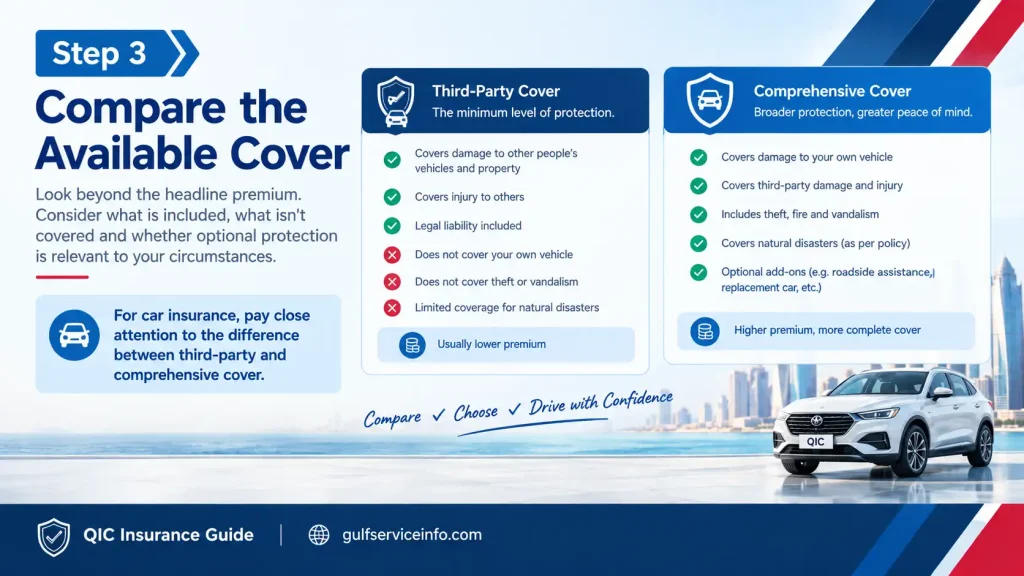
Step 3: Compare the available cover
Look beyond the headline premium. Consider what is included, what isn’t covered and whether optional protection is relevant to your circumstances.
For car insurance, pay close attention to the difference between third-party and comprehensive cover.
Step 4: Read the policy details
Before confirming the purchase, review:

QIC provides policy wording documents for its insurance products, making them a useful reference when you want to check the detailed terms.
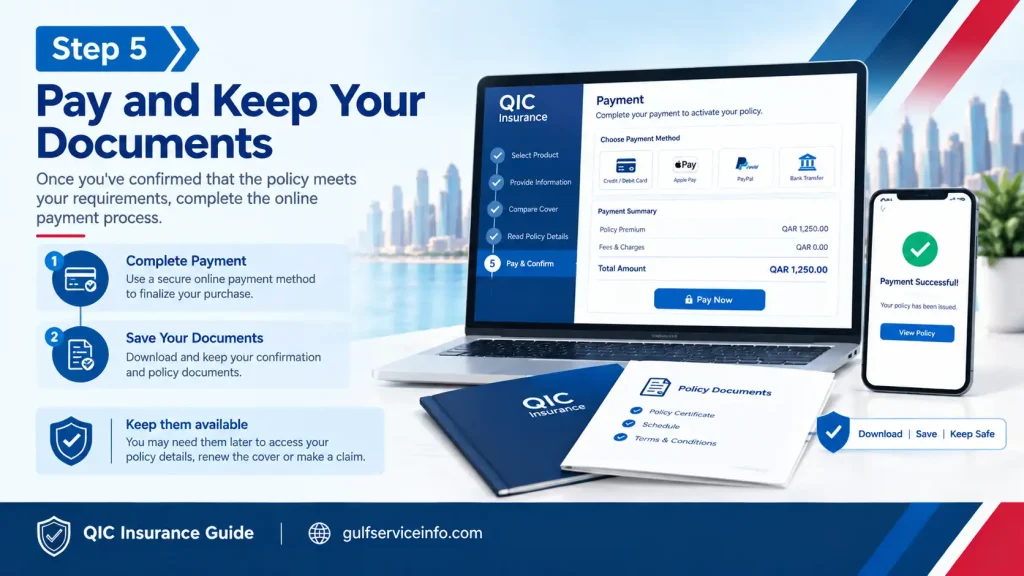
Step 5: Pay and keep your documents
Once you’ve confirmed that the policy meets your requirements, complete the online payment process.
After payment, save the confirmation and policy documents. Keep them available in case you need to access your policy details, renew the cover or make a claim later.
QIC Insurance Policy Check
A QIC Insurance policy check can help you confirm the information attached to an existing policy. This is useful when you need to verify your cover, policy dates or other insurance details before making a claim or renewing.
QIC provides digital access to policy information through its website and app. The company states that its app can also be used to access and share car policy information.
When reviewing your policy, check the following:
| Policy detail | What to verify |
|---|---|
| Policyholder | Name and personal information |
| Insurance type | TPL, comprehensive or relevant product |
| Vehicle | Registration and vehicle information where applicable |
| Policy number | Correct reference number |
| Start date | When cover begins |
| Expiry date | When cover ends |
| Coverage | What protection is included |
| Optional benefits | Any additional cover selected |
| Exclusions | Situations or losses not covered |
| Claims | Relevant claim information |
| Renewal | Current renewal status or requirements |
If a particular detail isn’t available through the digital service, QIC’s customer support channels can be used to request assistance.
QIC Insurance Renewal
A QIC Insurance renewal should be completed before the existing policy expires when you need uninterrupted protection. QIC states that customers can renew policies digitally, meaning a branch visit may not be necessary for eligible online renewals.
Renewal is also a good opportunity to reassess your cover. Your circumstances may have changed since the previous policy period, whether you are renewing car insurance, home contents insurance or another type of protection.
QIC Insurance renewal checklist
Before confirming your renewal, review:
Don’t leave the renewal until the last possible moment. If continuous coverage matters to you, completing the process before the existing policy ends gives you more time to deal with any issue that may arise during renewal.
What to remember
A renewal isn’t simply a repeat purchase. Use it as a chance to check whether the policy still matches your requirements and whether any optional benefits you previously selected remain useful.
If the price has changed, compare the new premium against the actual protection being offered rather than judging the renewal on cost alone.
QIC Insurance Claims
When you need to submit a QIC Insurance claim, starting with the official online claims service is usually the most practical option. QIC provides dedicated claim pathways for different types of insurance, including motor, home and travel policies, and its online claims service is available for submissions at any time.
How to file a QIC car insurance claim
For a QIC car insurance claim, it is worth gathering the required documents before opening the online claim form. Depending on the circumstances, QIC may require:
QIC advises customers to obtain the relevant police report and repair permit through the applicable MOI services. Qatar ID, Istimara and driving licence information can be accessed through Metrash.
For a minor accident, QIC states that the police report can be obtained through Metrash. If the incident involves serious damage or injuries, contact 999.
How to track a QIC Insurance claim
Online tracking is currently available for QIC car insurance claims. To check the status, you need your claim number together with the vehicle owner’s ID shown on the vehicle registration card, known as the Istimara.
After your claim has been registered, QIC’s tracking service can provide updates on its progress. For other insurance categories, QIC directs customers to its call centre or WhatsApp support.
Useful tip: Keep your claim number somewhere accessible after submitting the claim. You’ll normally need it when following up on the case.
QIC Insurance Payment
QIC Insurance payment services are available through QIC’s digital channels. Depending on the insurance product, customers can purchase cover online and manage associated payment-related services digitally.
QIC also lists instalment payment among its support services. However, payment arrangements can differ between insurance products, so check the options applicable to your specific policy rather than assuming instalments are available for every type of cover.
Before making a payment, confirm:
Once the transaction is complete, retain the payment confirmation together with your policy documents.
Staying safe when making a QIC Insurance payment
Be cautious if you receive an unexpected payment request. Instead of using an unfamiliar link sent by message or email, open the official QIC website directly and verify the request through an official channel.
QIC states that its general email senders include addresses using qic.online, qic.com.qa and qicgroup.com.qa domains.
QIC Travel Insurance
QIC Travel Insurance is available for people travelling from or into Qatar. QIC’s official platform lists both outbound and inbound travel insurance products.
Depending on the policy selected, travel cover can address risks associated with issues such as:
The exact protection, limits and exclusions depend on the policy terms.
How to make a QIC travel insurance claim
If a problem occurs during your trip, notify QIC as soon as possible. The company specifically advises customers to report situations such as lost or damaged baggage, lost passports or travel documents and trip cancellation immediately.
For eligible medical expenses involving inpatient treatment outside Qatar, QIC states that the claim should be submitted within 48 hours of admission.
Supporting documents may include:
For certain travel claims, QIC’s support team handles the submitted information and provides a claim number that can be used for subsequent tracking.
Travel insurance claim warning
Don’t postpone reporting an incident until you’ve returned to Qatar if the policy requires prompt notification. Reporting the problem early allows QIC to explain what documents are needed and how you should proceed under the relevant policy.
QIC Home Insurance
QIC Home Insurance focuses on protecting home contents, with additional benefits available depending on the selected plan.
The official QIC home insurance information includes options such as accidental damage and cyber-security protection, as well as benefits connected with personal injury or loss of life and domestic staff. The actual benefits depend on the policy you choose.
One point is particularly important when comparing home insurance: understand exactly what you’re insuring. Contents insurance, building insurance and broader household protection aren’t necessarily the same thing, and a policy won’t automatically cover every type of incident.
Making a QIC home insurance claim
Start by collecting the evidence relevant to the incident. Depending on what happened, QIC may require photographs, reports and other supporting documents that help establish the circumstances and extent of the loss.
The basic process can be viewed as:
Gather evidence → complete the claim form → upload supporting documents → submit the claim → allow QIC to assess the case.
For home contents claims, QIC states that its support team reviews the submitted information and responds within 2 business days.
QIC Insurance Customer Service
If the information you need isn’t available through the online platform, QIC Insurance customer service offers several ways to request assistance.
QIC currently lists the following support options:
| Support option | Current information |
|---|---|
| Hotline | 8000 742 |
| Available daily from 7 am to 8 pm | |
| Callback | Request a callback |
| Branch | In-person assistance |
The official QIC contact page contains the latest branch details and customer-service information.
Be careful with suspicious messages
Insurance-related scams can involve unexpected calls, emails or messages asking for personal information or payments. If something looks unusual, don’t respond through the message itself. Verify the request using an official QIC contact channel before providing information or transferring money.
QIC Insurance Login
The QIC Insurance login service gives customers online access to their insurance information. QIC’s website has a dedicated customer login area, while separate login routes are available for employees, brokers, agents and workshops.
Once you’ve signed in, the services available to you can include access to policy information and other relevant account functions. QIC’s digital ecosystem also supports access to car policy information through its mobile application.
QIC Insurance app
The QIC Insurance app is particularly focused on digital motor-insurance services. According to QIC, customers can use the app to purchase car insurance, renew an existing policy, access roadside assistance and receive real-time claim updates.
Open the official QIC App page
For motorists, the app can be convenient when policy information or roadside assistance is needed while travelling or driving in Qatar.
Common QIC Insurance Problems and Solutions
Online insurance services can remove many routine hassles, but issues can still occur. Whether you’re dealing with a policy, renewal, payment, login or claim, the best solution depends on the specific problem.
| Problem | What to do |
|---|---|
| Can’t access your policy | Check the official QIC account or app and confirm your registered information |
| Renewal isn’t showing | Check the policy expiry date and contact QIC support |
| Claim status isn’t updating | Keep your claim number and contact QIC customer service |
| Car claim documents are missing | Obtain the necessary reports and vehicle documents before submitting |
| Payment problem | Recheck the payment details and contact QIC through an official channel |
| Unsure about coverage | Read the relevant policy wording before making assumptions |
| Suspicious QIC message | Verify the sender using QIC’s official contact channels |
| Need branch assistance | Use the official QIC branch locator |
One of the most avoidable problems is submitting a claim without enough supporting evidence. Keep relevant photographs, reports, invoices, policy details and other documents because QIC may request additional information during its assessment.
QIC Insurance Fees and Prices
There is no single QIC Insurance price that applies to every customer. Your premium is calculated according to factors such as the insurance product, level of cover selected and the information used to prepare the quotation.
For motor insurance, details relating to the vehicle, driver and chosen protection can affect the final price. Travel and home insurance premiums can also change according to the selected policy and benefits.
Because of this, searching for a fixed QIC Insurance fee can give a misleading impression. A more useful approach is to request a current quotation based on your own requirements.
When comparing options, focus on the relationship between price and coverage. The cheapest quotation isn’t automatically the most suitable policy.
Frequently Asked Questions About QIC Insurance
Final Thoughts
QIC Insurance Qatar gives customers a convenient digital route for handling many everyday insurance requirements. From requesting a quotation and purchasing cover to renewing a policy and submitting or tracking eligible claims, a large part of the process can be managed online.
The safest approach is to begin with the official QIC website, check the actual policy wording and make sure the cover matches your needs before paying. Keep your policy, payment and claim documents after completing a transaction, and use QIC’s official customer-service channels if an issue cannot be resolved online.
Read More: Explore our related Gulf government service guides for more step-by-step information and helpful updates.