Finding the right UAE Ministry of Education student service can be confusing because students may encounter several connected systems, including the Student Portal, IMS, LMS, and SSO login pages. The important thing is to use the correct official MOE service for the task you want to complete. The Ministry’s SSO page currently provides email and password fields, a Remember Me option, and Forgot Password? functionality. It also describes the service as a trusted digital identity for citizens, residents and visitors. This Student Portal UAE guide covers the main login routes, IMS access, LMS and Smart Learning services, SSO authentication, common problems, frequently asked questions and the official links you should use.
Explore more UAE government services and helpful guides: Visit Our Homepage
Student Portal UAE Login
The Student Portal UAE is the main starting point for student-related Ministry services available through the official student system. You can access the portal directly from:
How to log in to Student Portal UAE
To begin your Student Portal UAE login, follow these steps:
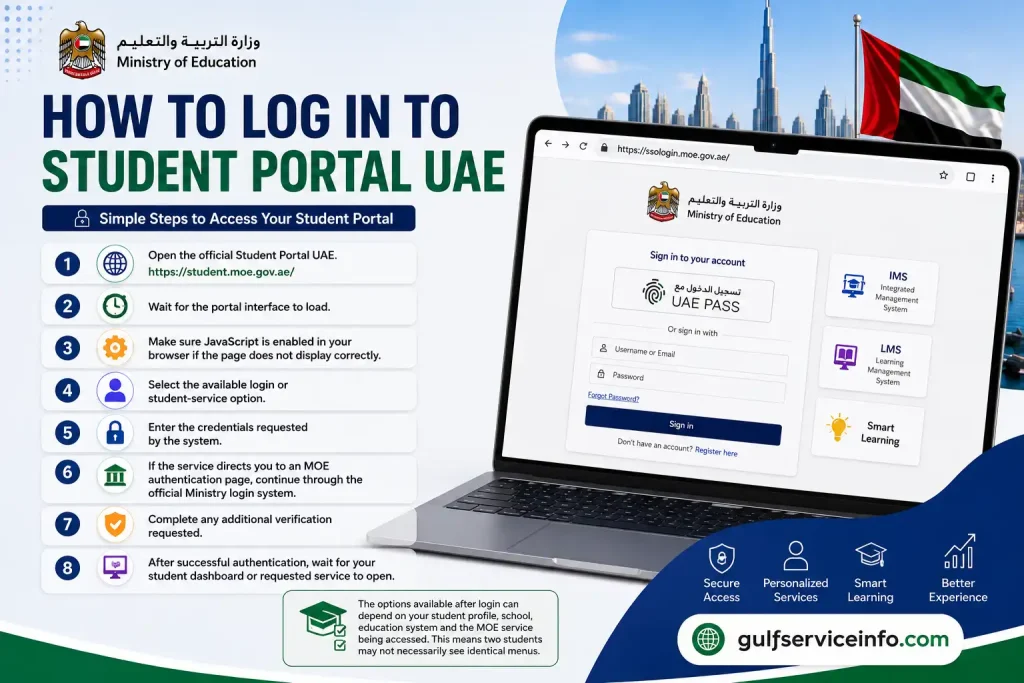
The exact options available after login can depend on your student profile, school, education system and the MOE service being accessed. This means two students may not necessarily see identical menus.
Student Portal UAE login requirements
Before starting, keep the following ready:

Important: Always check that you are using an official moe.gov.ae domain before entering your login information.
IMS MOE Gov AE: Student Portal Access
Students searching for IMS MOE Gov AE are generally looking for a Ministry system connected with student information and education records. The terminology used by users can vary, so it is important not to assume that every IMS-related service is identical to the main Student Portal UAE.
The Ministry’s student information documentation describes authenticated access to student information through a dedicated information system. This can include information connected with a student’s academic profile.
How to access student information
If your account provides an academic or student-information section, the general process is:
The information available through the Student Portal UAE can depend on what has been connected to your account.
Student information is missing
If you cannot find expected information after your Student Portal UAE login, check the following before assuming there is an account problem:
This distinction matters because the Student Portal UAE works alongside other Ministry systems rather than acting as the only location for every education service.
LMS SSO Login
LMS SSO login is another search term students may use when trying to reach Ministry learning services. SSO means Single Sign-On, which allows an authentication system to act as the entry point for connected services.
The official MOE SSO page is:
The current SSO page displays:
It also identifies the service as a trusted digital identity for citizens, residents and visitors.
How to use LMS SSO login
If your learning service directs you to the MOE SSO system:
- Step 1: Open the official SSO page.
- Open MOE SSO Login
- Step 2: Enter your registered email address.
- Step 3: Enter your password.
- Step 4: Select Remember Me only if you are using a trusted personal device.
- Step 5: Select Login.
- Step 6: If authentication succeeds, continue to the connected MOE learning service.
If you cannot remember your password, use the Forgot Password? option displayed directly on the official SSO page rather than entering your credentials into a third-party website.

Security tip: Never give another person your SSO password or approve an authentication request that you did not initiate.
LMS MOE Gov AE and Smart Learning Gateway
The LMS MOE Gov AE service is associated with Ministry online learning systems rather than simply being another name for the Student Portal UAE. Students should therefore identify whether they need student records or learning materials before choosing a login page.
The supplied Ministry information notes that the MOE Smart Learning Gateway has its own login page, with email/password authentication and password-recovery functionality.
MOE Smart Learning Gateway Login
Student Portal UAE vs LMS
| Service | Main purpose |
|---|---|
| Student Portal UAE | Student-related Ministry services and information |
| IMS / student information services | Student and academic information |
| LMS | Online learning and educational resources |
| SSO | Authentication and access to connected Ministry services |
| Smart Learning Gateway | Online learning environment |
The exact services available to an individual student can vary according to the account and Ministry system being used.
When should you use LMS instead of Student Portal UAE?
Use the Student Portal UAE when you are trying to access student-related Ministry information or services provided through the student system.
Use the relevant LMS when you are looking for online learning resources, courses, assignments or other learning materials hosted by the Ministry’s learning environment.
This difference can save time. If you repeatedly return to the Student Portal UAE looking for a learning resource that is hosted on the LMS, the resource may never appear in your student dashboard.
البوابة الذكية (Smart Learning Portal)
The البوابة الذكية, or Smart Learning Portal, is part of the UAE Ministry of Education’s wider digital learning environment. Students looking for the Smart Learning Portal should first identify whether they need access to learning resources or student records, because these services can be provided through different Ministry systems.
For online learning, the Ministry’s Smart Learning Gateway has a dedicated login environment. The available information indicates that this system uses email and password authentication and provides a password-recovery option.
Smart Learning Portal Login
If you need the Ministry’s learning environment rather than the standard Student Portal UAE, use the official LMS login:
The general access process is:

The exact learning materials and options displayed after authentication depend on the account and services assigned to the student.
Smart Learning Portal or Student Portal UAE?
These names are sometimes used interchangeably in online searches, but they should not automatically be treated as the same system.
The Student Portal UAE is primarily an entry point for student-related Ministry services, while the Smart Learning Gateway is designed around online learning. If your goal is to access course resources, assignments or digital learning materials, the LMS may be the more relevant destination.
SSO Login for UAE Ministry of Education Services
The SSO login provides an authentication route for connected UAE Ministry of Education services. Instead of maintaining a separate login process for every service, an SSO environment can help authenticate a user before they continue to an authorised connected service.
The official MOE SSO website is:
The current SSO page includes fields for Email and Password, together with a Remember Me option and a Forgot Password? link.
How to complete an MOE SSO login
If a Ministry service sends you to the SSO page, use the following sequence:
1. Open the official SSO page
Go to sso.moe.gov.ae.
2. Enter your email
Use the email address registered with the relevant Ministry service.
3. Enter your password
Type the password associated with your SSO account.
4. Review the Remember Me option
Only use this option on a device you personally control and trust.
5. Select Login
Submit your credentials and allow the authentication process to finish.
6. Continue to the requested service
If the authentication is successful, proceed to the Ministry service you originally wanted to access.
Forgot your SSO password?
The official SSO page provides a Forgot Password? option. Use that route if you cannot remember your login details rather than repeatedly entering incorrect passwords.
If your account uses a different Ministry authentication method, follow the recovery instructions presented by the relevant official service.
Security warning: A legitimate SSO login should always be completed on an official Ministry domain. Avoid websites that ask you to enter your MOE email, password or other personal information while pretending to provide Student Portal UAE access.
Student Portal Services
The services visible after a Student Portal UAE login are not necessarily identical for every student. Your account profile, school, education system and the particular Ministry platform being accessed can affect what appears in the dashboard.
Possible student-related functions may include access to:

The supplied Ministry information specifically notes that academic-record options can include Academic Records, Student Information, or similar menu items. Where available, students can select the relevant academic year and review subjects, grades, attendance or other academic information.
Checking academic information
After completing your Student Portal UAE login, look for the relevant student-information section. If an academic year selector is provided, choose the correct year before reviewing the record.
If something appears to be missing, check the selected year, account and school information first. A missing record can also mean that the relevant information has not yet been entered or that it belongs to another Ministry service.
Checking courses and subjects
Depending on your profile, you may see Courses, Subjects, Classes or a similar option. Select the academic year or term where required, then open the available course information.
If you are looking specifically for online learning resources, remember that the relevant information may be located in the LMS rather than the main Student Portal UAE.
Checking student results
Where results are released through the relevant Ministry service, students may find options such as Results, Grades or Examination Results.
A typical process is:
Results may not appear if they have not yet been officially released, if the wrong academic period has been selected, or if the student record is not correctly connected to the account.
Student Portal, LMS & SSO Login Problems
Different login systems can produce different errors, so the first step is to identify which service you are actually trying to access: Student Portal UAE, LMS or SSO.
Student Portal UAE not loading
If the Student Portal UAE does not load correctly:
The supplied portal information specifically identifies JavaScript and browser configuration as possible causes of access problems.
LMS login problem
If the LMS is not opening, first confirm that you are using the official Smart Learning Gateway rather than the general Student Portal UAE.
Official MOE Smart Learning Gateway
If you cannot remember the LMS password, use the recovery facility provided on the official LMS login page.
SSO login problem
For SSO problems, verify that:
Official MOE SSO
Academic information missing
If you can log in but your academic information is unavailable, check the academic year and student profile first. The school may also need to complete or update the relevant information.
Results not available
Results may simply not have been released yet. Before troubleshooting your account, confirm the relevant academic year and examination period.
Student Portal UAE FAQs
Final Thoughts
The Student Portal UAE provides a central starting point for accessing important UAE Ministry of Education services, while IMS, LMS, Smart Learning and SSO support different parts of the digital education system. For the safest experience, always use the official Student Portal UAE and MOE SSO links, check that you are on the correct Ministry website, and use the appropriate login system for the service you need. Whether you are checking student information, accessing learning resources, reviewing academic results or recovering your account, following the official MOE login route can help you avoid unnecessary access problems and keep your account information secure.
Read More: Explore our related Gulf government service guides for more step-by-step information and helpful updates.