A Qatar ID Check Online allows you to confirm the status, validity, and expiry details of your Qatar ID (QID) using the official MOI Qatar online services. It is the fastest way to verify whether your ID is active, check its expiration date, or monitor the progress of a renewal application without visiting a service centre. This section explains how to complete a Qatar ID check online through the MOI Qatar portal, explore alternative verification methods such as using a passport number where available, and troubleshoot common issues you may encounter during the process.
Explore more Qatar guides and helpful resources: Visit our website.
What Is a Qatar ID (QID)?
A Qatar ID (QID) is the official identification card issued to Qatari citizens and residents as proof of identity and legal residency in the country. It contains essential personal information, including your photograph, unique 11-digit Qatar ID number, and residency details. A valid QID is required for many everyday activities, such as opening a bank account, applying for a driving licence, accessing government services, signing employment contracts, and travelling in and out of Qatar. This section explains what the Qatar ID is, what information it includes, and why keeping it valid is important.
Why Is the MOI Qatar ID Important?
The MOI Qatar ID (QID) is more than an identity card—it serves as your official proof of identity and legal residency in Qatar. Issued by the Ministry of Interior (MOI), it is mandatory for both Qatari citizens and expatriate residents to hold a valid QID under Qatari law. Without an active Qatar ID, you cannot legally live, work, or study in the country, and failing to maintain a valid card may result in penalties such as fines, deportation, or temporary travel restrictions.
Your MOI Qatar ID also stores essential personal and residency information used by government departments, employers, banks, and other service providers to verify your identity. The card typically includes:
Because the QID is required for everyday services and official transactions, it is important to keep it valid at all times. Regularly performing a Qatar ID check online allows you to confirm your card’s status, monitor its expiry date, and renew it before it expires to avoid unnecessary disruptions or legal issues.
What Is a Qatar ID Number?
The Qatar ID number is a unique 11-digit identification number assigned to every Qatari citizen and resident. It is printed on the Qatar ID (QID) card and stored in the Ministry of Interior (MOI) database to verify an individual’s identity and legal residency status. This number is required for a wide range of official services, including visa processing, banking, healthcare, employment, and other government transactions. Understanding the structure of the Qatar ID number can also help you identify some of the information encoded within it.
Structure of the 11-Digit Qatar ID Number
Each section of the Qatar ID number has a specific purpose:
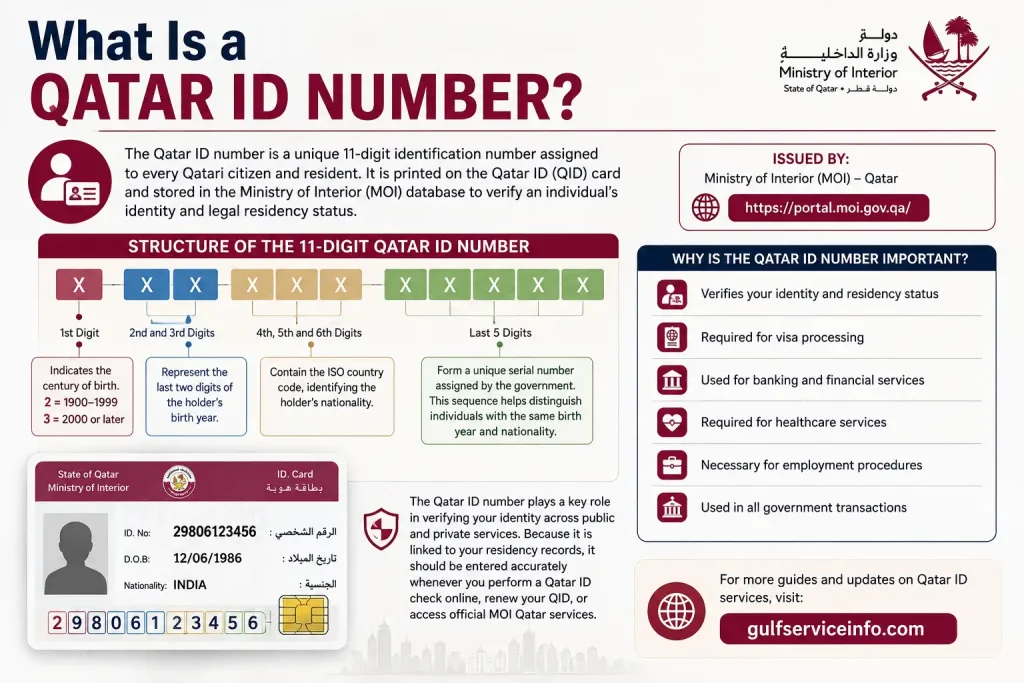
The Qatar ID number plays a key role in verifying your identity across public and private services. Because it is linked to your residency records, it should be entered accurately whenever you perform a Qatar ID check online, renew your QID, or access official MOI Qatar services.
All Ways to Check Your Qatar ID Online
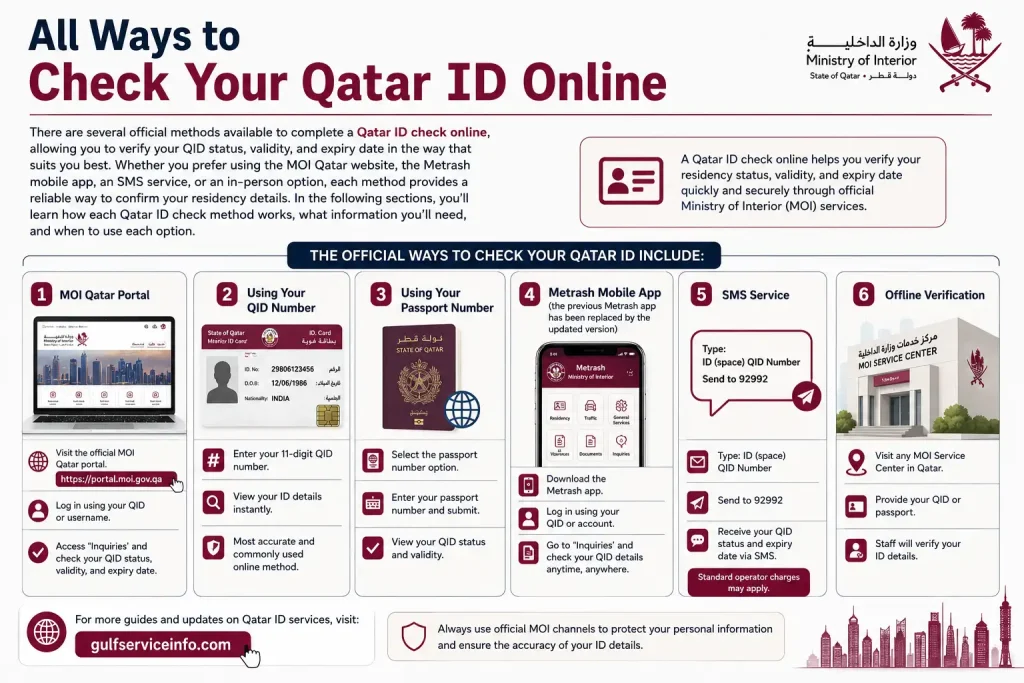
There are several official methods available to complete a Qatar ID check online, allowing you to verify your QID status, validity, and expiry date in the way that suits you best. Whether you prefer using the MOI Qatar website, the Metrash mobile app, an SMS service, or an in-person option, each method provides a reliable way to confirm your residency details. In the following sections, you’ll learn how each Qatar ID check method works, what information you’ll need, and when to use each option.
The official ways to check your Qatar ID include:
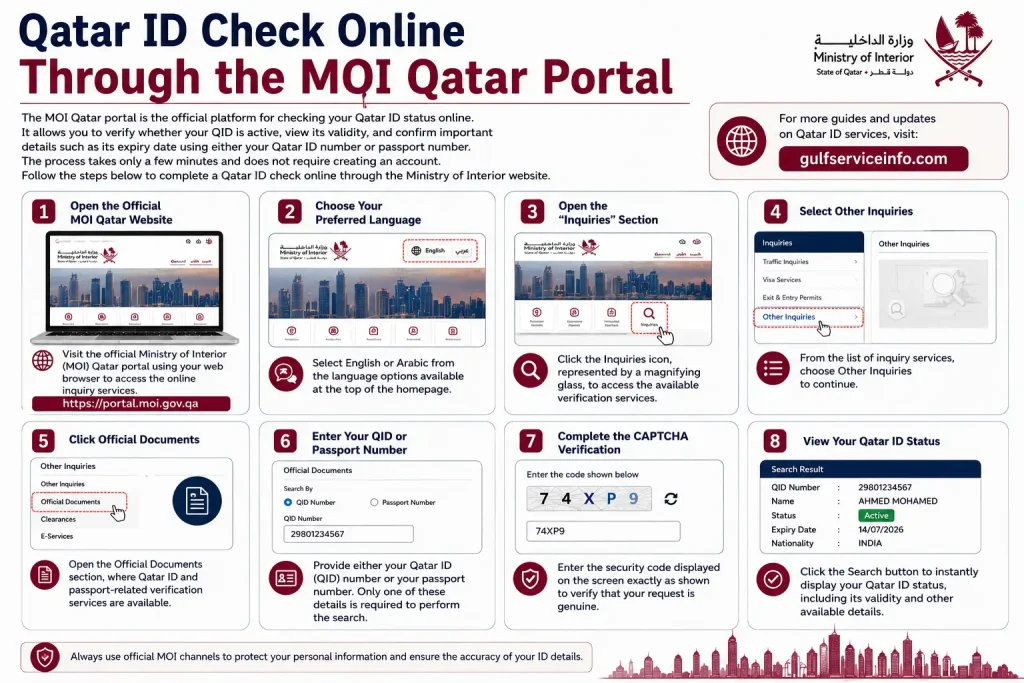
Qatar ID Check Online Through the MOI Qatar Portal
The MOI Qatar portal is the official platform for Qatar ID check online. It allows you to verify whether your QID is active, view its validity, and confirm important details such as its expiry date using either your Qatar ID number or passport number. The process takes only a few minutes and does not require creating an account. Follow the steps below to complete a Qatar ID check online through the Ministry of Interior website.
Step 1: Open the Official MOI Qatar Website
Visit the official Ministry of Interior (MOI) Qatar portal using your web browser to access the online inquiry services.
Step 2: Choose Your Preferred Language
Select English or Arabic from the language options available at the top of the homepage.
Step 3: Open the “Inquiries” Section
Click the Inquiries icon, represented by a magnifying glass, to access the available verification services.
Step 4: Select Other Inquiries
From the list of inquiry services, choose Other Inquiries to continue.
Step 5: Click Official Documents
Open the Official Documents section, where Qatar ID and passport-related verification services are available.
Step 6: Enter Your QID or Passport Number
Provide either your Qatar ID (QID) number or your passport number. Only one of these details is required to perform the search.
Step 7: Complete the CAPTCHA Verification
Enter the security code displayed on the screen exactly as shown to verify that your request is genuine.
Step 8: View Your Qatar ID Status
Click the Search button to instantly display your Qatar ID status, including its validity and other available details.
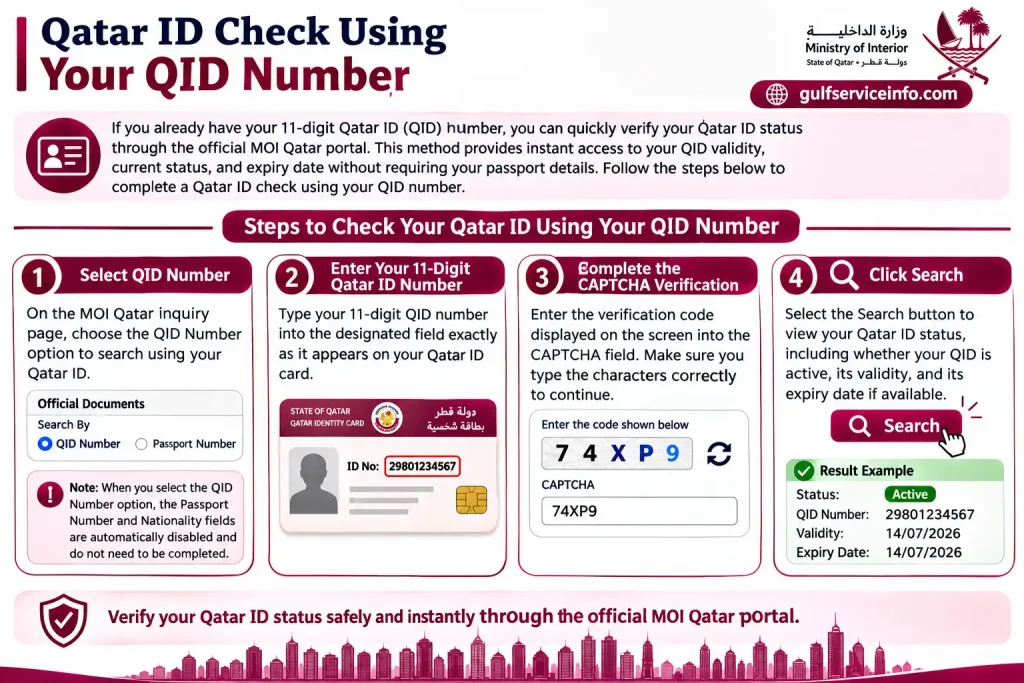
Qatar ID Check Using Your QID Number
If you already have your 11-digit Qatar ID (QID) number, you can quickly verify your Qatar ID status through the official MOI Qatar portal. This method provides instant access to your QID validity, current status, and expiry date without requiring your passport details. Follow the steps below to complete a Qatar ID check using your QID number.
Step 1: Select QID Number
On the MOI Qatar inquiry page, choose the QID Number option to search using your Qatar ID.
Step 2: Enter Your 11-Digit Qatar ID Number
Type your 11-digit QID number into the designated field exactly as it appears on your Qatar ID card.
Note: When you select the QID Number option, the Passport Number and Nationality fields are automatically disabled and do not need to be completed.
Step 3: Complete the CAPTCHA Verification
Enter the verification code displayed on the screen into the CAPTCHA field. Make sure you type the characters correctly to continue.
Step 4: Click Search
Select the Search button to view your Qatar ID status, including whether your QID is active, its validity, and its expiry date if available.
Qatar ID Check Using Your Passport Number
If you do not have your Qatar ID (QID) number, you can still complete a Qatar ID check online by using your passport number through the official MOI Qatar portal. This option is particularly useful for new residents, applicants waiting for their QID, or anyone who does not have their physical card available. By entering your passport details and nationality, you can verify your Qatar ID status and access available residency information.
Step 1: Select Passport Number
On the MOI Qatar inquiry page, choose the Passport Number option to search using your passport details instead of your QID.
Step 2: Enter Your Passport Number
Type your valid passport number into the designated field. Double-check the number to ensure it matches your passport exactly.
Step 3: Choose Your Nationality
Select your nationality from the drop-down list. The nationality must correspond to the passport number you entered for the search to work correctly.
Step 4: Complete the CAPTCHA Verification
Enter the verification code displayed on the screen into the CAPTCHA field exactly as shown to confirm your request.
Step 5: Click Search
Select the Search button to display your Qatar ID status and any available residency details linked to your passport information.
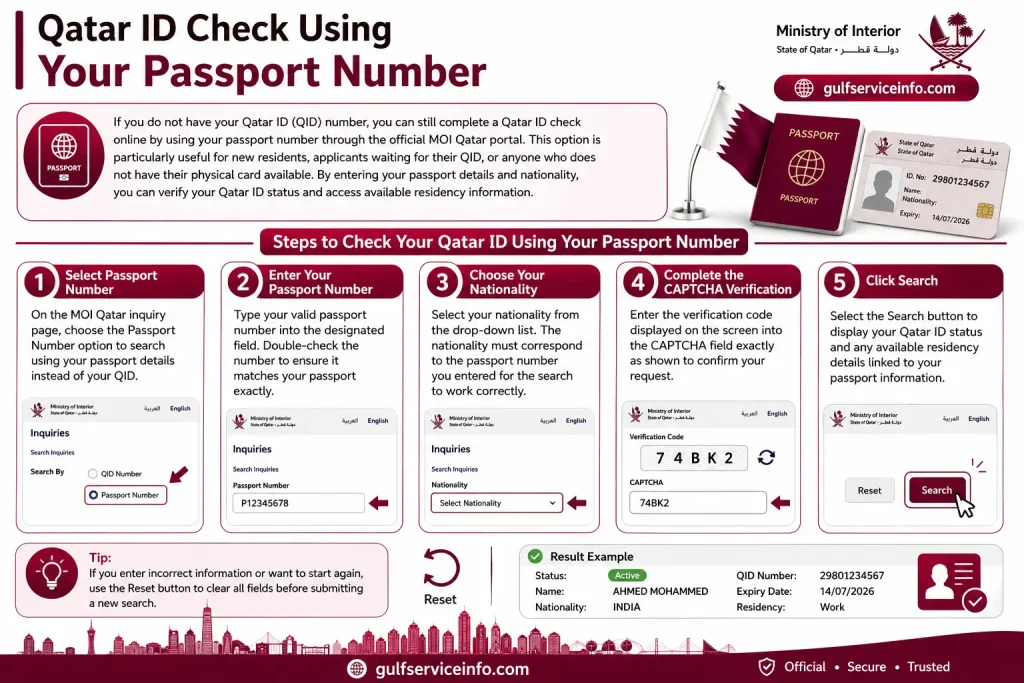
Tip: If you enter incorrect information or want to start again, use the Reset button to clear all fields before submitting a new search.
Qatar ID Check Through the Metrash App
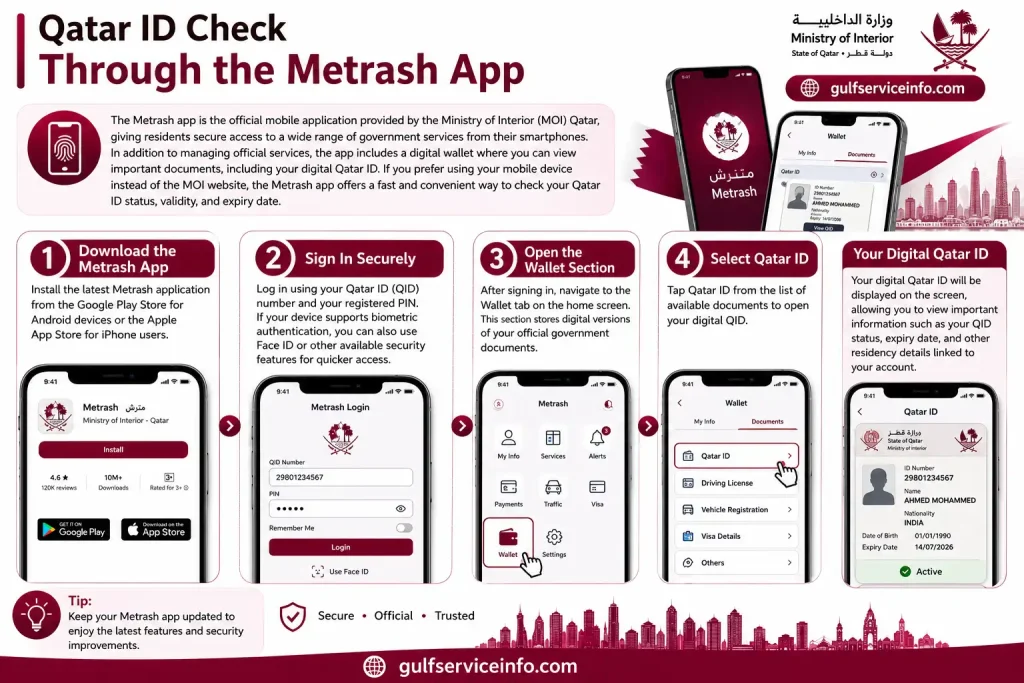
The Metrash app is the official mobile application provided by the Ministry of Interior (MOI) Qatar, giving residents secure access to a wide range of government services from their smartphones. In addition to managing official services, the app includes a digital wallet where you can view important documents, including your digital Qatar ID. If you prefer using your mobile device instead of the MOI website, the Metrash app offers a fast and convenient way to Qatar ID check status, validity, and expiry date.
Step 1: Download the Metrash App
Install the latest Metrash application from the Google Play Store for Android devices or the Apple App Store for iPhone users.
Step 2: Sign In Securely
Log in using your Qatar ID (QID) number and your registered PIN. If your device supports biometric authentication, you can also use Face ID or other available security features for quicker access.
Step 3: Open the Wallet Section
After signing in, navigate to the Wallet tab on the home screen. This section stores digital versions of your official government documents.
Step 4: Select Qatar ID
Tap Qatar ID check from the list of available documents to open your digital QID.
Your digital Qatar ID will be displayed on the screen, allowing you to view important information such as your QID status, expiry date, and other residency details linked to your account.
Offline Methods to Check Your Qatar ID
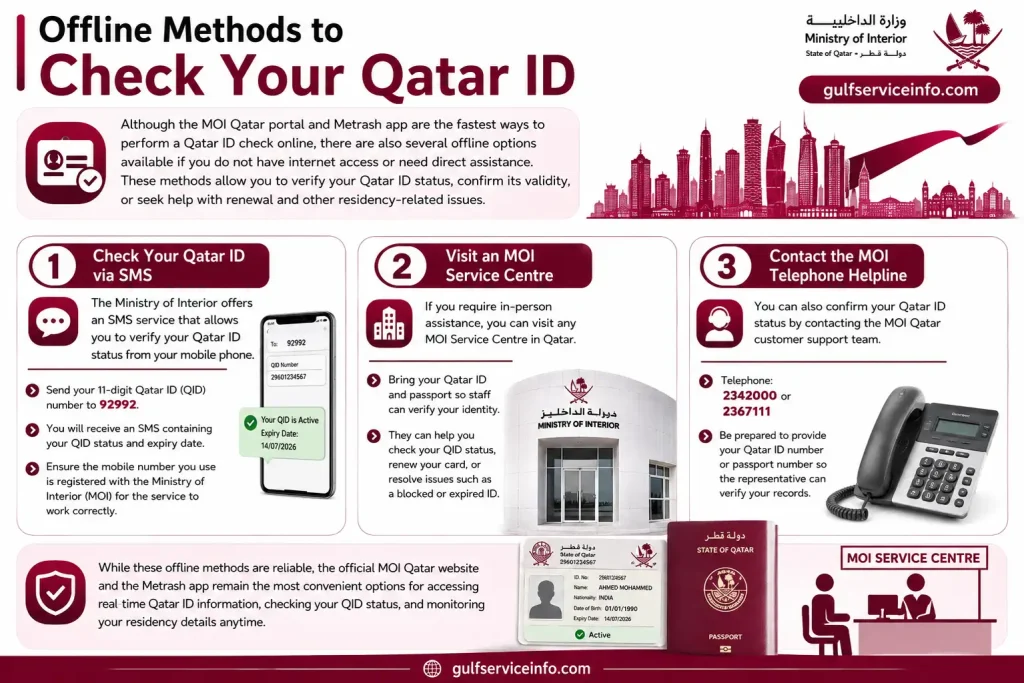
Although the MOI Qatar portal and Metrash app are the fastest ways to perform a Qatar ID check online, there are also several offline options available if you do not have internet access or need direct assistance. These methods allow you to verify your Qatar ID status, confirm its validity, or seek help with renewal and other residency-related issues.
Check Your Qatar ID via SMS
The Ministry of Interior offers an SMS service that allows you to verify your Qatar ID status from your mobile phone.
Visit an MOI Service Centre
If you require in-person assistance, you can visit any MOI Service Centre in Qatar. Bring your Qatar ID and passport so staff can verify your identity and help you Qatar ID check status, renew your card, or resolve issues such as a blocked or expired ID.
Contact the MOI Telephone Helpline
You can also confirm your Qatar ID status by contacting the MOI Qatar customer support team.
While these offline methods are reliable, the official MOI Qatar website and the Metrash app remain the most convenient options for accessing real-time Qatar ID information, checking your QID status, and monitoring your residency details anytime.
Common Qatar ID Check Problems and How to Fix Them
The MOI Qatar ID Check Online service is generally reliable, but you may occasionally encounter errors while checking your Qatar ID status. Most issues are caused by incorrect information, internet connectivity problems, or temporary maintenance on the MOI website. Understanding the reason behind these errors can help you resolve them quickly and complete your Qatar ID check online without unnecessary delays.
Invalid QID Number
If the system displays an “Invalid QID Number” or “QID Not Found” message, it usually means the Qatar ID number entered is incorrect or cannot be matched with MOI records.
How to fix it:
Incorrect CAPTCHA Code
The MOI portal requires you to enter a verification code before displaying your Qatar ID details. An error appears if the CAPTCHA is entered incorrectly.
How to fix it:
Invalid Passport Number
When checking your Qatar ID using a passport number, the search may fail if the passport details or nationality do not match the official records.
How to fix it:
Blank Results Page
Sometimes the MOI portal may load a blank page instead of displaying your Qatar ID information. This is often caused by a slow or unstable internet connection.
How to fix it:
MOI Website Is Unavailable
If you receive a message such as “This site can’t be reached”, the MOI Qatar portal may be temporarily unavailable due to maintenance or a network issue.
How to fix it:
Most Qatar ID check verification issues can be resolved within a few minutes by reviewing the information entered and ensuring the MOI portal is accessible. If problems continue despite following these steps, contacting the Ministry of Interior is the best way to confirm your Qatar ID check status and resolve account-specific issues.
How to Renew Your Qatar ID
Renewing your Qatar ID (QID) before it expires helps you maintain valid residency and continue using essential government and private services without unnecessary interruptions. The Ministry of Interior (MOI) Qatar provides different renewal options, so residents can choose between completing the process online or visiting an authorised service centre. This guide explains the official renewal process and the main steps to follow for a smooth Qatar ID renewal.
You can renew your Qatar ID using any of the following methods:
Each renewal method follows a straightforward process, although the required documents and eligibility may vary depending on your residency status and sponsorship. In the following sections, you’ll find step-by-step instructions for each option, along with guidance on what to do if your Qatar ID has expired or been lost.
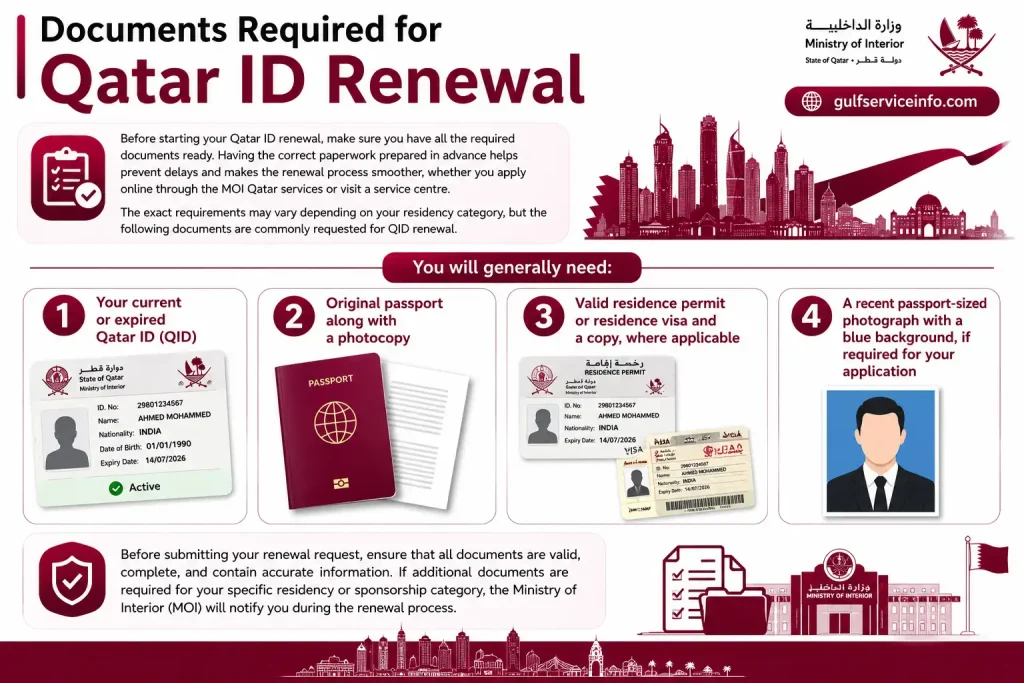
Documents Required for Qatar ID Renewal
Before starting your Qatar ID renewal, make sure you have all the required documents ready. Having the correct paperwork prepared in advance helps prevent delays and makes the renewal process smoother, whether you apply online through the MOI Qatar services or visit a service centre. The exact requirements may vary depending on your residency category, but the following documents are commonly requested for QID renewal.
You will generally need:
Before submitting your renewal request, ensure that all documents are valid, complete, and contain accurate information. If additional documents are required for your specific residency or sponsorship category, the Ministry of Interior (MOI) will notify you during the renewal process.
How to Apply for a Qatar ID (QID)
Obtaining a Qatar ID (QID) is an essential step for anyone planning to live and work in Qatar. The application process is managed by the Ministry of Interior (MOI) and is usually completed with the assistance of your employer or sponsor. From entering Qatar on a valid visa to completing medical and biometric requirements, each stage must be completed before your Qatar ID can be issued. The steps below explain how to apply for a Qatar ID for new residents.
Step 1: Enter Qatar on a Valid Visa
Your application begins after you enter Qatar using a valid entry visa issued or arranged by your employer or sponsor.
Step 2: Complete the Medical Examination
After arriving in Qatar, you must undergo the required medical examination at an authorised Medical Commission centre. This usually includes a blood test and chest X-ray to meet residency requirements.
Step 3: Provide Your Biometrics
Once you have passed the medical examination, visit a designated MOI service centre to complete your biometric registration, including digital fingerprinting.
Step 4: Submit the Required Documents
Your employer or sponsor will submit the necessary documents to the Ministry of Interior on your behalf. These commonly include:
Step 5: Receive Your Qatar ID
After the Ministry of Interior completes the verification, security clearance, and application processing, your Qatar ID (QID) will be issued. The physical card is typically delivered to your employer, sponsor, or through QPost, depending on the selected delivery method.
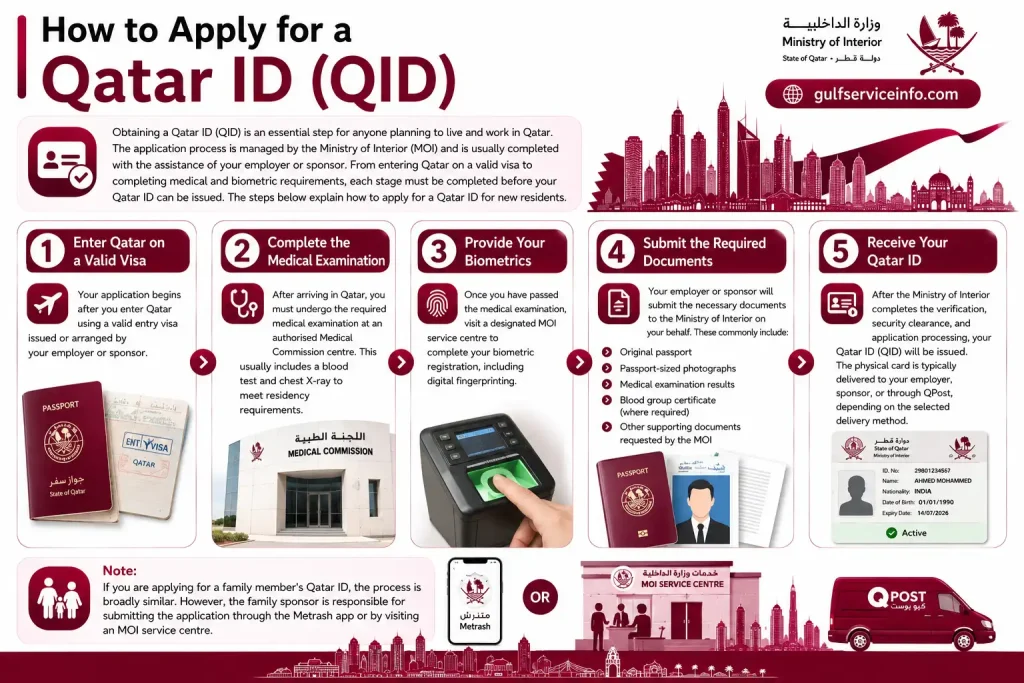
Note: If you are applying for a family member’s Qatar ID, the process is broadly similar. However, the family sponsor is responsible for submitting the application through the Metrash app or by visiting an MOI service centre.
Qatar ID (QID) Fees in 2026
The cost of obtaining or renewing a Qatar ID (QID) depends on the type of residency permit associated with the applicant. Different fee structures apply to employees, family residents, domestic workers, and replacement cards. Before submitting your application, it is advisable to confirm the applicable fee and ensure payment is made through the approved Ministry of Interior (MOI) channels. The table below provides an overview of the standard Qatar ID fees for 2026.
| Category | Fee (QAR) | Validity |
|---|---|---|
| Work Residency (Employees) | QAR 1,000 | 1 Year |
| Family Residency (Spouse and Children) | QAR 500 | 1 Year |
| Domestic Workers (Maids and Drivers) | QAR 300 | 1 Year |
| Replacement Card (Lost or Damaged QID) | QAR 200 | Not Applicable |
The applicable fee depends on your residency category and the type of service requested. If you are renewing your Qatar ID, replacing a lost or damaged card, or applying for a new QID, verify the latest payment requirements through the official MOI Qatar services before completing your application.
Digital Qatar ID
In addition to the physical card, residents can access a Digital Qatar ID check through the official Metrash app. The digital version securely stores your Qatar ID on your smartphone, making it easier to verify your identity without carrying the physical card in many situations. It provides quick access to your residency information and can be used whenever digital identification is accepted within Qatar.
After signing in to the Metrash app, your digital Qatar ID is available in the Wallet section, where you can view important details such as your QID information and validity. The Digital Qatar ID is widely accepted for identity verification at many government departments and authorised service providers across Qatar, offering a convenient alternative when you need to confirm your identity electronically.
Benefits of Having a Qatar ID (QID)
A Qatar ID check (QID) is more than just an identity card—it is an essential document that allows residents to live, work, and access a wide range of public and private services in Qatar. From completing everyday financial transactions to using government services, a valid QID is required for many important activities. Understanding its benefits highlights why keeping your Qatar ID active and up to date is so important.
Some of the key benefits of a Qatar ID include:
Because the Qatar ID is connected to many everyday services, it is important to perform a Qatar ID check online regularly and renew your QID before it expires. Keeping your card valid helps ensure uninterrupted access to essential services while maintaining your legal residency status in Qatar.
Qatar ID Contact Details
If you need assistance with your Qatar ID (QID), including enquiries about your application, renewal, replacement, or residency status, you can contact the Ministry of Interior (MOI) Qatar through its official support channels. The MOI provides telephone, email, and online services to help residents resolve Qatar ID-related issues and access the latest information.
| Contact Method | Details |
|---|---|
| [email protected] | |
| Telephone | +974 2366666 |
| Official Website | www.portal.moi.gov.qa |
If your enquiry relates to your Qatar ID status, QID renewal, or any other residency service, it is recommended to check the official MOI Qatar portal first, as many requests can be completed online without visiting a service centre. For application-specific issues or technical assistance, you can contact the MOI directly using the details above.
FAQs About Qatar ID Check
Conclusion
Performing a Qatar ID check online is the quickest and most reliable way to verify your QID status, validity, expiry date, and application progress through the official MOI Qatar portal or the Metrash app. Whether you need to check your Qatar ID using your QID or passport number, renew an expiring card, or resolve common issues, following the official MOI process helps you stay compliant with Qatar’s residency regulations. By checking your Qatar ID regularly and keeping it up to date, you can avoid service interruptions, fines, and legal complications while ensuring continued access to banking, healthcare, employment, travel, and other essential services.
Read More: Explore our related Gulf government service guides for more step-by-step information and helpful updates.
QCHP Login Qatar: DHP Registration, Sign Up & Account Access Guide
MOI Qatar Visa Check: Online Visa Status & Validity Guide