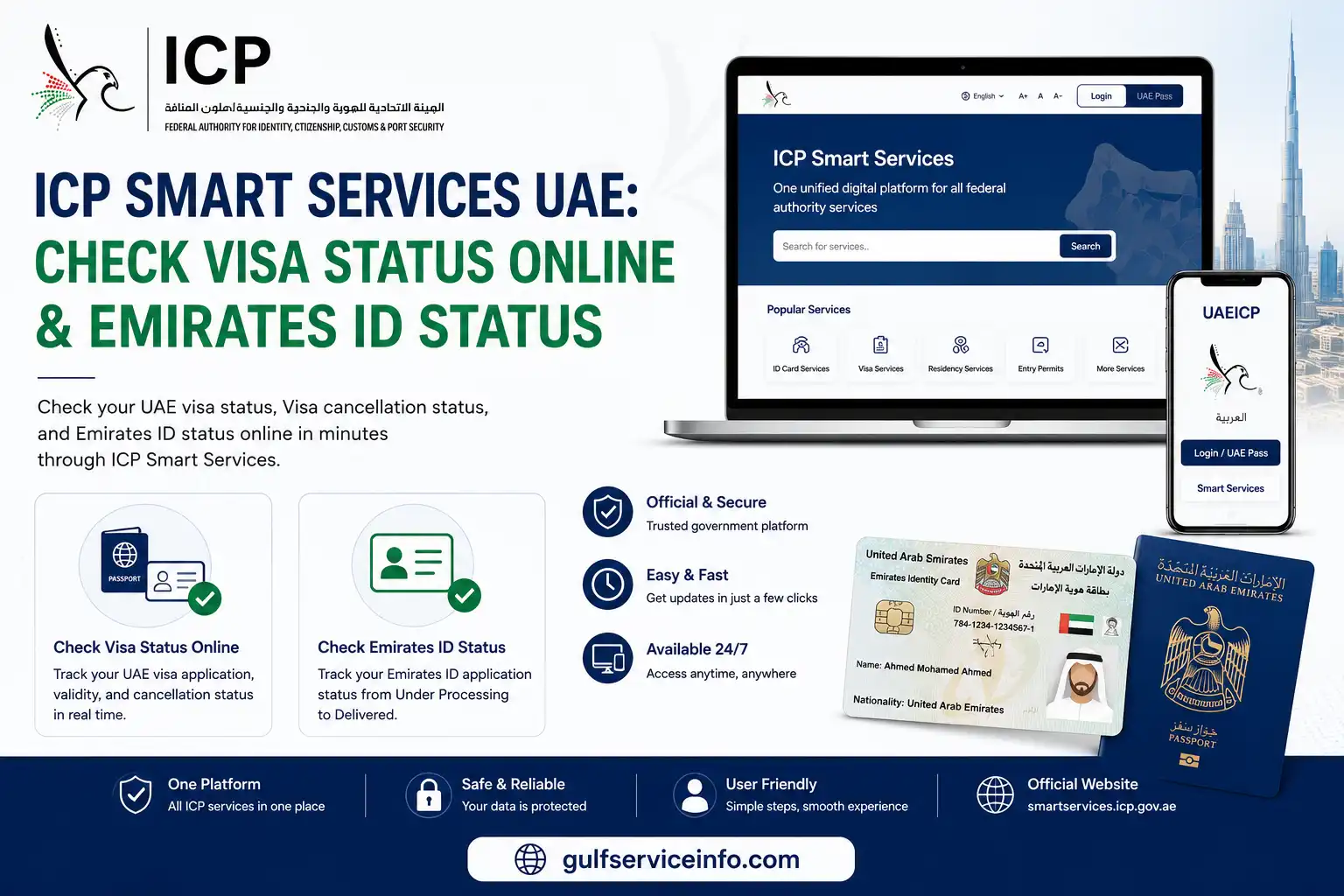
ICP Smart Services UAE is the official digital portal that enables UAE citizens, residents, and visitors to access essential immigration and identity services online. Through this platform, you can quickly check your UAE visa status, track your Emirates ID status, and monitor the progress of your applications without visiting an ICP service center. This guide explains how to use ICP Smart Services, interpret different application status updates, and follow the correct steps to track your visa or Emirates ID. Keeping track of your application online helps you stay informed, respond to any required actions promptly, and minimize unnecessary processing delays.
Explore more UAE government services and helpful guides: Visit Our Homepage
What Are ICP Smart Services in UAE?
ICP Smart Services UAE is the official online platform operated by the Federal Authority for Identity, Citizenship, Customs and Port Security (ICP), providing a wide range of immigration and identity-related services in one place. Although the authority was previously known as the Federal Authority for Identity and Citizenship (ICA), it was renamed ICP after a government restructuring, while the platform and its core services continued without major changes. Through ICP portal, UAE residents, citizens, visitors, GCC nationals, and businesses can apply for visas, manage Emirates ID services, obtain entry permits, and complete various residency-related procedures online instead of visiting government service centres. In this section, you’ll learn what ICP UAE is, who can use it, and the different ways to access the platform.
You can use ICP online services through the following official channels:
- ICP Smart Services web portal: smartservices.icp.gov.ae
- UAEICP mobile app: Available for both iOS (App Store) and Android (Google Play).
How to Register for UAE ICP Smart Services
Creating an account on UAE ICP online services is a quick process that gives you access to a wide range of immigration and identity services online. Whether you’re a UAE resident or a visitor, you can register through the official ICP website or the UAEICP mobile app in just a few steps. This section explains how to create your account, verify your details, and choose the most convenient login method for future access.
Follow these steps to register for ICP Smart Services:
- Visit the official ICP Smart Services portal at smartservices.icp.gov.ae or install the UAEICP mobile app.
- Click Login on the homepage.
- Choose one of the available sign-in options:
- Login with UAE Pass (recommended) for the fastest and most secure registration. Your verified identity is automatically linked to your ICP account.
- Use Other Login Option if you want to create an account using your personal details.
- If you select the alternative registration method, enter your information exactly as it appears on your passport or Emirates ID, including your full name, nationality, date of birth, email address, and mobile number.
- Verify your email address and mobile number using the One-Time Password (OTP) sent by ICP.
- Create a strong password that you can easily remember and keep it secure.
- Complete your profile by adding your Emirates ID number (for residents) or passport details (for visitors).
- If you created a standard account, link it to your UAE Pass afterwards to enjoy quicker logins and automatic synchronisation of your verified information.
After your account is created, you can sign in anytime using your email and password or simply use UAE Pass for faster, one-tap access to ICP online portal.
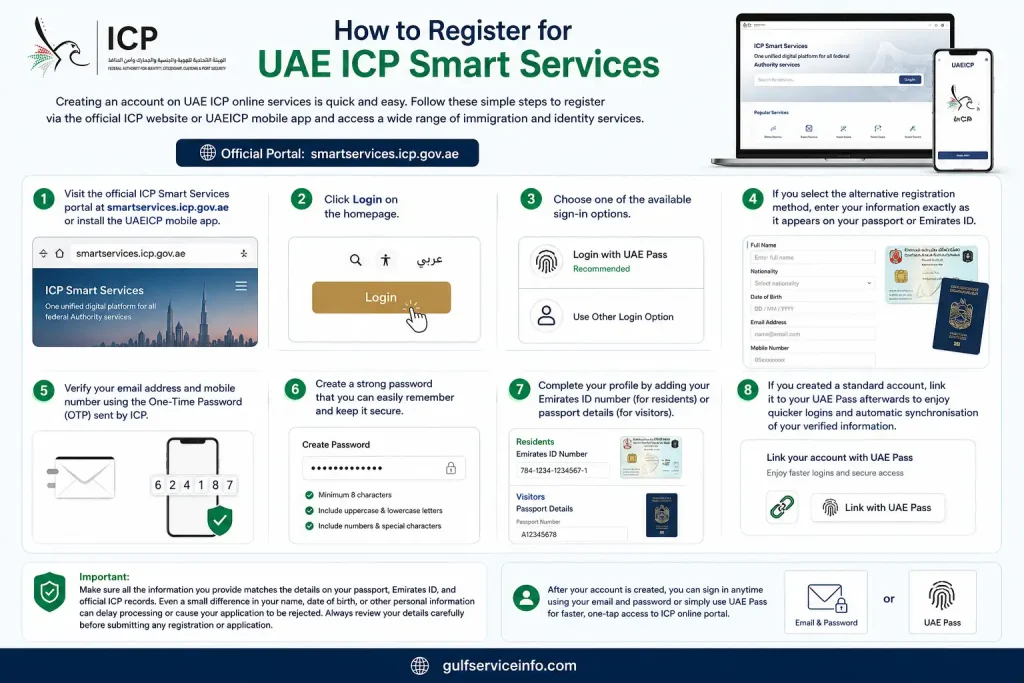
Important: Make sure all the information you provide matches the details on your passport, Emirates ID, and official ICP records. Even a small difference in your name, date of birth, or other personal information can delay processing or cause your application to be rejected. Always review your details carefully before submitting any registration or application.
How to Apply for a UAE Visa Through ICP Smart Services
ICP online services UAE allows eligible applicants to apply for a variety of UAE visas through a single online platform. Whether you’re applying for a tourist visa, family residence visa, employment visa, investor visa, or a long-term residency programme, the application process is completed digitally from your ICP account. This section explains how to submit a UAE visa application, upload the required documents, pay the applicable fees, and track your application until a decision is made.
Follow these steps to apply for a UAE visa through ICP online services:
- Tourist Visa
- Employment Visa
- Family Residence Visa
- Investor Visa
- Golden Visa
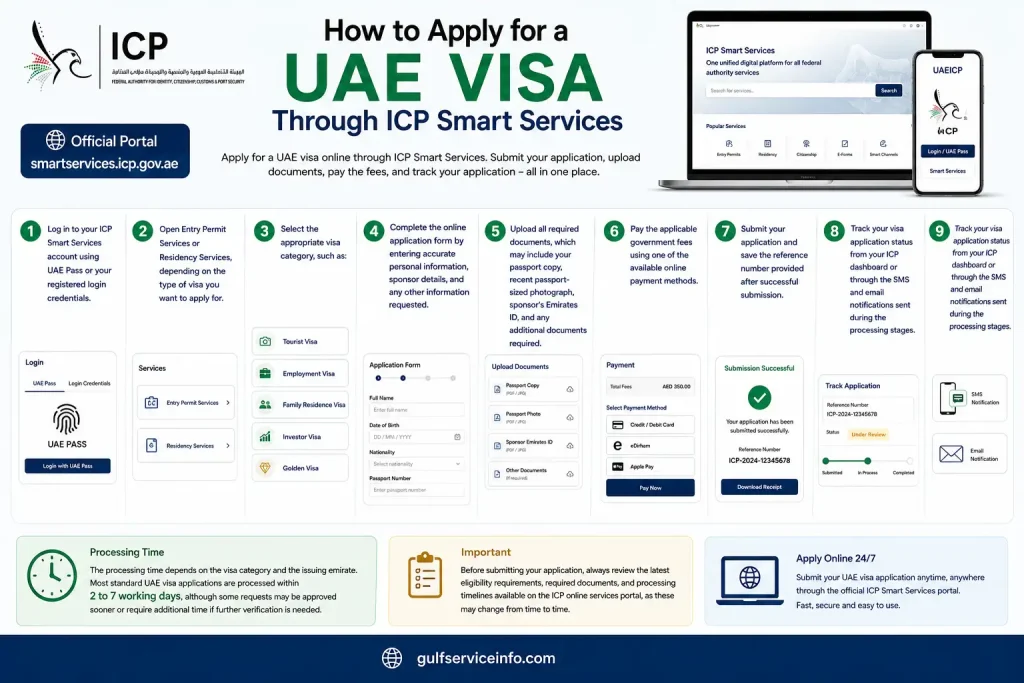
The processing time depends on the visa category and the issuing emirate. Most standard UAE visa applications are processed within 2 to 7 working days, although some requests may be approved sooner or require additional time if further verification is needed. Before submitting your application, always review the latest eligibility requirements, required documents, and processing timelines available on the ICP online services portal, as these may change from time to time.
How to Check Your UAE Visa Status on ICP Smart Services
Checking your UAE visa status is one of the most popular services available through ICP online services UAE. The platform allows you to verify your visa validity, residency details, and application progress online within minutes. You can perform a visa status enquiry using your passport information through the Public Services section without creating or logging into an account. However, if your residence visa was issued in Dubai, you should use the GDRFA Dubai portal, as Dubai visa records are managed separately.
Check Your UAE Visa Status Using Your Passport
Follow these steps to verify your visa status through ICP online services:
- Visit the ICP Smart Services homepage.
- Open the Public Services section.
- Select File Validity.
- Choose Passport Information as your preferred search method.
- Enter your passport number, nationality, and passport expiry date.
- Click Search to view your current visa or residence status.
Track an Existing Visa Application
If you have already submitted a visa application, you can monitor its progress from your ICP account:
- Log in to your ICP Smart Services account.
- Open My Services or Application Status.
- Enter your application reference number.
- Review the latest application status, such as Submitted, Under Review, Approved, or Rejected.
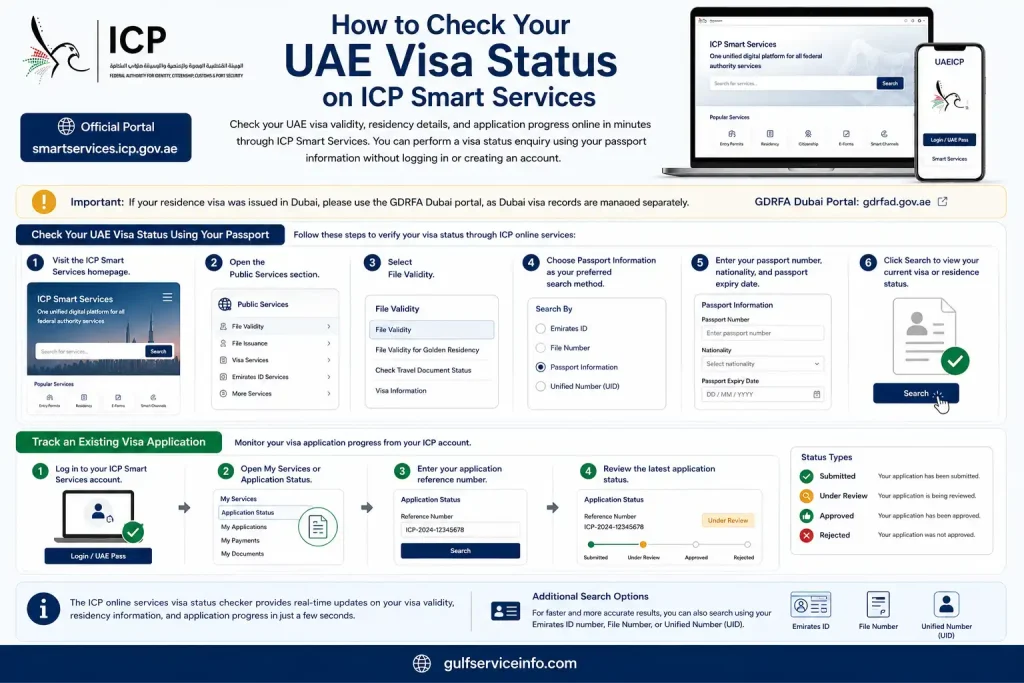
The ICP online services visa status checker provides real-time updates on your visa validity, residency information, and application progress in just a few seconds. If you have additional identification details available, you can also search using your Emirates ID number, File Number, or Unified Number (UID) for a quicker and more accurate status enquiry.
How to Check Your Emirates ID Status on ICP Smart Services
ICP online services UAE is the official platform for tracking the status of every Emirates ID application, renewal, and replacement across all seven emirates. Unlike residence visas, which may be managed by different authorities depending on the issuing emirate, all Emirates ID services are handled through ICP. This section explains how to check your Emirates ID status online and understand each stage of the card issuance process.
Follow these steps to track your Emirates ID application:
- Visit ICP Smart Services or open the UAEICP mobile app.
- Navigate to ID Card Services and select Application Status.
- Enter your PRAN (Personal Registration Acknowledgement Number) from your application receipt, or use your Emirates ID number if you’re checking the status of an existing card.
- Submit your details to view the latest update on your application.
After your search, the system will display your current Emirates ID status, such as:
- Under Processing – Your application is being reviewed by ICP.
- Printed – Your Emirates ID has been produced and is ready for dispatch.
- Dispatched – Your card has been handed over for delivery.
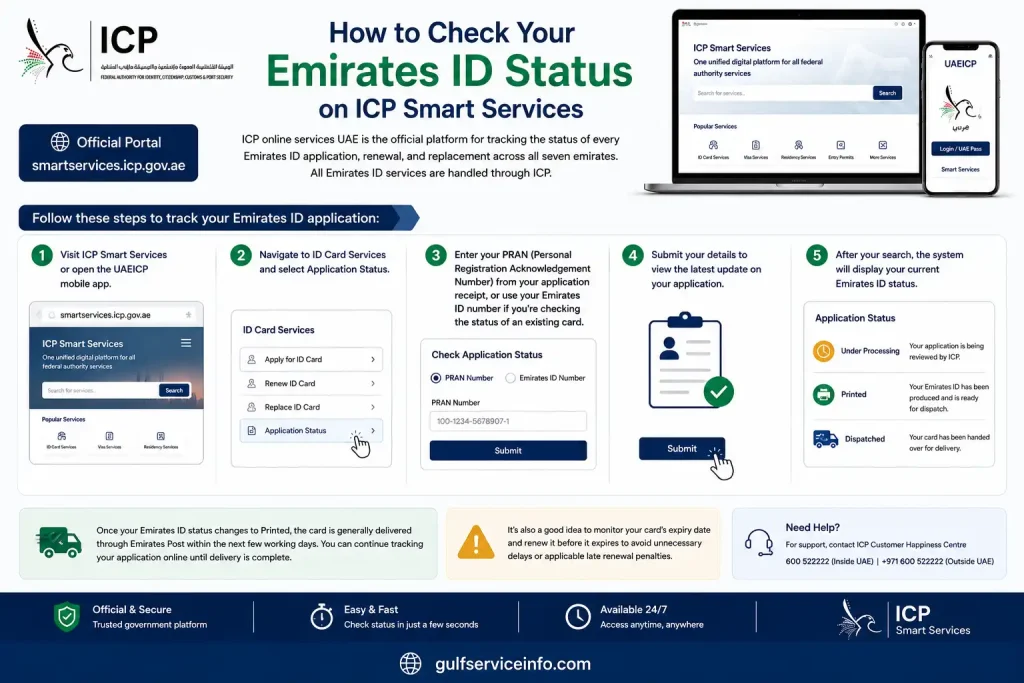
Once your Emirates ID status changes to Printed, the card is generally delivered through Emirates Post within the next few working days. You can continue tracking your application online until delivery is complete. It’s also a good idea to monitor your card’s expiry date and renew it before it expires to avoid unnecessary delays or applicable late renewal penalties.
How to Check Your Visa Cancellation Status on ICP Smart Services
After submitting a UAE visa cancellation request, you can easily monitor its progress through ICP website UAE. Tracking your cancellation status helps you confirm that the request has been processed successfully before applying for another visa or making travel plans. This section explains how to check your visa cancellation status and why it’s important to wait for final confirmation.
Follow these steps to check your visa cancellation status:
- Log in to your ICP account using your registered credentials or UAE Pass.
- Open the My Requests section from your dashboard.
- Locate your visa cancellation application in the list of submitted requests.
- Review the current application status, which may appear as:
- Pending – Your cancellation request is being processed.
- Approved – The request has been accepted.
- Completed – Your visa has been successfully cancelled.
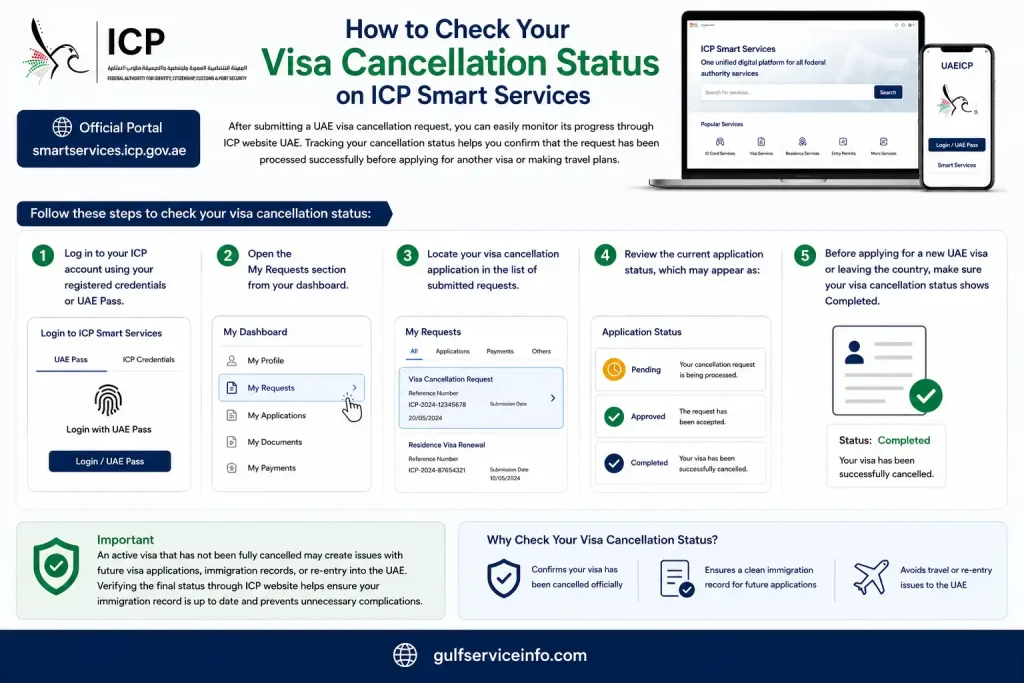
Before applying for a new UAE visa or leaving the country, make sure your visa cancellation status shows Completed. An active visa that has not been fully cancelled may create issues with future visa applications, immigration records, or re-entry into the UAE. Verifying the final status through ICP website helps ensure your immigration record is up to date and prevents unnecessary complications.
How to Pay a UAE Visa Fine or Overstay Fine on ICP Smart Services
If you have an outstanding UAE visa fine or overstay penalty, you can pay it online through ICP website UAE without visiting a government service centre. The platform allows you to search for unpaid fines, review the amount due, and complete the payment securely in just a few steps. This section explains how to check your outstanding fines and why it’s important to clear them before travelling or applying for another visa.
Follow these steps to pay your visa fine through ICP online services:
- Log in to your ICP account.
- Open the Fine Payment service under Public Services or Individual Services.
- Search for your outstanding fines using your passport number, Emirates ID number, or file number.
- Review the fine details and verify the total amount payable.
- Complete the payment using a supported credit or debit card.
- Download or save the payment receipt as proof that your fine has been settled.
In most cases, ICP overstay fines are charged at a fixed daily rate after your visa or entry permit expires. Since the total penalty increases each day, it’s advisable to check for any outstanding fines and pay them as soon as possible. Clearing your fines before travelling, renewing your visa, or submitting a new application can help prevent unnecessary delays and ensure your immigration.
ICP or GDRFA: Which Portal Should You Use?
Many people use the wrong government portal when checking their visa or Emirates ID status, which often leads to failed searches and unnecessary delays. The correct platform depends on where your residence visa was issued. While ICP Smart Services manages immigration and identity services across most of the UAE, GDRFA Dubai is responsible for visas issued in Dubai. Knowing which authority handles your application will help you access the right services and avoid wasting time searching on the wrong portal.
| Service or Requirement | Correct Portal |
|---|---|
| Residence visa issued in Dubai | GDRFA Dubai (gdrfad.gov.ae or the GDRFA mobile app) |
| Residence visa issued in Abu Dhabi, Sharjah, Ajman, Ras Al Khaimah, Fujairah, or Umm Al Quwain | ICP Smart Services (smartservices.icp.gov.ae) |
| Emirates ID application, renewal, or replacement (all emirates) | ICP online services |
| Entry permit, tourist visa, visit visa, or federal visa inquiry | ICP UAE |
| Federal Golden Visa nomination or application status | ICP online services (Dubai residents may also use GDRFA where applicable) |
The easiest way to remember the difference is this: all Emirates ID services are handled through ICP, regardless of where you live. For residence visas, the issuing emirate determines which portal you should use—Dubai visas are managed by GDRFA, while visas.
What Can You Do with ICP Smart Services?
ICP Smart Services brings together a wide range of immigration, residency, and identity-related services on a single online platform. Whether you’re applying for an Emirates ID, managing a residence visa, requesting an entry permit, or tracking an existing application, most tasks can be completed digitally without visiting an ICP service centre. This section outlines the key services available through the portal and explains what individuals, sponsors, and businesses can manage online.
| Category | Available Services |
|---|---|
| Emirates ID | Apply for a new Emirates ID, renew an existing card, replace a lost or damaged card, update personal information, and check card status or validity. |
| Residence Visa | Apply for, renew, or cancel residence visas for non-Dubai emirates, check visa status and validity, and download or print an e-visa. |
| Entry Permits | Submit applications for tourist visas, visit visas, job exploration permits, mission visas, and multiple-entry permits. |
| Sponsor & Establishment Services | Issue or renew an establishment card, manage sponsor files, and add or update dependent information. |
| Golden & Green Visas | Apply for long-term residency programmes, check eligibility, and monitor the progress of submitted applications. |
| Payments | Pay fines, settle government fees, and track the payment status of submitted requests. |
One of the biggest advantages of ICP Smart Services is that individual users can create an account and complete most transactions without using a company or a Public Relations Officer (PRO). However, more complex procedures—such as sponsor management, establishment card applications, or handling multiple visa requests—often require careful document preparation and accurate.
Who Can Use ICP Smart Services in the UAE?
ICP Smart Services is designed for a wide range of users who need access to the UAE’s immigration, residency, and identity services. Whether you’re living in the UAE, planning to visit, or managing visas for employees or family members, the platform allows eligible users to complete many government services online. In this section, you’ll learn who can register for ICP Smart Services and when another authority, such as GDRFA Dubai, may also be involved.
The following users can access ICP Smart Services:
- UAE citizens using government identity and residency services.
- UAE residents, including individuals sponsored by an employer or a family member.
- GCC nationals who are eligible to use selected ICP services.
- Foreign visitors and tourists applying for entry permits or visit visas.
- Businesses and establishments managing employee, dependent, or sponsor-related visa services.
- Authorised typing centres that submit applications on behalf of individuals and organisations.
If your residence visa is sponsored in Dubai, some immigration services—particularly visa renewals and application status enquiries—may also be processed through GDRFA Dubai instead of ICP. Understanding which authority manages your application helps.
How to Use ICP Smart Services UAE
Using ICP Smart Services UAE is straightforward once you’ve signed in to your account. The platform follows a similar process for most services, whether you’re renewing a residence visa, applying for an Emirates ID, requesting an entry permit, or accessing other immigration services. This section walks you through the general application process, from selecting a service to tracking your request and downloading approved documents.
Follow these steps to use ICP Smart Services:
- Sign in to your ICP Smart Services account using your UAE Pass or your registered email address and password.
- Choose the appropriate service category from your dashboard, such as Residency Services, Emirates ID, Entry Permits, or Public Services.
- Select the required service, for example, Residence Visa Renewal, Emirates ID Replacement, or another option that matches your application.
- Complete the online application form by providing the requested information, including your personal details, sponsor information, visa category, and any other required fields.
- Upload the necessary documents. Depending on the service, you may need to submit a copy of your passport, Emirates ID, passport-sized photograph, medical fitness certificate, or other supporting documents.
- Review your application carefully to ensure all information is accurate, then pay the applicable government fee using a supported online payment method.
- Submit your application. Once your request is received, ICP will send a confirmation message by SMS and email, along with your application reference number.
- Track your application status from your ICP dashboard or by checking the email notifications sent during each stage of the review process.
- Download your approved documents directly from your account when processing is complete. Depending on the service, this may include your electronic visa, application approval, or Emirates ID status confirmation.
One of the main benefits of ICP Smart Services UAE is that most applications can be completed entirely online. After approval, eligible documents are available for download through your account, eliminating the need to visit an ICP service centre or wait for physical.
The UAEICP Mobile App
The UAEICP mobile app offers the same core services as the ICP website, making it a convenient way to manage your immigration and identity services from your smartphone. Whether you want to renew an Emirates ID, check your visa status, pay government fees, or track an application, the app provides quick access to these services without needing to visit a service centre. This section explains the main features of the official UAEICP app and how to make sure you’re using the correct application.
The UAEICP app is available for both Android and iOS devices and allows you to:
- Check your UAE visa status and Emirates ID status.
- Apply for or renew selected immigration and identity services.
- Track the progress of submitted applications with real-time updates.
- Pay eligible government fees and fines securely from your mobile device.
- Receive notifications about important changes to your application status.
When downloading the app, search for “UAEICP” and make sure you install the official application, as there are several similar-looking apps that are not affiliated with ICP. If you experience technical issues or need assistance with a service that cannot be completed.
Required Documents for ICP Smart Services
The required documents for ICP online services UAE vary depending on the service you want to use. While many applications only require basic identification, others may ask for sponsor details, supporting certificates, or additional verification documents. Preparing the correct documents before you apply can help prevent delays, reduce the chances of rejection, and make the application process much smoother. In this section, you’ll find the common documents required for popular ICP services and learn why it’s important to review the official requirements before submitting your application.
| ICP Service | Common Documents Required |
|---|---|
| Emirates ID | Passport, recent passport-sized photograph, existing Emirates ID (if renewing or replacing) |
| Residence Visa | Passport, sponsor documents, recent passport-sized photograph, and any service-specific supporting documents |
| Tourist Visa | Passport copy and a recent passport-sized photograph |
| Family Residence Visa | Passport, sponsor’s Emirates ID, proof of relationship, and other supporting documents |
| Golden Visa | Passport, recent photograph, and documents proving eligibility for the selected Golden Visa category |
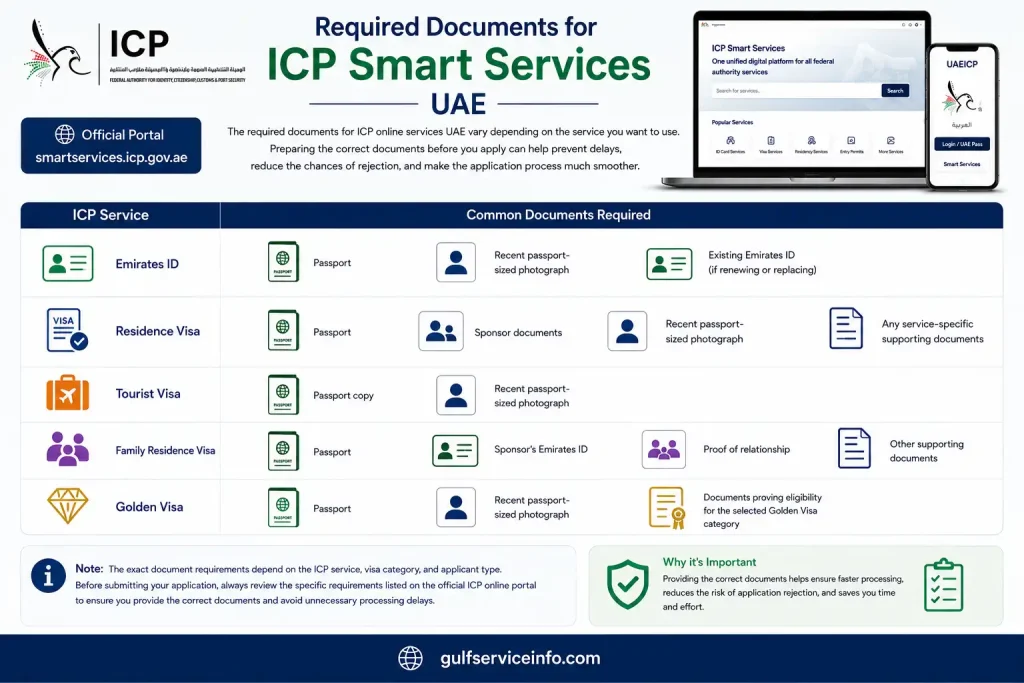
Note: The exact document requirements depend on the ICP service, visa category, and applicant type. Before submitting your application, always review the specific requirements listed on the official ICP online portal to ensure you provide the correct documents and avoid unnecessary processing delays.
ICP Smart Services Processing Time
The processing time for ICP depends on the type of application you submit and the verification required by the Federal Authority for Identity, Citizenship, Customs and Port Security (ICP). Some requests are approved within a few working days, while others may take longer if additional documents, security checks, or eligibility reviews are needed. This section provides a general overview of typical processing times and explains the factors that can affect how long your application takes.
| ICP Service | Typical Processing Time* |
|---|---|
| Tourist Visa | Usually 2–7 working days |
| Residence Visa | Varies depending on the visa category and application requirements |
| Emirates ID | Depends on application approval, biometric verification (if required), and card printing |
| Visa Renewal | Processing time varies based on document verification and eligibility checks |
| Golden Visa | Depends on the applicant’s eligibility review and supporting document verification |
Important: Processing times are estimates and may vary depending on the requested service, the completeness of your application, document verification, and the issuing authority. If ICP requires additional information or supporting documents, your application may take longer to process. You can monitor the latest progress of your request through the ICP online portal or the UAEICP mobile app.
ICP Smart Services Customer Support
If you need help with ICP UAE, the ICP Customer Happiness Centre provides support for a wide range of issues, including login problems, application status enquiries, payment issues, Emirates ID services, visa applications, and technical errors. Whether you’re using the ICP website or the UAEICP mobile app, you can contact the support team through several official channels. This section explains how to reach ICP customer support and where to find additional assistance when needed.
| Support Channel | Details |
|---|---|
| Inside UAE | 600 522222 |
| Outside UAE | +971 600 522222 |
| Official Website | ICP Smart Services / ICP Official Website |
| Live Chat | Available through the official ICP website |
| Customer Happiness Centres | Located across the UAE for in-person assistance |
In addition to telephone support, the ICP website offers several self-service resources, including frequently asked questions (FAQs), a virtual assistant, live chat, and an online enquiries and complaints portal. If you experience issues with your application, payment, or account, these official support channels can help you resolve the problem and provide updates on your request.
Common ICP Smart Services Errors and How to Fix Them
While ICP UAE is generally reliable, users may occasionally encounter issues such as missing OTPs, CAPTCHA failures, login problems, or messages stating “No Record Found.” In most cases, these errors are caused by incorrect information, temporary system delays, or expired sessions rather than a problem with your application. This section explains the most common ICP online services errors and the practical steps you can take to resolve them quickly.
OTP Not Received
If you don’t receive the One-Time Password (OTP) required for verification, first make sure your registered mobile number and email address are correct in your ICP account. Wait for a minute before requesting another OTP, as network delays can sometimes affect message delivery. If the issue continues, try signing in with UAE Pass, which allows you to access your account without using an OTP.
Captcha Error
A captcha error usually occurs when the verification session expires or the page has been open for too long. Refresh the page, complete the captcha again, and submit your request without unnecessary delays. If the problem persists, clearing your browser cache or trying a different browser may also help.
No Record Found
The “No Record Found” message is commonly caused by incorrect search details. Double-check your passport number, visa file number, nationality, or any other information you entered, ensuring it matches your official documents exactly. If your details are correct but no record appears, verify that you are using the correct government portal. Dubai-issued visas are managed through GDRFA Dubai, while visas issued in the other emirates are available through ICP online services.
Login Problems
If you’re unable to access your account, use the Forgot Password option to reset your login credentials. When password recovery isn’t possible, signing in with UAE Pass is often the quickest alternative, allowing you to bypass standard username and password authentication.
Application Status Not Updating
If your application status hasn’t changed for some time, it may simply be due to a temporary system delay. This is common shortly after submitting an application or updating your documents. Wait a few hours and check your status again before assuming there’s a problem. If the delay continues beyond the normal processing period, you can contact ICP customer support for further assistance.
Tips for Using ICP Smart Services More Efficiently
Using ICP Smart Services UAE is straightforward, but a few simple practices can help you complete your applications more quickly and reduce the risk of delays. Keeping your documents organised, ensuring your personal information is accurate, and following the service requirements carefully can make the entire process smoother. The following tips will help you get the most out of the ICP online portal.
- Keep digital copies of your documents ready, including your passport, Emirates ID, photographs, and any supporting documents required for your application.
- Use UAE Pass whenever possible for faster, more secure, and hassle-free access to your ICP account.
- Monitor your application status regularly so you can respond promptly if ICP requests additional information or documents.
- Update your contact details, including your email address and mobile number, to ensure you receive OTPs, notifications, and application updates without interruption.
- Review the eligibility criteria and document requirements before submitting any application to avoid unnecessary rejections or processing delays.
Spending a few minutes preparing your documents and verifying your information before you begin can save significant time later and help ensure your application.
Frequently Asked Questions
Conclusion
ICP Smart Services UAE provides a secure and convenient way to manage your immigration and identity services online. From checking your UAE visa status and tracking your Emirates ID to applying for visas, renewing residency, paying fines, and monitoring application progress, the platform brings essential government services together in one place. Throughout this guide, you’ve learned how to use ICP Smart Services, choose the correct portal for your application, avoid common errors, and complete your requests more efficiently.