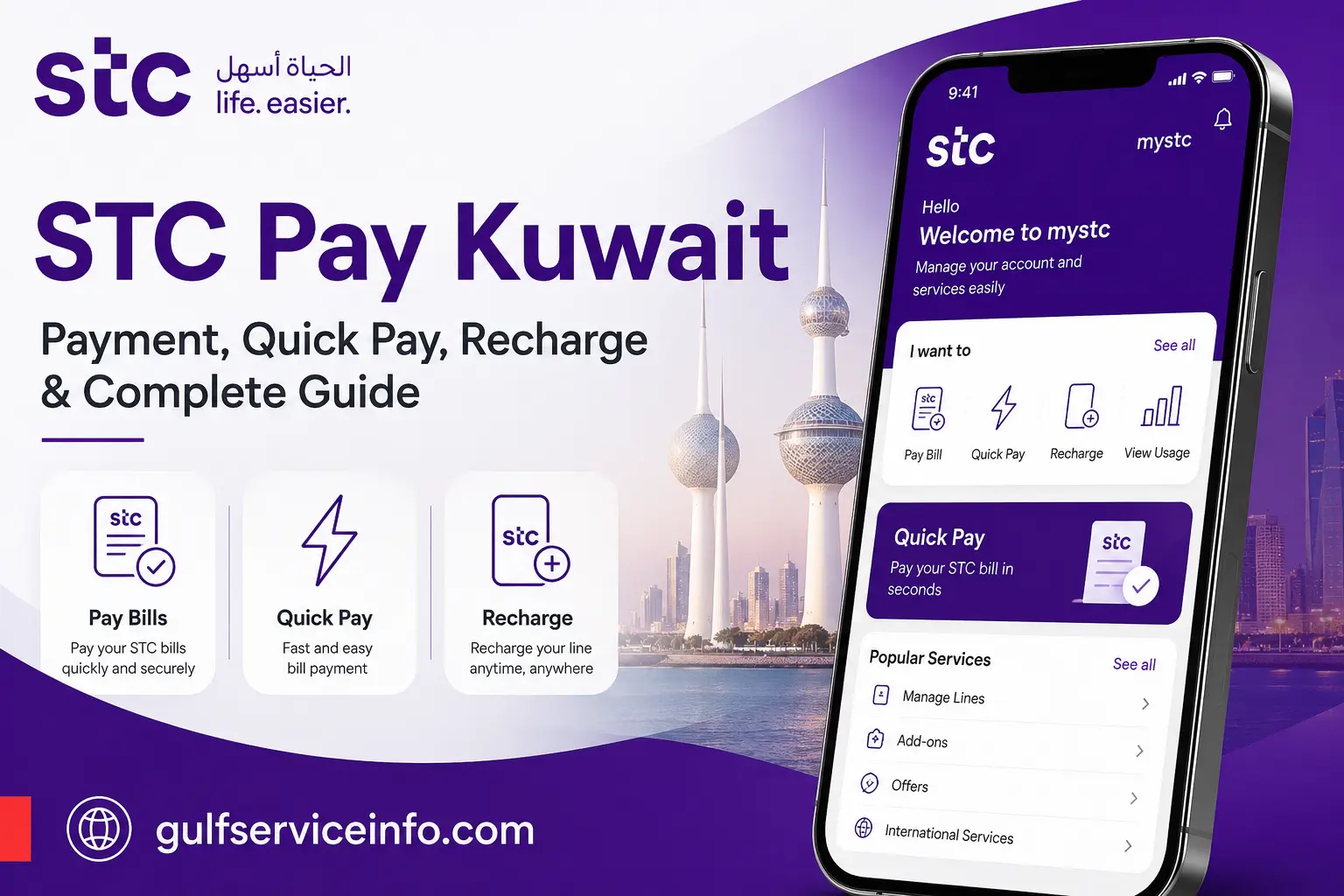
Paying an STC Kuwait bill online does not always require you to sign in to your full customer account. STC Quick Pay Kuwait provides a direct way to access payment services through the official stc website, while the same payment area also supports recharge options for eligible voice and internet lines.
There are several terms that can make an STC payment search confusing. STC Pay, STC Quick Pay, STC payment and STC recharge are often used together, although they do not necessarily refer to the same service. Understanding the difference helps you choose the right official channel for paying a bill, recharging a line or handling another payment requirement.
For more guides, updates, and useful information, visit our Gulf Service Info homepage.
What Does STC Quick Pay Kuwait Do?
STC Quick Pay Kuwait is an online payment channel that allows customers to handle eligible stc payments without first navigating the complete account-management area. The official Quick Pay interface requests identifying information and then provides a route towards the relevant payment service.
The stc payment area also includes options for bill payments, voice-line recharge, internet-line recharge and payments related to terminated lines. This means the service can be useful for different types of customers, depending on the line or account involved.
Official Quick Pay: STC Kuwait Quick Pay
Services available through the payment area
Depending on the account and service involved, customers may use the official payment channel to:
A key point to remember is that Quick Pay is presented as a payment channel rather than a separate mobile-wallet account. The official stc pages referenced here describe it in connection with bill payments and recharge services.
How the STC Quick Pay Process Works
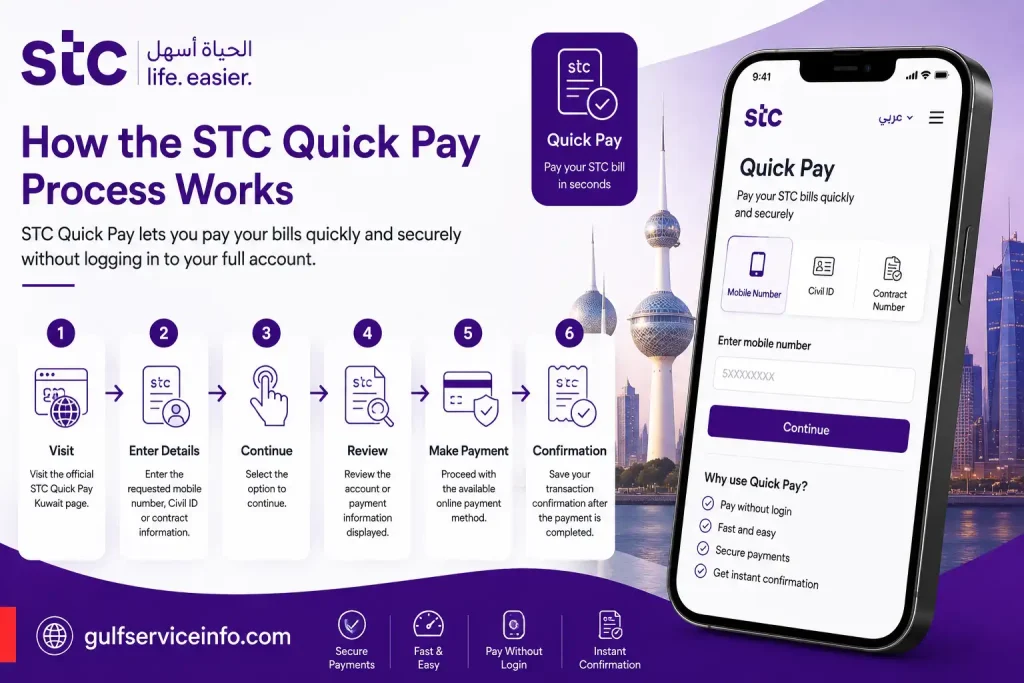
The Quick Pay process begins by identifying the relevant stc service. Depending on what you are paying for, the official interface may request your mobile number, Civil ID or contract number before allowing you to continue.
This direct approach means you can start from the payment page instead of first opening the full customer account area. Once the requested details are entered, the system can display the relevant payment information before you proceed with the transaction.
A typical payment journey looks like this:
Quick Pay or the mystc KW app?
The main advantage of Quick Pay is its direct payment-focused route. By comparison, the mystc KW app is intended for broader service management and allows customers to recharge, pay bills and check their services.
| Feature | STC Quick Pay | mystc KW |
|---|---|---|
| Bill payment | Yes | Yes |
| Recharge | Available through official payment channels | Yes |
| Account management | Payment-focused | Broader service management |
| Main purpose | Direct payment | Managing STC services |
| Suitable for | One-off or direct payments | Regular account and service management |
If you only need to settle a bill, Quick Pay provides a more focused route. If you regularly manage several stc services, the mystc KW app may offer more of the functions you need.
Accessing STC Quick Pay Kuwait Online
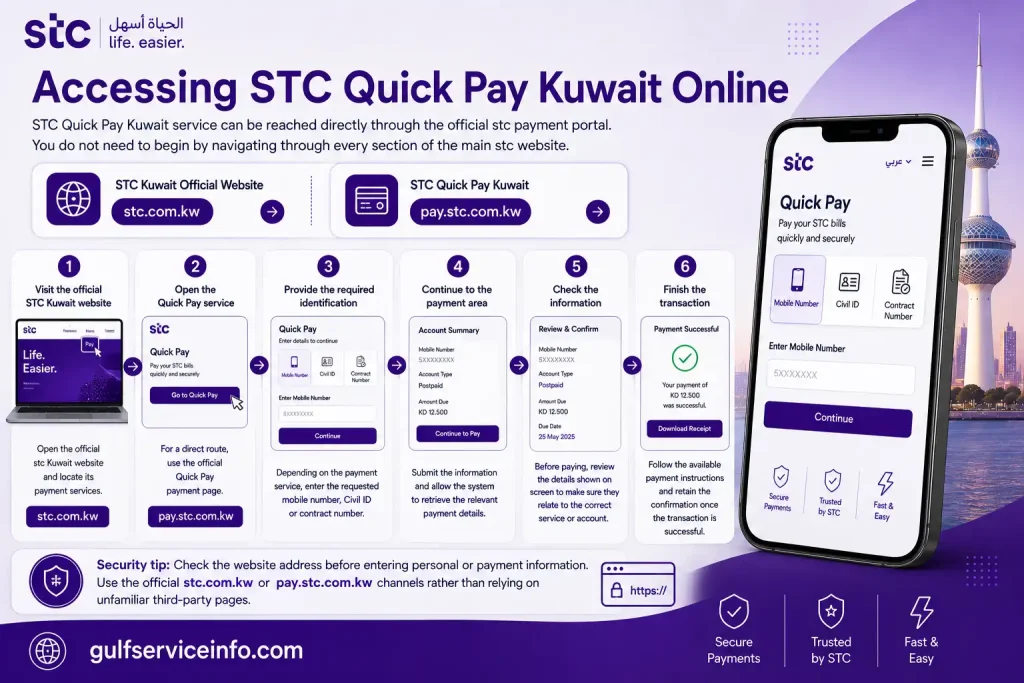
The STC Quick Pay Kuwait service can be reached directly through the official stc payment portal. You do not need to begin by navigating through every section of the main stc website.
Follow these steps
1. Visit the official stc Kuwait website
Open the official stc Kuwait website and locate its payment services.
STC Kuwait Official Website
2. Open the Quick Pay service
For a direct route, use the official Quick Pay payment page.
STC Quick Pay Kuwait
3. Provide the required identification
Depending on the payment service, enter the requested mobile number, Civil ID or contract number.
4. Continue to the payment area
Submit the information and allow the system to retrieve the relevant payment details.
5. Check the information
Before paying, review the details shown on screen to make sure they relate to the correct service or account.
6. Finish the transaction
Follow the available payment instructions and retain the confirmation once the transaction is successful.
Security tip: Check the website address before entering personal or payment information. Use the official
stc.com.kworpay.stc.com.kwchannels rather than relying on unfamiliar third-party pages.
Paying an STC Kuwait Bill Through Quick Pay
An STC Kuwait payment through Quick Pay starts with the information required to identify your account or service. The payment page is intended to provide a more direct route than entering the wider customer-management area first.
Online payment process
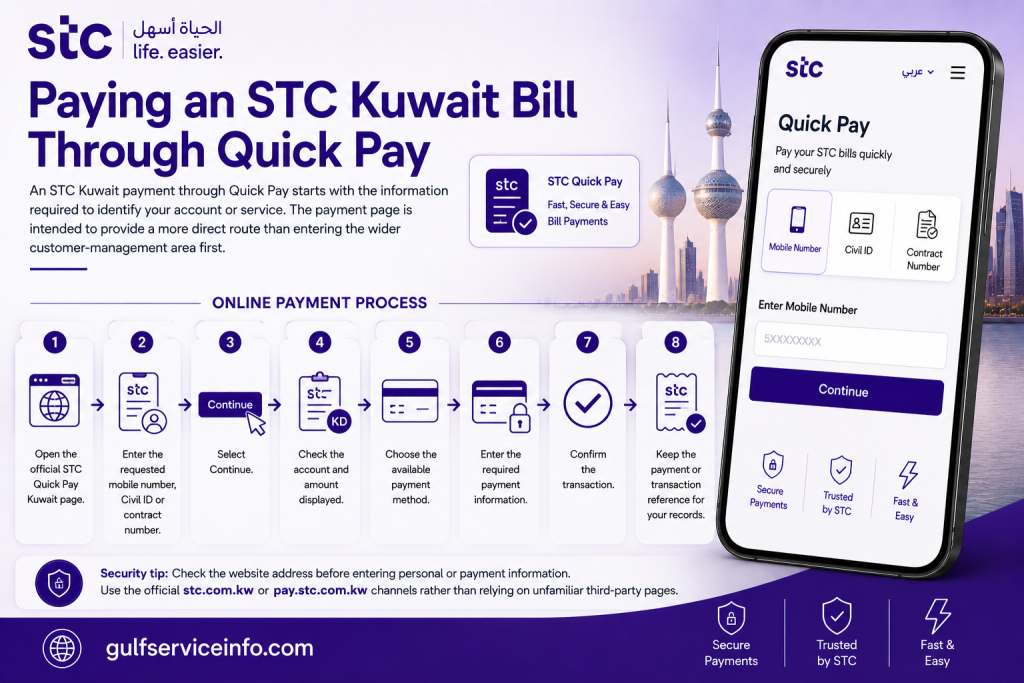
The appearance and order of individual screens can change when stc updates its online platform. For that reason, follow the instructions and labels displayed on the current official page rather than relying on older screenshots.
Paying through mystc KW
The mystc KW app is another official option for customers who want to pay bills while also managing other services. stc positions the app as a broader service-management tool that supports functions such as bill payment, recharge and service checking.
This makes the app particularly useful when your task involves more than a single STC payment.
STC Pay vs STC Quick Pay in Kuwait
The term STC Pay Kuwait can cause confusion because it may sound like the name of a separate digital wallet. However, the official stc Kuwait services discussed here distinguish between the Quick Pay payment channel and the mystc KW app.
For an STC Kuwait customer looking to make a payment, the relevant official routes include:
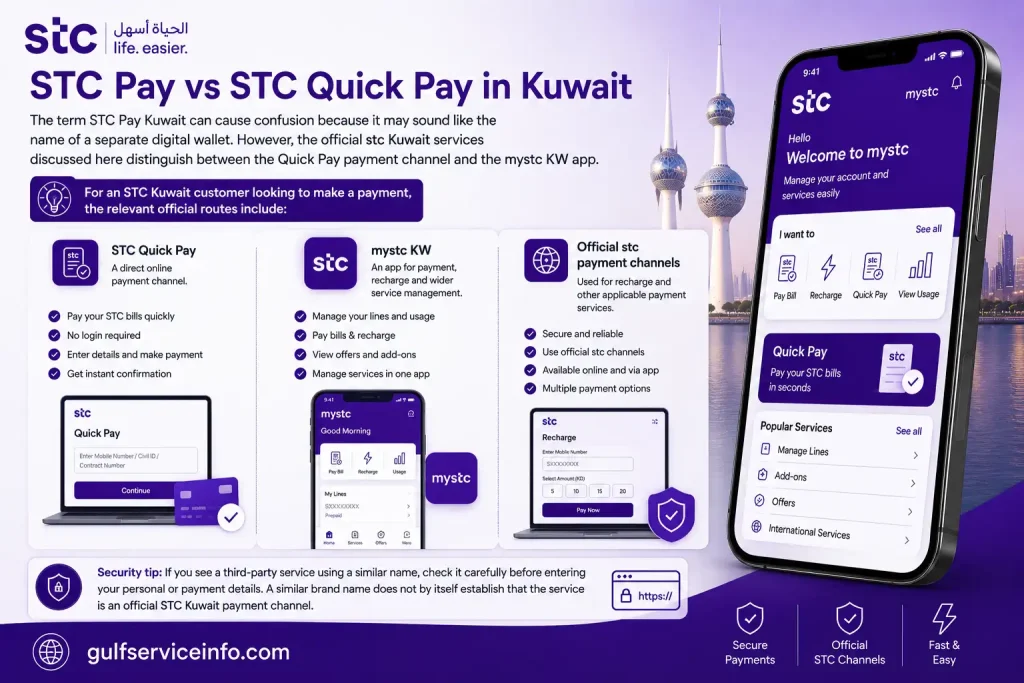
If you see a third-party service using a similar name, check it carefully before entering your personal or payment details. A similar brand name does not by itself establish that the service is an official STC Kuwait payment channel.
How to Recharge an STC Kuwait Number
STC Kuwait recharge services allow eligible voice and internet lines to be topped up through the official payment channels. The current payment area includes a dedicated recharge option, allowing customers to begin the process from the stc payment platform.
STC recharge process
You can generally approach the recharge service as follows:
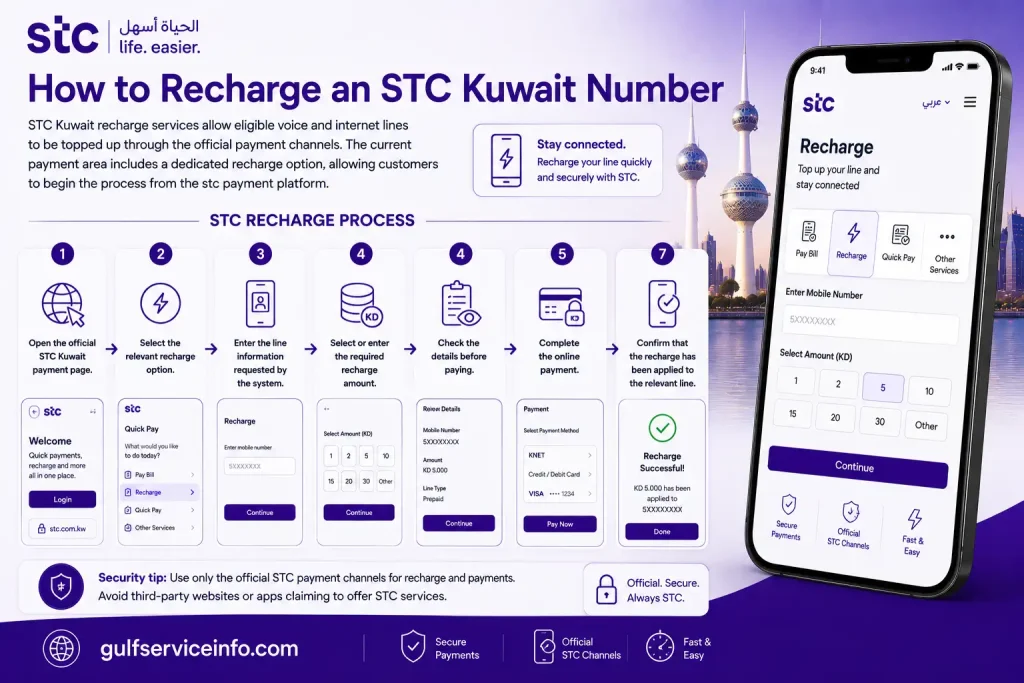
For prepaid users, stc also provides recharge and plan information through its official prepaid services. The available prepaid plans can differ in price and validity, while the mystc KW app can be used for managing supported services.
Key point to remember
Quick Pay, STC recharge and mystc KW serve related but different purposes. Quick Pay is focused on direct payment access, while the mystc KW app provides a wider service-management experience. When searching for STC Pay Kuwait, check the exact service you need before proceeding so that you use the appropriate official stc channel.
Recharging an STC Kuwait Prepaid Line
For prepaid customers, STC Recharge Quick Pay is mainly useful when you need to add credit to a service rather than pay a recurring monthly bill. The official stc Kuwait payment channels provide recharge options for eligible voice and internet lines, while the mystc KW app also supports both recharge and payment services.
Before starting, make sure you choose the recharge option that matches your service. A prepaid voice line should be handled through the applicable voice recharge route, while an eligible internet service should use its corresponding recharge option.
Steps to Recharge Through STC Kuwait
You can use the official payment channel by following these steps:
For frequent users, mystc KW may be more practical because it combines recharge and payment functions with wider stc service management.
Tip: Check the number before confirming the transaction. A payment can go through successfully but still reach the wrong line if incorrect details were entered.
How Can You Check an STC Kuwait Bill?
If you want to review your STC Kuwait bill before paying, the appropriate method depends on whether you need a quick payment check or broader account information.
The official stc payment interface provides Quick Pay with fields for Mobile No./Civil ID or Contract No. These details allow the system to identify the relevant service and move you into the payment process.
For customers who regularly manage their stc account, mystc KW offers a wider set of account and service functions. This can be useful when you want to review your information before deciding whether to make a payment.
Quick bill-check process
Use the following route:
Keep in mind that bill checking and bill payment are closely connected but are not exactly the same task. Quick Pay is centred on the payment journey, whereas mystc KW is better suited to customers who need wider account and service information.
How to Confirm Your STC Payment Status
Once an STC payment has been submitted, the first thing to check is whether the transaction produced a confirmation or reference number. Keep this information until you are certain that the payment has been applied successfully.
If the transaction appears uncertain, avoid immediately submitting another payment. First check your bank or payment provider to see whether the amount was actually charged, then use an official stc support channel if the payment and service status do not match.
Payment status checklist
If you are unsure whether a payment went through:
The official stc Kuwait website currently provides 24/7 customer-support channels, including chat and other support options.
Important: If your payment method already shows a completed transaction, avoid making another payment until you know what happened to the first one. This helps reduce the risk of an unnecessary duplicate charge.
Which STC Kuwait Payment Methods Can You Use?
The available STC Kuwait payment methods can vary according to the service and payment route. stc provides digital payment options through its website, including Quick Pay, while the official mystc KW app also supports payment and recharge functions.
Rather than relying on an outdated third-party list, check the options displayed during the transaction. The payment methods shown on the current official screen are the ones available for that particular payment flow.
Main official payment routes
| Payment route | Main purpose |
|---|---|
| STC Quick Pay | Direct online bill payment |
| STC website payment channels | Bill payments and recharge services |
| mystc KW app | Account management, payments and recharge |
| STC customer support | Assistance with payment and account issues |
The official stc website presents Quick Pay as a payment option and starts the process with information such as Mobile No./Civil ID or Contract No.
Which route suits your needs?
For a one-off bill payment:
Quick Pay provides a direct payment route.
For a prepaid recharge:
Use the applicable official recharge service or mystc KW.
For regular account management:
The mystc KW app provides a broader range of service-management functions.
If money has been deducted but the service has not updated:
Keep the transaction details and contact official stc support instead of immediately submitting another payment.
STC Quick Pay Kuwait Not Working? Try These Checks
An STC Quick Pay Kuwait problem can have several causes. Incorrect account details, a temporary website issue, a payment-provider interruption, browser problems or an unstable internet connection can all affect an online payment attempt.
Before trying the transaction repeatedly, work through the basic checks below.
STC Quick Pay troubleshooting steps
1. Verify your details
Quick Pay can request information such as your mobile number, Civil ID or contract number. Check every digit carefully before continuing.
2. Reopen the payment page
If the page becomes unresponsive or fails to load properly, close it and reopen the official stc payment page rather than repeatedly pressing the payment button.
3. Try a different browser or device
A browser session or compatibility issue can sometimes interfere with an online payment page. Using an up-to-date browser or another device may help identify whether the problem is local to your current setup.
4. Check your internet connection
An unstable connection can interrupt the payment process. Make sure your connection is working properly before starting another attempt.
5. Check whether you have already been charged
This is especially important after an error message. If your bank or payment provider shows a completed charge, do not immediately repeat the transaction.
6. Keep evidence of the transaction
Save any confirmation screen, payment reference or bank transaction information. These details can help stc identify the payment if you need assistance.
7. Contact official STC support
If the problem continues, use the customer-support channels provided by the official stc Kuwait website.
What if Quick Pay displays an error?
First check that you entered the correct mobile number, Civil ID or contract number. These identifiers are used at the beginning of the current Quick Pay payment process, so an incorrect entry can prevent the system from locating the relevant service.
If the details are correct but the error continues, reopen the official payment page and try again after checking your browser and internet connection.
What if money was deducted but the bill still appears unpaid?
Do not assume that another payment is required. Check your payment confirmation and bank transaction first, then allow time for the payment status to update.
If the amount remains unresolved, contact stc through an official support channel and provide the transaction information. This gives the support team the details needed to investigate the payment.
What if the Quick Pay page is unavailable?
If the Quick Pay page is temporarily inaccessible, check the official stc Kuwait website for other available digital payment and service channels. The mystc KW app may also provide an alternative route for supported payments and recharges.
The key is to use an official stc channel and confirm the transaction status before attempting multiple payments.
STC Quick Pay vs STC Pay: Understanding the Difference
STC Quick Pay and STC Pay may appear together in search results, but they should not be assumed to describe the same service. On the official stc Kuwait website, Quick Pay is presented as a direct way to pay an stc bill, while the mystc KW app provides wider account and service-management features, including recharge and bill payments.
If you’re looking for STC Quick Pay Kuwait, the main difference is the purpose of each option:
| Service | Main purpose | Typical use |
|---|---|---|
| STC Quick Pay | Direct online payment | Pay an stc bill |
| STC Recharge | Add credit to a line | Recharge prepaid voice or internet services |
| mystc KW | Manage stc services | Recharge, pay bills and check account services |
| STC Pay | Payment-related search term | Confirm the specific service on the official stc Kuwait website |
The official stc Kuwait payment area currently brings together several payment options, including Quick Pay, bill payment, line recharge and payment for terminated lines.
So, if you see the term STC Pay elsewhere online, don’t assume it automatically refers to STC Quick Pay Kuwait. The safest approach is to check the current service description on the official stc Kuwait website before entering payment or account information.
Common Questions About STC Quick Pay Kuwait
Final Thoughts
For customers who only need to settle an outstanding stc bill, STC Quick Pay Kuwait provides a direct online payment route. The official stc payment area also includes separate options for recharging voice or internet lines and making payments related to terminated lines. The mystc KW app is broader, with features for recharging, paying bills and checking account-related information. Choosing between the two therefore depends mainly on what you need to do: use Quick Pay for a direct payment, or use mystc KW when you need wider service management. If a payment does not appear to have gone through, check the transaction status and retain your confirmation details before attempting another payment.
Read More: Explore our related Gulf government service guides for more step-by-step information and helpful updates.