TLS Login: TLScontact Account Login, Registration & Visa Guide

Published On: September 24, 2026
Follow Us
TLS Login TLScontact account login, registration and visa guide

Need to access your TLS Login account? The safest place to begin is the official TLScontact website, because the login page you need depends on your country of residence and the visa destination.

TLScontact supports governments with parts of the visa application process, including appointment scheduling, document submission, biometric collection and passport return. Your online account can therefore be an important part of managing your application, but there is not one universal TLS Login page for every applicant.

For more useful guides on visa applications, government services, and online portals, visit Gulf Service Info.

Quick answer: Open the official TLScontact website, select your country of residence and destination, and follow the relevant visa application journey. From the local TLScontact portal, you can then sign in or register an account.

What Does TLS Login Do?

A TLScontact account gives applicants access to the online part of their visa application journey. Depending on the country and visa service involved, you may be able to continue an application, manage appointment information, access application updates or track your case.

TLScontact handles administrative services for government clients, while the visa decision is made by the relevant government or consular authority. Creating an account, submitting an application or securing an appointment does not itself mean that a visa has been approved.

Your application journey may involve several stages, such as:

  • Selecting the appropriate TLScontact Visa Application Centre
  • Creating or activating an account
  • Providing personal and application details
  • Uploading documents when required
  • Choosing available additional services
  • Booking an appointment
  • Paying the applicable fees
  • Visiting the Visa Application Centre
  • Completing biometric enrolment where required
  • Checking application progress where tracking is available
  • Collecting your passport or arranging delivery

The exact process varies according to the visa destination, country of residence and type of application.

Start From the Correct TLScontact Portal

Rather than searching for a generic TLS Login URL, use the official TLScontact visa journey first. This reduces the risk of reaching the wrong country-specific portal or an unofficial website.

You will generally need to identify:

  • Where you live
  • Where you intend to travel
  • The relevant TLScontact Visa Application Centre
  • The instructions provided for your application

Once those details are selected, TLScontact can direct you towards the appropriate local application website.

How to Sign In to Your TLScontact Account

Because TLScontact operates different application journeys for different destinations and government clients, your TLS Login page may be specific to your application location.

Follow this route instead of using an unfamiliar login link.

1. Visit TLScontact

Go to the official TLScontact website:

Before entering any personal information, check that you are using the genuine TLScontact website.
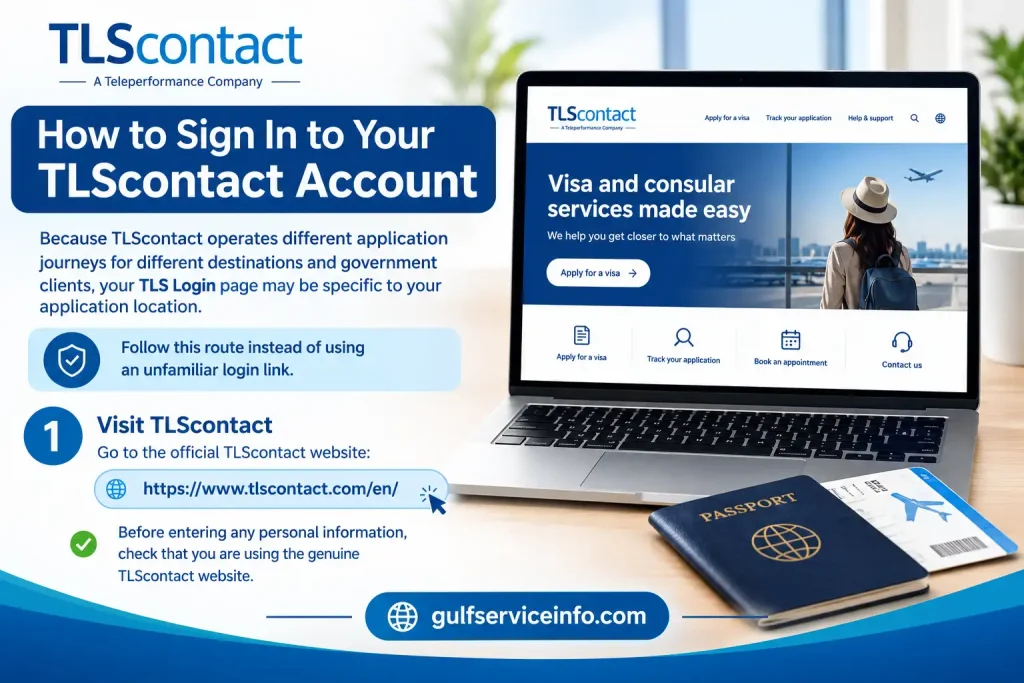
Visit TLScontact official website for account login and visa services

2. Open the Visa Journey

Use the official visa journey page and enter your country of residence and destination:
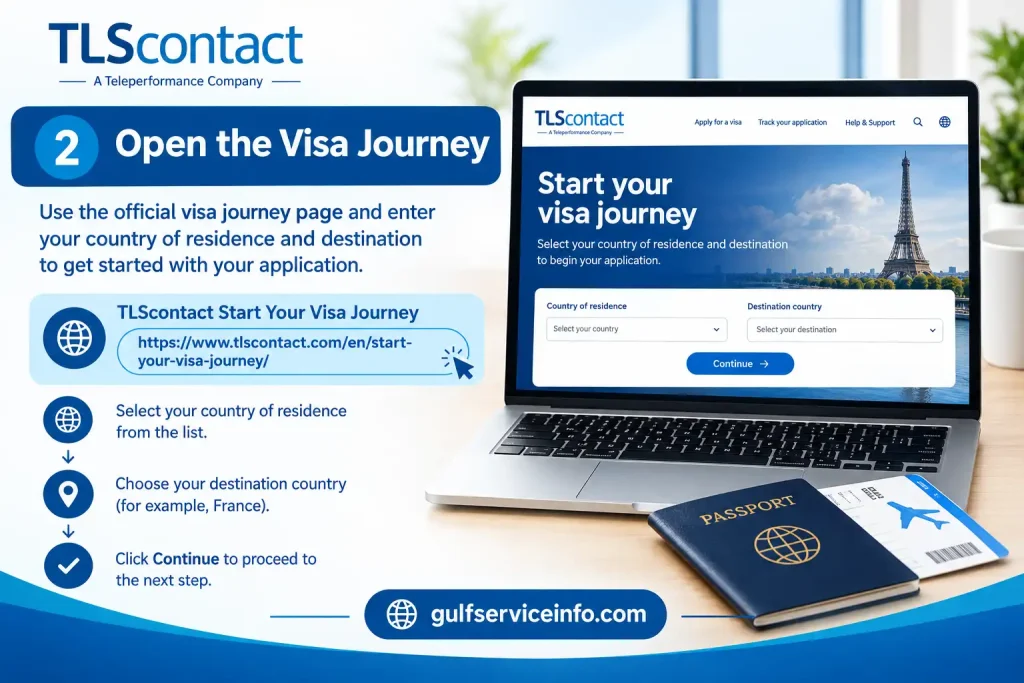
Open the TLScontact Visa Journey page and select your country of residence and destination

3. Identify Your Application Centre

Select the Visa Application Centre that applies to your location and destination. The available centre and application process depend on the arrangements for that particular visa service.
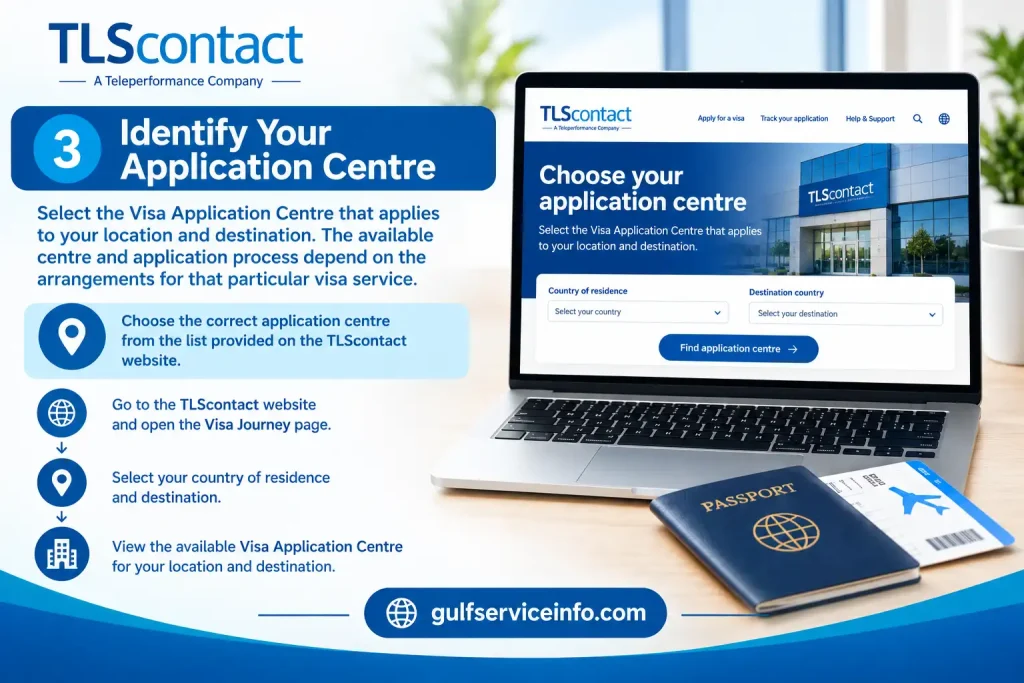
Identify your TLScontact Visa Application Centre based on your location and destination

4. Find the Account Login

After reaching the relevant local TLScontact application portal, look for the account option labelled Login, Sign in, or similar wording.
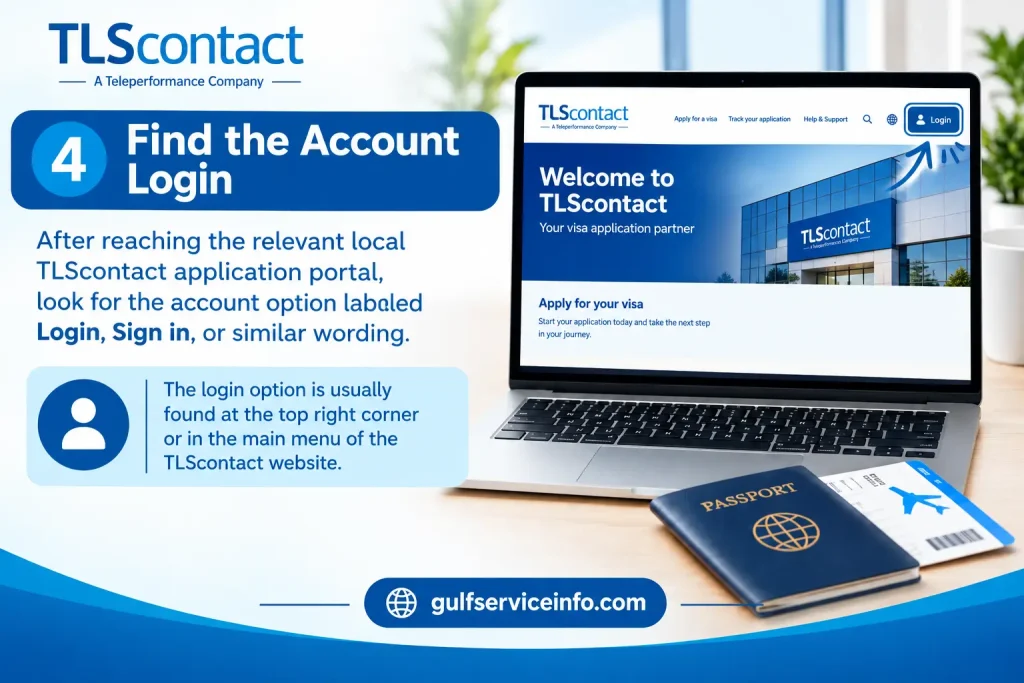
Find the Account Login option on the TLScontact visa application portal

5. Enter Your Credentials

Most account login pages require the details associated with your TLScontact account, such as:

  • Registered email address
  • Account password
  • Any additional security verification requested

Select Login after entering the required information.
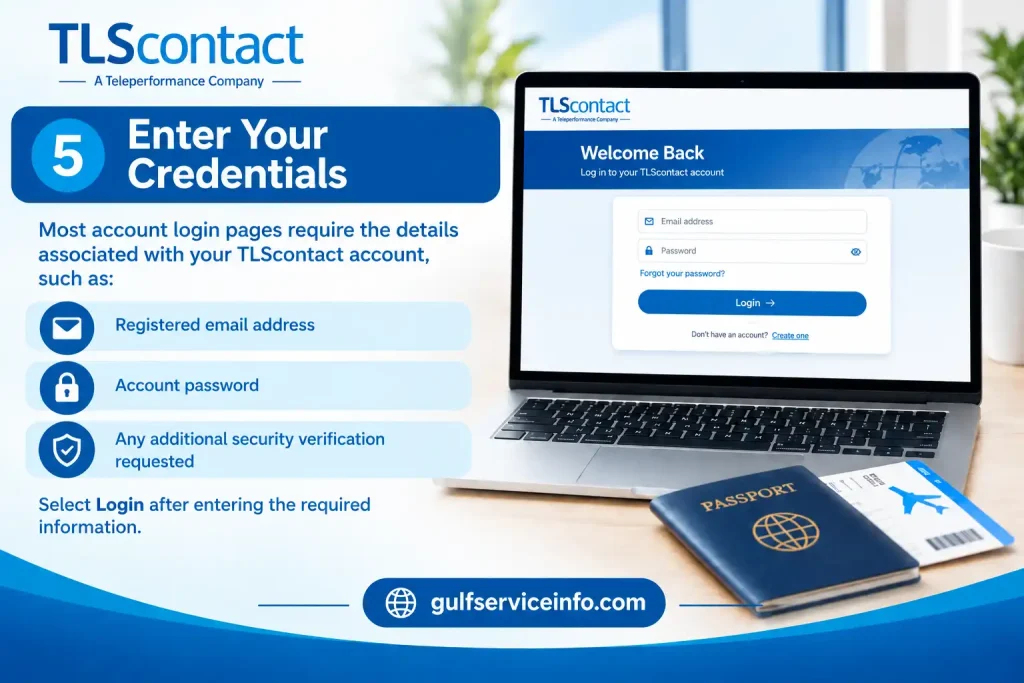
Enter your registered email address, password, and security verification on the TLScontact login page

Before You Sign In

A few checks can prevent unnecessary account problems:

  • Confirm that you’re using the correct TLScontact country portal.
  • Use the email address connected to your application.
  • Check your password carefully before submitting it.
  • Make sure the page has loaded properly.
  • Confirm that you selected the correct visa destination.
  • Use the recovery option if you’ve forgotten your password.

Don’t repeatedly guess a forgotten password. If your local TLScontact portal provides account recovery, use that process instead.

Creating a New TLScontact Account

If you haven’t registered before, you’ll normally create your account through the TLScontact application website linked to your visa destination.

Registration details can vary between application journeys. However, an accessible email address and password are commonly part of the process.

A Practical Registration Route

Start with the official visa journey:
Official TLScontact Visa Journey

Then work through the following sequence:

Choose your location and destination
Enter your country of residence and the country you’re travelling to so the relevant application route can be identified.

Select the appropriate Visa Application Centre
The centre available to you depends on the destination and your place of residence.

Open registration
Choose the option to create a new TLScontact account.

Provide an accessible email address
Use an email account you can regularly access, as TLScontact may use it for registration or account-related communication.

Set your password
Follow the password requirements displayed on the registration page you’re using. Requirements can differ between TLScontact application portals. For example, one current registration page requires a password of 8–20 characters containing lower-case and upper-case letters, numbers and supported special characters.

Accept the required conditions
Review the applicable terms and privacy information before submitting the registration.

Activate your account if required
If an activation or confirmation email is sent, open it and follow the instructions provided.

Return to TLS Login
Once the registration process is finished, use your registered email address and new password to access the account.

Keep Your Account Information Safe

Visa applications aren’t always completed in one sitting. You may need to return to your TLScontact account later to continue an application, manage an appointment or review available updates.

Keep your login details and any application identifiers in a secure place. For certain UK Visas and Immigration application journeys, for example, TLScontact guidance advises applicants to retain their password, GWF number and email address for future access.

Account tip: If you can’t find an existing application, don’t immediately create another account. First confirm that you’re using the correct TLScontact country portal and check the account-recovery options available to you.

Official TLScontact Websites and Support

PurposeOfficial link
TLScontact main websiteTLScontact official website
Start a visa journeyTLScontact Visa Journey
Contact TLScontactTLScontact Contact Us

For application-specific questions, TLScontact directs applicants towards their local Visa Application Centre, since procedures and support can vary by country and visa service.

Signing In to Your TLScontact Account

Once your TLScontact account has been created, getting back into it is usually a straightforward process. The key is to use the TLScontact portal linked to your visa application, as the login page and available features can differ depending on the destination.

If you’re unsure which portal applies to you, begin with the official TLScontact visa journey and select your country of residence and destination.

TLS Login: What to Do

  1. Find your correct TLScontact portal
    Visit the official TLScontact visa journey and enter the required location and destination details.
  2. Go to account access
    On the relevant local website, select Login, Sign in, or the equivalent option provided for applicants.
  3. Use your registered email
    Enter the email address you used when registering the TLScontact account. Using a different address may prevent the system from locating your application.
  4. Enter your password
    Type the password associated with the account. If you’ve forgotten it, use the recovery facility rather than opening another account.
  5. Complete additional security checks
    Some portals may ask for extra verification before allowing you to continue.
  6. Access your application area
    After a successful TLS login, the options displayed will depend on your visa programme. These may include application information, appointment management or other available services.

Helpful tip: Once you’ve identified the correct local TLScontact portal, bookmark it. This can save time and helps you avoid accidentally returning to an unofficial website.
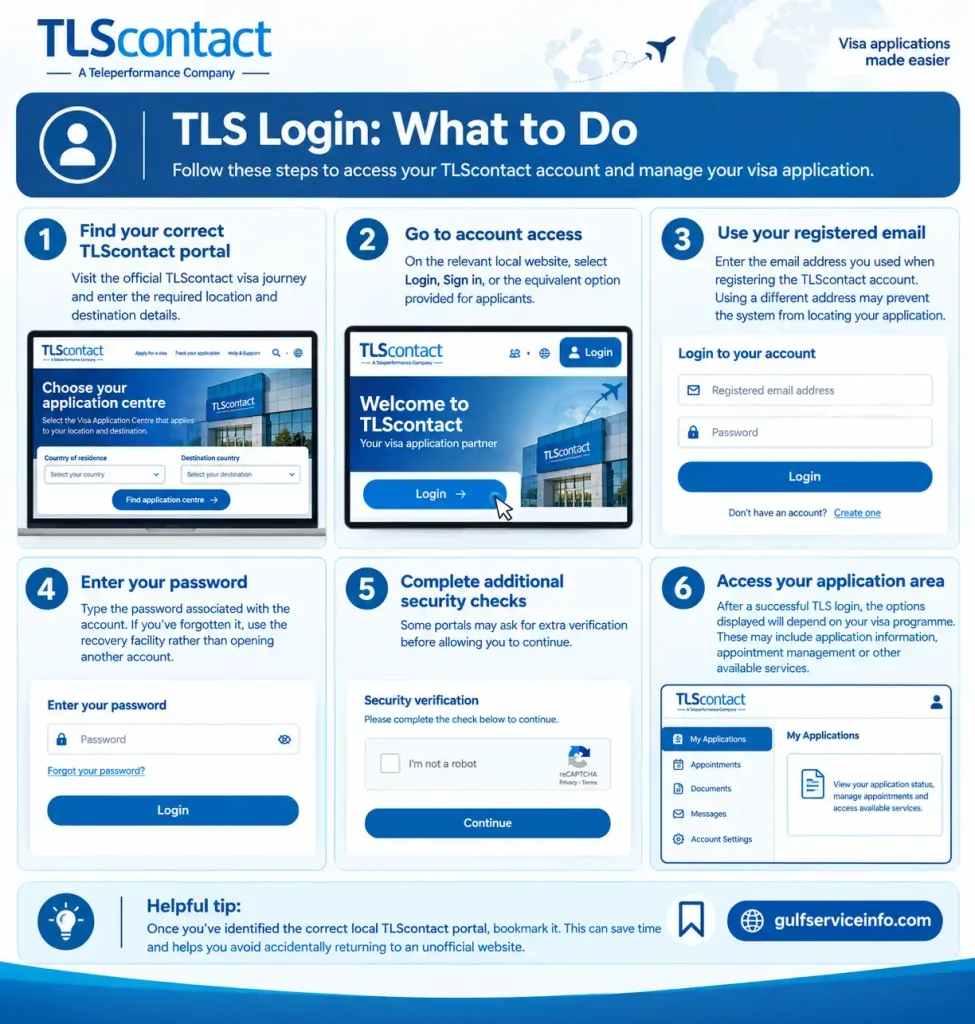
TLS Login steps for accessing a TLScontact account and visa application portal

What Is Available After TLS Login?

Your TLScontact account is mainly used to manage the administrative side of your visa application. What you can see after signing in depends on your destination, visa type and the application system being used.

Depending on your particular application, your account may allow you to:

  • Continue an application that hasn’t been finished
  • Check information already entered
  • View or manage appointment details
  • Choose available appointment-related services
  • Upload documents when online submission is supported
  • Receive or view application updates
  • Read instructions for your Visa Application Centre visit
  • Access available tracking information
  • Update certain account details

These features aren’t identical for every applicant.

It’s also worth keeping TLScontact’s role clear. TLScontact can provide administrative and application-centre services, but the relevant government or consular authority makes the visa decision. An update shown in your TLScontact account should therefore not automatically be treated as a final visa outcome.

Forgot Your TLS Login Password? Here’s What to Do

A forgotten password doesn’t usually mean you need to register a new account. If your TLScontact portal has a Forgot password, Reset password, or similar link, use that facility first.

The exact recovery screen can vary between TLScontact application portals, so follow the instructions shown on the login page associated with your application.

Password Recovery Process

First, return to the correct login page.
Use the official TLScontact visa journey and select the relevant country and destination.

Next, open password recovery.
Look for wording such as Forgot your password? or Reset password.

Enter the email linked to your account.
Use the same email address that was registered with TLScontact.

Check your inbox.
If the account details are recognised, follow the recovery instructions sent to your registered email.

Set a new password.
Where a reset link is provided, use it to create a new password that meets the requirements displayed on your portal.

Sign in again.
Return to the TLS Login page and use your registered email address together with the new password.

Didn’t Receive the Password-Reset Email?

Before trying to create another account, check the following:

  • Spam or junk folders
  • Promotional folders
  • Email filtering rules
  • Whether you entered the correct email address
  • Whether you’re using the same TLScontact portal where the account was originally created

A missing recovery email doesn’t necessarily mean that your application is gone. Avoid creating duplicate accounts unless the official TLScontact instructions specifically require it.

If you’re still unable to regain access, use the support route provided by your relevant TLScontact Visa Application Centre. You can find the appropriate contact route through the official TLScontact Contact Us page.

Booking a TLScontact Visa Appointment

For many visa applications, appointment booking takes place through the relevant TLScontact online portal. The exact procedure isn’t the same for every destination, so confirm the application route before selecting a date.

Before you begin, check that you’ve chosen the correct:

  • Country of residence
  • Visa destination
  • Visa category
  • Visa Application Centre
  • Application route

Appointment Booking Process

Start at TLScontact.
Open the official TLScontact visa journey, then select your location and destination.

Follow the destination-specific instructions.
Your local application website will explain what needs to be completed before an appointment can be booked. In some cases, another government or visa application step may come first.

Register or use your existing account.
New applicants may need to create an account, while existing applicants should use their current TLS login.

Complete the requested application information.
Enter your details carefully. Your name, passport information and other personal details should correspond with your official documents.

Review available appointment services.
If appointment booking is handled through TLScontact, the portal will display the services available for your application.

Choose an available slot.
Select an appointment date and time from the options shown on screen. Availability can change, so a slot that’s unavailable today may appear later.
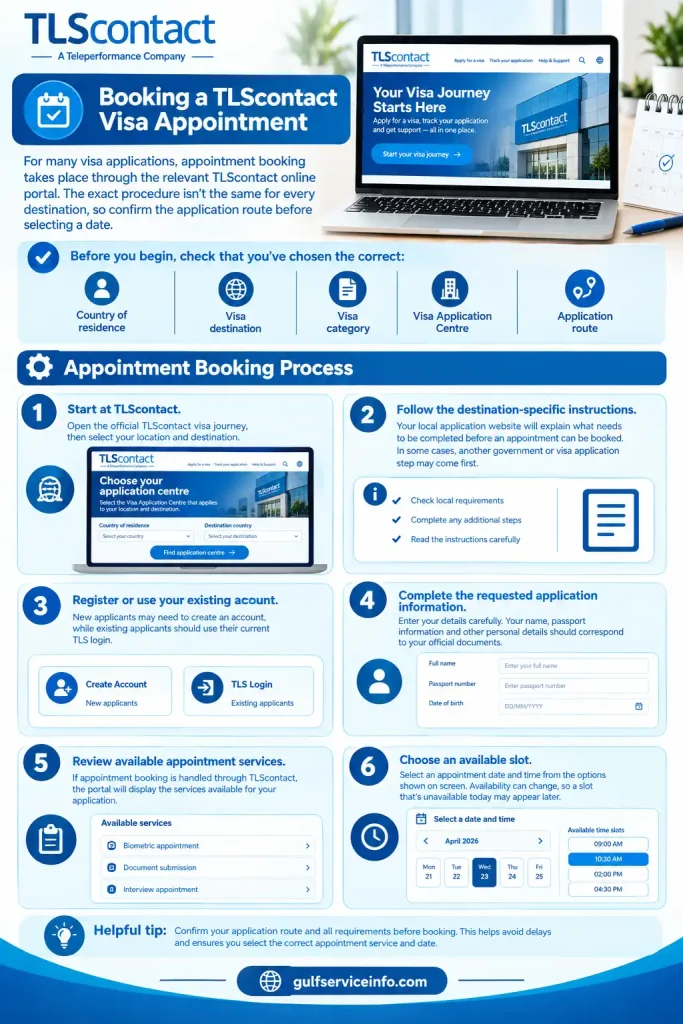
Booking a TLScontact visa appointment online by selecting the correct application route, service, date, and time slot

Check Everything Before Confirming

Before finalising the appointment, review:

DetailWhat to check
ApplicantName matches your official documents
PassportDetails are correct
VisaCorrect category selected
CentreCorrect Visa Application Centre
DateAppointment date is suitable
TimeAppointment time is correct
ServicesSelected services are accurate

If payment is required, complete it using the instructions shown on the official portal. Once the booking has been confirmed, save the appointment confirmation and any reference number provided.

Before You Visit the Visa Application Centre

Don’t prepare only for the appointment time. Read the instructions for your particular Visa Application Centre and gather the required documents in advance.

Depending on the government client and application process, TLScontact Visa Application Centres can provide services such as document collection, biometric enrolment and passport return.

Important: Booking a TLScontact appointment is one stage of the visa application process. It isn’t confirmation that the visa has been approved.

How to Track a Visa Application Through TLScontact

A TLS login may give you access to application-related information, but tracking isn’t identical across every visa programme.

Some applications include online tracking within the TLScontact portal, while other processes may provide separate tracking information or instructions during the application.

General TLScontact Tracking Steps

  • Open the TLScontact website connected to your application.
  • Select your country and destination if requested.
  • Sign in using your existing TLS login.
  • Look for an application, tracking or status section.
  • Enter any reference information requested.
  • Review the latest status or message displayed.

Keep your application reference number, passport information and appointment documents accessible. You may need these details at different stages of the application.

Understanding Application Status

A status message generally indicates where your application sits within the relevant administrative or processing workflow. It shouldn’t automatically be interpreted as the final visa decision.

The actual visa decision is made by the competent government or consular authority responsible for the application.

If your TLScontact account indicates that the application has been transferred to or is being processed by the relevant authority, further processing may take place outside the TLScontact Visa Application Centre.

TLS Login Not Working? Common Problems and Fixes

A failed login doesn’t always mean there’s a problem with your application. In many cases, the issue comes down to the wrong portal, incorrect credentials, an unavailable email or a temporary technical problem.

Login or application problemWhat you can try
Password doesn’t workUse the password-reset option
Wrong email enteredConfirm the email used during registration
Login page won’t openCheck that you’re on the correct country-specific portal
Reset email hasn’t arrivedCheck spam, junk and email filters
Account isn’t recognisedConfirm you’re using the portal connected to your application
No appointment appearsCheck the official portal again later
Application isn’t visibleSign in to the original account
Website displays an errorRefresh, clear browser data or try another supported browser
Unsure which portal to useReturn to the official TLScontact visa journey

If You’ve Forgotten Your Password

Use Forgot password or the equivalent recovery option on your local TLScontact portal. Creating another account should not be your first response to a forgotten password.

If You Don’t Remember Your Email Address

Look through previous TLScontact messages, registration emails and appointment confirmations. These may help identify the email address connected with your account.

If Your Application Isn’t Showing

Check that you’re using the same country-specific TLScontact portal where the application was created. TLScontact operates different websites for different visa programmes, so two pages that look similar may not belong to the same application system.

If No Appointment Slots Are Available

Appointment availability can change. If no suitable slot is displayed, check the official portal again according to its instructions. Avoid unofficial sellers or claims that someone can guarantee an appointment slot.

If the Website Keeps Showing an Error

Try these basic troubleshooting steps:

  • Refresh the page.
  • Close and reopen your browser.
  • Use an updated browser.
  • Clear cached website data if necessary.
  • Try another device or internet connection.
  • Return to the portal through the official TLScontact website.

If the issue continues after these checks, contact the appropriate TLScontact Visa Application Centre through its official support channel.

Keeping Your TLScontact Account Secure

Your TLS login is connected to information about your visa application, so your account details should be treated like any other sensitive online credentials. A few basic precautions can reduce the risk of someone accessing your application information or making changes without your knowledge.

Always Start With the Official TLScontact Portal

The safest way to reach your account is through the official TLScontact website or the country-specific application portal linked from it:

TLScontact Official Website

If you’re starting a new application, use the official:

Start Your TLScontact Visa Journey

Be cautious with unfamiliar login links shared through social media, search results or messages from people offering guaranteed appointments. Instead, navigate from the official TLScontact website to the Visa Application Centre relevant to your application.

Protect Your Password

Your TLScontact password should remain private. Don’t send it to anyone through email, social media, messaging apps or public forums.

If you think somebody else may have obtained your password, use the password-recovery facility available through your relevant TLScontact portal and replace it with a new one.

Keep Access to Your Registered Email

The email attached to your TLScontact account can be important for application communication and password recovery. Make sure you can still access that inbox.

If your email address changes, check the account-management options on your particular application portal to see whether an official update process is available.

Avoid Creating Multiple Accounts

Having trouble accessing an existing application doesn’t necessarily mean you need a new account. Try the TLS login recovery process first, or contact the relevant Visa Application Centre if you cannot regain access.

Creating several accounts can make it more difficult to identify which account contains your application information.

Keep Your Application Records Safe

It’s useful to retain important information throughout the visa process, including:

  • TLScontact account email
  • Application reference number
  • Appointment confirmation
  • Payment confirmation, where applicable
  • Important TLScontact emails
  • Visa application documents
  • Appointment date and time

Store these records securely. Avoid uploading screenshots containing passport details, reference numbers or other personal information to public websites or social media.

Check the Website Before Entering Personal Details

Before entering your email, password, passport information or payment details, check that you’re on the correct TLScontact application portal.

Because TLScontact operates different application websites for different destinations and government clients, the safest route is to reach your relevant portal through the official visa journey rather than clicking an unfamiliar login link.

TLS Login Mistakes That Can Cause Problems

Small mistakes can create unnecessary delays during a visa application. The following are worth checking before you contact support.

Choosing the Wrong TLScontact Portal

If your application isn’t appearing after TLS login, first confirm that you’ve reached the correct country-specific website.

A login associated with one destination or application route may not work on another TLScontact portal. Return to the official website, select your country of residence and destination, and follow the appropriate application journey.

Creating a New Account Instead of Recovering the Existing One

If you’ve forgotten your password, don’t immediately register again.

Use the account-recovery option first. If that doesn’t resolve the problem, contact the relevant Visa Application Centre for guidance.

Leaving Everything Until the Last Minute

Give yourself enough time to deal with registration, application information, documents and appointment booking. Visa application processes can involve multiple stages, and appointment availability may change.

Starting early gives you more time to deal with an unexpected account or technical issue.

Trusting Unofficial Appointment Services

Be wary of websites or individuals claiming to guarantee TLScontact appointments. Use the official application portal and follow the instructions provided for your Visa Application Centre.

Assuming TLScontact Makes the Visa Decision

TLScontact supports administrative parts of the application process. The relevant government or consular authority is responsible for assessing the application and making the visa decision.

This distinction matters when you’re checking an application status through your TLS login.

Frequently Asked Questions About TLS Login

The main TLScontact website is the company’s global online home, where applicants can learn about its visa application services and find the appropriate application route.

You can access it here:

TLScontact Official Website

However, you may not complete your entire visa application through the main homepage. TLScontact operates country- and destination-specific Visa Application Centres, so applicants are often directed to a separate regional or service portal based on the visa they are applying for.

For example:

  • UK Visa and Citizenship (UKVCAS): TLScontact UKVCAS
  • Schengen and other country-specific visas: TLScontact uses different portals depending on the destination. For example, applicants using the French Visa Application Centre may be directed to the French TLScontact visa portal.

Which TLScontact Website Should You Use?

The correct website depends on where you live and which country you are applying to visit. Rather than choosing a TLScontact subdomain at random, start from the main TLScontact website and follow the relevant visa journey for your application.

This helps ensure that you reach the correct Visa Application Centre and use the appropriate TLS login, registration and appointment system.

A TLScontact login may fail for several reasons, ranging from browser problems to temporary security restrictions. If you’re unable to access your account, you can first try the TLScontact portal associated with your application and then work through the common fixes below.

TLScontact Portal

Common TLScontact Login Problems and Fixes

1. Browser or Cookie Problems

Old cached files, cookies or strict browser privacy settings can sometimes interfere with the TLScontact login page.

Try these steps:

  • Clear your browser cache and cookies.
  • Allow third-party cookies if your browser is blocking them.
  • Temporarily adjust strict tracking-protection settings.
  • Try a different browser, such as Firefox or Safari, instead of your usual browser.

A fresh browser session can sometimes resolve a login page that repeatedly fails to load correctly.

2. VPN Connection

If you’re connected through a VPN, disconnect it before attempting to sign in again. TLScontact security systems may restrict connections originating from VPN networks.

After disabling the VPN, try your normal home internet connection or mobile data.

3. Login Loops or Virtual Queues

Some applicants may encounter a page that keeps refreshing, redirects repeatedly or leaves them stuck in a virtual waiting queue.

If this happens, try returning to the specific local TLScontact application centre rather than repeatedly following a direct redirect link from another government or visa website. Community reports indicate that this approach has resolved login loops for some applicants.

4. Temporary Security or IP Restrictions

Repeatedly entering incorrect login information or refreshing the page too quickly can potentially trigger a temporary security restriction.

If you believe your connection has been temporarily blocked, avoid repeatedly attempting to log in. Wait before trying again and make sure you’re using the correct credentials and application portal.

Tip: Before troubleshooting further, confirm that you’re using the TLScontact website associated with your particular country, destination and visa application. Different TLScontact portals can have different login systems.

Booking a TLS visa appointment usually comes after you have completed the required government visa application. Once that stage is finished, you can use the relevant TLScontact portal to set up your appointment and prepare for your visit.

Start from the official TLScontact Visa Journey and select the destination and application location that apply to you.

TLS Visa Appointment Booking Process

1. Complete the required visa application

Before using TLScontact, complete the online visa application through the relevant government or national visa portal.

For example, depending on your destination, you may need to use services such as France-Visas or GOV.UK. After submitting the required application, you’ll normally receive an application reference or another identifier, such as a Unique Application Number (UAN).

Keep this information available because it may be required when you continue to the TLScontact stage.

2. Access the TLScontact Journey Portal

Next, open the official TLScontact journey page and select your destination country and application location.

You may then be asked to register or sign in and provide the application details connected with your visa request.

3. Choose an appointment slot

Once your application is linked to the TLScontact system, check the available appointments at the relevant Visa Application Centre.

Select a suitable date and time from the slots displayed by the portal.

Appointment availability can depend on the centre and application route, so only choose from the options actually shown in your account.

4. Pay the required service fees

If your application requires TLScontact appointment or service fees, complete the payment using the instructions provided by the official portal.

The source information indicates that some payments may need to be completed within a stated period, such as 72 hours, to secure the selected appointment. Check the deadline shown on your own TLScontact portal rather than assuming the same payment window applies to every application.

5. Save your appointment confirmation

After the appointment has been confirmed, save or print the appointment confirmation letter.

Before travelling to the Visa Application Centre, organise the physical documents required for your specific visa application and check the centre’s instructions carefully.

Important: The exact appointment process can vary according to the destination country, visa programme and Visa Application Centre. Always follow the instructions displayed on the official TLScontact portal for your application.

Applicants can run into several types of problems when using TLScontact, particularly around the online portal, appointment availability and customer support. The exact experience can vary by application centre and visa programme, but the issues below are among the problems reported in the supplied source material.

Website and Technical Problems

Website errors and loading failures

The TLScontact website may sometimes become difficult to use, particularly when traffic is high. Applicants can encounter error pages, loading screens that do not finish or other temporary website failures.

If the page isn’t responding, avoid repeatedly refreshing it. Give the site some time and try again through the correct TLScontact application portal.

Temporary IP or rate-limit restrictions

Repeatedly refreshing pages or opening several TLScontact tabs at once may trigger temporary security or rate-limit restrictions. In some cases, users may see messages such as an invalid username or password even when their credentials are correct.

If this happens, stop repeated login attempts and wait before trying again.

Payment errors

Payment can also cause problems during the TLScontact booking process. Applicants may encounter checkout errors, including messages such as “Invalid MERCHANT ID or ACCOUNT”, when attempting to pay service fees.

If a payment fails, check the instructions and payment status shown by the official portal before attempting the transaction repeatedly.

TLScontact Appointment Problems

Appointment availability can be unpredictable

One of the main challenges applicants report is finding a suitable appointment slot. New appointments may not appear according to a predictable schedule, meaning availability can change without much notice.

If no suitable slot is available, follow the instructions provided by your local TLScontact centre and check the official portal again rather than relying on unofficial appointment sellers.

Application reference details may be rejected

Small formatting differences in an application reference can sometimes prevent the TLScontact system from matching the application.

For example, an unnecessary space at the beginning or end of a government visa reference number may cause the system to reject an otherwise valid entry.

When entering a reference number, copy it carefully and check for unwanted spaces or other formatting mistakes.

Customer Support and Visa Centre Issues

Support responses may take time

Applicants may not always receive an immediate response when they contact TLScontact through online forms or customer-service channels. The supplied source notes that resolving some issues can take several working days.

For this reason, it’s useful to contact support as soon as a genuine application problem appears and provide the relevant reference information clearly.

Premium or priority services

Some applicants report concerns about premium or VIP services and the additional fees associated with them. In particular, some users have felt that premium options were presented as a way to obtain more convenient appointment access.

If additional services are offered, carefully check what the service actually includes and whether it is required for your visa application. Don’t assume that paying for a premium option is necessary unless the official application instructions say so.

Waiting at the Visa Application Centre

Problems aren’t limited to the website. Physical Visa Application Centres can also have local queues or waiting arrangements.

The source material notes that staffing levels and rules about waiting outside the centre before the scheduled appointment can affect the in-person experience. Check the instructions for your specific centre before travelling.

Tip: If you’re dealing with a TLScontact problem, first identify whether the issue concerns your account, the website, payment, appointment availability or the physical Visa Application Centre. This makes it easier to follow the appropriate troubleshooting or support route.

If you’ve forgotten your TLS password, the reset process depends on which TLS platform you’re using. For services such as TLScontact, you can normally recover access through the login page by using the password-recovery option linked to your registered account.

Resetting a Password on a TLS Online Portal

To reset your password, follow these steps:

  1. Open the correct TLS login portal for the service you use, such as TLScontact.
  2. Select “Forgot Password” or “Don’t remember your password” on the sign-in page.
  3. Enter the email address or username connected to your account.
  4. Check your inbox for the password-reset email.
  5. Open the secure reset link or enter the temporary code provided, then follow the instructions to create a new password.

Make sure you’re using the login page for the correct TLS service, as “TLS” can refer to different platforms. It can also refer to Transport Layer Security, which is a security protocol and does not use an account password.

What to Do If the Reset Email Does Not Arrive

If you don’t receive the password-reset message, first confirm that you entered the same email address used when registering the account. It’s also worth checking your spam or junk folder, as automated messages can sometimes be filtered there.

If the system does not recognise your email address or you still cannot access your account, contact the customer support team for the specific TLS platform you’re using.

A temporary TLScontact block may happen after repeated login attempts, frequent page refreshes, or other activity that the system identifies as unusual. In many cases, the restriction is temporary, so avoid repeatedly trying to sign in while the block is active.

What to Try When TLScontact Blocks Your Access

Start with the least disruptive option and allow some time for the restriction to clear. You can then try the following:

  • Wait before trying again: Temporary blocks may clear automatically after a short period. Some reported lockouts can last longer, potentially up to 24 hours.
  • Try another internet connection: Switching from Wi-Fi to mobile data or another network may help if the restriction is related to your current IP address.
  • Use a different browser: Open the TLScontact website in a private or incognito window, or try another browser. Clearing your browser’s cache and cookies may also resolve session-related problems.
  • Try another device: If the problem continues, attempt to access your account from a different phone or computer.

What If the TLScontact Block Does Not Clear?

If you remain unable to access your account after waiting and trying the basic troubleshooting steps, check the TLScontact support options for the specific visa application centre and destination you are using.

Creating another account should not be treated as the first solution, particularly if you already have a visa application linked to your existing account. The supplied source mentions community reports of creating a new account and linking an existing application reference, but this is not established in the source as an official TLScontact procedure.

Similarly, community discussions have suggested modifying a passport number slightly when a new account reports that the passport is already in use. This should not be presented as an official TLScontact workaround, because altering passport information could create account or application problems.

Important: If your existing visa application is already connected to a TLScontact account, keep your application reference and passport details unchanged unless TLScontact specifically instructs you otherwise.

Yes. TLScontact provides regional telephone support, but the available phone numbers, opening hours and services can vary depending on the country and visa application centre you’re dealing with.

TLScontact Phone Numbers and Support Details

For example, some TLScontact centres in the UK use different telephone numbers depending on the diplomatic mission:

  • France visa services: +44 203 892 1485
  • Germany visa services: +44 20 3892 1481
  • Typical opening hours: Monday to Friday, usually around 08:00 to 17:00, although some centres may operate on a different schedule, such as 07:00 to 16:00.
  • Information to have ready: Keep your TLScontact application reference number or passport number available when contacting the centre.

The type of assistance available by telephone can also vary. Call centres generally provide general application or appointment information and may assist with cancelling an existing appointment. They may not be able to book a new appointment or provide detailed information about the progress of an individual visa application.

Because TLScontact contact details and opening hours are location-specific, check the contact information for the exact TLScontact centre handling your application before calling.

The amount you pay when using TLScontact depends on several factors, including the visa destination, visa category and country where you submit your application. The TLScontact service fee may range from around €8 to €45 for short-stay applications, while some long-stay applications can have service fees of up to €220.

Your overall visa cost is generally made up of three separate types of charges: the TLScontact service fee, the government or consular visa fee, and any optional services you choose.

1. TLScontact Service Fee

The TLScontact service fee covers services associated with handling your visa application, such as appointment management, document handling and biometric submission. According to the supplied information, this fee is generally paid online during the appointment-booking process and is non-refundable.

Typical amounts mentioned include:

  • Short-stay Schengen visas: Approximately €28–€45, depending on the application centre.
  • Long-stay visas: Service charges can reach around €220 in some locations, including certain centres in the United States.
  • Country-specific centres: Some centres handling applications for countries such as Germany or Italy may have fees around €29–€31.

The exact amount can vary, so applicants should check the fee displayed for their particular TLScontact centre and visa route.

2. Government or Consular Visa Fee

The visa fee is separate from the TLScontact service charge. It is set by the government or diplomatic authority responsible for processing the visa application and covers the assessment of the visa itself.

For a standard short-stay Schengen application, the supplied information lists:

ApplicantVisa Fee
Adults€90
Children aged 6–11€45
Children under 6Free

For long-stay visas, the fee is generally listed as €99 or more, depending on the visa category.

The method and timing of payment can differ by application centre, so check the instructions provided for your specific destination.

3. Optional TLScontact Services

TLScontact may also offer additional paid services for applicants who want extra convenience or assistance. These services are optional and are charged separately from both the TLScontact service fee and the government visa fee.

Examples from the supplied information include:

  • Prime Time appointment: Around $80 / £60, for appointments outside standard hours.
  • Premium Lounge: Approximately $100–$115 / £100.
  • Passport courier return: Around £30 for local delivery or £50 for international delivery.
  • Form-filling assistance: Approximately £15.
  • Photocopies and passport photographs: Smaller charges, ranging from around £0.20 per copy to £10 for photo sets.

What Is the Total TLScontact Cost?

There isn’t one fixed TLScontact price for every applicant. Your final amount depends on the TLScontact service fee + applicable government visa fee + any optional services you select.

Before paying, review the charges shown for your specific TLScontact application route. Fees can differ between countries, visa categories and application centres, so figures from another destination should not automatically be applied to your application.

Final Things to Remember About TLS Login

The simplest way to avoid confusion is to start with the official TLScontact website and follow the visa journey for your specific country and destination. Since TLScontact application systems vary by government client, location and visa programme, the registration, login, appointment and tracking screens won’t necessarily look the same for every applicant. If you’ve forgotten your password, recover the existing account before considering a new registration. Likewise, if an application or appointment isn’t visible after signing in, first check that you’re using the correct TLScontact portal and the same account originally connected with the application.
GulfServiceInfo Editorial Team

The GulfServiceInfo Editorial Team researches and publishes accurate, easy-to-follow guides on government, education, finance, immigration, employment, and public services across the UAE, Kuwait, and Qatar. Every article is fact-checked and references official government sources whenever possible to help readers access services confidently and efficiently.

Join WhatsApp

Join Now

Join Telegram

Join Now

Related Posts

Leave a Comment