Sukoon Insurance UAE provides health, motor, life, home, travel, and other insurance services for individuals and businesses across the UAE. For health insurance members, the company provides online tools to manage policies, access an eCard, locate network hospitals and clinics, and submit or track reimbursement claims. The Sukoon login portal and mySukoon services can make it easier to manage your insurance without visiting a branch.
This guide explains how to use Sukoon Insurance UAE, including the Sukoon login, policy and claim status, Emirates ID-related verification, the Sukoon Insurance hospital list, policy documents, reimbursement claims, and customer support. The steps below are based primarily on information available through Sukoon’s official website.
Looking for more UAE service guides and useful online resources? Visit Our Homepage
What Is Sukoon Insurance UAE?
Sukoon Insurance UAE is an insurance provider offering a range of insurance products, including health insurance plans for individuals, families, and employees. Its health insurance services include provider-network searches, digital insurance cards, claims management, and policy information through its online services and mySukoon app.
For healthcare customers, Sukoon says its network-search service can help members locate hospitals, clinics, pharmacies, and medical centres. The company’s provider search currently covers more than 3,500 network facilities across the UAE, although the facilities available to you depend on your particular insurance network and policy.
Sukoon also provides different health insurance options. Its HealthPlus range includes multiple plans, while its DHA Essential Benefits and enhanced plans are designed around Dubai’s health-insurance requirements. Coverage, network access, deductibles, co-insurance, and benefits can vary according to the specific policy.
For this reason, you should always check your own policy documents before assuming that a particular hospital, clinic, treatment, or service is covered.
What Can You Do Through Sukoon Online Services?
Depending on your policy and account type, Sukoon’s digital services can help you:

The mySukoon app is also designed to help health members view policy details, find network providers, and submit and track reimbursement claims.
How to Access Sukoon Insurance Login
The Sukoon login process depends on which Sukoon online service you need to access. Health members can use the mySukoon ecosystem to manage healthcare-related services, while certain business or administrative portals are intended for authorized users.
Steps for Sukoon Login

The official medical portal identifies itself as mySukoon and provides access to authorized users. Sukoon also provides digital functionality for healthcare members, including reimbursement claims and policy-related services.
If you are an individual policyholder and cannot access the correct login page, it is better to start from the main Sukoon website rather than using an unofficial login link. This helps ensure that you are using the current portal provided by Sukoon.
What If Sukoon Login Is Not Working?
If your Sukoon login does not work, first check that:
For account-specific problems, contacting Sukoon directly is the safest option because support staff can determine whether the issue relates to your policy or account.
How to Check Sukoon Insurance Status Online
If you want to check Sukoon status online, the exact information available depends on what type of status you mean. For example, a policyholder may want to check the status of an insurance policy, medical claim, reimbursement request, or healthcare coverage.
For health insurance claims, Sukoon states that members can submit, track, and manage medical claims through its online portal or mobile app.
How to Check Sukoon Insurance Claim Status
A general process is:
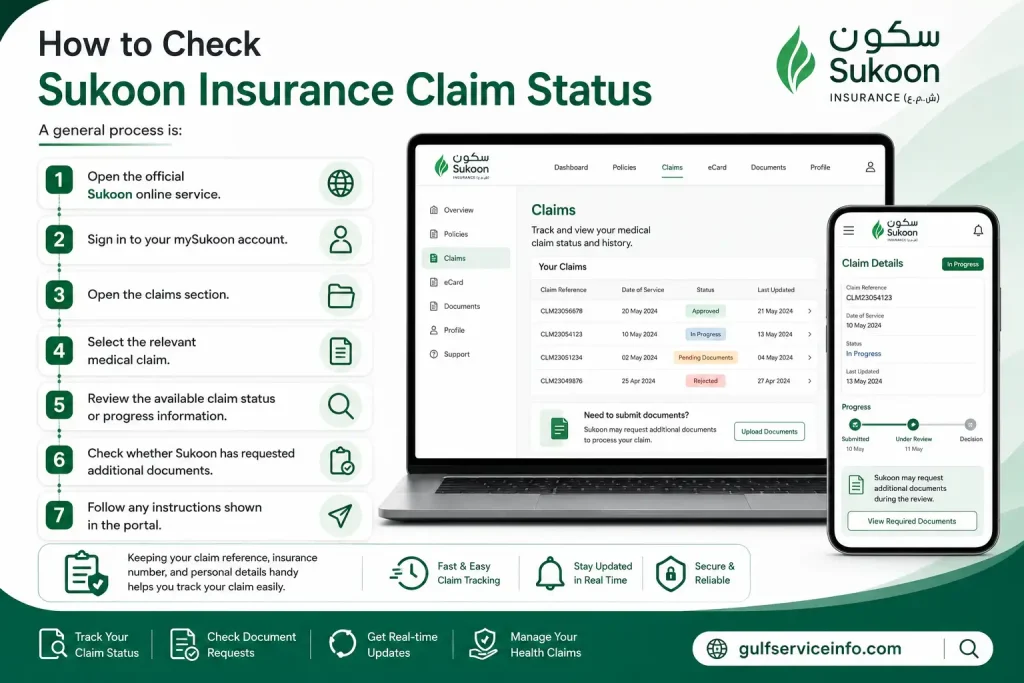
Keeping your claim reference, insurance card, invoices, medical reports, and other supporting documents available can make it easier to follow up if additional information is requested.
Sukoon’s health-claim guidance says that the company may contact the claimant if additional documents or information are required. It also states that eligible reimbursement claims are processed after the required documentation has been received.
Sukoon Insurance Status for a Medical Claim
The status of a reimbursement claim may change as the claim moves through the submission and assessment process. Therefore, a submitted claim does not necessarily mean that reimbursement has already been approved.
Sukoon recommends submitting the required claim documentation within 120 days of treatment for health reimbursement claims. The company also states that claim settlement can take up to three weeks after submission, depending on the circumstances and required documentation.
If your claim remains pending, check whether Sukoon has requested missing documents or clarification before contacting customer support.

How to Check Sukoon Insurance with Emirates ID
Many UAE residents search for Sukoon Insurance status check with Emirates ID because the Emirates ID is an important identifier in the UAE healthcare and insurance ecosystem. However, the information displayed by Sukoon depends on the member’s policy, nationality, registration information, and the specific online service being used.
For Dubai health insurance administration, Sukoon explains that member records are validated through the Dubai Health Authority’s relevant eClaims process. For UAE Nationals, the member information must match the Emirates ID details. Sukoon’s medical portal also explains that different categories of residents may be validated using different identification details.
General Steps to Check Your Sukoon Insurance Details
You can try the following process:

It is important not to enter your Emirates ID on unofficial websites claiming to provide a Sukoon Insurance status check. Use Sukoon’s official website or its authorized digital services whenever possible.
The official Sukoon network-search page specifically provides search fields for Emirates ID / Card No., along with emirate/city and network information.
How to Find the Sukoon Insurance Hospital List
The Sukoon Insurance hospital list helps members find hospitals, clinics, pharmacies, and other medical facilities available within their insurance network. Sukoon’s official provider-search tool currently allows members to search from more than 3,500 network facilities across the UAE. The available providers depend on your specific insurance network and policy.
Steps to Check the Sukoon Insurance Hospital List
Sukoon’s provider search is designed to help members locate facilities according to their network. The search also supports location-based information, making it easier to identify a suitable provider near you.
Check Your Network Before Visiting a Hospital
Do not assume that every hospital shown in a general Insurance hospital list is automatically covered under your plan. Sukoon explains that access depends on the type of network assigned to your health insurance policy, which is generally shown on your Sukoon Health card.
This is especially important when visiting a specialist or receiving expensive treatment. Before an appointment, check the facility and your policy benefits to determine whether the service is covered through direct billing or whether you may need to pay first and submit a reimbursement claim.
The mySukoon app also provides provider-search functionality, including filters for distance, area, specialty, and facility type. Members can view provider locations, contact providers, and access other healthcare information through the app.
How to Download Your Sukoon Insurance Policy
Your insurance documents contain important information about your coverage, benefits, exclusions, network, deductibles, and other policy conditions. Keeping a digital copy of your policy is useful when checking whether a particular hospital or medical treatment is covered.
For health insurance members, Sukoon’s digital services can also provide access to policy details and an electronic medical card. The mySukoon app allows members to view and download their medical card for themselves and their dependents.
Steps to Access Your Sukoon Insurance Policy
If you have insurance through your employer, some policy information may be administered through your company’s HR or insurance coordinator. Sukoon notes that employees can obtain information about their applicable healthcare network through their insurance coordinator or HR department.
What Should You Check in Your Policy?
Before using your Sukoon Insurance UAE health coverage, check the following information:
Your Table of Benefits is particularly important because it explains the benefits and limitations applicable to your particular plan.
How to Submit a Sukoon Insurance Reimbursement Form
If you receive eligible treatment outside your direct-billing network or under a reimbursement arrangement, you may need to pay the provider first and then submit a Sukoon Insurance reimbursement form.
Sukoon provides an official medical reimbursement claim form and allows health members to submit reimbursement claims through the mySukoon portal or app.
Documents Required for a Sukoon Reimbursement Claim
Before submitting your reimbursement request, prepare the documents required for your claim. Sukoon’s claim guidance includes documents such as:
The claim form also requires information such as the claimant’s name, card number, contact details, treatment information, hospital or doctor’s name, treatment date, invoice details, and total amount claimed.
Steps to Submit Your Sukoon Insurance Reimbursement Form
Step 1: Complete the claim form
Download the official reimbursement form and enter the claimant and treatment information accurately.
Step 2: Complete the medical section
The attending doctor must complete the applicable medical section, including the required signature and stamp.
Step 3: Add your supporting documents
Attach the invoices, medical reports, insurance card copy, and other documents requested for your claim.
Step 4: Check your policy benefits
Before submission, compare the treatment with your Table of Benefits and check for exclusions or limitations. Sukoon specifically recommends checking the policy benefits to help avoid claim rejection.
Step 5: Submit the claim online
Sukoon allows eligible health reimbursement claims to be submitted through the mySukoon portal or mobile application.
Sukoon Insurance Reimbursement Deadline
One important point is the submission deadline. Sukoon currently states that the reimbursement claim form should be submitted within 120 days of the treatment for timely processing. A separate claim form is required for each person, so family members should submit their claims individually.
How Long Does Sukoon Reimbursement Take?
Sukoon says it aims to pay eligible health reimbursement claims within three weeks of submission, subject to the required documentation and claim assessment. The actual amount reimbursed can depend on the policy terms, network customary rates, deductibles, and applicable co-insurance.
For example, Sukoon explains that reimbursement may be based on the customary price applicable within its network rather than necessarily the full amount charged by an individual provider. Applicable deductibles and co-insurance may also reduce the final payable amount.
Update Your IBAN for Faster Payment
If you are expecting a reimbursement payment, keeping your bank information updated can help. Sukoon states that members can update their IBAN through the mySukoon portal or app for faster payment processing.
This is particularly useful when submitting a claim online because the reimbursement can be transferred to the registered bank account when applicable.
Important Note About Original Documents
Sukoon’s current health-claim guidance states that original documents are required for claims above certain thresholds, including AED 10,000 for claims in the UAE and AED 5,000 for claims abroad. Additional documents may also be requested during claim processing.
Therefore, keep copies of everything you submit until your Sukoon Insurance status check shows that the claim has been completed and payment has been received.
Sukoon Insurance Contact Number and Customer Support
If you need help with Insurance UAE, the company provides several official customer-support channels. The main Sukoon Insurance contact number for customer service is 800 SUKOON (785666) within the UAE. Sukoon also lists 04 233 7777 as its head-office number.
Sukoon Insurance Contact Details
| Service | Official Contact |
|---|---|
| Sukoon Insurance Customer Service | 800 SUKOON (785666) |
| Head Office | 04 233 7777 |
| General Enquiries | [email protected] |
| Complaints | [email protected] |
| Sales Inquiries | 800 1642 |
| Health/General Emergency Assistance within UAE | +971 4 233 7463 |
Sukoon’s official support pages also provide online enquiry and complaint forms. When contacting the company about a policy or claim, keep your policy number, member/card number, and relevant claim information available because customer service may need these details to locate your account.
Sukoon Insurance Customer Service Email
For general enquiries, Sukoon currently lists [email protected]. For complaints, the official website lists [email protected].
When sending an email about a Sukoon Insurance status check, login problem, reimbursement, or policy question, include enough information for the support team to identify your request. Avoid sending unnecessary sensitive information or passwords by email.
Sukoon Insurance Services in Dubai and Across the UAE
Sukoon UAE provides insurance solutions for individuals, families, employees, and businesses. Its products include health, motor, life, home, travel, personal accident, and several commercial insurance solutions.
For health insurance customers, Sukoon provides services designed to make it easier to manage healthcare coverage digitally. These include finding network healthcare providers, managing claims reimbursement, and accessing policy information.
Health Insurance Services
The health insurance section of Sukoon’s website provides information about different plans and healthcare services. Depending on the policy, members may have access to:
Sukoon’s health insurance business currently reports 1.6 million lives insured and more than 50 years of experience.
Sukoon Insurance Services in Dubai
Dubai residents can use Sukoon’s health insurance services to locate network providers and manage their healthcare insurance. Sukoon offers health plans including HealthPlus products and a DHA Essential Benefits Plan for eligible employees in Dubai.
If you are using a Sukoon hospital list, always select the network applicable to your policy. A hospital may appear in Sukoon’s overall provider directory but still not be available under your particular network.
mySukoon App
Sukoon also provides the mySukoon app for managing health and motor insurance policies. The official website says the app is available for Apple and Android devices and provides features such as policy management and claim tracking.
For health members, digital services can be particularly useful for checking your insurance information, finding healthcare providers, and managing reimbursement claims.
Common Sukoon Login and Status Check Issues
Sometimes users cannot complete a Sukoon login or cannot immediately find their policy or claim status. In many cases, the problem is related to using the wrong portal, incorrect account information, or incomplete policy details.
Incorrect Login Portal
Sukoon provides different digital services for different insurance needs. If you are trying to access a health insurance service, make sure you are using the appropriate mySukoon or medical portal rather than an unrelated business or administrative service.
Start from the official Sukoon website if you are unsure which portal to use.
Emirates ID Information Does Not Match
If you are attempting a Sukoon Insurance status check with Emirates ID, make sure the details you enter match your insurance records.
A mismatch can occur if your policy information has not been updated or if the information entered does not correspond with the member record.
If the problem continues, contact 800 SUKOON (785666) and ask customer service to verify your membership information.
Hospital Is Not Showing in the Search
If a hospital does not appear when you search the Sukoon hospital list, do not immediately assume that Sukoon does not cover the hospital.
First check:
Your policy network determines which healthcare providers are available to you.
Claim Status Is Still Pending
A pending reimbursement claim may require additional documentation or assessment. Check your online claim account first to see whether Sukoon has requested additional information.
Keep your invoices, medical reports, claim form, and other supporting documents available in case they are needed.
Sukoon Login Is Not Working
If your login continues to fail:
Do not provide your password or account credentials to anyone claiming to offer unofficial Sukoon Insurance login assistance.
Frequently Asked Questions About Sukoon Insurance
Final Takeaway
Using Sukoon Insurance UAE online services can make everyday insurance tasks easier, from Sukoon Insurance login and status checks to finding hospitals and submitting reimbursement claims. The safest approach is to start with the official Sukoon website, verify your specific insurance network, and use the company’s official customer-service channels when you need help. For the latest policy information, provider availability, claims requirements, and contact details, always verify the information directly through Sukoon’s official website, because insurance networks and digital services can change over time.
Read More: Explore our related Gulf government service guides for more step-by-step information and helpful updates.
RTA Dubai: Login, Fines, NOL Card, Vehicle Renewal & Customer Care Guide
Achieve3000 Login: Portal, Clever Access & Complete Guide
ICP Smart Services UAE: Check Visa Status Online & Emirates ID Status