HDFC NetBanking Login, Online Banking, Services & Complete Guide

Published On: August 24, 2026
Follow Us
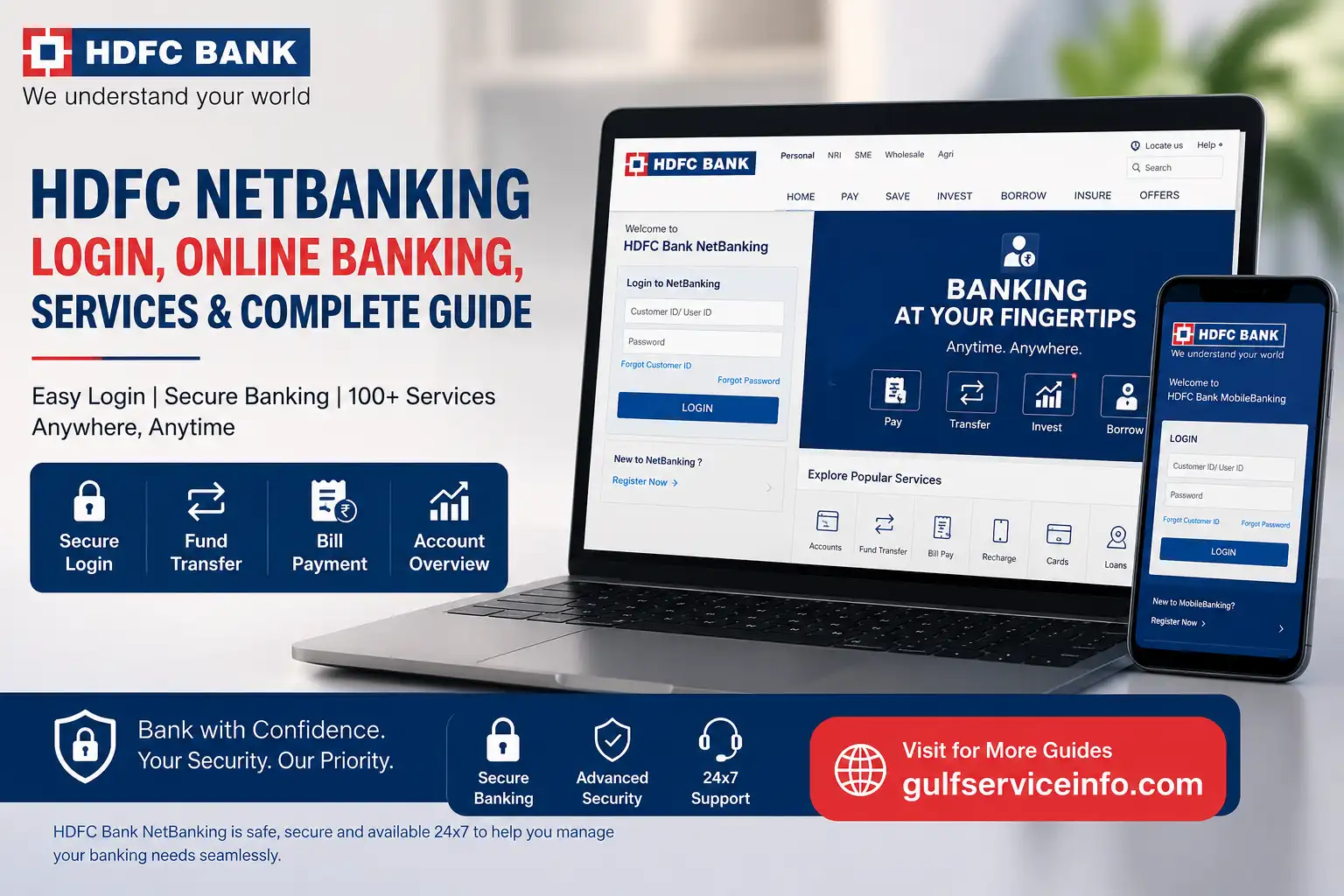
HDFC NetBanking login, online banking services and complete guide

HDFC NetBanking gives HDFC Bank customers a convenient way to manage their accounts online without visiting a branch. From checking your balance and downloading statements to transferring funds, paying bills and managing cards, many everyday banking tasks can be handled through the online banking platform. The official HDFC Bank NetBanking service is available around the clock, with security features designed to protect customer access and transactions. This guide explains the HDFC NetBanking login, registration process, major services, account management options, fund transfers, payments, support and common login problems.

Explore more useful online services and helpful guides: Visit Our Homepage.

What Is HDFC NetBanking?

HDFC online banking is HDFC Bank’s online banking platform for carrying out banking activities through an internet-connected device. Customers can use it to access accounts, transfer money, pay bills, manage deposits, view transactions and access other banking services without relying on a physical branch. HDFC Bank says its updated NetBanking platform supports more than 300 transactions and brings accounts, cards, transfers, investments, loans and other services into one online interface.

The platform is designed around three main benefits: convenience, a broad range of banking functions and security. Customers can also access features such as beneficiary name verification, configurable transfer limits, risk-based authentication and real-time fraud monitoring.

For customers with eligible HDFC Bank accounts, NetBanking can become the main online channel for routine banking. HDFC Bank states that customers with Savings or Current Accounts are eligible to use NetBanking and the HDFC Bank App.

HDFC NetBanking Login

The HDFC NetBanking login process requires your Customer ID and NetBanking password, also known as the IPIN. HDFC Bank specifically states that customers should use their Customer ID, rather than a separate User ID, to sign in to NetBanking.

Steps to log in to HDFC NetBanking
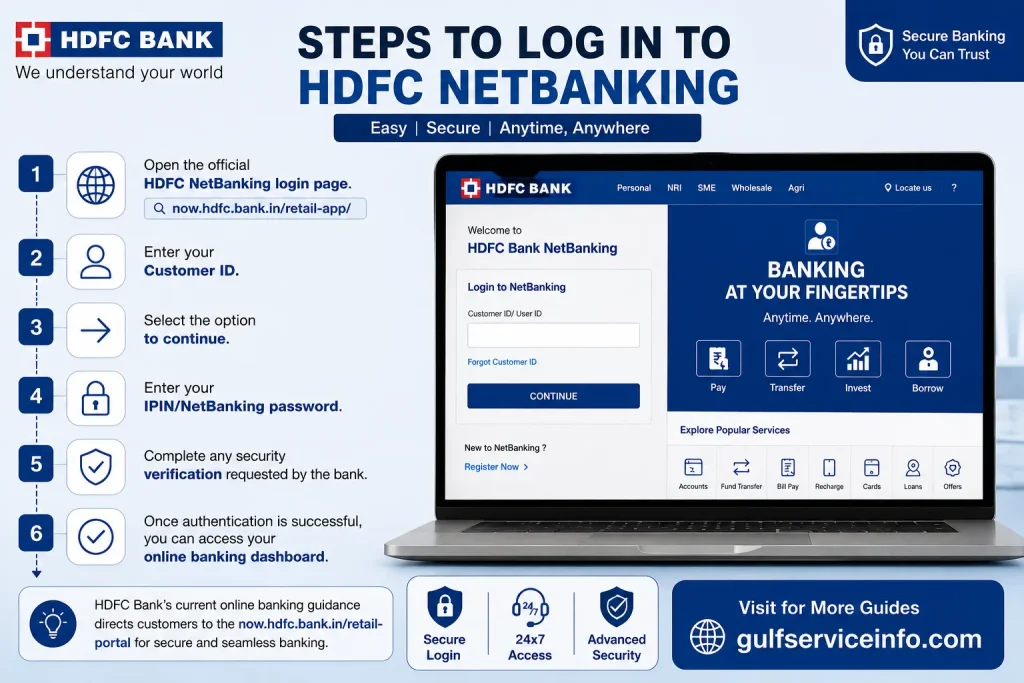
  • Open the official HDFC NetBanking login page.
  • Enter your Customer ID.
  • Select the option to continue.
  • Enter your IPIN/NetBanking password.
  • Complete any security verification requested by the bank.
  • Once authentication is successful, you can access your online banking dashboard.

HDFC Bank’s current online banking guidance directs customers to the now.hdfc.bank.in/retail-app/ login route.

Important: Always check that you are using the official HDFC Bank website before entering your Customer ID, password, OTP or card information. Do not share your IPIN or OTP with another person.

Forgot HDFC NetBanking password?

If you cannot remember your IPIN, HDFC Bank provides an online password-reset process. From the NetBanking login page, select Reset Password, enter your Customer ID and security code, and follow the verification process. Depending on the available authentication method, HDFC Bank may use your registered mobile number together with debit-card details or registered email information.

How to Register for HDFC NetBanking

New users need to register before they can use HDFC NetBanking. The online registration process connects your Customer ID with your registered mobile number and uses OTP and debit-card verification before you create your NetBanking password.

Online HDFC NetBanking registration

  • Visit the official HDFC NetBanking registration/login page.
  • Enter your Customer ID.
  • Confirm your registered mobile number.
  • Enter the OTP sent to your mobile.
  • Select your HDFC Bank debit card when prompted.
  • Provide the requested debit-card details.
  • Set your new IPIN/NetBanking password.
  • Return to the login page and sign in using your Customer ID and new IPIN.
Online HDFC NetBanking registration process

HDFC Bank’s official registration information confirms that the online process involves Customer ID verification, registered-mobile OTP authentication and debit-card details before setting the IPIN.

Other registration options

HDFC Bank has also documented alternative registration routes through PhoneBanking, an HDFC Bank ATM and a branch. However, the online route is generally the most convenient option when the required registered mobile number and card details are available.

Tip: Keep your registered mobile phone available during registration because OTP verification is part of the authentication process.

How to Use HDFC Online Banking

Once you complete the HDFC online banking login, the dashboard provides access to several categories of banking services. The updated interface groups common activities so customers can find accounts, cards, fund transfers, bills and other services more easily.

For example, you can use HDFC online banking to:

  • View your account information and available balance
  • Review recent transactions
  • Transfer money through available payment methods
  • Add or manage beneficiaries
  • Pay bills and recharge services
  • Manage debit and credit cards
  • Manage deposits
  • Access loan-related information
  • View investment and insurance-related services
  • Use Service & Support for assistance

HDFC Bank’s online banking service is designed for 24×7 access, although individual transactions or services may have their own rules, limits or processing conditions.

HDFC online banking browser requirements

If the login page does not work correctly, check your browser and device settings. HDFC Bank currently recommends using recent browser versions, keeping your device date and time accurate, and enabling JavaScript because the updated NetBanking platform relies on these settings.

Current browser guidance from HDFC Bank includes:

BrowserRecommended version
Google Chromev125 or above
Microsoft Edgev125 or above
Safariv17.6 or above
Firefoxv126 or above

If your browser is outdated, update it before attempting another HDFC NetBanking login.

HDFC NetBanking Services

HDFC online banking provides access to a wide range of everyday banking functions from one online dashboard. According to HDFC Bank, the current NetBanking platform supports more than 300 transactions covering accounts, fund transfers, bill payments, loans, investments, insurance, cards and deposits.

Some of the main HDFC NetBanking services include:

  • Savings and Current Account management
  • Balance and transaction enquiries
  • Account statements
  • NEFT, RTGS and IMPS transfers
  • Beneficiary management
  • Bill payments and recharges
  • Credit Card management
  • Debit Card services
  • Fixed Deposit and Recurring Deposit services
  • Loan-related services
  • Investment-related services
  • Insurance-related services
  • Profile and personal-information management
  • Service and support requests
HDFC NetBanking Services for accounts, fund transfers, bill payments, cards, loans, investments and deposits

The official HDFC transaction list also includes features such as viewing bill-payment history, managing billers, setting AutoPay, managing cards, viewing loan details, changing transfer limits and handling beneficiaries.

Official service information: HDFC Bank Online Services

HDFC Bank Account Services

Your HDFC Bank account can be managed online through NetBanking without visiting a branch for many routine tasks. After completing the HDFC NetBanking login, customers can access account information, transaction history, linked accounts and other account-related options available to their profile.

Common account functions include:

Account functionWhat you can do
Balance enquiryCheck available account balance
TransactionsReview recent account activity
StatementView or download account statements
Linked accountsView eligible linked accounts
Nominee detailsAccess available nominee information
DepositsManage eligible FD/RD services
TransfersMove funds between eligible accounts
Service requestsSubmit supported banking requests

HDFC Bank’s official NetBanking transaction list includes linked-account management, statements, deposits, transfers and other account-related facilities.

The exact options shown after HDFC NetBanking login can vary depending on your account type, products and services linked to your Customer ID.

How to Check HDFC Account Balance Online

Checking your HDFC account balance online is one of the most common reasons customers use HDFC NetBanking. Once you sign in, your account information is available through the NetBanking dashboard, allowing you to review the balance and recent transactions without visiting an ATM or branch.

Check balance through HDFC NetBanking

  • Open the official HDFC NetBanking login page.
  • Enter your Customer ID and IPIN.
  • Complete the required authentication.
  • Open the Accounts section or the relevant account displayed on your dashboard.
  • Review your available balance and recent transaction information.

HDFC Bank’s current NetBanking platform includes dedicated account sections and allows customers to set a primary account for easier access.

Other online ways to check your balance

Depending on your banking setup, you may also use HDFC Bank’s mobile banking services. The bank’s official online-services page provides separate instructions for MobileBanking, including login and account-related functions.

Security tip: Never check your balance by entering your banking credentials on a website reached through an unknown SMS, email or social-media link. Start from the official HDFC Bank website instead.

How to Download HDFC Bank Statement

HDFC online banking can also be used to access account statements and transaction records. The bank’s official list of NetBanking transactions includes Statement as an available service.

A typical process is:

  • Complete your HDFC NetBanking login.
  • Open the relevant account.
  • Look for the statement or transaction-history option.
  • Select the required date range or statement period.
  • Review the transactions.
  • Use the available download or statement option to save the record.

The exact buttons and layout can change as HDFC Bank updates its online banking interface, so use the options displayed within your authenticated account rather than relying on an old screenshot or third-party tutorial.

Best practice: If you need a statement for a loan, visa application, tax record or other official purpose, check the downloaded document carefully to make sure the selected period and account are correct before submitting it.

HDFC Fund Transfer Services

HDFC NetBanking supports several ways to transfer money. HDFC Bank’s official online-services page specifically directs customers to Fund Transfer and then to options such as NEFT, RTGS and IMPS.

How to transfer money through HDFC NetBanking

A basic transfer flow is:

HDFC NetBanking login → Fund Transfer → Select transfer method → Choose/add beneficiary → Enter amount → Verify details → Authorise transaction

HDFC Bank also provides a beneficiary-management route:

Fund Transfer → Request → Add a Beneficiary

This allows customers to set up a beneficiary before making supported transfers.

Main HDFC fund transfer options

Transfer methodTypical use
NEFTElectronic bank-to-bank transfers
RTGSEligible higher-value bank transfers
IMPSImmediate electronic fund transfers
HDFC transferTransfers involving eligible HDFC Bank accounts
Scheduled transferTransfers that support scheduling

The available limits, processing rules and beneficiary requirements depend on the transfer type and your account settings. HDFC Bank also provides configurable transfer limits and beneficiary-name verification as part of its current NetBanking security features.

Before confirming a transfer

Always check:

  • Beneficiary name
  • Account number
  • IFSC
  • Transfer amount
  • Transfer type
  • Your available balance
  • Applicable transaction limits

A wrong account number can result in money being sent to an unintended recipient, so never rush through the final confirmation screen.

HDFC Bill Payment Services

HDFC online banking can be used to pay many bills and manage registered billers online. HDFC Bank’s current online-services instructions direct customers to the BillPay & Recharge section, where billers can be added and payments managed.

How to pay a bill through HDFC NetBanking

  • Complete your HDFC NetBanking login.
  • Open BillPay & Recharge.
  • Select the appropriate biller category.
  • Add the biller if it has not already been registered.
  • Enter the requested customer or account details.
  • Review the bill information.
  • Select the payment account and amount.
  • Confirm the payment using the required authentication.

HDFC Bank also provides options for viewing payment history, managing billers, scheduling bill payments and configuring SmartPay for eligible services.

For utility bills, HDFC’s NetBanking FAQ directs users to Bills & Recharges and then the relevant biller under the Utilities category.

Useful reminder: Save or note the transaction reference after a successful payment, particularly when paying a bill close to its due date.

HDFC Credit Card Services

HDFC NetBanking provides several credit-card management options for eligible customers. Depending on the card and account relationship, customers can view card information, manage settings, make payments and access other supported card services.

HDFC Bank’s official NetBanking transaction list includes credit-card statements, payments, reward-point functions, card upgrades, limit management, PIN services, international-usage controls and other card-related actions.

Pay an HDFC credit card bill through NetBanking

HDFC Bank currently gives the following route for paying an HDFC Bank Credit Card bill:

  • Log in to HDFC NetBanking.
  • Go to Cards.
  • Select Transact from the left-side menu.
  • Choose Credit Card Payment.
  • Select your HDFC Bank account.
  • Select the relevant credit card.
  • Choose the payment amount type.
  • Complete the payment.

HDFC Bank states that NetBanking credit-card bill payments generally take one day to process, subject to applicable system cut-offs.

Paying another bank’s credit card bill

HDFC NetBanking can also be used to pay eligible credit-card bills issued by other banks. The official route is:

Login → BillPay and Recharge → Credit Card Bill → Select issuer → Enter card details → Enter amount → Select payment method → Complete payment.

For customers who regularly pay bills, HDFC Bank also provides bill-registration and payment-management facilities through its BillPay service.

Security note: Never share your credit-card OTP, NetBanking IPIN or other authentication information with someone claiming to be a bank employee. Use HDFC Bank’s official support channels if you are unsure about a payment or card transaction.

HDFC Bank Share Price

HDFC Bank share price is a stock-market topic rather than a NetBanking service, but it is relevant to readers searching for HDFC-related financial information. HDFC Bank is a listed company, and its share price changes continuously during market hours based on buying and selling activity.

If you want the latest HDFC Bank share price, use a recognised stock-market platform or the official investor-relations information provided by the bank rather than relying on an old article. NetBanking itself should not be treated as a live stock-price source unless the relevant investment or market feature is specifically available within your account.

For current market information, check the official HDFC Bank corporate website and a regulated market-data source.

Important: A bank’s share price is different from the balance or value of your HDFC Bank savings account. Your account balance is a banking figure, while the HDFC Bank share price is determined in the stock market.

HDFC Bank Share

The HDFC Bank share represents an equity interest in HDFC Bank. Investors who buy shares are purchasing a security traded on the relevant Indian stock exchanges, while ordinary HDFC Bank customers simply hold banking products such as savings accounts, current accounts, deposits or cards.

This distinction matters because searches for HDFC Bank share, HDFC Bank share price and HDFC NetBanking can lead to very different services. NetBanking is primarily a digital banking channel, whereas buying or selling shares requires an appropriate investment or securities account and access to a permitted trading platform.

If you’re researching HDFC Bank as an investment, review the company’s official investor information, financial disclosures and exchange-listed market information before making any investment decision.

HDFC Life

HDFC Life is a life insurance company and is separate from routine HDFC Bank NetBanking functions. HDFC Life provides insurance products and services, while HDFC Bank provides banking and financial services through its own digital channels.

Because the names are closely associated, users sometimes search for HDFC Life when they actually need HDFC Bank login information. Before entering credentials, confirm that you are on the correct official website for the service you need.

For insurance-related matters, use the official HDFC Life website rather than entering banking credentials on an unrelated page.

HDFC Securities

HDFC Securities is associated with investment and securities services, which are different from ordinary HDFC NetBanking activities. Users interested in shares, investments, trading or demat-related services may need a securities account and the appropriate HDFC Securities platform.

HDFC Bank’s NetBanking ecosystem can provide access to certain investment-related services, but customers should distinguish between HDFC NetBanking, banking products and dedicated securities/trading services. The service available to you can depend on the accounts and products linked to your customer relationship.

Before investing, always verify the official platform and understand the relevant fees, risks and product terms.

HDFC Customer Care and Support

HDFC Bank provides several official support channels for customers who cannot complete an HDFC NetBanking login, need help with an account or want to report a problem. The bank’s current customer-care page lists 1800 1600 / 1800 2600 as its India-accessible helpline numbers. Customers travelling abroad can call +91 22 6160 6160.

You can use the official support options for:

  • NetBanking login problems
  • Password-related issues
  • Account queries
  • Credit-card assistance
  • Loan-related enquiries
  • Demat-related services
  • Unauthorised transactions
  • Complaints and service requests

Official HDFC customer care: HDFC Bank Customer Care

HDFC Bank specifically warns customers to use only the customer-care numbers published on its official website because fraudulent callers may impersonate bank representatives.

For online assistance, HDFC Bank also provides options to submit a query or complaint, chat with support and locate a branch.

Reporting an unauthorised NetBanking transaction

If you notice a transaction that you did not make, act promptly rather than waiting to see whether it is reversed automatically. HDFC Bank provides a dedicated process for reporting unauthorised electronic banking transactions and lists 18002586161 for reporting unauthorised credit-card, debit-card, NetBanking and UPI transactions.

When reporting an unauthorised NetBanking transaction, HDFC Bank says customers may need information such as the Customer ID, account number, transaction date, amount and transaction type.

HDFC NetBanking Login Problems and Solutions

An HDFC NetBanking login may fail because of an incorrect password, an expired password, a disabled login, browser compatibility problems or temporary technical issues. HDFC Bank’s official FAQ provides specific solutions for several common situations.

ProblemWhat to do
Forgot passwordUse Reset Password on the login page
Password expiredReset the NetBanking password
Login disabledContact HDFC Bank customer support
Browser problemUpdate your browser
Incorrect device timeEnable automatic date and time
JavaScript issueAllow JavaScript in browser settings
Suspicious activityContact HDFC Bank immediately
NetBanking blockedContact customer care or visit a branch

Password expired

HDFC Bank states that the NetBanking password expires after 180 days for security reasons. If you receive a password-expired message, use the reset-password option and create a new password.

Login disabled

A Login Disabled message can occur when a customer has requested that the account be blocked, when the bank detects a suspicious login attempt or transaction, or in certain situations involving legal or government instructions. HDFC Bank advises affected customers to contact Customer Service.

Browser or technical problems

If the login page is not functioning correctly, HDFC Bank recommends keeping your browser updated. Its current compatibility guidance lists Chrome 125+, Edge 125+, Safari 17.6+ and Firefox 126+ as recommended versions. The bank also advises customers to use the correct device date and time and enable JavaScript.

A good troubleshooting sequence is:

Update browser → check internet connection → enable JavaScript → correct device date/time → clear temporary browser data → reopen the official login page.

If the problem remains, use HDFC Bank’s official support channels rather than downloading software or entering your banking password into a third-party troubleshooting website.

Frequently Asked Questions About HDFC NetBanking

You can chat with HDFC customer care online through WhatsApp ChatBanking or the EVA virtual assistant available on the official HDFC Bank website. WhatsApp ChatBanking lets customers access more than 200 banking services, while EVA can provide automated answers to common banking questions. For WhatsApp access, save the verified HDFC Bank number +91 7070022222 and use your bank-registered mobile number to begin the conversation.

WhatsApp ChatBanking

HDFC Bank’s WhatsApp ChatBanking provides a convenient way to access supported banking services directly through WhatsApp. Follow these steps:

  1. Save +91 7070022222 in your phone contacts.
  2. Open WhatsApp using your bank-registered mobile number.
  3. Send “Hi” or “Register” to start the conversation.
  4. Enter the OTP received by SMS to verify your account.
  5. Once verified, type your question or select the required banking service.
  6. Use the available options for services such as account balances, statements and card-related requests.

Security tip: Before sharing any information, check that you are interacting with the official verified HDFC Bank WhatsApp account and that the displayed verification indicator matches the official account.

EVA Web Chatbot

You can also use EVA, HDFC Bank’s virtual assistant, through the official HDFC Bank website. Open the HDFC Bank website, locate the EVA chat icon and enter your banking question. EVA can provide automated responses to common queries and may also support voice-based interaction where available.

For account-specific or sensitive banking matters, use HDFC Bank’s official customer-care channels and never share your NetBanking password, OTP or other confidential authentication details in a chat.

Yes, you can maintain a zero balance in HDFC Bank if you have an account specifically designed without a minimum-balance requirement. Eligible options can include a Corporate Salary Account, Basic Savings Bank Deposit Account (BSBDA) and certain specialised student, minor or institutional accounts. However, a standard HDFC savings account may have minimum-balance requirements depending on the account type and applicable terms, so customers should check the conditions of their particular account before allowing the balance to fall below the required level.

Which HDFC Accounts Allow Zero Balance?

Not every HDFC Bank account follows the same balance rules. Zero-balance eligibility generally depends on the type of account you hold.

  • Corporate Salary Account: Salary accounts provided through eligible employer-corporate arrangements can generally be maintained without a minimum balance while the account continues to qualify as a salary account.
  • BSBDA: The Basic Savings Bank Deposit Account (BSBDA) is designed as a basic savings account with no minimum-balance requirement, subject to its applicable terms and eligibility conditions.
  • Specialised Accounts: Certain student, minor or institutional account types may also have different minimum-balance requirements. Check the specific product terms before assuming that the account can remain at zero.

For the latest eligibility and account conditions, check the relevant product information on the official HDFC Bank website.

What Happens If a Regular HDFC Account Falls Below the Required Balance?

If you have a regular savings account with a minimum-balance requirement, keeping the balance below the applicable threshold may result in non-maintenance charges according to the account’s terms. The required balance can differ between products and locations, so avoid relying on a fixed figure found on third-party websites.

Another point to consider is account inactivity. A bank account with no customer-initiated activity for a prolonged period can eventually be classified as dormant or inoperative under applicable banking rules. Therefore, keeping an account at zero for a long period is different from simply having a zero balance temporarily.

Tip: If you specifically want an HDFC Bank account that can be maintained with zero balance, check the official product terms for a BSBDA or eligible salary account rather than assuming that every HDFC savings account is zero-balance.

HDFC Bank has recently faced increased scrutiny over deposit-pricing practices, corporate governance and senior-management decisions, although the bank’s internal review did not find evidence of personal financial motive or broader governance misconduct. The main issue centred on preferential interest rates reportedly offered on certain large deposits from the Maharashtra State Road Development Corporation (MSRDC), which raised questions about compliance with Reserve Bank of India (RBI) rules. HDFC Bank’s board subsequently accepted recommendations from an independent disciplinary committee and imposed warning letters and ₹1 lakh fines on its CEO, CFO and head of retail assets.

What happened with the MSRDC deposit issue?

The controversy relates to allegations that HDFC Bank offered preferential rates on certain large MSRDC deposits. Media reports raised concerns that such pricing could have breached RBI requirements governing deposit rates. HDFC Bank conducted an internal review and concluded that the employees involved had shown business overreach rather than acted for personal gain. The bank then took disciplinary action against three senior executives, including CEO Sashidhar Jagdishan and CFO, with warning letters and monetary penalties.

Is HDFC Bank facing a governance crisis?

The situation has increased investor attention on HDFC Bank’s governance and leadership, but it is important not to describe the matter as a confirmed broad governance failure. Former chairman Atanu Chakraborty resigned abruptly in March 2026, citing differences related to ethics and values. However, a subsequent external legal review found no evidence supporting the broader governance concerns he had raised, and the RBI said in March that it had no material concerns on record regarding the bank’s conduct or governance.

What about the CEO’s reappointment?

The review also created uncertainty around the reappointment of HDFC Bank CEO Sashidhar Jagdishan, whose current term is scheduled to end in October 2026. Reuters reported in July that the board’s recommendation to the RBI had been delayed while independent directors conducted an additional review related to the deposit-pricing matter. The bank later concluded its internal review and announced disciplinary measures against senior executives.

Is HDFC Bank under financial pressure?

HDFC Bank has also faced pressure from investors over its financial and market performance. One concern is net interest margin (NIM), which can come under pressure when the return earned on assets declines faster than the cost of funding. At the same time, uncertainty surrounding management and governance has weighed on investor sentiment. Reuters reported on July 27, 2026, that HDFC Bank’s shares had fallen about 25% year-to-date, compared with an 8% decline in the Nifty 50 over the same period.

What does this mean for HDFC Bank customers?

For ordinary HDFC Bank customers, the reported issues primarily concern internal governance, regulatory compliance and investor confidence, rather than a reported disruption to everyday banking services. Customers should continue to use official HDFC Bank channels for NetBanking, account services, payments and customer support, while investors should distinguish between short-term share-price movements and the bank’s underlying financial position.

Key takeaway: HDFC Bank is dealing with heightened scrutiny, but the latest internal findings are more nuanced than simply describing the bank as being in a “crisis”. The deposit-pricing matter resulted in disciplinary action, while an external legal review did not substantiate broader governance allegations. Investors are nevertheless watching the bank’s leadership transition, regulatory developments, margins and share-price performance closely.

You can get your HDFC Bank account details through NetBanking, the mobile banking app, your passbook, chequebook, bank statement or account-opening documents. The online methods are useful when you need information such as your account number, IFSC, balance or Customer ID without visiting a branch. This section explains the main ways to find your HDFC account details securely and what information you may need for each method.

Get HDFC Account Details Through NetBanking

You can view your account information after completing your HDFC NetBanking login with your Customer ID and password. Depending on your account and the current NetBanking interface, you can access information such as your account number, IFSC, balance and account summary.

  1. Open the official HDFC Bank website.
  2. Go to the NetBanking login option.
  3. Enter your Customer ID and password.
  4. Complete the required authentication.
  5. Open the relevant account from your dashboard.
  6. Review the available account information.

Get HDFC Account Details Through the Mobile App

You can also use the official HDFC Bank mobile banking app to access your account information. After signing in, select the relevant account card or account section to view the details available for your account.

The mobile method can be convenient when you need to check your account information while away from a computer. Always download the HDFC Bank app through an official app store and avoid unofficial APK files or links.

Find Your HDFC Customer ID

If you have forgotten your HDFC Customer ID, the bank provides a Customer ID retrieval option through its NetBanking login page. Select the Forgot Customer ID or help option and follow the verification process using the information requested by HDFC Bank, such as your registered mobile number and other identifying details.

Once your identity is successfully verified, follow the instructions provided by HDFC Bank to retrieve your Customer ID.

Check Your Passbook or Chequebook

Your physical HDFC Bank passbook or chequebook can also provide important account details. The first page of a passbook generally contains account information, while a cheque leaf can display details such as the account number and branch-related information.

Check the document carefully before sharing any account information with another person.

Check Your HDFC Bank Statement

A recent HDFC Bank statement can also contain account-related information and transaction details. You can obtain an eligible statement through NetBanking or other HDFC Bank channels and use it when you need to confirm your account information.

Visit an HDFC Bank Branch

If you cannot access your online banking account or do not have your physical documents, you can visit an HDFC Bank branch for assistance. Carry a valid photo ID and any account-related information you have available. Bank staff can guide you through the appropriate process for retrieving your account details.

Security tip: Never share your HDFC NetBanking password, OTP, PIN or other confidential authentication information with anyone claiming to help you retrieve your account details. Use the official HDFC Bank website or customer-care channels whenever you need assistance.

Yes, HDFC Bank WhatsApp ChatBanking is available 24 hours a day, 7 days a week, including weekends and public holidays, allowing customers to access supported self-service banking services at any time. Customers can use the official HDFC Bank WhatsApp service for more than 200 banking transactions by messaging the verified WhatsApp number 7070022222 from their bank-registered mobile number. This section explains the availability, requirements and main features of HDFC WhatsApp ChatBanking.

HDFC WhatsApp ChatBanking Details

  • WhatsApp number: 7070022222
  • Availability: 24 hours a day, 7 days a week, 365 days a year
  • Weekends and holidays: Available
  • Requirement: Use your mobile number registered with HDFC Bank
  • Services: More than 200 supported self-service banking transactions

To use the service, save the official HDFC Bank WhatsApp number in your contacts and start a WhatsApp conversation from your registered mobile number. Always verify that you are interacting with the official verified HDFC Bank account before providing any information.

Official information: HDFC Bank WhatsApp ChatBanking

Yes, you can keep ₹20 lakh in a savings account. There is generally no fixed legal limit on the total amount you can maintain in a bank savings account, but large balances and transactions may be subject to applicable banking, tax and reporting requirements. What matters is that the source of the funds is legitimate and properly documented, particularly when making a large deposit. Interest earned on your savings balance may also have tax implications depending on your circumstances, so keep relevant records and check the applicable rules before making a large deposit.

Choosing between SBI and HDFC Bank depends on your banking needs, preferred service style, and the products you use most. State Bank of India (SBI) may be a better choice if you value a large branch and ATM network, broader physical access, and potentially lower service or loan charges, while HDFC Bank can be more suitable if you prioritize digital banking, faster loan processing, and modern online services. Instead of choosing one bank as universally better, compare their fees, loan rates, branch access, digital features, and customer-service options before opening or switching your account.

State Bank of India (SBI)

Advantages:

  • Extensive branch and ATM network across India
  • Strong physical banking access
  • Competitive service and loan charges in some products
  • Suitable for customers who prefer branch-based banking

Disadvantages:

  • Branches can be crowded during busy periods
  • Some customers may find its digital banking experience less intuitive than private-bank alternatives

HDFC Bank

Advantages:

  • Strong digital banking facilities
  • Convenient mobile and online banking services
  • Fast loan processing for eligible customers
  • Wide range of banking and financial products

Disadvantages:

  • Certain services or products may have higher charges depending on the account or customer category
  • Branch experience may not be the main advantage for customers who prefer extensive physical coverage

Bottom line: If branch accessibility and traditional banking are your priorities, SBI may be the better fit. If you prefer digital banking, online services, and convenience, HDFC Bank may be more suitable. Always compare the current fees, interest rates, account requirements, and product terms before making your decision.

HDFC Bank stock can come under selling pressure when investors become concerned about weaker margins, slower earnings growth, governance developments, or higher operating and funding costs. The factors highlighted in the provided information include pressure on net interest margins (NIM), quarterly earnings that were below expectations, penalties involving senior executives following an internal governance review, and elevated borrowing costs. These factors can influence investor sentiment and contribute to a decline in the HDFC Bank share price, although a single day’s movement may reflect several market factors rather than one specific cause.

Key Factors Affecting HDFC Bank Stock

  • Weak Net Interest Margins: HDFC Bank’s NIM has faced pressure, with the provided information placing it around 3.26%–3.4%. Lower margins can affect the bank’s ability to generate income from its core lending and deposit business.
  • Slower Earnings Growth: Recent quarterly profit growth of approximately 5% reportedly fell short of analyst expectations and lagged some other major private-sector lenders. A weaker-than-expected earnings performance can lead investors to reassess the bank’s valuation.
  • Executive Penalties: The bank reportedly penalized senior executives following an internal governance review concerning preferential deposit rates. Such developments can create uncertainty around governance and management practices and may affect market sentiment.
  • Higher Costs and Funding Pressure: Elevated borrowing costs and a lower CASA ratio can put pressure on the bank’s funding structure and profitability. Investors may therefore monitor deposit growth, funding costs, and margins closely.

What Does the Fall Mean for Investors?

A decline in HDFC Bank stock does not necessarily mean that the bank’s underlying business has deteriorated permanently. Share prices respond to expectations about future earnings, margins, risks and overall market sentiment. Investors should therefore review the latest financial results, management commentary, regulatory disclosures and broader market conditions before concluding why HDFC Bank shares moved lower on a particular day.

Note: The points above are based on the information provided in your source material. They explain the reported pressures but do not establish that these factors alone caused a specific day’s stock movement.

You can check your HDFC Bank account type through NetBanking, the HDFC Bank mobile banking app, your account documents, or by contacting the bank. After logging in, review your account details or account summary to identify whether you have a savings, salary, current, or another type of HDFC Bank account. You can also check your passbook, account statement, or welcome documents, where the account type may be mentioned.

Is HDFC Account Number 14 Digits?

Yes, HDFC Bank account numbers are generally 14 digits long. The provided information states that older account formats with fewer digits were updated by the bank to a 14-digit structure. When entering your HDFC account number for NetBanking, fund transfers, or other banking services, enter all 14 digits exactly as shown in your official account records.

A 12-digit bank account number is a unique sequence of twelve numbers assigned by a bank to identify a specific personal or business account. Banks use this number to distinguish one account from another and to manage activities such as deposits, payments, fund transfers, and other banking transactions. The exact length and format of an account number can vary between banks, so customers should use the account number shown on their official bank documents or online banking account.

Final Thoughts on HDFC NetBanking

HDFC NetBanking provides a convenient way to manage everyday HDFC Bank services online, including checking account balances, downloading statements, transferring funds, paying bills and managing eligible cards and other banking products. The key to a smooth experience is using the official HDFC NetBanking login, keeping your Customer ID and IPIN secure, and following the bank’s recommended security practices. If you face login or password problems, HDFC Bank’s official support and FAQ resources can help you resolve them safely. For the best experience, always use official HDFC Bank channels and verify website addresses before entering any banking or personal information.

GulfServiceInfo Editorial Team

The GulfServiceInfo Editorial Team researches and publishes accurate, easy-to-follow guides on government, education, finance, immigration, employment, and public services across the UAE, Kuwait, and Qatar. Every article is fact-checked and references official government sources whenever possible to help readers access services confidently and efficiently.

Join WhatsApp

Join Now

Join Telegram

Join Now

Leave a Comment