Mero Share Login: Registration, Portfolio, Application & Complete Guide

Published On: September 13, 2026
Follow Us
Mero Share Login registration portfolio and application guide

Mero Share is CDS and Clearing Limited (CDSC)’s online platform for investors who want to manage and monitor activities connected with their Demat accounts. Once access is provided through a Depository Participant (DP), investors can use CDSC online portal to view holdings, review transactions, monitor their portfolio, apply for IPOs and other public issues, and use electronic delivery instructions such as EDIS.

For investors who already have a Demat account, Mero Share Login provides a convenient way to check important account information without relying on their DP for every routine enquiry. The platform is particularly useful for people who regularly participate in Nepal’s share market.

If you are also looking for other online services in Qatar, check our Qatar government services guide for useful information about accessing important digital services.

What Does Mero Share Do?

Mero is a web-based investor facility that gives Demat account holders electronic access to information about their securities. Its services include checking holdings and transactions as well as handling activities associated with IPO applications and electronic share transfers.

It is useful to understand the difference between a Demat account and CDSC online portal. Your Demat account holds securities electronically, while CDSC online portal gives you an online interface for viewing and carrying out supported Demat-related activities.

For investors, this means routine information such as securities balances and transaction records can be checked online. Mero Share can therefore be especially useful when tracking shares received through IPOs, FPOs, right shares, bonus shares or other transactions.

CDSC also provides information about registered Depository Participants and other investor resources through its official website.

How to Log In to Mero Share

Mero Share login is available to investors whose accounts have been registered and activated through a Depository Participant. You normally use the login details supplied by your DP together with the DP selected on the Mero Share login page.

Mero Share Login Steps

Use the following process to access your account:

  • Open the official Mero Share website: Mero Share Login
  • Choose your registered Depository Participant (DP) from the list.
  • Enter your assigned username or login ID.
  • Type your Mero Share password.
  • Complete any security verification displayed by the platform.
  • Select Login.
  • Once your credentials are successfully verified, your Mero Share dashboard should become available.
How to Log In to Mero Share step-by-step

Security tip: Always check the website address before entering your username or password. Avoid using login links received through suspicious messages, unknown websites or untrusted emails.

If you have forgotten your password, use the recovery option available on the Mero Share login page instead of repeatedly trying incorrect passwords.

How to Register for Mero Share

CDSC online portal registration is linked to your Demat account and is generally arranged through your Depository Participant. It is not simply a matter of creating a new account directly from the public Mero website.

Your DP may be a bank, capital company, brokerage-related institution or another participant registered with CDSC. The exact procedure can differ between institutions, so investors should follow the requirements given by their own DP.

Mero Share Registration Process

The usual process looks like this:

  • Maintain or open an eligible Demat account with a CDSC-registered DP.
  • Request CDSC online portal access from your DP.
  • Provide the information or application requested by the institution.
  • Allow the DP to process your CDSC online portal registration.
  • Receive the login credentials issued for your account.
  • Visit the official Mero Share website.
  • Select your DP and enter the credentials provided to you.
  • Sign in and confirm that your account information appears correctly.
How to Register for Mero Share step-by-step

The paperwork or verification required can vary by DP. If your institution asks you to complete a particular form or provide additional information, follow its specific instructions.

You can also check CDSC’s official information about registered DPs here:

What Do You Need Before Using Mero Share?

An active Demat account is the main requirement for accessing CDSC online portal. Your Demat account must be associated with a Depository Participant that can arrange the relevant CDSC online portal access.

Common requirements include:

  • An active Demat account
  • A registered Depository Participant
  • Investor identification and account details
  • Registered contact information
  • Mero access arranged through your DP
  • Login credentials provided or activated by the DP
What you need before using Mero Share

Your DP may have additional requirements depending on its own registration and verification process.

Keeping your investor information accurate and up to date is also important. CDSC provides Demat-related forms and investor resources through its official channels.

Activating Your Mero Share Account

After your DP has registered your account, you can access CDSC online portal using the credentials provided to you. Depending on the setup, your first login may involve changing an initial or temporary password before you can use the account normally.

First-Time Mero Share Activation

Follow these steps when accessing a newly issued account:

  • Go to the official Mero Share website.
  • Select your registered DP.
  • Enter the username and initial password supplied by your DP.
  • Click Login.
  • If prompted, replace the temporary password with a new one.
  • Store the new credentials securely.
  • Sign in again using the updated password.
  • Review the dashboard and confirm that your account information is showing correctly.

After activation, the services available to you will depend on your account and the functions supported by the platform.

If your credentials fail immediately after registration, contacting your DP is usually the appropriate next step because the DP handles account-level registration and access matters.

Forgot Your Mero Password? Here’s What to Do

A forgotten password does not normally mean you need to create a new CDSC online portal account. The login page provides a password-recovery option that can be used to regain access.

Mero Share Password Reset Steps

  • Open the official Mero Share website.
  • Select your DP.
  • Enter your username if requested.
  • Choose Forgot Password or the available password-recovery option.
  • Enter the account information requested by the system.
  • Complete the verification process.
  • Set a new password when prompted.
  • Return to the login screen.
  • Sign in with the updated password.
Mero Share password reset steps

If recovery does not work or you no longer have access to the information required for verification, contact your Depository Participant for assistance.

Never share your Mero password, OTP or other authentication details with anyone. Avoid storing your credentials on public or shared computers as well.

Checking Your Portfolio in Mero

The CDSC online portal portfolio section allows investors to review securities associated with their Demat account. This is particularly useful when you want to confirm what securities are currently recorded without requesting a physical statement for every routine check.

CDSC identifies CDSC online portal as a facility through which beneficial owners can view their balances and transaction information.

Steps to View Your Mero Portfolio

After logging in:

  • Open the My Portfolio or relevant portfolio section.
  • Review the securities listed in your account.
  • Identify the company or security name.
  • Check the quantity held.
  • Review any additional information displayed for each holding.

Portfolio information can help you confirm whether securities from an IPO, FPO, right-share issue, bonus issue or another transaction have been credited to your Demat account.

Keep in mind that CDSC online portal shows account-related securities information. Investment decisions and market values are separate matters, and the value of listed securities can change with market conditions.

How to Check Your Demat Balance

You can use Mero to monitor the securities recorded against your Demat account. This gives investors an online way to review their holdings and compare them with recent activity.

Checking Your Securities Balance

  • Sign in to CDSC online portal.
  • Open the portfolio or relevant account section.
  • Review the securities available in the account.
  • Check the quantity recorded for each security.
  • Compare the information with recent transactions when necessary.

If a balance does not look correct, consider whether a recent purchase, sale, IPO allotment, transfer or another transaction is still being processed. If the difference continues after processing should have been completed, contact your DP or the institution responsible for the transaction.

CDSC states that investors can view account balances and transaction information through Mero.

Viewing Share Transactions on Mero

CDSC online portal also provides access to transaction information associated with your Demat account. Checking these records can help you understand changes in your holdings and verify when securities were credited or debited.

Steps to Review CDSC online portal Transactions

  • Log in to your Mero account.
  • Open the account statement or transaction-related section.
  • Select an appropriate date range if that option is available.
  • Review the transactions displayed.
  • Check the security name, quantity and other transaction details.
  • Compare the record with information from your broker, DP or other relevant records when required.

Transaction history is particularly useful for active investors because it provides another way to track changes in Demat holdings.

CDSC also notes that a DP can provide an account statement when required, while investors can electronically view balances and transactions through CDSC online portal.

Mero Share Security Tips

Because your Mero account contains information related to your investments, protecting your login details is essential. The safest approach is to access the platform through the official website and treat unexpected login or IPO-related links with caution.

Keep these practices in mind:

  • Use the official Mero website.
  • Keep your password confidential.
  • Never disclose OTPs or login credentials.
  • Avoid signing in from unfamiliar public computers.
  • Log out when using a shared device.
  • Be cautious of suspicious websites or messages claiming to provide CDSC online portal or IPO services.
  • Contact your DP if you notice unusual activity or have an account-access problem.

CDSC encourages investors to use its internet-based Mero facility to monitor their Demat accounts and advises them to contact their DP when account-related assistance is required.

How to Apply for an IPO Using Mero Share

One of the main reasons investors use CDSC online portal is to submit IPO applications online through the My ASBA service. Eligible investors can choose an available public issue, provide the required details and authorise the application through their linked bank account instead of completing a physical form.

Before starting, make sure your bank account has enough funds and that your C-ASBA registration and CRN are active. The application amount is generally blocked by the bank for the ASBA process rather than treated as an immediate final payment.

Mero IPO Application Steps

To apply for an available IPO, follow this process:

  • Visit the official Mero website and sign in.
  • From your dashboard, open My ASBA.
  • Select Apply for Issue to view available public offerings.
  • Choose the IPO you want to apply for.
  • Read the issue information, including the permitted minimum and maximum quantity.
  • Enter the number of units you wish to request.
  • Select your registered bank account.
  • Provide the required CRN information.
  • Check the application details carefully.
  • Submit the application.
  • Complete the transaction PIN or other verification step if requested.
  • Keep the confirmation details for your records.

The fields and options shown on CDSC online portal can change depending on the issue and platform updates. Always rely on the information displayed for the specific IPO before submitting your application.

IPO Application Checklist

A few checks before submission can prevent avoidable mistakes. Make sure:

  • Your Mero Share account is active.
  • Your Demat information is correct.
  • Your C-ASBA/CRN details are available.
  • The linked bank account has sufficient funds.
  • The IPO is still within its application period.
  • You have selected the correct number of shares.
  • Your bank account is properly connected for ASBA.
  • Your application stays within the issue’s permitted limits.

Remember: submitting an IPO application does not guarantee that shares will be allotted. Allotment is handled according to the applicable issue and allocation process.

Applying for FPO and Right Shares Through Mero

CDSC online portal is not limited to IPO applications. When an issue is made available through the platform, eligible investors can also use My ASBA for offerings such as FPOs and right shares.

An FPO (Further Public Offering) is an additional public offering made by a company that is already listed. A right-share issue, meanwhile, gives eligible existing shareholders the opportunity to purchase additional shares under the conditions announced by the company.

How to Apply for FPO or Right Shares

The general process is:

  • Log in to your Mero account.
  • Open My ASBA.
  • Select the relevant available issue.
  • Read the company’s issue information.
  • Confirm that you meet the eligibility conditions.
  • Enter the required number of shares.
  • Select your bank account.
  • Enter the requested CRN or other information.
  • Review the application before submission.
  • Submit it through Mero.

Right-share applications require particular attention because eligibility is normally linked to existing share ownership, the company’s record date and the specific terms of the issue.

Before applying: read the official issue notice carefully. CDSC online portal provides the electronic application facility, but the issuer’s terms determine matters such as eligibility, pricing, permitted quantity and deadlines.

How to Check Mero Share IPO Application Status

After submitting an IPO application, you can use Mero to review the information associated with your application. This is useful for confirming that the application was recorded and checking its current status.

Steps to View IPO Application Status

  • Sign in to Mero Share.
  • Go to My ASBA.
  • Open the section containing your application history or previously submitted issues.
  • Select the IPO you want to review.
  • Check the displayed application status and details.
  • Confirm the quantity you applied for and other available information.

There is an important distinction between application status and allotment. A successfully submitted application does not automatically mean that shares have been allocated to you.

For the final allotment result, check the official information published by the relevant issue registrar or another authorised source.

What Is Mero Share EDIS?

EDIS (Electronic Delivery Instruction Slip) is used when securities are sold through the secondary market. It enables an investor to authorise the electronic delivery of the sold securities from their Demat account.

Selling shares does not necessarily mean the investor’s work is finished. Where EDIS is required, the delivery instruction needs to be completed within the applicable settlement period. Missing the required process can create settlement-related problems.

How to Complete EDIS in CDSC online portal

After selling shares, you can generally follow these steps:

  • Log in to your Mero account.
  • Open My EDIS.
  • Find the relevant selling transaction.
  • Review the transaction information.
  • Select the transaction that requires authorisation.
  • Complete the required EDIS details.
  • Submit the delivery instruction.
  • Confirm that the instruction has been processed successfully.

The exact screens and available options may change as CDSC updates the CDSC online portal system. Follow the instructions currently shown inside your account.

Why EDIS Matters After Selling Shares

When securities are sold in the secondary market, settlement requires the shares to be delivered electronically. EDIS provides the mechanism for authorising that delivery from the investor’s Demat account.

For that reason, investors should check their CDSC online portal account after selling shares rather than assuming the broker transaction alone completes every required step.

If you are unsure about a particular selling transaction or EDIS requirement, contact your broker or Depository Participant promptly.

Mero Share Account Renewal

CDSC online portal access may require periodic renewal depending on the procedures and service arrangements of your Depository Participant. If renewal is due or the service has expired, you may be unable to use some Mero functions until the account is renewed.

The renewal process is not necessarily identical for every DP. Your own DP should therefore be treated as the source for the current renewal procedure.

Steps to Renew Mero Share

A typical renewal process may involve:
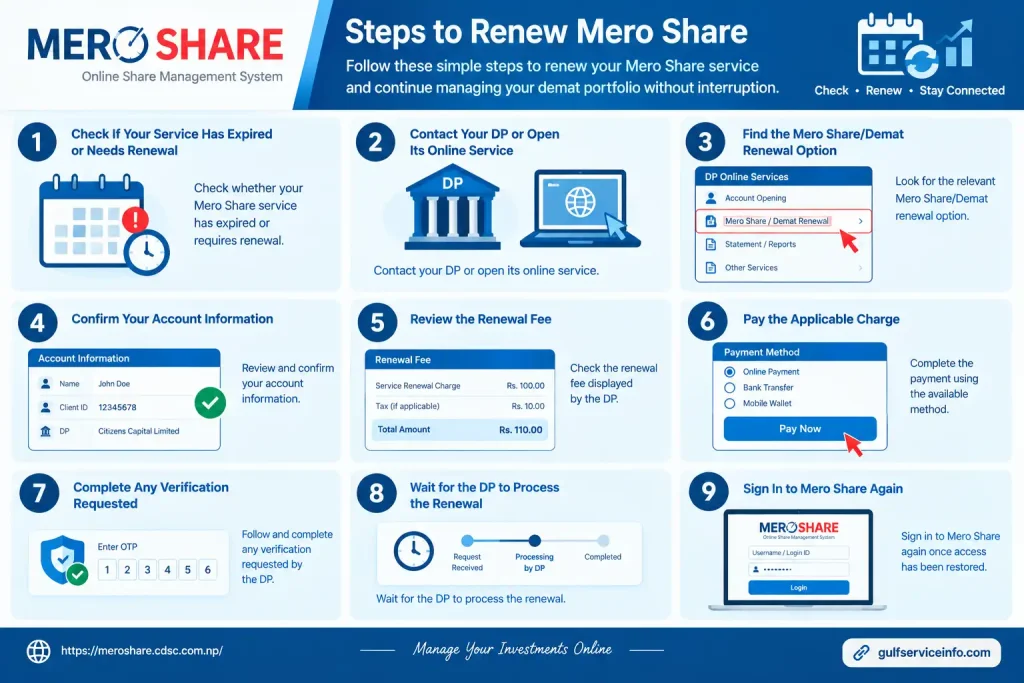
  • Check whether your CDSC online portal service has expired or requires renewal.
  • Contact your DP or open its online service.
  • Find the relevant Mero Share/Demat renewal option.
  • Confirm your account information.
  • Review the renewal fee displayed by the DP.
  • Pay the applicable charge.
  • Complete any verification requested.
  • Wait for the DP to process the renewal.
  • Sign in to Mero again once access has been restored.
Mero Share account renewal steps

Some DPs provide online renewal, which may allow investors to complete the process without visiting a branch. Others may require additional verification or steps.

Mero Share Renewal Fee and Payment Options

There is no single renewal amount that should be assumed for every investor because charges depend on the applicable arrangements of the Depository Participant. For the current Mero Share renewal fee, check directly with your DP rather than relying on old information from third-party websites.

Depending on the institution, payment may be available through online banking, mobile banking, a payment gateway or another official payment channel.

How to Pay the Mero Renewal Fee

If your DP offers online renewal, the process may look like this:

  • Visit your DP’s official website or online banking/service portal.
  • Locate the Mero Share or Demat renewal service.
  • Enter the requested account details.
  • Confirm the renewal amount shown by the DP.
  • Select an available payment method.
  • Complete the payment.
  • Save the receipt or payment confirmation.
  • Check your CDSC online portal access after the renewal has been processed.

Security warning: never send renewal money to an unofficial individual, social-media account or unfamiliar website. If the fee or payment method seems unclear, confirm it directly with your DP.

What If Your Mero Share Account Expires?

If Mero Share access expires and you do not complete the renewal, your access to the online service may be affected. However, an expired Mero service does not automatically mean that the securities held in your Demat account have disappeared.

The Demat account and CDSC online portal internet service are related but serve different purposes. If you cannot sign in because your service has expired, contact your DP and ask them to confirm your current status and the steps required to restore access.

Once the renewal has been processed, access should resume according to the DP’s procedure.

Mero Share Renewal: What Should You Keep in Mind?

A little attention to your account can prevent access problems at an inconvenient time, especially when you need Mero for an IPO application or share-transfer process.

Keep these points in mind:

  • Check your CDSC online portal account periodically.
  • Keep your registered mobile number and email information updated.
  • Renew the service within the applicable period.
  • Save renewal payment receipts.
  • Use only official DP payment channels.
  • Contact your DP if a completed renewal does not appear.
  • Keep your password and other security details private.

Mero Share vs Demat Account

Mero Share and a Demat account are different, although they work together. A Demat account holds securities in electronic form, while Mero Share provides an online interface through which investors can view and manage certain activities connected with that account.

For example, an investor may hold shares in a Demat account and use Mero to check the portfolio, review transactions, submit eligible public-issue applications and complete EDIS instructions.

Your Depository Participant remains important even when you use Mero Share. Registration, account corrections, access issues and other account-level requests may need to be handled through the DP.

Quick Comparison

FeatureDemat AccountMero Share
Main purposeHolds securities electronicallyProvides online access to Demat-related services
Share holdingsStored in the accountCan be viewed online
TransactionsRecorded against the accountCan be monitored electronically
IPO applicationsLinked to the investment accountCan be used for eligible online applications
EDISSecurities are delivered from the accountProvides the interface for delivery instructions
DP involvementRequiredUsed for registration and account-related support

Mero Share Login Problems and Common Errors

Common Mero Share login problems include incorrect credentials, wrong DP selection, forgotten passwords, expired services, browser issues and temporary website problems. These issues can prevent investors from accessing their Mero account even when their underlying Demat holdings remain unaffected.

Some of the most common problems are:

  • Incorrect username or password
  • Wrong DP selected during login
  • Forgotten CDSC online portal password
  • Expired Mero service
  • Temporary website or server problems
  • Browser cache or compatibility issues
  • Incorrect account information
  • Problems with registered contact details
  • Account-specific issues managed by the DP

Identifying the type of problem first makes it easier to choose the correct solution instead of repeatedly trying to log in.

Mero Share Mobile App and Mobile Access

Mero Share can be accessed from a compatible mobile device through its online platform, making it possible to manage supported investor activities without relying entirely on a desktop computer. However, investors should be careful when searching for a separate Mero mobile application.

The availability, name and features of mobile applications can change. Before installing any application that claims to provide Mero services, verify it through official CDSC or authorised sources.

For mobile browser access, use the official Mero Share website:

Is Mero Share Available on Mobile?

Yes, CDSC online portal can be accessed from a compatible smartphone or other mobile device through its online platform. The layout may differ from the desktop experience, but investors can use the services supported by their account.

Mobile access can be useful for checking portfolio information, reviewing transactions, monitoring applications and completing other supported activities while away from a computer.

However, convenience should not come at the expense of security.

How to Stay Safe When Using Mero Share on Mobile

Avoid downloading APK files or applications from unknown websites simply because they claim to be an official Mero application.

Before installing or using a Mero Share-related application, check:

  • The official developer or publisher
  • Where the application was downloaded from
  • The permissions requested by the application
  • Official CDSC announcements
  • Current user reviews and information
  • Whether the application is linked through an authorised source

Never enter your CDSC online portal username, password or verification information into an unknown website or application.

Mero Share Services and Features

Mero Share provides several online services that help investors monitor and manage activities connected with their Demat accounts. Its features cover portfolio information, transactions, issue applications and electronic delivery instructions.

Portfolio Monitoring

Mero allows investors to view information about securities held in their Demat account and monitor their portfolio electronically. This gives investors a convenient way to review their holdings without relying entirely on physical records.

Transaction Information

Transaction-related information can be reviewed through Mero, helping investors monitor changes associated with their securities account. Regularly checking transaction information can also help investors identify unexpected activity.

IPO Applications Through My ASBA

One of the most important CDSC online portal facilities is My ASBA, which allows eligible investors to apply electronically for available public issues.

Investors should check the requirements of each issue before applying, including eligibility, application limits, deadlines and available funds.

FPO Applications

Mero can also support applications for available Further Public Offerings (FPOs) when the relevant issue is open and the investor meets its requirements.

The exact application conditions depend on the individual FPO, so investors should always review the official issue information before submitting an application.

Right-Share Applications

Eligible investors can use the relevant Mero facilities to apply for available right-share issues.

Right-share eligibility and entitlement depend on the company’s issue terms, record date and other applicable conditions. Investors should therefore confirm the official issue notice before submitting an application.

My EDIS

My EDIS is used for electronic delivery instructions associated with securities sold in the secondary market.

After selling applicable securities, investors may need to complete the required EDIS process within the applicable settlement period. Completing this step on time is important for properly processing the securities delivery.

Account and Holding Information

Mero Share provides electronic access to information related to an investor’s securities account, including holdings and transaction-related details. CDSC also provides investor and account-related information through its official resources.

Online Investor Convenience

A major advantage of Mero is that many routine investor activities can be completed online. This can reduce the need to visit a DP branch for basic account monitoring and supported online services.

For investors who regularly participate in Nepal’s securities market, an active Mero account can make everyday account management considerably more convenient.

Benefits of Using Mero Share

Mero is useful because it gives investors convenient online access to several Demat-related services and account activities. Instead of depending completely on physical paperwork or branch visits, investors can monitor supported activities electronically.

Key benefits include:

  • Online access to Demat-related information
  • Portfolio monitoring
  • Transaction checking
  • Online IPO applications
  • FPO application facilities
  • Right-share application facilities
  • EDIS functionality
  • Access through compatible computers and mobile devices
  • Less dependence on physical paperwork for supported services

Mero Share is particularly useful for investors who frequently check their holdings, participate in public issues or need to complete electronic delivery instructions.

At the same time, Mero is an investor-service platform rather than a substitute for investment research. Investors should still understand the risks, deadlines, eligibility rules, issue terms and other requirements connected with each investment.

Mero Share FAQs

The annual Mero renewal fee is Rs. 50, while the yearly Demat account renewal fee is Rs. 100. If you renew both services together, the combined annual cost is Rs. 150.

How to Renew Mero Online

You can renew your Mero account online through the renewal option available in your Mero Share portal. Follow these steps:

  1. Log in to your Mero Share account.
  2. Click your profile icon in the top-right corner.
  3. Select “Renew Account” from the available options.
  4. Choose a supported digital payment service, such as eSewa or Khalti.
  5. Select the renewal type: Mero, Demat, or Both.
  6. Choose the number of years you want to renew.
  7. Review your account and renewal details carefully.
  8. Confirm the information and complete the payment through your selected digital wallet.

After the payment is completed, keep the transaction confirmation or receipt for your records. Renewal options and supported payment methods may vary, so always check the options displayed inside your Mero Share account before making the payment.

To use Mero Share, log in through the official Mero Share Portal using your Depository Participant (DP), username and password. Once logged in, you can manage your Demat-related information, monitor your shares and use supported services such as applying for public offerings.

Mero Share Official Portal

Getting Started with Mero Share Login

Before you can use Mero Share, you need access credentials linked to your Demat account and Depository Participant. The basic setup and login process is as follows:

  • Get your login credentials: After opening a Demat account, contact your bank, broker or other Depository Participant to obtain your Mero Share username and password.
  • Select your DP: Open the official Mero Share website and select the bank or capital market associated with your Demat account from the available list.
  • Enter your login details: Enter your username and password in the relevant fields and sign in to your account.
  • Update your security settings: When accessing the account for the first time, change your password and set a transaction PIN where required.

Once you are logged in, you can access the different Mero Share services available through your account.

How to Apply for an IPO Through Mero Share?

You can apply for an available IPO through the My ASBA section of Mero Share by selecting the issue, entering the required bank and application details, and confirming the request with your transaction PIN.

Follow these steps:

  1. Log in to your Mero Share account.
  2. Open My ASBA from the sidebar menu.
  3. Select Apply for Issue.
  4. Find the company whose IPO is currently open and click Apply.
  5. Enter the required bank account information.
  6. Enter the number of shares you want to apply for.
  7. Provide your CRN (C-ASBA Registration Number).
  8. Review the application details carefully.
  9. Enter your transaction PIN to confirm the IPO application.

After submitting the application, keep the confirmation details for your records. Make sure your bank account has sufficient funds and that the application is submitted within the issue period.

No, a Demat account and Mero Share are not the same. They are two separate services that work together: the Demat account is used to hold your shares and securities electronically, while Mero Share provides an online platform for accessing and managing supported Demat-related activities.

What Is a Demat Account?

A Demat account is an electronic account used to hold shares and other securities in digital form. It records your ownership of securities and is an essential part of participating in Nepal’s stock market.

The main features of a Demat account include:

  • Electronic storage: Your shares and securities are held digitally instead of as physical certificates.
  • Ownership record: The account maintains records of the securities you own.
  • 16-digit BOID: A Demat account is associated with a 16-digit BOID (Beneficial Owner Identification Number).
  • Required for shareholding: Investors generally need a Demat account to hold securities purchased through the stock market.

What Is Mero Share?

Mero Share is an online investor-service platform associated with CDS and Clearing Limited (CDSC). It allows Demat account holders to access and manage various securities-related activities electronically.

CDSC Official Website

Some of the key things you can use Mero Share for include:

  • Applying for IPOs through My ASBA
  • Checking your portfolio and securities information
  • Reviewing transaction-related details
  • Completing supported share-delivery processes such as EDIS

In simple terms, your Demat account holds your securities, while Mero Share gives you online access to supported services related to that account.

How Do Demat and Mero Share Work Together?

A Demat account generally comes first, because Mero Share access is connected to your Demat account and Depository Participant. After opening a Demat account through an authorised DP, you can request Mero Share access and use the platform for supported online services.

The two can therefore be understood as follows:

Demat AccountMero Share
Holds your shares and securities electronicallyProvides online access to supported investor services
Records your securities ownershipHelps you manage and monitor related activities
Provides a 16-digit BOIDUsed for services such as IPO applications
Required to hold securitiesUsed to access supported Demat-related functions

Both services may involve annual renewal requirements, depending on the applicable DP and service terms. Investors should check the current renewal requirements and fees with their Depository Participant.

You can transfer shares after selling them through the Mero Share platform by first calculating the applicable Weighted Average Cost of Capital (WACC) and then completing the required EDIS (Electronic Delivery Instruction Slip) process. The transfer request is completed through the My EDIS section of your Mero Share account.

Step 1: Calculate WACC in Mero Share

Before completing the share transfer process, you need to calculate the WACC for the shares you have sold. You can do this through the My Purchase Source section of your Mero Share dashboard.

Follow these steps:

  1. Log in to your Mero Share account using a web browser.
  2. Open the My Purchase Source option from the dashboard.
  3. Search for the company or select the relevant script/code for the shares you sold.
  4. Select the appropriate transaction from the displayed list.
  5. Click Proceed.
  6. Read and accept the terms and conditions.
  7. Click Update to generate the applicable WACC rate.

Once the WACC information has been generated, you can proceed with the electronic share-transfer process through My EDIS.

Step 2: Transfer Shares Through My EDIS

After completing the WACC process, use the My EDIS section to submit the transfer instruction for your sold shares.

Follow these steps:

  1. Log in to your Mero Share account.
  2. Open My EDIS from the sidebar menu.
  3. Select Transfer Shares to view the settlement details of your sold securities.
  4. Click View Details for the relevant stock transaction.
  5. Select the required transaction or share quantity using the checkbox.
  6. Click Proceed.
  7. Review the agreement statement carefully.
  8. Select I Agree to accept the terms.
  9. Click Confirm to submit the transfer request.
  10. Wait for the confirmation message showing that your transfer request has been successfully submitted.

Completing the My EDIS process after selling shares is an important part of the electronic settlement process. Make sure the transaction details and share quantity are correct before confirming the request.

Your Mero Share ID or username is linked to your 16-digit BOID (Beneficial Owner Identification) number. If you cannot remember your Mero Share ID, you can check your original Demat or Mero Share documents, review old account-related emails, or contact the Depository Participant (DP) where you opened your Demat account.

Mero Share Official Portal

How to Find Your Mero Share ID

You can usually find the information you need through your existing account documents or by contacting your DP.

Check Your Old Emails and Account Documents

Start by checking the documents or emails you received when your Demat and Mero Share account was created. Your confirmation slip, welcome letter or account-related email may contain your BOID and other login information.

Identify Your 16-Digit BOID

Your BOID is a 16-digit identification number associated with your Demat account. It includes an 8-digit DP identification portion followed by your unique 8-digit client identification portion.

Check your Demat documentation carefully if you need to locate this number.

Contact Your Depository Participant

If you cannot find your Mero Share ID or BOID in your records, contact the Depository Participant (DP) where you maintain your Demat account. This may be your bank, broker or capital market institution.

Contact the DP’s customer-support team and follow its account-verification procedure to retrieve the relevant account information. You may be asked to provide appropriate identification or account details to verify ownership before the information is provided.

Once you have recovered your account information, keep it stored securely and avoid sharing your Mero Share password or other login credentials with anyone.

Yes, you can access Mero Share on your phone through a compatible mobile browser or the official Mero Share mobile application. This allows investors to manage supported services, check their portfolio and access share-related features without needing a desktop computer.

How to Access Mero Share on Mobile

You can access Mero Share from your smartphone in two main ways.

Use the Mero Share Mobile App

For supported devices, you can download the Mero Share application through the relevant official app store.

  • Android: Download the Mero Share app through the Google Play Store.
  • iPhone: Download the Mero Share app through the Apple App Store.
  • Before installing, verify that the application is the official Mero Share app and check the developer information.

Use a Mobile Web Browser

You can also access Mero Share directly through your phone’s web browser. Open your preferred browser and visit the official Mero Share login page.

Mero Share Official Portal

Select your Depository Participant, enter your login credentials and sign in to your account.

What Can You Do on Mero Share Mobile?

Mero Share provides several useful services that can be accessed from a compatible mobile device, including:

  • Apply for IPO, FPO and right shares through My ASBA.
  • Check share application information and results.
  • View your portfolio and securities balance.
  • Complete applicable EDIS share-transfer instructions.
  • Calculate or update WACC information through the relevant account facilities.

Using Mero Share on your phone can make routine investor activities more convenient, but always access the platform through an official source and keep your login credentials secure.

Yes, you can generally register for Mero Share online by submitting a Mero Share request or application through your Depository Participant (DP). Your DP is typically the bank, broker or capital market institution where your Demat account is maintained.

The exact registration process can vary between DPs, so investors should follow the instructions provided by their own DP.

Requirements for Mero Share Registration

Before applying for Mero Share access, you generally need an active Demat account and the relevant information connected to it.

Active Demat Account

You need an active Demat account before registering for Mero Share. Your Demat account provides the relevant DP and client identification details, including your BOID (Beneficial Owner Identification).

C-ASBA Registration Number

A CRN (C-ASBA Registration Number) is generally required when you want to apply for shares through the My ASBA facility. The CRN is obtained from your bank according to its applicable C-ASBA process.

Mero Share Registration and Renewal Fees

The source information states that a standard NPR 50 registration fee may apply, along with an annual renewal fee of NPR 50. Fees can vary by service provider, so confirm the current charges with your DP before making a payment.

How to Register for Mero Share Online

The Mero Share registration process normally starts with your Depository Participant rather than directly from the Mero Share login page.

1. Visit Your DP’s Online Service Portal

Start by visiting the website or online service portal of the bank, broker or capital market institution where your Demat account is maintained.

Your DP may provide a dedicated online form for requesting Mero Share access.

2. Complete the Mero Share Registration Form

Enter the information requested by your DP’s Mero Share application form. This may include your BOID, name and contact details, along with other account information required for verification.

Review the information carefully before submitting the request.

3. Receive Your Mero Share Login Credentials

After your DP processes the request, your Mero Share username and password may be sent to your registered email address.

Keep these credentials secure and do not share your password with another person.

4. Log In to the Official Mero Share Portal

Once you receive your credentials, open the official Mero Share login portal and select your Depository Participant.

Mero Share Official Portal

Enter your username and temporary password to access your account. If prompted, change the temporary password and complete any required security settings before using the available Mero Share services.

Important Note

The exact registration method, fee, verification requirements and credential-delivery process may differ between Depository Participants. For this reason, always follow the current instructions provided by your own DP when applying for Mero Share access.

A CRN number in Mero Share is your C-ASBA Registration Number, a unique number issued by your bank. It connects your bank account with your Demat-related application process and is used when applying for shares through Mero Share.

What Is a CRN Number?

CRN stands for C-ASBA Registration Number, while C-ASBA means Centralized Application Supported by Blocked Amount.

The CRN is important when using the My ASBA facility in Mero Share because it allows the bank to identify and process the funds required for an eligible share application.

What Is the Purpose of a CRN?

The main purpose of a CRN is to enable your bank to block the required application amount in your linked bank account when you apply for an IPO, FPO or eligible right-share issue through Mero Share.

The required amount remains blocked according to the applicable ASBA process until the application is processed.

Do You Need a CRN to Apply for an IPO?

Yes, a valid CRN is generally required to submit an IPO application through Mero Share’s My ASBA facility. Having sufficient money in your bank account alone is not enough if you do not have the required C-ASBA registration information.

If you do not have a CRN, contact your bank and follow its current C-ASBA registration procedure before attempting to submit an application through Mero Share.

Yes, an active Demat account is required to apply for an IPO because the shares are credited electronically if you receive an allotment. However, a Demat account alone is not enough; you also need the required banking and application details to complete the IPO process.

Requirements for Applying for an IPO

Before submitting an IPO application, make sure you have the following:

  • Active Demat Account: Required to receive IPO shares in electronic form.
  • Trading Account: May be used by a broker when placing an IPO bid through its platform.
  • PAN or Required Identification: Used to verify your identity and link the application to your investment account.
  • Bank Account: A linked bank account is needed to fund the application through an applicable ASBA or UPI-based process.

How to Apply for an IPO

The exact process depends on your bank, broker, and the application method available. Generally, you can follow these steps:

  1. Log in to your broker’s app or bank’s online banking portal.
  2. Open the IPO section and select the IPO currently accepting applications.
  3. Enter the required bid quantity and price according to the issue terms.
  4. Provide your Demat account details if requested.
  5. Complete the payment authorisation through the applicable UPI mandate or ASBA process.
  6. Review the information carefully and submit the IPO application.
  7. Keep the application confirmation for future reference.

Your application amount is generally blocked rather than immediately debited under the ASBA process, and the final allotment depends on the IPO’s allotment process.

Final Thoughts on Mero

Mero Share provides investors with a convenient online platform for managing and monitoring many Demat-related activities. From Mero login and portfolio checking to IPO applications, FPOs, right shares, transaction information and EDIS, the platform brings several useful investor services into one online system. The safest approach is to use the official Mero website, keep your credentials private and contact your Depository Participant whenever an account-specific problem cannot be resolved through the available online options.

Before applying for an IPO, FPO or right shares, always review the official issue information, eligibility requirements, application limits, deadlines and available funds. Likewise, after selling securities, check whether an EDIS instruction is required and complete it within the applicable settlement period.

GulfServiceInfo Editorial Team

The GulfServiceInfo Editorial Team researches and publishes accurate, easy-to-follow guides on government, education, finance, immigration, employment, and public services across the UAE, Kuwait, and Qatar. Every article is fact-checked and references official government sources whenever possible to help readers access services confidently and efficiently.

Join WhatsApp

Join Now

Join Telegram

Join Now

Leave a Comment