UAE PASS is the UAE’s national digital identity that allows citizens, residents, and visitors to access participating digital services with one trusted identity. Instead of maintaining separate login details for every supported platform, users can use their UAE PASS account to authenticate themselves across participating government, semi-government, and private-sector services. The platform also supports digital document signing, signature verification, and requesting or sharing official digital documents.
For new users, understanding the UAE PASS login, registration, and verification process can make accessing online services much easier. This guide explains how UAE PASS works, how to create an account, how to complete verification, and how to use the service for supported government platforms. It also covers account recovery, common problems, security, support, and frequently asked questions so you can manage your UAE PASS account with confidence.
Looking for more UAE service guides and useful online resources? Visit Our Homepage
What Is UAE PASS?
UAE PASS is the UAE’s national digital identity for citizens, residents, and visitors, providing secure access to participating digital services through a single account. The platform was created to provide a trusted digital identity solution that can be used across different sectors while making online services more convenient and reducing the need for paper-based processes.
With UAE PASS, users can sign in to many participating websites and applications, authenticate their identity, digitally sign documents, verify digital signatures, and request or share supported official documents. The exact services available to you depend on the organization and whether it has integrated UAE PASS into its platform.
The official UAE PASS website describes the service as a digital identity that can be used with many government, semi-government, and private entities. This makes it particularly useful for people who regularly complete government transactions online.
You can access the official UAE PASS website for the latest information about registration, supported features, verification, and account services.
UAE PASS Login
UAE PASS login allows registered users to securely authenticate themselves when accessing a participating website or application. Instead of creating a separate account for every supported service, you can select the UAE PASS authentication option and complete the requested verification.
The current UAE PASS authentication page accepts an Emirates ID, email address, or phone number as the login identifier.
How to Login to UAE PASS
To complete a UAE PASS login, follow these general steps:
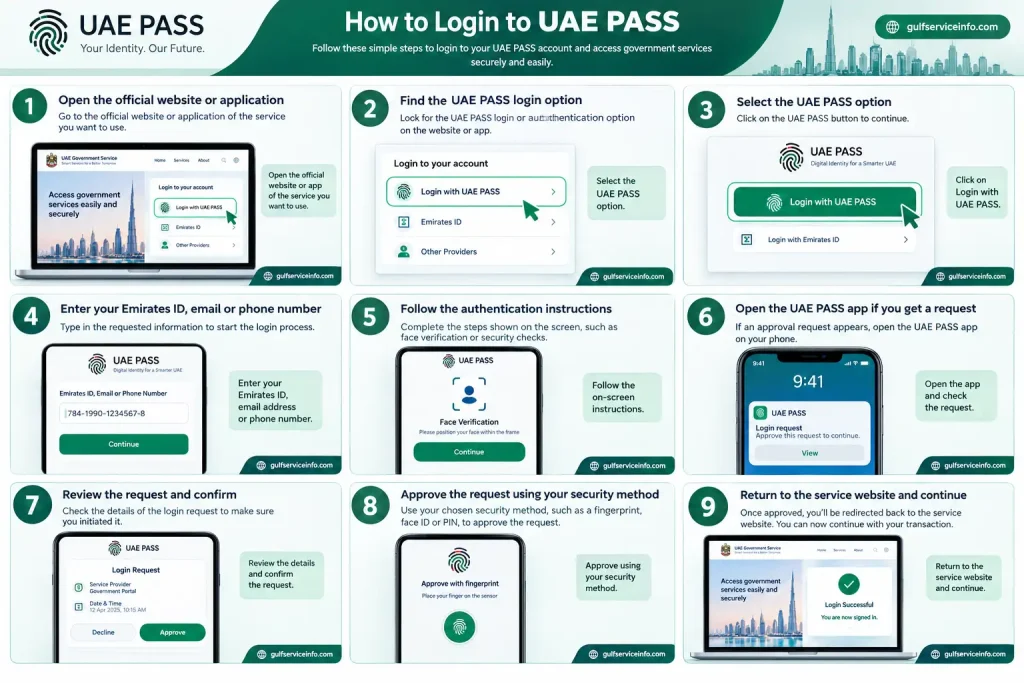
The exact authentication experience can vary between service providers because each organization integrates UAE PASS into its own digital platform.
Important: Never approve a UAE PASS authentication request that you did not initiate. If an unexpected request appears on your phone, reject it and investigate the reason before attempting another login.
For account access, use the official UAE PASS authentication service when it is provided by the service you are trying to access.
UAE PASS Registration
UAE PASS registration creates your digital identity account and begins the process of connecting your identity to the UAE PASS platform. The official UAE PASS website currently describes registration as a three-step process: download the application, register using an accepted identification document, and verify the account through face verification or a nearby kiosk.
According to the official platform, registration can be started using an Emirates ID, GCC ID, or passport, depending on the available registration route and your circumstances.
How to Register for UAE PASS
The general UAE PASS registration process is:
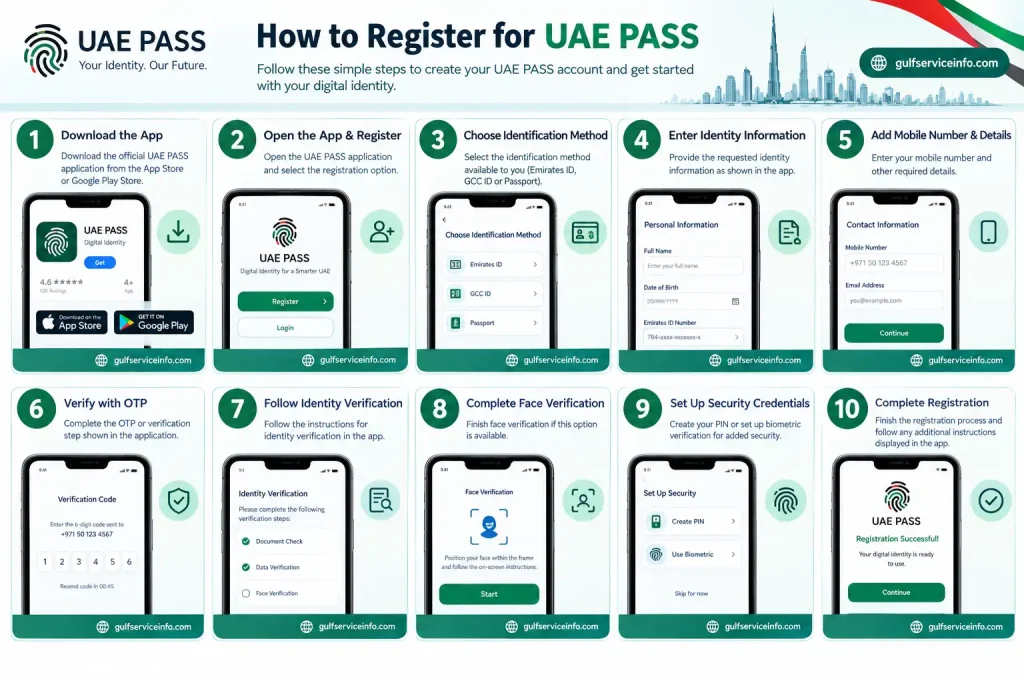
The exact screens and requirements can change as UAE PASS updates its services, so users should follow the instructions shown in the current official application rather than relying on outdated screenshots or third-party guides.
What Do You Need for UAE PASS Registration?
You generally need an accepted identity document, a smartphone, and the information required by UAE PASS to begin registration. The official UAE PASS website specifically identifies an Emirates ID, GCC ID, or passport as registration options.
Depending on your registration route, you may need:
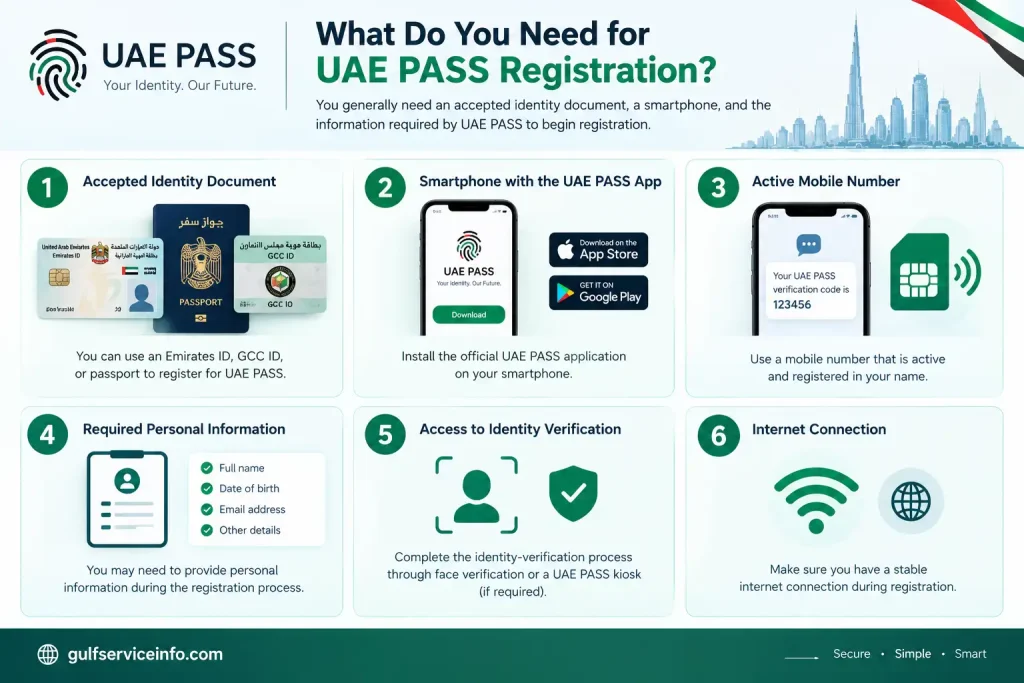
Make sure the information you provide matches your official identity documents. Incorrect or outdated information can create problems during registration or verification.
The safest approach is to download the application through an official app store and begin the process from the official UAE PASS website rather than using an unofficial download link.
UAE PASS Verification
UAE PASS verification confirms your identity after registration and helps establish the required level of trust for your digital identity account. The official UAE PASS website currently lists two verification routes: face verification or visiting a nearby UAE PASS kiosk.
Verification is important because UAE PASS is not simply a username-and-password service. It is designed to provide a trusted digital identity that can be used when interacting with participating online services.
UAE PASS Face Verification
UAE PASS face verification allows eligible users to verify their identity through the smartphone application. The app guides you through the required steps and uses your phone’s camera as part of the verification process.
For a smoother verification attempt:
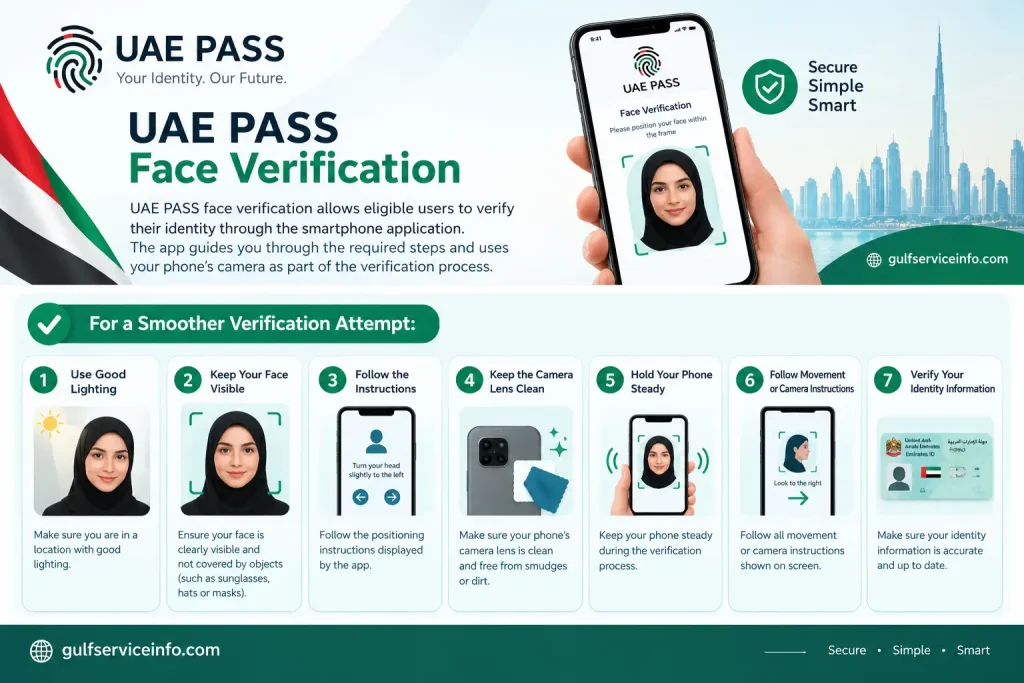
If your first attempt fails, carefully repeat the process rather than continuously submitting unsuccessful attempts. Poor lighting, camera problems, or difficulty following the on-screen instructions can affect the verification experience.
UAE PASS Kiosk Verification
A UAE PASS kiosk provides a physical verification option for users who need to verify or upgrade their account through a kiosk. The official UAE PASS kiosk page provides a location map where users can find available verification points across the UAE.
To find a kiosk:
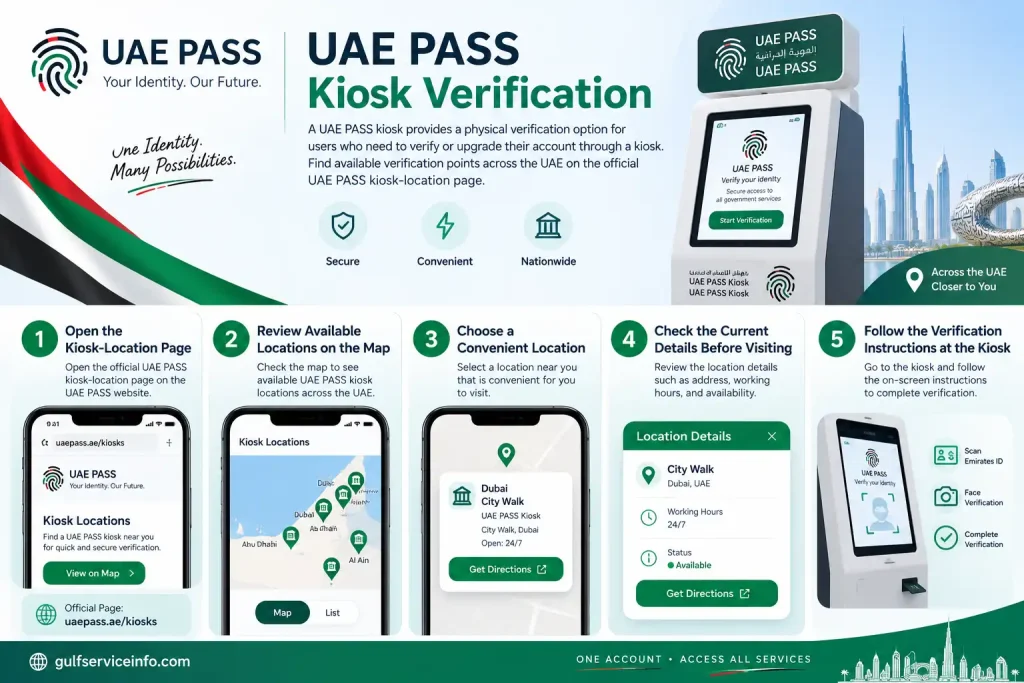
You can use the official UAE PASS Kiosk Locations page to find a verification point.
Because kiosk locations can change, always check the official UAE PASS map before travelling to a particular location.
How to Use UAE PASS for Government Services
UAE PASS can be used to authenticate users on participating UAE government services that have integrated the digital identity platform. Once your account has been registered and verified as required, you can select UAE PASS when it is offered as a login or authentication method.
UAE PASS is not automatically available on every government website. The official terms explain that use with a particular government service depends on whether that service provider has integrated UAE PASS.
Steps to Use UAE PASS for a Government Service
To use UAE PASS for government services, follow these steps:
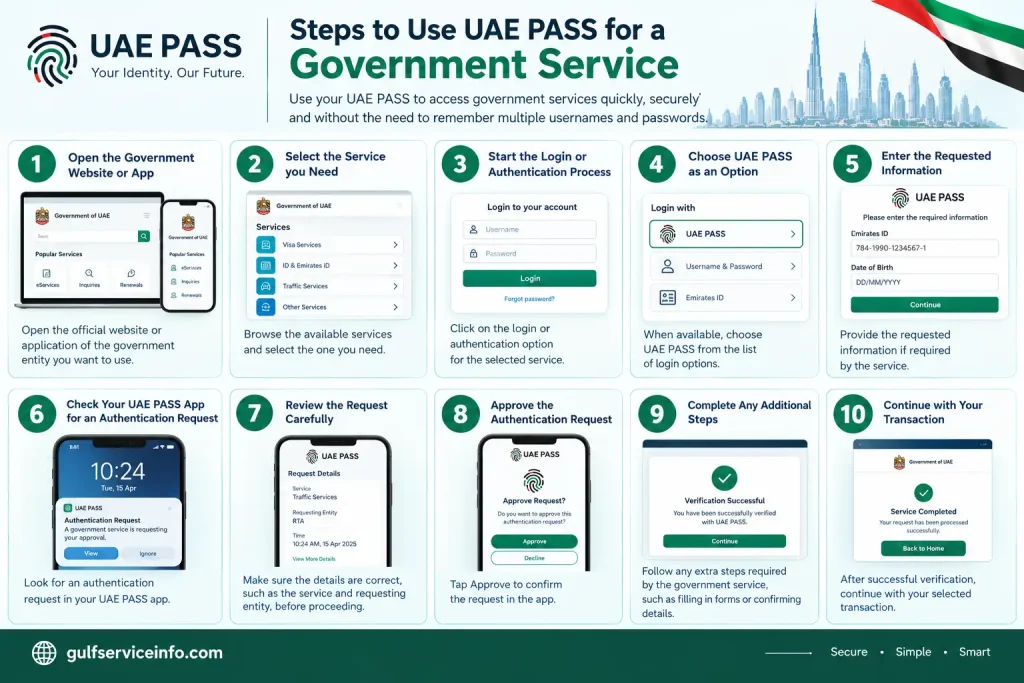
The exact process can differ between government entities because the individual service provider controls its own website and transaction flow.
What Can You Do With UAE PASS?
UAE PASS can support secure sign-in, digital signatures, document verification, and official document sharing on participating services. These features extend the platform beyond simple login authentication.
Depending on the service, users may be able to:
The availability of a particular feature depends on the organization and service involved.
UAE PASS App
The UAE PASS app is the main smartphone application used to register, verify, and authenticate your digital identity. It is an important part of the UAE PASS experience because many authentication and identity-related actions are completed through the mobile application.
The official platform promotes smartphone-based access for sign-in and registration and also supports document signing through the UAE PASS app or self-care portal.
UAE PASS App Features
The UAE PASS app provides several digital identity features beyond basic login. Depending on the service and your account, you may use it to:
Keeping the application updated can also help maintain compatibility with supported services. Always install updates through an official app store or access the application through the official UAE PASS platform.
If you need to use UAE PASS on a new phone or encounter an app-related problem, follow the account-management or recovery instructions provided by the official service rather than creating another account unnecessarily.
UAE PASS Recovery
UAE PASS recovery helps users regain access to their digital identity when they cannot log in or need to resolve an account-access problem. The appropriate recovery process depends on the reason you cannot access the account, such as forgotten credentials, a changed phone, or difficulty completing authentication.
If you are having trouble accessing UAE PASS, start with the official application and follow the recovery instructions available for your account. Avoid third-party websites that claim they can recover or activate UAE PASS accounts for a fee.
How to Recover UAE PASS Account
The general recovery process can include these steps:
The available options can differ according to your account and the current UAE PASS system. Therefore, always follow the instructions displayed by the official application.
What If You Forgot Your UAE PASS Password?
If you forgot your UAE PASS password or another security credential, use the official recovery option provided by UAE PASS rather than creating a second account. The system may require you to verify your identity before allowing you to regain access.
Start by opening the official UAE PASS application and checking the available account-recovery options. If you cannot complete the required verification, use the official UAE PASS support channels for further assistance.
Never give your password or OTP to another person who claims they can recover your account.
What If You Changed Your Phone?
If you changed your smartphone, you may need to complete additional authentication before using your existing UAE PASS account on the new device. Install the official UAE PASS application on the new phone and follow the instructions for accessing an existing account.
If you still have access to your previous device, keep it available until you have successfully completed the transition where possible. If you lost your old phone or can no longer access your previous authentication method, follow the official account-recovery instructions.
If the application cannot verify you on the new device, contact UAE PASS through its official support channels rather than registering a duplicate identity.
How to Update UAE PASS Account Information
Updating UAE PASS account information keeps your digital identity details accurate and can help prevent authentication and recovery problems. Depending on the type of information involved, changes may be handled through the UAE PASS app, self-care portal, or an official verification process.
Some information may be directly manageable by the user, while identity information connected to official documents may require additional verification. This means you should not assume that every profile field can be changed manually.
How to Update UAE PASS Information
A typical account-information update process is:
The exact options can change as the platform is updated, so use the current instructions shown by UAE PASS.
Update Your Mobile Number
Keeping your registered mobile number current is important because your phone may be involved in authentication and account-security processes. If your number changes, check the official UAE PASS account-management options to determine how the new number can be registered.
If you no longer have access to the old number, you may need to complete an additional identity-verification or recovery process.
Do not ask another person to receive your verification codes on your behalf. Your UAE PASS account should remain under your own control.
Update Identity Information
Identity information connected to official documents may require an official verification process rather than a simple profile edit. If your Emirates ID, passport, or other identification information has changed, follow the instructions provided by UAE PASS for your particular account.
Always make sure that your information matches your current official documents before attempting verification.
UAE PASS Common Problems and Solutions
Most UAE PASS problems are related to login, identity verification, OTP delivery, authentication requests, or the mobile application. The correct solution depends on the exact error you receive, but checking your connection, application, account information, and authentication request can resolve many basic issues.
UAE PASS Login Not Working
If UAE PASS login is not working, first check your account details, internet connection, application status, and authentication request. Make sure you are using the correct UAE PASS account and that the service you are accessing actually supports UAE PASS.
Try these steps:
If UAE PASS works normally but the particular government website does not, the issue may be with that service rather than your digital identity.
UAE PASS Verification Failed
If UAE PASS verification fails, check your camera, lighting, identity information, and the instructions shown by the application before trying again. Face verification can be affected by poor lighting or difficulty capturing a clear image.
Try:
If the problem continues, check whether another official verification option is available, such as a UAE PASS kiosk.
UAE PASS OTP Not Received
If you do not receive a UAE PASS OTP, first confirm that the registered mobile number is correct and that your phone can receive SMS messages.
You can also:
Never share a UAE PASS OTP with anyone.
UAE PASS Authentication Request Not Showing
If a UAE PASS authentication request does not appear, check your internet connection and open the UAE PASS app manually. You should also make sure notifications are enabled for the application.
Try the following:
If an unexpected authentication request appears, do not approve it.
UAE PASS App Not Working
If the UAE PASS app crashes, freezes, or fails to open, check your internet connection and make sure you are using the latest available version.
You can try:
Before reinstalling, make sure you understand how you will regain access to your existing account.
Is UAE PASS Free?
UAE PASS is intended to provide digital identity and authentication services without requiring users to purchase a general monthly subscription for the basic identity account. However, this does not mean that every service accessed through UAE PASS is free.
A government department or private organization can charge its own fees for a particular transaction, application, certificate, permit, or other service. That payment is separate from using UAE PASS to authenticate your identity.
For example, if you use UAE PASS to sign in to a government service and that service requires a transaction fee, the charge comes from the relevant service provider rather than from the basic act of logging in with UAE PASS.
Are UAE PASS Government Services Free?
UAE PASS does not determine whether an individual government service is free or paid. Each participating organization sets its own requirements and fees.
Before completing a transaction, check the official website of the relevant government entity for current charges. Avoid websites that ask you to pay an unofficial “UAE PASS activation” or “UAE PASS registration” fee.
Are There Paid UAE PASS Services?
Some features or services connected to UAE PASS can have their own terms or charges depending on the participating service provider. Therefore, users should check the specific service they are using instead of assuming that every transaction has the same cost.
The safest approach is to use the official UAE PASS platform and the official website of the government or organization providing the service.
UAE PASS Security and Privacy
UAE PASS security is important because the platform is connected to your digital identity and can be used to authenticate you on participating services. Users should protect their account, mobile device, authentication credentials, and approval requests just as carefully as other sensitive online accounts.
The official UAE PASS terms place responsibilities on users regarding their account information and security.
UAE PASS Security Tips
Follow these basic precautions when using UAE PASS:
Check Every Authentication Request
You should approve a UAE PASS authentication request only when you personally started the related login or transaction. Before approving, check the service or organization shown in the request and make sure it matches what you are currently doing.
If you receive an unexpected request, reject it instead of approving it simply to make the notification disappear.
UAE PASS Privacy
UAE PASS processes identity-related information as part of providing its digital identity services. The information involved can depend on the registration method, account, and service being accessed.
For the most accurate and current information about privacy, terms, and data handling, review the official UAE PASS documentation rather than relying on third-party explanations.
The official UAE PASS website should be your primary source for current platform information.
UAE PASS Customer Support
UAE PASS customer support helps users resolve account, registration, verification, login, and other technical issues. Before contacting support, identify the exact problem you are facing, such as a failed verification attempt, missing OTP, account-access issue, or authentication error. This makes it easier to explain your problem and follow the appropriate solution.
For reliable assistance, always use the official UAE PASS support channels rather than phone numbers or social-media accounts found on random websites. You can start from the official UAE PASS website and access the latest support information available there.
How to Contact UAE PASS Support
The safest way to contact UAE PASS support is through the official UAE PASS platform and its listed support channels. Follow these steps:
When contacting support, never provide your password, OTP, or approve an authentication request simply because someone claims to be a support representative.
What Information Should You Have Ready?
Having basic information about your problem can make UAE PASS support easier and faster. Depending on the issue, you may need to explain:
Only provide sensitive information through an official and verified UAE PASS support channel.
UAE PASS Tips for New Users
New UAE PASS users can avoid many common problems by completing registration carefully and following basic digital-security practices. Because UAE PASS is linked to your digital identity, it is important to keep your account information accurate and protect your authentication requests.
Complete Verification Carefully
Completing UAE PASS verification correctly can make future authentication easier. If you are using face verification, choose a well-lit location and follow every instruction displayed in the app.
If a kiosk is required or available for your verification, use the official UAE PASS kiosk-location page instead of relying on information from unofficial websites.
Keep Your Information Updated
Keeping your UAE PASS account information current can help prevent problems with login and account recovery. Pay particular attention to your registered mobile number and other information used for authentication.
If your identification information changes, follow the official process for updating your digital identity.
Protect Your Account
Your UAE PASS account should be treated as sensitive because it represents your digital identity. Never give another person your password, OTP, or access to your authentication requests.
You should also use a secure lock on the smartphone where your UAE PASS application is installed.
Never Approve Unknown Requests
Never approve a UAE PASS authentication request unless you personally initiated the related login or transaction. If an unexpected request appears, reject it and investigate the issue.
This is one of the simplest ways to protect your digital identity from unauthorized authentication attempts.
Use Official Websites
Always use official UAE PASS sources when registering, logging in, recovering an account, or checking verification information. Avoid websites that promise instant account activation, paid recovery, or unofficial UAE PASS services.
The official website is:
UAE PASS Official Website
Frequently Asked Questions About UAE PASS
Conclusion
UAE PASS provides a single digital identity that can simplify access to participating government, semi-government, and private-sector services in the UAE. From registration and verification to UAE PASS login, account recovery, digital signatures, and document sharing, the platform brings several digital identity functions together in one service. For new users, the most important step is to begin with the official UAE PASS application and complete the required registration and verification process carefully. Once your account is ready, you can use UAE PASS to authenticate with participating services whenever the option is available.
Read More: Explore our related Gulf government service guides for more step-by-step information and helpful updates.