SBI Online: Login, Registration, Net Banking & Complete Guide

Published On: September 12, 2026
Follow Us
SBI Online login, registration and net banking services guide

Banking with the State Bank of India does not always require a trip to the branch. Through SBI Online, eligible customers can access internet banking, view account details, transfer funds, request selected services and manage various banking activities from a computer with an internet connection. The official SBI internet banking service is available through onlinesbi.sbi.bank.in. SBI describes its internet banking platform as a way for retail customers to operate their accounts online, although the exact services available can depend on the account and access enabled for the customer.

This guide covers the key parts of SBI, including login, new-user registration, activation, username and password requirements, account management, fund transfers, security precautions and common access issues.

Looking for more UAE service guides and useful online resources? Visit Our Homepage

What Is SBI Online?

SBI Online is the State Bank of India’s internet banking platform for retail customers. It brings many everyday banking facilities together in one online service, allowing customers to manage eligible accounts without depending on a branch for every routine request.

The available features vary according to the customer’s account and enabled services. Depending on the access provided, SBI Online can be used for account transfers, third-party payments, statements, cheque-book requests, selected service requests and other banking functions.

For customers who prefer managing their accounts from a desktop or laptop, internet banking provides a wider account-management interface. SBI also offers mobile-based digital banking services separately, but SBI Online remains an important option for customers who need internet banking access.

SBI Online Services at a Glance

Depending on your account and the facilities enabled, SBI Net Banking may provide access to:

  • Account information and balance details
  • Transfers between eligible SBI accounts
  • Transfers to other SBI customers
  • Inter-bank fund transfers
  • Eligible standing instructions
  • Account-related information
  • Cheque-book requests
  • Selected banking service requests
  • Certain profile and security settings
  • Bill-payment facilities

SBI’s internet banking service supports transfers between a customer’s own accounts, payments to other SBI accounts and transfers to accounts held with other banks.

What to Have Ready Before Using SBI Online

A little preparation can prevent problems during registration or login. Your SBI account details and registered mobile number should be available, while customers using the self-registration process may also need an eligible SBI debit card.

For an existing SBI Net Banking user, the basic login credentials are the registered username and login password. A registered mobile connection may also be required when SBI requests OTP-based or additional verification.

Before you start: Make sure your mobile number is accessible and use only the official SBI website when entering banking credentials.

SBI Online Login: How to Access Your Account

The SBI Online login process starts from the official State Bank of India internet banking website. Using the correct website is particularly important because fake banking pages can be designed to capture usernames, passwords or other confidential information.

Steps for SBI Online Login

Follow this general login process:
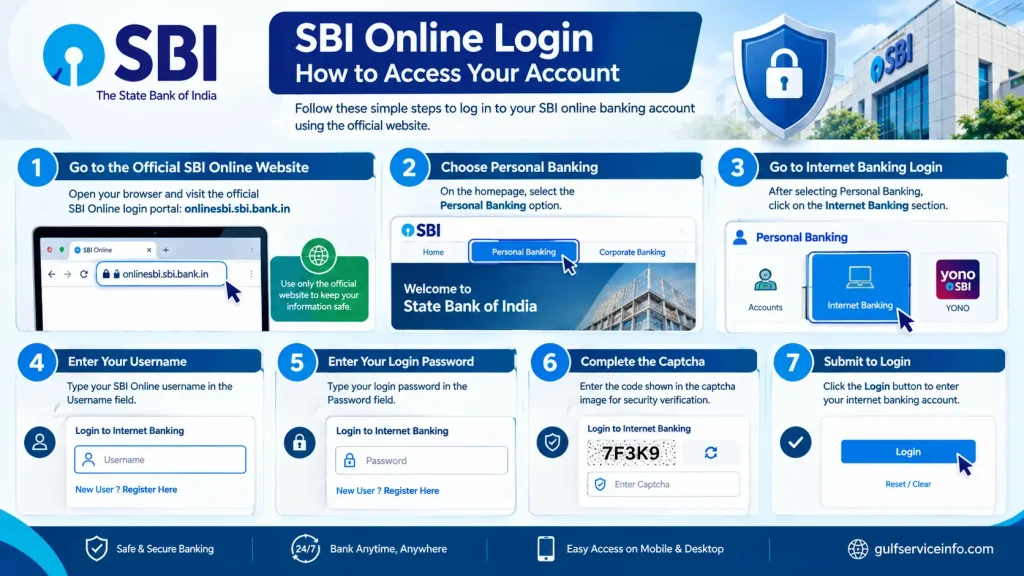
  • Go to the official SBI Online website: SBI Online Login Portal
  • Choose the Personal Banking option.
  • Continue to the internet banking login page.
  • Enter your Username.
  • Enter your Login Password.
  • Complete any captcha or security verification displayed on the page.
  • Submit the information to enter your internet banking account.
Steps for SBI Online login using the official State Bank of India

The login page should always be accessed through the authorised SBI domain. SBI warns customers against entering usernames or passwords on unauthorised pages and states that confidential information such as passwords, PINs and OTPs should not be disclosed in response to suspicious calls, emails or messages.

SBI Online Login Safety Tip

Do not use a banking link simply because it appears in an SMS, email or social-media message. Instead, open the official SBI website yourself and navigate to the internet banking service.

Before entering your credentials, check the website address carefully. A genuine-looking page is not enough; the domain itself matters.

How to Register for SBI Internet Banking

If you have not previously used SBI Net Banking, eligible retail customers may be able to create or activate internet banking access through SBI’s self-registration facility. The online route can reduce the need for a branch visit when the required debit-card verification is available.

The exact registration options shown to you can depend on your account and existing banking access.

SBI Online Registration Process

To begin, open the official SBI website and enter the personal banking section. Look for the option related to New User Registration / Activate and follow the instructions displayed by SBI.

The registration process generally involves these stages:

  • Open the official SBI Net Banking portal.
  • Enter the Personal Banking section.
  • Select New User Registration / Activate.
  • Choose the new-user registration option.
  • Provide the account and personal information requested on screen.
  • Complete the required verification.
  • Where eligible, verify the account using your SBI debit card details.
  • Set or confirm your internet banking username and password.
  • Finish the registration process and attempt your first login.
SBI Online registration process for SBI Internet Banking

SBI’s official information indicates that customers with an SBI debit card can use their card details for self-activation of internet banking. Customers without the required SBI debit card may need assistance from their branch.

Important: Registration availability can vary according to the account and access already enabled by SBI. If the online activation facility is not available for your account, contact the relevant SBI branch rather than repeatedly entering incorrect information.

SBI Net Banking Activation Explained

SBI net banking activation links your eligible SBI account with your internet banking access. Customers who meet the online requirements may be able to activate the service through debit-card verification, while those who do not have the required card may have to complete the process through a branch.

After registration, SBI may display or provide an initial username and may require you to replace temporary credentials with credentials of your choice. SBI also notes that internet banking usernames and passwords are case-sensitive.

One point that often causes confusion is the difference between the login password and profile password. They serve different purposes. The login password is used to access internet banking, while the profile password provides an additional layer of protection for certain profile-related activities.

SBI Net Banking Activation Checklist

Before considering the activation process finished, check that:

  • Your registered mobile number is accessible.
  • Your SBI account information has been entered correctly.
  • Your SBI debit card is available if card-based activation is required.
  • You know the username created or assigned to you.
  • Your login password satisfies SBI’s requirements.
  • A separate profile password has been created where required.
  • You are using the official SBI website.

Taking a moment to check these details can prevent avoidable registration and first-login problems.

SBI Online Username and Password Requirements

Your SBI Net Banking username and password are the primary credentials used to access internet banking. Because SBI treats these credentials as case-sensitive, you need to enter capital and small letters exactly as registered.

According to SBI’s stated requirements, usernames can be alphanumeric and may contain up to 20 characters. Login passwords should contain between 8 and 20 characters and use a combination of letters, numbers and special characters.

Keep your login details private. SBI specifically warns customers not to disclose confidential information such as passwords, OTPs, PINs or card details through unsolicited communications.

Login Credentials: What to Remember

CredentialPurpose
UsernameIdentifies your SBI Online internet banking account
Login PasswordUsed to sign in to internet banking
Profile PasswordAdds security for selected profile-related activities
OTPMay be required for certain verification or banking activities

Never share any of these security details with another person. If someone contacts you claiming to be from SBI and asks for confidential credentials, treat the request with caution.

Before Your First SBI Online Login

Make sure you can distinguish between your username, login password and profile password. Enter each credential in the correct field and remember that passwords are case-sensitive.

If you encounter an unexpected registration or activation message, do not keep guessing credentials. Check the official SBI instructions or contact the bank through an authorised channel.

SBI Online Services You Can Use

Once your SBI Net Banking access is active, a range of routine banking tasks can be handled through internet banking. The exact facilities shown after login depend on your account, registration status and the services SBI has enabled for your profile.

Common facilities include account information, balance enquiries, fund transfers, statements, cheque-book requests, bill payments, selected profile settings and eligible standing instructions.

SBI Online FacilityTypical Use
Account informationView details linked to your account
Balance enquiryCheck your available balance
Fund transferSend money to eligible accounts
SBI account transferTransfer funds to another SBI account
Inter-bank transferSend money to an account with another bank
Account statementReview or download transaction records
Cheque bookSubmit an eligible cheque-book request
Bill paymentsPay supported bills online
Profile managementUpdate selected personal or security settings
Standing instructionsSet up eligible recurring instructions
SBI Online services including account information, balance enquiry, fund transfer, statements, cheque book and bill payments

The availability of a particular service should always be confirmed inside your SBI Online account because not every facility is available to every customer.

Good practice: Before approving a payment or transfer, check the beneficiary, amount and transaction details carefully.

How to Check SBI Account Balance Online

Checking your balance is one of the simplest things you can do after signing in to SBI Online. You can view your account information through internet banking without needing to visit an ATM or branch.

SBI Online Balance Check Steps

  • Open the official SBI Online portal.
  • Sign in using your SBI Net Banking username and password.
  • Complete any additional verification requested by the portal.
  • Open the account or account-summary section.
  • Select the SBI account you want to check.
  • Review the balance and other account information displayed.
SBI Online balance check steps to view an SBI account balance through internet banking

The wording and position of individual options may change as SBI updates its internet banking interface, so follow the options currently shown on the official website.

Other Ways to Check Your SBI Balance

Internet banking is not the only digital option available. SBI customers may also use the bank’s official mobile banking services when they want to check account information from a smartphone.

Whichever method you choose, use an official SBI website or application. Keeping your phone, browser and security software updated also helps reduce avoidable security risks.

How to Transfer Money Through SBI Online

SBI Net Banking supports several types of fund transfers, including transfers between your own SBI accounts, payments to other SBI accounts and eligible transfers to accounts held with other banks.

The available transfer method depends on the recipient’s bank, your account setup and the facilities enabled for your internet banking profile.

SBI Online Fund Transfer: Step-by-Step

The process generally follows this sequence:

  • Sign in to the official SBI Online portal.
  • Open the Payments / Transfers section or the relevant transfer option.
  • Select the type of transfer you want to make.
  • Choose the account from which the money will be debited.
  • Select an existing beneficiary or add one if the service requires it.
  • Enter the recipient’s account information where requested.
  • Enter the amount to be transferred.
  • Check the beneficiary details carefully.
  • Review the complete transaction information.
  • Complete any required authentication or OTP verification.
  • Confirm the transfer.
  • Keep the transaction reference or confirmation information for your records.

Check These Details Before Sending Money

A fund transfer should never be confirmed without checking the recipient information first. Pay particular attention to the account number, beneficiary details and amount.

SBI may also apply different limits, beneficiary activation rules and authentication requirements depending on the transfer type and account configuration.

Security warning: Never disclose your OTP, internet banking password, profile password or ATM PIN to anyone, even if the person claims to represent SBI.

How to Get an SBI Account Statement Online

An SBI Online account statement lets you review transaction activity associated with your account. This can be useful for checking deposits, withdrawals, transfers and other financial activity without requesting a paper statement from a branch.

Steps to Download an SBI Statement

  • Log in to the official SBI Online website.
  • Go to the account information or statement section.
  • Select the account you want to review.
  • Choose the relevant transaction period or dates.
  • Submit the request.
  • Review the transactions displayed.
  • Use the download or print facility if it is available.
  • Save the statement securely on your device.
Steps to download an SBI account statement online through SBI Online

Before downloading, check that you have selected the correct account and date range. This is particularly important when you need a statement covering a specific financial period.

Why Keep an SBI Net Banking Statement?

A digital statement can help you:

  • Review recent account activity
  • Confirm incoming payments
  • Check completed transfers
  • Monitor regular spending
  • Maintain personal financial records
  • Provide banking records when a statement is required

Because statements contain sensitive financial information, store downloaded copies securely and avoid leaving them in publicly accessible folders or shared devices.

SBI Online Fund Transfer Limits

There is no single SBI Net Banking transfer limit that necessarily applies to every transaction. The permitted amount can depend on the transfer method, beneficiary, account configuration, authentication requirements and the rules applicable to that particular service.

SBI can also revise transaction conditions and limits. Therefore, an older limit mentioned on another website may no longer reflect the current position.

What Can Affect an SBI Transfer Limit?

The applicable limit may depend on factors such as:

  • Type of transfer
  • Beneficiary or recipient
  • Account configuration
  • Transfer channel
  • Authentication requirements
  • SBI’s current transaction rules
  • Whether a beneficiary has recently been added

If a transfer is declined because of a limit, read the message shown by SBI before attempting it again. The problem could relate to the amount, beneficiary status or another account restriction.

SBI Online Banking Charges

SBI Online charges depend on the particular service or transaction. Access to internet banking provides numerous facilities, but this does not mean that every transaction or request is necessarily free.

Fees can differ according to the type of transfer, payment or banking service. SBI may also update its service-charge schedule, so information found on older third-party websites may not reflect the current applicable amount.

How to Check SBI Online Charges

Before approving a service that may involve a fee:

  • Sign in through the official SBI Online portal.
  • Select the banking service you need.
  • Check whether a charge is displayed before confirmation.
  • Refer to SBI’s current official service-charge information when required.
  • Confirm the transaction only after checking the applicable cost.

This is particularly useful for fund transfers and other services where charges can depend on the method used.

SBI Online Mobile Banking Options

If you prefer using a smartphone, SBI also provides digital banking services through its mobile ecosystem. YONO SBI is SBI’s digital banking platform and provides banking and related services through its official application.

For security, download a banking application only through an official app-store listing. Check the publisher information before installing it so you do not accidentally use an imitation application.

SBI Online vs SBI Mobile Banking

FeatureSBI Net BankingSBI Mobile Banking
Primary accessComputer or web browserSmartphone
Sign-in methodInternet banking credentialsApp-based access
Balance checkingAvailableAvailable
Fund transfersAvailableAvailable
StatementsAvailable for supported servicesAvailable for supported services
Best suited forLarger screens and detailed account managementConvenient access while using a phone

These services can complement each other rather than replace one another. For example, you may prefer SBI Online when working on a computer and use SBI’s mobile banking service when you need account access while away from your desktop.

SBI Online Login Not Working? Common Fixes

A failed SBI Online login does not always mean there is a problem with your account. Incorrect credentials, an inactive registered mobile connection, browser problems, internet issues and verification errors can all prevent successful access.

Before contacting SBI, check the message displayed on the login page and work through the basic causes below.

Login ProblemWhat You Can Try
Incorrect usernameCheck that you are entering the correct SBI Net Banking username
Forgotten passwordUse SBI’s official password-recovery facility
Account access blockedFollow the instructions provided by SBI or contact support
OTP not receivedCheck your registered mobile number, signal and network connection
Website not loadingCheck your internet connection and try again later
Browser issueClear the browser cache or use an updated browser
Captcha errorCarefully enter the characters displayed
Session expiredReturn to the login page and sign in again

SBI Online Website Is Not Opening

If the SBI Online website fails to load, first check whether your internet connection is working correctly. Refreshing the page or trying the official portal through an updated browser may resolve a temporary access problem.

There is one situation where repeatedly refreshing the page can make matters worse: when you’ve already submitted a payment or transfer. Instead of immediately trying the transaction again, check its status first to avoid accidentally submitting it more than once.

SBI Online Password Is Not Accepted

When your password is rejected, check whether Caps Lock is enabled and make sure every character has been entered correctly. SBI states that usernames and passwords are case-sensitive.

If you cannot remember the password, don’t keep guessing. Use the official Forgot Username / Login Password recovery option to regain access.

SBI Online OTP Not Received

An SBI Online OTP can sometimes be delayed because of mobile-network problems, SMS delivery delays or an issue with the registered mobile number.

Wait briefly before requesting another OTP. If messages continue to be unavailable, confirm that the mobile number registered with SBI is active and correctly linked to your account.

Never share an OTP. A genuine SBI employee or support representative should not require you to disclose your confidential OTP to them.

SBI Online Security: How to Stay Safe

Using SBI Online safely involves more than protecting your password. Customers should also watch for phishing websites, fake customer-care numbers, fraudulent messages, suspicious applications and callers pretending to represent the bank.

SBI’s security guidance warns customers against disclosing confidential banking information, including passwords, PINs and OTPs.

SBI Online Security Checklist

Use these habits whenever you access internet banking:

  • Enter banking credentials only on the official SBI website.
  • Check the website address before signing in.
  • Keep your SBI Online username and password private.
  • Never disclose an OTP to another person.
  • Do not reveal your ATM or debit-card PIN.
  • Install banking applications only from trusted official app stores.
  • Avoid banking transactions over public or unsecured Wi-Fi.
  • Keep your computer and smartphone updated.
  • Use a strong, unique banking password.
  • Don’t save banking credentials on a shared computer.
  • Sign out after completing your SBI Online session.
  • Treat unexpected calls asking you to verify your account with caution.
  • Avoid clicking unknown banking links received through SMS, email or social media.

How to Recognise a Fake SBI Message

A common banking scam involves a message that creates urgency. For example, a fraudulent SMS or email may claim that your account will be blocked unless you immediately update your KYC information, password or mobile number.

Don’t use the link provided in such a message.

Instead, open the official SBI website yourself and check whether any action is genuinely required. This removes the risk of being redirected to a fake banking page.

Security reminder: Keep your password, OTP, PIN and other confidential banking information private. Never provide them to an unknown caller or through an unsolicited message.

SBI Online Customer Care and Support

When an SBI Net Banking problem cannot be resolved through the portal, use SBI’s official customer-support channels. The appropriate support route can depend on whether the issue concerns internet banking, a transaction, a card, an account or another banking service.

Don’t rely on customer-care numbers copied from random websites, forwarded messages or social-media posts. Use SBI’s official customer-care resources instead.

Official SBI Customer Care

When You May Need SBI Support

Contact SBI through an authorised channel if:

  • You cannot recover your internet banking credentials.
  • Your SBI Online access appears to be blocked.
  • A transaction has an unexpected or unclear status.
  • Money has been debited but the transaction result is uncertain.
  • Your registered mobile number requires attention.
  • You notice activity that you did not authorise.
  • A banking facility you need is unavailable through internet banking.

When contacting SBI about a transaction, keep useful information such as the transaction reference, date and amount available. However, never provide your password, OTP or PIN to someone simply because they claim to be offering customer support.

SBI Online Frequently Asked Questions

You can solve many SBI Net Banking problems by checking your login details, browser settings, account access and the official SBI support options. Most common issues involve incorrect credentials, forgotten passwords, browser errors or temporary access problems. Start by using the official SBI Internet Banking portal rather than third-party links or search results. If the issue continues after basic troubleshooting, SBI’s official customer support or your branch can provide further assistance.

Common Ways to Fix SBI Net Banking Problems

The right solution for an SBI Net Banking problem depends on the error you are experiencing. Try the following checks before contacting SBI support.

1. Reset Your SBI Login Credentials

If you cannot sign in because your username or password is being rejected, use the official Forgot Username / Login Password recovery option available on the SBI login page. Follow the on-screen verification process and create new credentials when prompted.

Avoid repeatedly entering an incorrect password, as this can cause additional access restrictions. Always complete password recovery through the official SBI website.

2. Check Your Browser and Connection

Some SBI Net Banking problems may be caused by browser data, outdated software or an unstable internet connection. Try these basic checks:

  • Clear your browser cache and cookies.
  • Update your browser to the latest available version.
  • Try another supported browser if the page does not load correctly.
  • Check that your internet connection is stable.
  • If possible, try accessing SBI Net Banking from a desktop or laptop.

Do not repeatedly refresh the page while a banking transaction is processing. If you have already submitted a transaction, first check whether it was completed before attempting it again.

3. Check for Temporary Website or Server Issues

An SBI Net Banking problem may sometimes occur because the service is experiencing heavy traffic or a temporary technical issue. If the website is slow, unavailable or repeatedly returns an error, wait for a while and try again.

Avoid assuming that every failed login or page-loading issue means your account is blocked. Check your credentials and connection first, then retry through the official portal.

4. Check Access for SBI Digital Channels

If you are accessing SBI services through YONO or another SBI digital channel, check whether the required banking channel or service access has been enabled for your account.

The exact settings and availability can depend on the SBI service you are using. If you cannot enable the required access yourself, contact SBI through its official support channels for guidance.

5. Contact SBI Customer Support

If basic troubleshooting does not resolve your SBI Net Banking problem, contact SBI using its official customer-care channels. SBI provides customer support for issues involving online banking access, credentials, transactions and other account-related services.

For account issues that require branch-level verification or activation, you may need to visit your SBI branch with the documents requested by the bank.

SBI customer-care numbers mentioned in the source: 1800 1234 and 1800 2100.

When contacting support, keep relevant information such as the transaction date, amount and reference number available. Never disclose your Internet Banking password, OTP, ATM PIN or other confidential authentication details to anyone claiming to be from SBI.

This version keeps the useful troubleshooting information while removing forum-driven claims and making the section more suitable for an SEO article focused on SBI Net Banking problems.

SBI Online generally allows three unsuccessful login attempts before internet banking access may be temporarily locked. This security measure helps protect your SBI Online account from repeated unauthorised login attempts. If you enter the wrong credentials several times, you may need to wait for the lockout period to end or use the available password recovery option.

What Happens After 3 Failed SBI Login Attempts?

After three unsuccessful login attempts, your SBI Online user ID may be temporarily blocked. According to the information provided, the restriction can remain for 24 hours or until the next calendar day, after which access is automatically restored.

If you need access sooner, you can try the Forgot Login Password option through the official SBI Online portal. If online recovery is unsuccessful or your account requires further verification, contact SBI or visit your branch for assistance.

Tip: Check your username and password carefully before each login attempt. Since repeated incorrect entries can trigger a temporary lock, avoid guessing your credentials multiple times.

If you’ve forgotten your SBI internet banking login password, you can reset it online through the official OnlineSBI Portal. The process starts from the login page, where you can use the “Forgot Username / Login Password” option to recover access.

Reset Your SBI Login Password Online

You can complete the password reset process by following these steps:

Open the OnlineSBI Portal and select Login, followed by Continue to Login.

On the login page, look for “Forgot Username / Login Password” and select it.

From the available options, choose “Forgot my Login Password”, then click Next to continue.

You’ll be asked to provide some account and identity details, including:

  • Username
  • Account Number
  • Country
  • Registered Mobile Number
  • Date of Birth
  • Captcha code shown on the screen

After entering the requested information, select Submit. SBI will send a One-Time Password (OTP) to your registered mobile number for verification.

Once the OTP has been verified, select the available method you want to use for resetting the login password. Depending on your situation, the options may include:

  • ATM Card Details — use your active debit card number, expiry date and PIN.
  • Profile Password — verify your identity using your existing profile password.
  • Branch Assistance — seek help from an SBI branch if the available online verification methods cannot be used.

After successful verification, create your new SBI login password and enter it again for confirmation. The password should be 8 to 20 characters long and contain a combination of uppercase and lowercase letters, numbers and special characters.

If you’re unable to sign in to SBI online banking, the problem may be related to your login details, account status, browser settings or internet connection. SBI’s Retail Internet Banking FAQ provides troubleshooting guidance for common login problems.

Common Reasons SBI Online Login May Fail

Several issues can prevent a successful SBI internet banking login:

  • Incorrect login details: Your SBI user ID and password are case-sensitive, so make sure both are entered exactly as registered.
  • Temporary account lock: Entering an incorrect password three times can lock the account for the remainder of that calendar day.
  • Browser or network problems: An unstable connection, active VPN or proxy, or stored browser data such as cache and cookies may interfere with the secure login page.
  • Internet banking kit not yet activated: If you recently received a new internet banking kit from an SBI branch, activation may take around 24 to 48 hours.

What to Do If SBI Online Banking Is Not Working

Start by checking your login information carefully. If you’ve forgotten your credentials, use the “Forgot Username / Login Password” option available on the SBI login page to begin the recovery process.

If the page still doesn’t work, clear your browser’s cache and cookies and temporarily disable any VPN or proxy connection. Then try accessing SBI internet banking again.

Have you entered the wrong password several times? If the account has been locked after three failed attempts, you may need to wait until the next calendar day before trying again.

For issues involving KYC updates or manual internet banking kit activation, contact or visit your home SBI branch for assistance.

Entering an incorrect password three consecutive times can temporarily lock your SBI net banking account. During this period, you won’t be able to access internet banking, even if you remember and enter the correct password afterwards.

What Happens After Three Failed Login Attempts?

The main effects of the SBI password lock are:

  • Login access is blocked: You cannot sign in to your net banking account while the lockout is active.
  • The account unlocks automatically: The system generally restores access after the lockout period, typically after 24 hours or at 12:00 AM on the following calendar day.

If you don’t need immediate access, waiting for the automatic unlock is one option.

Can You Unlock SBI Net Banking Without Waiting?

If you need access sooner, you can try resetting your login credentials through the SBI online banking portal.

Reset Your Login Password Online

Open the official SBI Net Banking Portal and select “Forgot Login Password”. You’ll need to verify your identity using the available verification options, which may include an OTP sent to your registered mobile number, debit card details or your profile password.

Once verification is completed, follow the prompts to create a new login password.

Get Help From an SBI Branch

If the online reset option isn’t available or doesn’t resolve the lockout, you can contact your home SBI branch or another SBI branch for assistance. Take your passbook or valid identification with you when requesting help with the account.

To sign in to your State Bank of India (SBI) online account, you need your registered user ID (username) and login password. These credentials are used to access the SBI Online Portal.

How to Find Your SBI User ID

If you haven’t registered for SBI internet banking yet, open the SBI Online Portal and select New User Registration to begin the registration process.

Already registered but can’t remember your username? Use the Forgot Username option available in the login section. You can also follow the relevant username-recovery or troubleshooting instructions provided through the YONO SBI portal.

How to Reset Your SBI Login Password

If you know your user ID but have forgotten your password, you can reset it from the SBI login page.

Select Forgot Password, then provide the requested details, such as:

  • User ID
  • Account number
  • Country
  • Registered mobile number
  • Date of birth
  • Captcha text

Submit the information to receive an OTP on your registered mobile number. Enter the OTP when prompted and follow the instructions to create a new login password.

Keep Your SBI Login Details Secure

Your SBI internet banking credentials should always be kept private. SBI does not ask customers to provide their user ID, password or OTP through phone calls, SMS or email.

Never disclose your banking login details or OTP to another person, even if someone claims to be contacting you on behalf of SBI.

Yes. Your SBI YONO username and login password can be the same credentials you use for SBI Internet Banking. This makes it possible to access both services without maintaining completely separate login details.

Can You Use Your Net Banking Login on YONO?

If you already have SBI Internet Banking, you can use your existing net banking user ID and login password when registering for and accessing the SBI YONO app.

For regular YONO use, you may not need to enter the full password each time. SBI allows you to set up an MPIN, a short numeric code, or use supported biometric authentication, such as a fingerprint, for quicker access.

What If You Set Up YONO First?

You can also register with YONO before having internet banking access. The credentials created during the YONO setup can provide access to the main internet banking portal once internet banking access has been enabled through the relevant security settings.

The important point is that YONO and SBI Internet Banking can use linked login credentials, while MPIN or biometric authentication provides a more convenient way to access the YONO app.

Yes, SBI Internet Banking can be activated online without going to a branch if you have an active SBI ATM or debit card and a mobile number registered with your bank account.

Before starting, make sure you have the information needed for registration, as well as access to your registered mobile number for OTP verification.

What You Need for Online SBI Internet Banking Activation

Keep the following ready before beginning the activation process:

  • An active SBI ATM or debit card
  • Your bank passbook or account statement to obtain details such as your Account Number, CIF Number and Branch Code
  • Your registered mobile number for receiving the OTP

Steps to Activate SBI Internet Banking Online

Go to the official SBI Internet Banking Portal and locate New User Registration/Activation under the personal banking section.

Enter your Account Number, CIF Number, Branch Code, Country and registered mobile number, then complete the captcha and submit the form.

SBI will send an OTP to your registered mobile number. Enter the OTP to verify your request.

When asked how you want to continue, select “I Have My ATM Card”. This option allows you to complete the registration without visiting an SBI branch.

Next, provide the requested ATM card information, including your card number and expiry date, to complete the verification.

Once your card details have been validated, create your permanent SBI username and login password. After completing these steps, your internet banking activation process is finished.

Final Thoughts

SBI Online makes everyday banking more convenient by bringing services such as account management, balance checks, fund transfers and statements together through internet banking. Whether you’re registering for the first time, troubleshooting a login problem or managing an existing account, always use the official SBI website and keep your username, password, OTP and other banking details private. Taking these basic precautions can help you use SBI Online confidently while reducing the risk of avoidable access and security issues.

GulfServiceInfo Editorial Team

The GulfServiceInfo Editorial Team researches and publishes accurate, easy-to-follow guides on government, education, finance, immigration, employment, and public services across the UAE, Kuwait, and Qatar. Every article is fact-checked and references official government sources whenever possible to help readers access services confidently and efficiently.

Join WhatsApp

Join Now

Join Telegram

Join Now

Leave a Comment