An overdue ILOE payment does not always mean that you have been charged a fine. In some cases, the amount shown in your account may simply be an unpaid insurance premium or another outstanding payment. That is why checking your ILOE account and statement is the best first step. The IloE fine check process allows eligible employees in the UAE to review their insurance position, check what they owe and confirm whether their policy is still active. You can access the relevant information through the official ILOE service after verifying your Emirates ID and mobile number with an OTP.
The Involuntary Loss of Employment (ILOE) scheme applies to eligible private-sector and federal-government employees. Keeping the required premiums up to date is important because prolonged non-payment can lead to policy cancellation and an applicable fine.
Quick answer: To carry out an IloE fine check online UAE, access the official ILOE service, select your employment sector, provide your Emirates ID and mobile number, complete OTP verification and open View Statement. This statement can show the amount currently due according to your payment arrangement.
What Does an IloE Fine Mean?
An IloE fine is a penalty that may apply when an insured employee fails to pay ILOE premiums according to the chosen payment frequency for more than three months after the premium’s due date. Under the official ILOE information, prolonged non-payment can result in cancellation of the insurance policy as well as the applicable fine.
There is an important difference between the regular insurance premium and a fine. Your ILOE premium is the payment required to maintain your insurance cover, whereas an ILOE fine is a penalty that may arise because of non-compliance with the payment requirements.
This distinction matters when you log in and see an amount displayed on your account. An outstanding premium should not automatically be treated as a fine.
Why Keeping ILOE Payments Up to Date Matters
ILOE provides financial protection to eligible employees who lose their employment for qualifying reasons. Under the current information supplied for this guide, eligible workers may receive a monthly cash benefit of up to 60% of their average basic salary for the six months before unemployment, subject to the relevant policy conditions.
For an eligible claim, compensation may continue for a maximum of three consecutive months.
Because the insurance arrangement depends on maintaining the required payments, an overdue premium can eventually affect your policy status. The official FAQ states that payments must follow the selected payment frequency and that non-payment exceeding three months can result in cancellation and a fine.
Key Things to Remember
How to Check an IloE Fine Online in the UAE
If you want to know whether you have an outstanding ILOE payment, start with the official ILOE service rather than relying on an unofficial checker. The online process involves identifying your employment sector, entering your Emirates ID and mobile number and confirming your identity through an OTP.
Once you have signed in, the View Statement option can help you determine what amount is currently due.
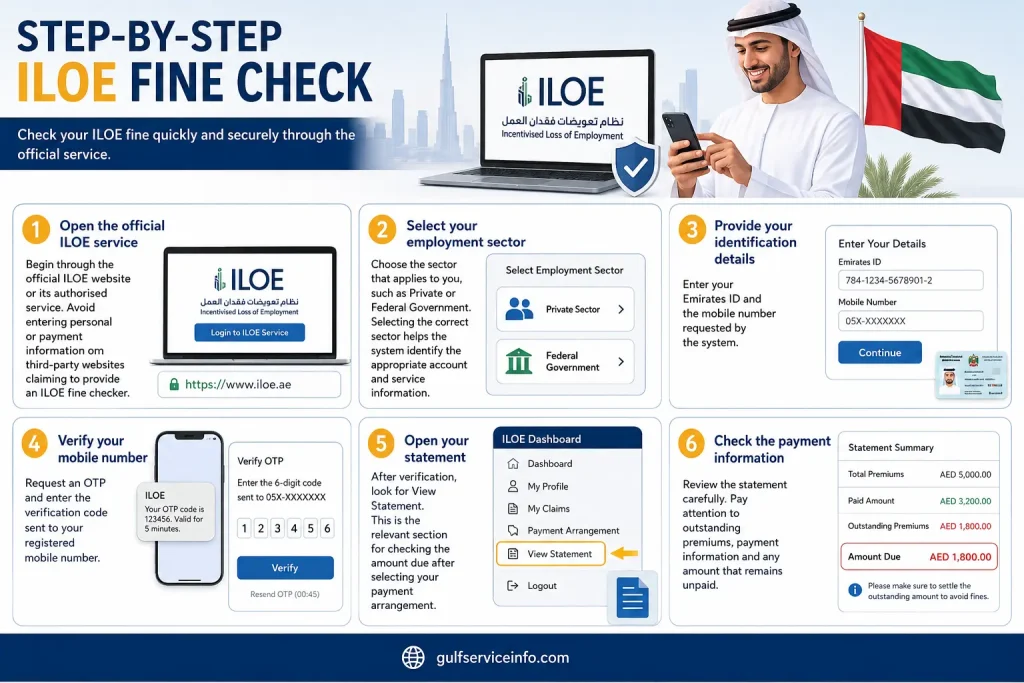
Step-by-Step IloE Fine Check
1. Open the official ILOE service
Begin through the official ILOE website or its authorised service. Avoid entering personal or payment information on third-party websites claiming to provide an ILOE fine checker.
2. Select your employment sector
Choose the sector that applies to you, such as Private or Federal Government. Selecting the correct sector helps the system identify the appropriate account and service information.
3. Provide your identification details
Enter your Emirates ID and the mobile number requested by the system.
4. Verify your mobile number
Request an OTP and enter the verification code sent to your registered mobile number.
5. Open your statement
After verification, look for View Statement. This is the relevant section for checking the amount due after selecting your payment arrangement.
6. Check the payment information
Review the statement carefully. Pay attention to outstanding premiums, payment information and any amount that remains unpaid.
Important: Seeing an amount due does not necessarily mean that the amount is an ILOE fine. It may be an unpaid insurance premium. Use the official statement and policy information to understand your actual payment position.
ILOE Insurance Fine vs Outstanding Premium
Many searches for IloE insurance fine actually relate to an overdue insurance payment. The two situations should be kept separate.
The ILOE system provides access to both policy information and payment statements. If your aim is to understand your insurance coverage, you should check View Policy Details. If you want to know how much you need to pay, View Statement is the more relevant option.
What You May See in Your Account
|
Item |
What it means |
|
ILOE Premium |
The regular insurance payment required under your selected plan |
|
Amount Due |
An outstanding amount shown in your payment statement |
|
ILOE Fine |
A penalty that may apply after prolonged non-payment under the applicable rules |
|
Policy Status |
Information showing whether your insurance arrangement remains active or has been affected |
This simple distinction can save you from a common mistake: assuming that every outstanding amount in your ILOE account is a fine.
How to Check Your ILOE Policy Details
If you are concerned about your insurance certificate or policy status, use the policy-details section rather than relying only on the payment screen.
The basic process is:
If your main question is “How much do I owe?”, switch to View Statement. The official information distinguishes this function from the area used to view policy details.
How to Pay an IloE Fine Online
After completing your IloE fine check, the next step is to confirm exactly what the official system says you need to pay. Do not use an old amount from a previous receipt or information copied from an unofficial website.
The safest approach is to sign in, review your statement, confirm the amount and then use an available official payment method.
Have These Details Ready
Before starting an ILOE payment, make sure you can access:
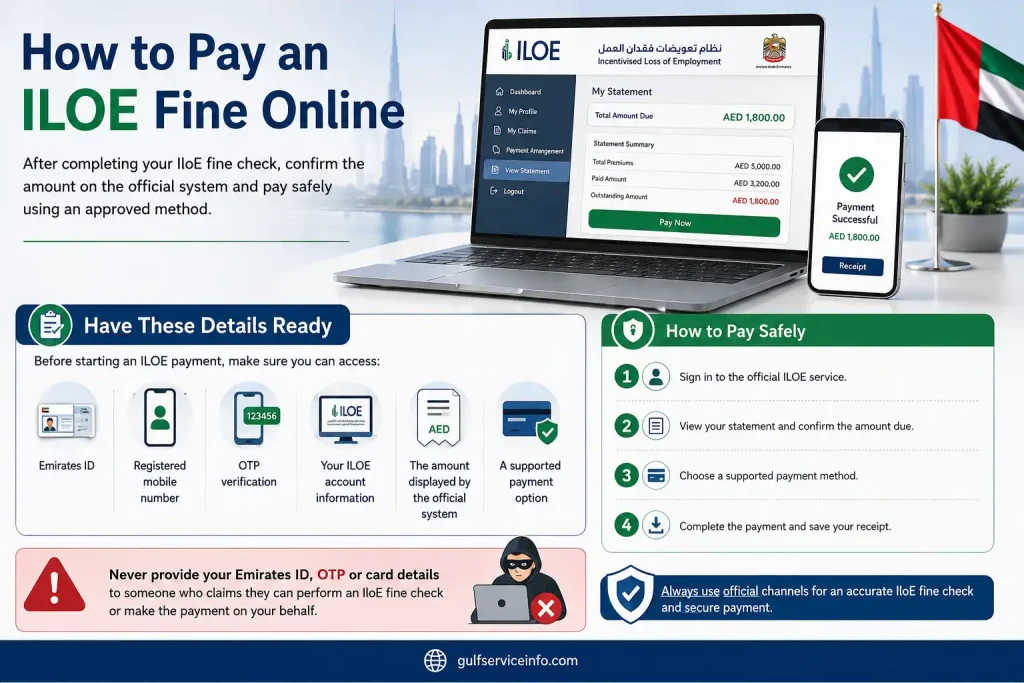
Never provide your Emirates ID, OTP or card details to someone who claims they can perform an IloE fine check or make the payment on your behalf.
A Safer Payment Sequence
A straightforward routine is:
Official ILOE service → Sign in → View Statement → Confirm amount → Pay → Save confirmation
Checking the statement before paying gives you an opportunity to verify what the system currently records as outstanding.
What If Your Policy Has Already Been Cancelled?
This is an important point for anyone who has allowed premiums to remain unpaid for an extended period.
If the policy has been cancelled because payment was not made for more than three months, you should not assume that paying an old outstanding premium will automatically restore the previous policy. The official FAQ states that after cancellation for this reason, the worker must subscribe again through a new insurance policy.
ILOE Fine Payment Methods
ILOE offers several channels for subscription and renewal. The official information identifies the ILOE Portal and ILOE Mobile App as direct channels that do not carry an additional service charge when used for these services.
Other authorised channels may also be available, including exchange houses, business service centres, SMS or mobile-billing arrangements, kiosks and certain bank applications or ATMs. Some of these channels can involve additional service fees.
For an online IloE fine payment, the official portal remains a practical starting point because you can first verify your account and statement before proceeding with payment.
ILOE Payment Channels at a Glance
| Channel | Main use |
|---|---|
| ILOE Website | Online subscription, renewal and account services |
| ILOE Mobile App | Mobile access to ILOE services |
| Other authorised channels | Additional subscription and payment options may be available |
The payment options shown by ILOE can change, so check the current choices available for your transaction rather than assuming that every method is always supported.
Common Mistake: Confusing an Amount Due With a Fine
One of the easiest errors to make during an IloE fine check online UAE is to see an outstanding amount and immediately assume that a penalty has been issued.
That is not necessarily the case. Your statement may show an unpaid insurance premium, while an actual fine relates to prolonged non-payment under the applicable rules.
If you are uncertain, check both your View Statement and View Policy Details sections. Together, these can give you a clearer picture of the amount due and your insurance status.
The safest rule is simple: verify the information through the official ILOE system before making a payment.
How to Use IloE Quick Pay for a Fine or Outstanding Amount
If you already know that an ILOE payment is outstanding, you may prefer to deal with it directly instead of navigating through the entire website. The sensible approach is to use the official ILOE service, verify your identity and check the amount recorded against your Emirates ID and policy before making any payment.
One point is worth clarifying first: an overdue insurance premium and an IloE fine are not automatically the same thing. According to the official ILOE FAQ, failing to pay premiums for more than three months after the due date can lead to cancellation of the insurance policy and a fine under the applicable law.
Quick Pay Process
When the relevant online payment option is available, follow this general sequence:
The official process specifically directs users who are unsure about their outstanding amount to log in, select their sector, provide their Emirates ID and mobile number, verify with an OTP and then use View Statement.
Important: Don’t treat an amount shown in a search result, SMS or unofficial website as confirmation of an IloE fine. Check the figure through the official ILOE portal before paying.
What Happens If Your ILOE Policy Has Been Cancelled?
A cancelled policy changes the situation, so this is particularly important when performing an IloE fine check online UAE.
If an insured employee does not pay premiums for more than three months under the agreed payment arrangement and the insurance certificate is subsequently cancelled, the official ILOE FAQ states that the employee must subscribe again through a new insurance policy.
In other words, finding an old unpaid amount does not necessarily mean that paying it will reactivate the previous policy.
How to Check Your ILOE Insurance Online
Checking your ILOE insurance is slightly different from looking for an IloE fine. An insurance check is primarily used to confirm your policy information, certificate and current payment position.
The official ILOE service provides access to policy information through its online portal and mobile application. If you have already subscribed but have not received your Certificate of Insurance, the published instructions direct you to log in, select your sector, enter your Emirates ID and mobile number, complete OTP verification and choose View Policy Details.
Steps to Check ILOE Insurance
Step 1: Visit the official ILOE service
Step 2: Identify your sector
Select the employment sector that applies to your ILOE account.
Step 3: Enter your details
Provide your Emirates ID and mobile number as requested.
Step 4: Complete OTP verification
Request the one-time password and enter the code when prompted.
Step 5: View your policy
Choose View Policy Details to access your insurance information.
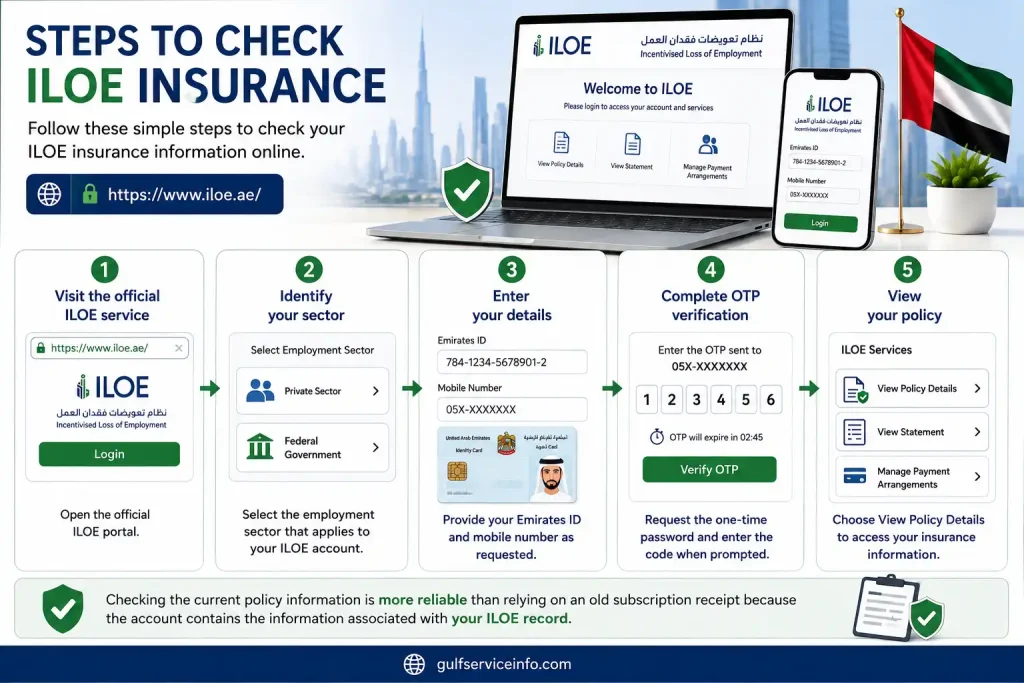
Checking the current policy information is more reliable than relying on an old subscription receipt because the account contains the information associated with your ILOE record.
How to Find the Amount You Need to Pay
If your main concern is “How much ILOE do I need to pay?”, go to View Statement rather than relying solely on the insurance certificate.
The official FAQ specifically directs users who have selected a payment method but do not know the amount due to use View Statement.
| What you want to check | Where to look |
|---|---|
| Insurance certificate | View Policy Details |
| Current amount due | View Statement |
| Payment position | Account or statement information |
| Policy status | Policy Details |
| Possible non-payment issue | Statement + policy status |
This makes it easier to identify whether you are dealing with a normal outstanding premium, a policy issue or a potential fine.
IloE Login: How to Access Your Account
The IloE login process described by the official instructions is not presented as a conventional username-and-password sign-in. Instead, the verification process uses your employment sector, Emirates ID, mobile number and a one-time password.
ILOE Login Steps
Start from the official ILOE website and work through these stages:
1. Select your employment sector
Choose the sector relevant to your employment.
2. Enter your Emirates ID
Provide the Emirates ID information requested by the portal.
3. Add your mobile number
Enter the mobile number associated with your ILOE information.
4. Request an OTP
Ask the system to send your one-time verification code.
5. Verify your identity
Enter the OTP to gain access to the available ILOE services.
6. Choose the service you need
Depending on your purpose, select View Policy Details or View Statement.
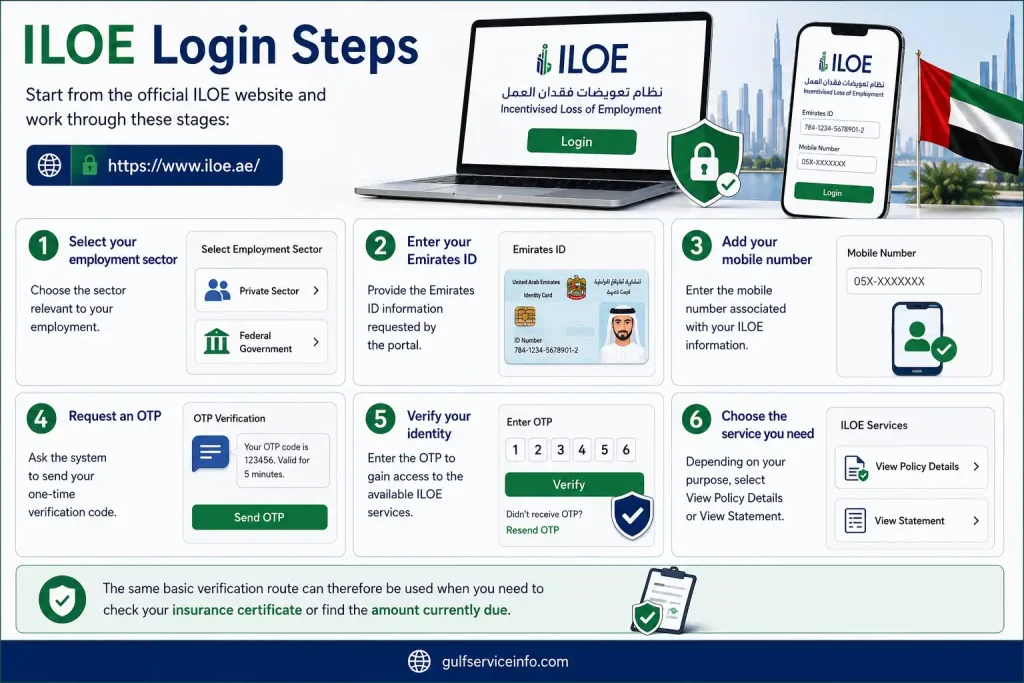
The same basic verification route can therefore be used when you need to check your insurance certificate or find the amount currently due.
ILOE Login Not Working? Try These Checks
If your OTP doesn’t arrive, first confirm that the mobile number entered is correct and that your phone can receive SMS messages. Checking your internet connection or trying the official ILOE mobile application may also help.
Avoid repeatedly entering random information or attempting to bypass the verification process. If your account details appear to be incorrect, contacting ILOE support is the safer option.
The official ILOE website lists 600 599 555 as its contact number.
Common Problems During an IloE Fine Check
An IloE fine check can become confusing when several issues overlap. For example, you might have an outstanding premium, a cancelled certificate, an OTP problem or a payment that has not yet appeared in your account.
Here are the situations users are most likely to encounter.
1. The Amount Due Isn’t Showing
If you’ve selected a payment method but aren’t sure what you owe, sign in through the official ILOE portal and open View Statement. This is the official process for checking the amount due.
2. Your ILOE Certificate Hasn’t Arrived
If you subscribed but cannot find your Certificate of Insurance, complete the normal login process and use View Policy Details to review the available information.
3. Your Policy Has Been Cancelled
Where premiums remain unpaid for more than three months from the due date, the ILOE information states that the policy may be cancelled and a fine may apply. If the certificate has already been cancelled, the employee must subscribe again through a new insurance policy.
4. You’ve Paid but the Account Still Shows an Amount
Don’t immediately submit another payment. First compare the account with your payment confirmation or receipt. If the transaction was successful but the account hasn’t updated, retain the receipt and contact ILOE support.
5. Your OTP Isn’t Arriving
Check the mobile number entered and make sure your phone can receive messages. If the problem continues, use an official ILOE support channel instead of sharing your OTP with another person.
6. You Used an Unofficial Website
For an IloE fine check online UAE, start with iloe.ae. The official service provides access to the ILOE portal, policy information, subscription and renewal services, and support details.
Security reminder: Your Emirates ID and OTP should be treated as private account information. Use the official ILOE service rather than giving these details to someone offering to check or pay your fine.
Frequently Asked Questions About IloE Fine
Final Thoughts
Checking an IloE fine online is straightforward when you use the official ILOE portal and verify your policy details before making any payment. Start with an IloE fine check to review your statement, confirm whether you have an outstanding premium or penalty, and check your current insurance status. If your policy has been cancelled because of prolonged non-payment, follow the official ILOE instructions for re-subscription rather than assuming an old payment will restore the policy. Most importantly, use the official ILOE website for IloE fine check, insurance verification, login and payment, and keep your payment confirmation for future reference.
Read More: Explore our related Gulf government service guides for more step-by-step information and helpful updates.
Sukoon Insurance UAE: Login, Status Check, Hospital List & Contact Guide
RTA Dubai: Login, Fines, NOL Card, Vehicle Renewal & Customer Care Guide
Achieve3000 Login: Portal, Clever Access & Complete Guide
FTA Login UAE: Complete EmaraTax Account Access and Online Services Guide