UAE PASS Login: Registration, Verification, Recovery & Complete Guide

Published On: September 15, 2026
Follow Us
UAE PASS login, registration, verification and account recovery guide in the UAE

UAE PASS is the UAE’s national digital identity that allows citizens, residents, and visitors to access participating digital services with one trusted identity. Instead of maintaining separate login details for every supported platform, users can use their UAE PASS account to authenticate themselves across participating government, semi-government, and private-sector services. The platform also supports digital document signing, signature verification, and requesting or sharing official digital documents.

For new users, understanding the UAE PASS login, registration, and verification process can make accessing online services much easier. This guide explains how UAE PASS works, how to create an account, how to complete verification, and how to use the service for supported government platforms. It also covers account recovery, common problems, security, support, and frequently asked questions so you can manage your UAE PASS account with confidence.

Looking for more UAE service guides and useful online resources? Visit Our Homepage

What Is UAE PASS?

UAE PASS is the UAE’s national digital identity for citizens, residents, and visitors, providing secure access to participating digital services through a single account. The platform was created to provide a trusted digital identity solution that can be used across different sectors while making online services more convenient and reducing the need for paper-based processes.

With UAE PASS, users can sign in to many participating websites and applications, authenticate their identity, digitally sign documents, verify digital signatures, and request or share supported official documents. The exact services available to you depend on the organization and whether it has integrated UAE PASS into its platform.

The official UAE PASS website describes the service as a digital identity that can be used with many government, semi-government, and private entities. This makes it particularly useful for people who regularly complete government transactions online.

You can access the official UAE PASS website for the latest information about registration, supported features, verification, and account services.

UAE PASS Login

UAE PASS login allows registered users to securely authenticate themselves when accessing a participating website or application. Instead of creating a separate account for every supported service, you can select the UAE PASS authentication option and complete the requested verification.

The current UAE PASS authentication page accepts an Emirates ID, email address, or phone number as the login identifier.

How to Login to UAE PASS

To complete a UAE PASS login, follow these general steps:
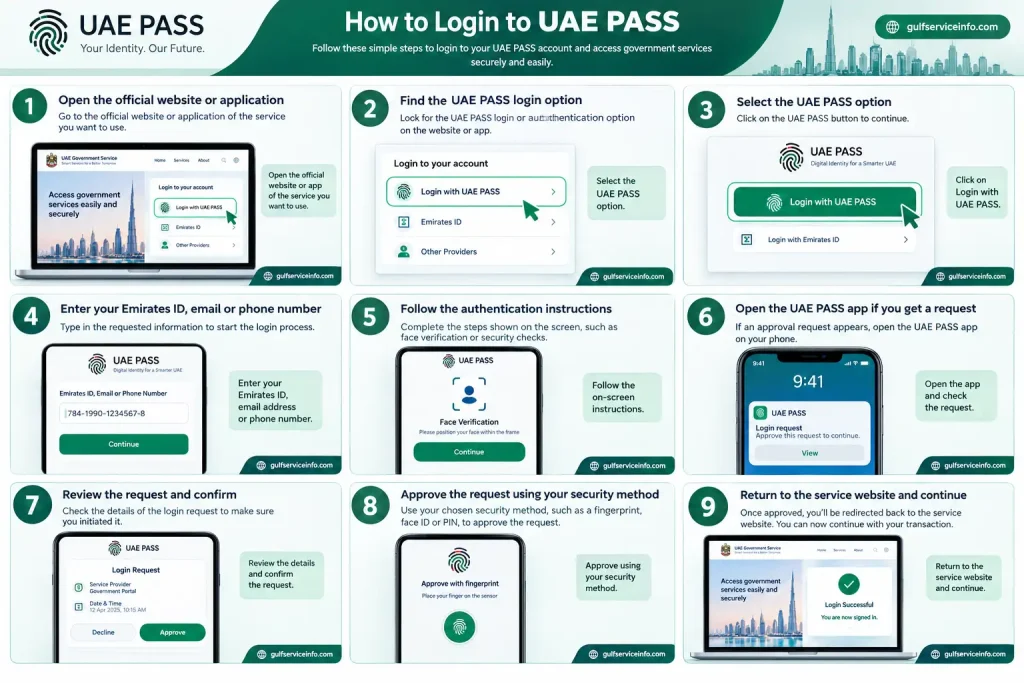
  • Open the official website or application of the service you want to use.
  • Find the UAE PASS login or authentication option.
  • Select the UAE PASS option.
  • Enter the requested Emirates ID, email address, or phone number.
  • Follow the authentication instructions displayed on the screen.
  • Open the UAE PASS app if an approval request appears.
  • Review the request and confirm that you initiated the login.
  • Approve the request using your available security method.
  • Return to the service website and continue with your transaction.
How to login to UAE PASS using the official UAE PASS authentication process

The exact authentication experience can vary between service providers because each organization integrates UAE PASS into its own digital platform.

Important: Never approve a UAE PASS authentication request that you did not initiate. If an unexpected request appears on your phone, reject it and investigate the reason before attempting another login.

For account access, use the official UAE PASS authentication service when it is provided by the service you are trying to access.

UAE PASS Registration

UAE PASS registration creates your digital identity account and begins the process of connecting your identity to the UAE PASS platform. The official UAE PASS website currently describes registration as a three-step process: download the application, register using an accepted identification document, and verify the account through face verification or a nearby kiosk.

According to the official platform, registration can be started using an Emirates ID, GCC ID, or passport, depending on the available registration route and your circumstances.

How to Register for UAE PASS

The general UAE PASS registration process is:
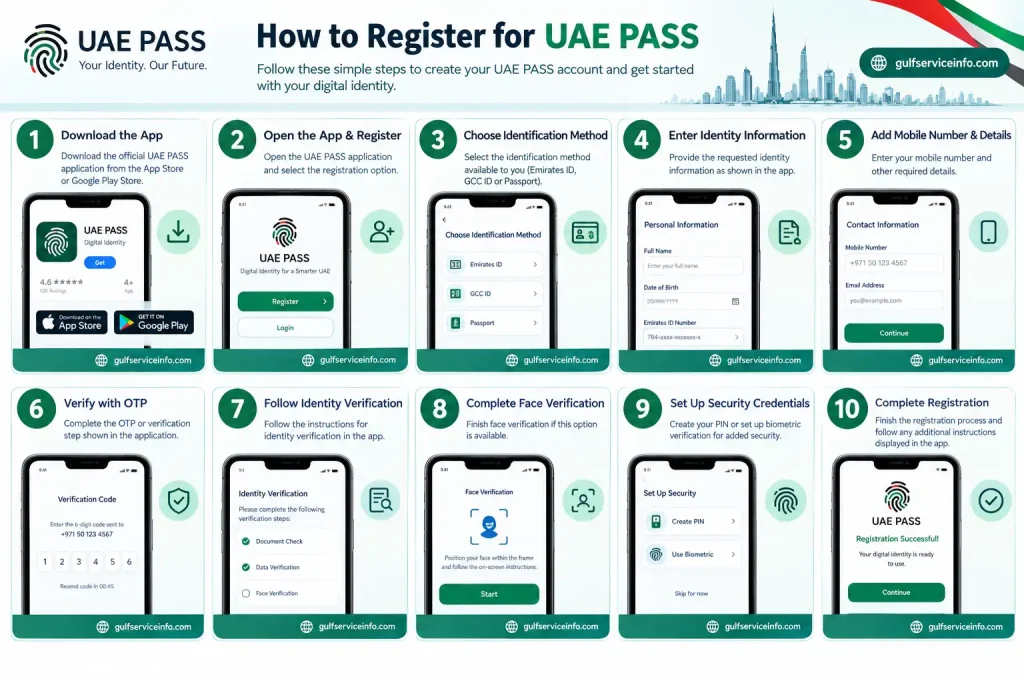
  • Download the official UAE PASS application on your smartphone.
  • Open the application and select the registration option.
  • Choose the identification method available to you.
  • Enter the requested identity information.
  • Provide your mobile number and other required details.
  • Complete any OTP or verification step shown by the application.
  • Follow the instructions for identity verification.
  • Complete face verification if this option is available.
  • Set up the required security credentials.
  • Finish the registration process and follow any additional instructions displayed in the app.
How to register for UAE PASS using the official UAE PASS registration process

The exact screens and requirements can change as UAE PASS updates its services, so users should follow the instructions shown in the current official application rather than relying on outdated screenshots or third-party guides.

What Do You Need for UAE PASS Registration?

You generally need an accepted identity document, a smartphone, and the information required by UAE PASS to begin registration. The official UAE PASS website specifically identifies an Emirates ID, GCC ID, or passport as registration options.

Depending on your registration route, you may need:
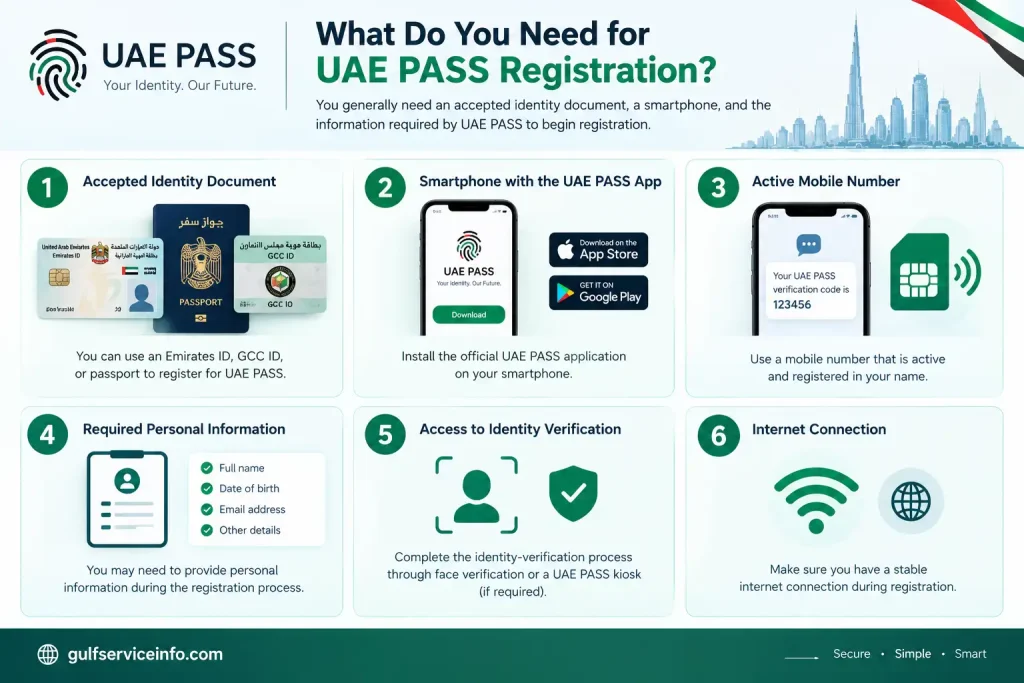
  • Emirates ID, GCC ID, or passport
  • Smartphone with the UAE PASS app
  • Active mobile number
  • Required personal information
  • Access to the identity-verification process
  • Internet connection
Requirements needed for UAE PASS registration including ID, smartphone, mobile number and verification

Make sure the information you provide matches your official identity documents. Incorrect or outdated information can create problems during registration or verification.

The safest approach is to download the application through an official app store and begin the process from the official UAE PASS website rather than using an unofficial download link.

UAE PASS Verification

UAE PASS verification confirms your identity after registration and helps establish the required level of trust for your digital identity account. The official UAE PASS website currently lists two verification routes: face verification or visiting a nearby UAE PASS kiosk.

Verification is important because UAE PASS is not simply a username-and-password service. It is designed to provide a trusted digital identity that can be used when interacting with participating online services.

UAE PASS Face Verification

UAE PASS face verification allows eligible users to verify their identity through the smartphone application. The app guides you through the required steps and uses your phone’s camera as part of the verification process.

For a smoother verification attempt:
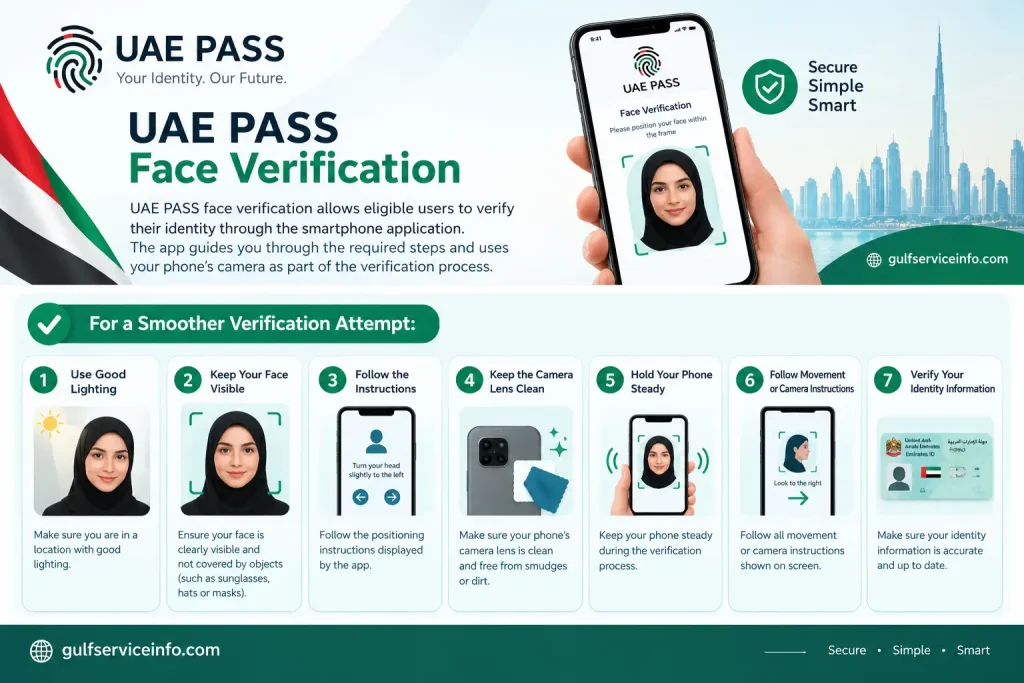
  • Use a location with good lighting.
  • Keep your face clearly visible.
  • Follow the positioning instructions displayed by the app.
  • Keep the camera lens clean.
  • Hold your phone steady.
  • Follow all movement or camera instructions shown on screen.
  • Make sure your identity information is accurate.
UAE PASS face verification using the smartphone app for identity verification

If your first attempt fails, carefully repeat the process rather than continuously submitting unsuccessful attempts. Poor lighting, camera problems, or difficulty following the on-screen instructions can affect the verification experience.

UAE PASS Kiosk Verification

A UAE PASS kiosk provides a physical verification option for users who need to verify or upgrade their account through a kiosk. The official UAE PASS kiosk page provides a location map where users can find available verification points across the UAE.

To find a kiosk:
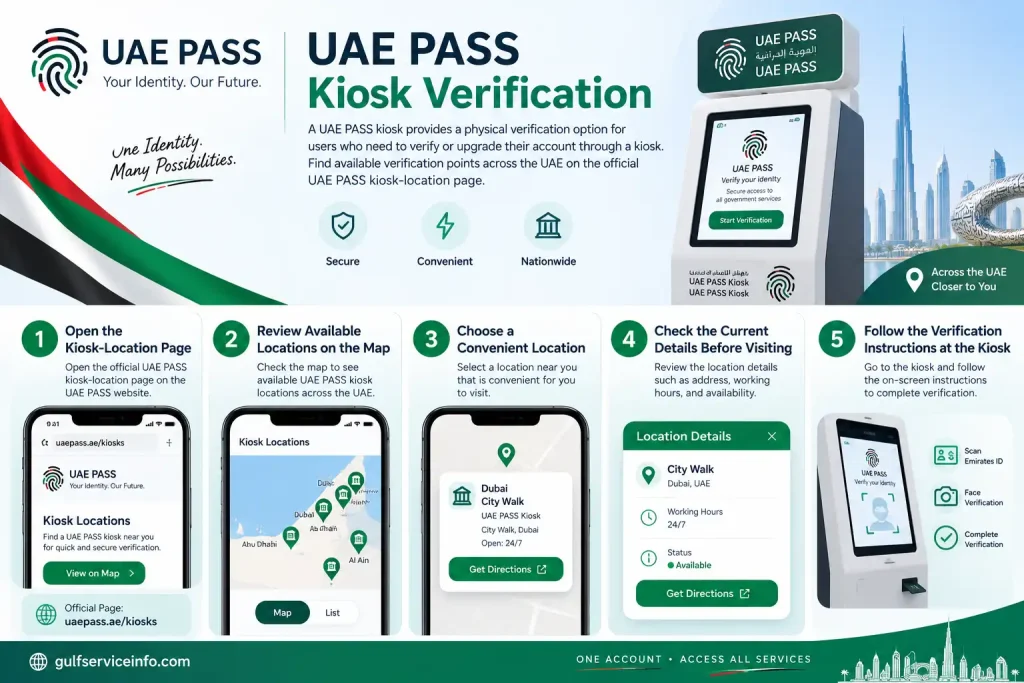
  • Open the official UAE PASS kiosk-location page.
  • Review the available locations on the map.
  • Choose a convenient location.
  • Check the current details before visiting.
  • Follow the verification instructions provided at the kiosk.
UAE PASS kiosk verification process and steps to find a verification kiosk in the UAE

You can use the official UAE PASS Kiosk Locations page to find a verification point.

Because kiosk locations can change, always check the official UAE PASS map before travelling to a particular location.

How to Use UAE PASS for Government Services

UAE PASS can be used to authenticate users on participating UAE government services that have integrated the digital identity platform. Once your account has been registered and verified as required, you can select UAE PASS when it is offered as a login or authentication method.

UAE PASS is not automatically available on every government website. The official terms explain that use with a particular government service depends on whether that service provider has integrated UAE PASS.

Steps to Use UAE PASS for a Government Service

To use UAE PASS for government services, follow these steps:
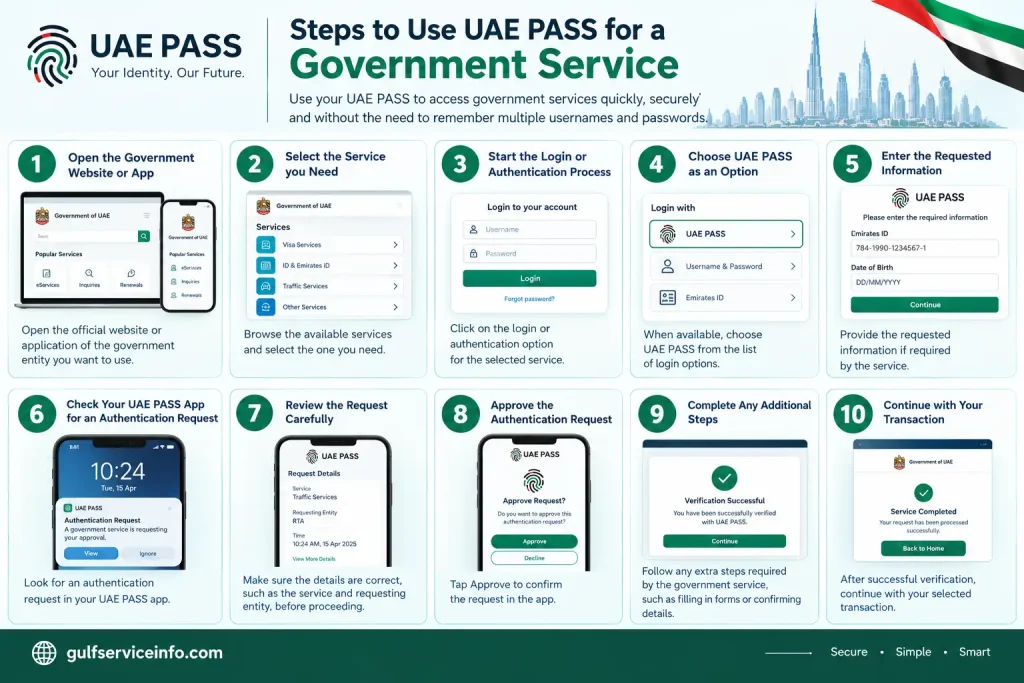
  • Open the official website or application of the government entity.
  • Select the service you need.
  • Start the login or authentication process.
  • Choose UAE PASS when it appears as an available option.
  • Enter the requested information if required.
  • Check your UAE PASS app for an authentication request.
  • Review the request carefully.
  • Approve the authentication request.
  • Complete any additional steps required by the government service.
  • Continue with your selected transaction.
Steps to use UAE PASS for government services, including login and authentication approval

The exact process can differ between government entities because the individual service provider controls its own website and transaction flow.

What Can You Do With UAE PASS?

UAE PASS can support secure sign-in, digital signatures, document verification, and official document sharing on participating services. These features extend the platform beyond simple login authentication.

Depending on the service, users may be able to:

  • Sign in to participating digital services
  • Authenticate their identity
  • Digitally sign documents
  • Verify digital signatures
  • Request digital copies of official documents
  • Share supported official documents
  • Access services from participating organizations

The availability of a particular feature depends on the organization and service involved.

UAE PASS App

The UAE PASS app is the main smartphone application used to register, verify, and authenticate your digital identity. It is an important part of the UAE PASS experience because many authentication and identity-related actions are completed through the mobile application.

The official platform promotes smartphone-based access for sign-in and registration and also supports document signing through the UAE PASS app or self-care portal.

UAE PASS App Features

The UAE PASS app provides several digital identity features beyond basic login. Depending on the service and your account, you may use it to:

  • Complete account registration
  • Verify your identity
  • Approve authentication requests
  • Sign supported documents digitally
  • Verify digital signatures
  • Access supported digital documents
  • Share official digital documents
  • Manage aspects of your digital identity

Keeping the application updated can also help maintain compatibility with supported services. Always install updates through an official app store or access the application through the official UAE PASS platform.

If you need to use UAE PASS on a new phone or encounter an app-related problem, follow the account-management or recovery instructions provided by the official service rather than creating another account unnecessarily.

UAE PASS Recovery

UAE PASS recovery helps users regain access to their digital identity when they cannot log in or need to resolve an account-access problem. The appropriate recovery process depends on the reason you cannot access the account, such as forgotten credentials, a changed phone, or difficulty completing authentication.

If you are having trouble accessing UAE PASS, start with the official application and follow the recovery instructions available for your account. Avoid third-party websites that claim they can recover or activate UAE PASS accounts for a fee.

How to Recover UAE PASS Account

The general recovery process can include these steps:

  • Open the official UAE PASS application.
  • Select the available login, recovery, or account-access option.
  • Enter the requested account information.
  • Complete the identity or security verification requested by the system.
  • Follow the instructions displayed by UAE PASS.
  • Update your credentials if the recovery process allows you to do so.
  • Complete any additional verification.
  • Try signing in again after completing the recovery process.

The available options can differ according to your account and the current UAE PASS system. Therefore, always follow the instructions displayed by the official application.

What If You Forgot Your UAE PASS Password?

If you forgot your UAE PASS password or another security credential, use the official recovery option provided by UAE PASS rather than creating a second account. The system may require you to verify your identity before allowing you to regain access.

Start by opening the official UAE PASS application and checking the available account-recovery options. If you cannot complete the required verification, use the official UAE PASS support channels for further assistance.

Never give your password or OTP to another person who claims they can recover your account.

What If You Changed Your Phone?

If you changed your smartphone, you may need to complete additional authentication before using your existing UAE PASS account on the new device. Install the official UAE PASS application on the new phone and follow the instructions for accessing an existing account.

If you still have access to your previous device, keep it available until you have successfully completed the transition where possible. If you lost your old phone or can no longer access your previous authentication method, follow the official account-recovery instructions.

If the application cannot verify you on the new device, contact UAE PASS through its official support channels rather than registering a duplicate identity.

How to Update UAE PASS Account Information

Updating UAE PASS account information keeps your digital identity details accurate and can help prevent authentication and recovery problems. Depending on the type of information involved, changes may be handled through the UAE PASS app, self-care portal, or an official verification process.

Some information may be directly manageable by the user, while identity information connected to official documents may require additional verification. This means you should not assume that every profile field can be changed manually.

How to Update UAE PASS Information

A typical account-information update process is:

  • Open the official UAE PASS app or relevant self-care service.
  • Sign in to your account.
  • Open your profile or account settings.
  • Review the information currently associated with your account.
  • Select the available information you need to update.
  • Enter the new details if editing is permitted.
  • Complete any verification requested by UAE PASS.
  • Save and confirm the changes.

The exact options can change as the platform is updated, so use the current instructions shown by UAE PASS.

Update Your Mobile Number

Keeping your registered mobile number current is important because your phone may be involved in authentication and account-security processes. If your number changes, check the official UAE PASS account-management options to determine how the new number can be registered.

If you no longer have access to the old number, you may need to complete an additional identity-verification or recovery process.

Do not ask another person to receive your verification codes on your behalf. Your UAE PASS account should remain under your own control.

Update Identity Information

Identity information connected to official documents may require an official verification process rather than a simple profile edit. If your Emirates ID, passport, or other identification information has changed, follow the instructions provided by UAE PASS for your particular account.

Always make sure that your information matches your current official documents before attempting verification.

UAE PASS Common Problems and Solutions

Most UAE PASS problems are related to login, identity verification, OTP delivery, authentication requests, or the mobile application. The correct solution depends on the exact error you receive, but checking your connection, application, account information, and authentication request can resolve many basic issues.

UAE PASS Login Not Working

If UAE PASS login is not working, first check your account details, internet connection, application status, and authentication request. Make sure you are using the correct UAE PASS account and that the service you are accessing actually supports UAE PASS.

Try these steps:

  • Check your internet connection.
  • Confirm your login information.
  • Open the UAE PASS application.
  • Check for a pending authentication request.
  • Make sure the request belongs to your current login.
  • Update the UAE PASS application if an update is available.
  • Restart the application.
  • Restart your phone if necessary.
  • Try the login process again.

If UAE PASS works normally but the particular government website does not, the issue may be with that service rather than your digital identity.

UAE PASS Verification Failed

If UAE PASS verification fails, check your camera, lighting, identity information, and the instructions shown by the application before trying again. Face verification can be affected by poor lighting or difficulty capturing a clear image.

Try:

  • Moving to a well-lit area.
  • Cleaning your phone camera.
  • Keeping your face clearly visible.
  • Following the positioning instructions.
  • Checking that your identity details are correct.
  • Restarting the application.
  • Trying the verification again.

If the problem continues, check whether another official verification option is available, such as a UAE PASS kiosk.

UAE PASS OTP Not Received

If you do not receive a UAE PASS OTP, first confirm that the registered mobile number is correct and that your phone can receive SMS messages.

You can also:

  • Check your mobile network.
  • Wait briefly before requesting another code.
  • Make sure your phone is not blocking relevant messages.
  • Avoid repeatedly requesting OTPs.
  • Restart your phone if necessary.
  • Try again later if there is a temporary service issue.

Never share a UAE PASS OTP with anyone.

UAE PASS Authentication Request Not Showing

If a UAE PASS authentication request does not appear, check your internet connection and open the UAE PASS app manually. You should also make sure notifications are enabled for the application.

Try the following:

  • Confirm that you initiated the login.
  • Check your internet connection.
  • Open the UAE PASS app.
  • Look for a pending request.
  • Check your phone’s notification settings.
  • Restart the login process.
  • Try again.

If an unexpected authentication request appears, do not approve it.

UAE PASS App Not Working

If the UAE PASS app crashes, freezes, or fails to open, check your internet connection and make sure you are using the latest available version.

You can try:

  • Closing and reopening the app.
  • Restarting your smartphone.
  • Checking for application updates.
  • Checking available phone storage.
  • Ensuring your operating system is compatible.
  • Reinstalling the official application if necessary.

Before reinstalling, make sure you understand how you will regain access to your existing account.

Is UAE PASS Free?

UAE PASS is intended to provide digital identity and authentication services without requiring users to purchase a general monthly subscription for the basic identity account. However, this does not mean that every service accessed through UAE PASS is free.

A government department or private organization can charge its own fees for a particular transaction, application, certificate, permit, or other service. That payment is separate from using UAE PASS to authenticate your identity.

For example, if you use UAE PASS to sign in to a government service and that service requires a transaction fee, the charge comes from the relevant service provider rather than from the basic act of logging in with UAE PASS.

Are UAE PASS Government Services Free?

UAE PASS does not determine whether an individual government service is free or paid. Each participating organization sets its own requirements and fees.

Before completing a transaction, check the official website of the relevant government entity for current charges. Avoid websites that ask you to pay an unofficial “UAE PASS activation” or “UAE PASS registration” fee.

Are There Paid UAE PASS Services?

Some features or services connected to UAE PASS can have their own terms or charges depending on the participating service provider. Therefore, users should check the specific service they are using instead of assuming that every transaction has the same cost.

The safest approach is to use the official UAE PASS platform and the official website of the government or organization providing the service.

UAE PASS Security and Privacy

UAE PASS security is important because the platform is connected to your digital identity and can be used to authenticate you on participating services. Users should protect their account, mobile device, authentication credentials, and approval requests just as carefully as other sensitive online accounts.

The official UAE PASS terms place responsibilities on users regarding their account information and security.

UAE PASS Security Tips

Follow these basic precautions when using UAE PASS:

  • Never share your password.
  • Never share an OTP.
  • Never approve an unexpected authentication request.
  • Keep your phone protected with a screen lock.
  • Keep the UAE PASS app updated.
  • Avoid suspicious login links.
  • Check the website domain before entering information.
  • Do not allow other people to use your UAE PASS account.
  • Use official UAE PASS support channels for account problems.

Check Every Authentication Request

You should approve a UAE PASS authentication request only when you personally started the related login or transaction. Before approving, check the service or organization shown in the request and make sure it matches what you are currently doing.

If you receive an unexpected request, reject it instead of approving it simply to make the notification disappear.

UAE PASS Privacy

UAE PASS processes identity-related information as part of providing its digital identity services. The information involved can depend on the registration method, account, and service being accessed.

For the most accurate and current information about privacy, terms, and data handling, review the official UAE PASS documentation rather than relying on third-party explanations.

The official UAE PASS website should be your primary source for current platform information.

UAE PASS Customer Support

UAE PASS customer support helps users resolve account, registration, verification, login, and other technical issues. Before contacting support, identify the exact problem you are facing, such as a failed verification attempt, missing OTP, account-access issue, or authentication error. This makes it easier to explain your problem and follow the appropriate solution.

For reliable assistance, always use the official UAE PASS support channels rather than phone numbers or social-media accounts found on random websites. You can start from the official UAE PASS website and access the latest support information available there.

How to Contact UAE PASS Support

The safest way to contact UAE PASS support is through the official UAE PASS platform and its listed support channels. Follow these steps:

  • Visit the official UAE PASS website.
  • Look for the support or contact section.
  • Select the option related to your issue.
  • Explain your problem clearly.
  • Provide the information requested by the support team.
  • Follow the recommended troubleshooting or verification steps.

When contacting support, never provide your password, OTP, or approve an authentication request simply because someone claims to be a support representative.

What Information Should You Have Ready?

Having basic information about your problem can make UAE PASS support easier and faster. Depending on the issue, you may need to explain:

  • Whether you cannot register or log in
  • Whether identity verification failed
  • Whether you changed your phone or mobile number
  • Whether you are not receiving an OTP
  • Which service you were trying to access
  • The exact error message displayed
  • When the problem started

Only provide sensitive information through an official and verified UAE PASS support channel.

UAE PASS Tips for New Users

New UAE PASS users can avoid many common problems by completing registration carefully and following basic digital-security practices. Because UAE PASS is linked to your digital identity, it is important to keep your account information accurate and protect your authentication requests.

Complete Verification Carefully

Completing UAE PASS verification correctly can make future authentication easier. If you are using face verification, choose a well-lit location and follow every instruction displayed in the app.

If a kiosk is required or available for your verification, use the official UAE PASS kiosk-location page instead of relying on information from unofficial websites.

Keep Your Information Updated

Keeping your UAE PASS account information current can help prevent problems with login and account recovery. Pay particular attention to your registered mobile number and other information used for authentication.

If your identification information changes, follow the official process for updating your digital identity.

Protect Your Account

Your UAE PASS account should be treated as sensitive because it represents your digital identity. Never give another person your password, OTP, or access to your authentication requests.

You should also use a secure lock on the smartphone where your UAE PASS application is installed.

Never Approve Unknown Requests

Never approve a UAE PASS authentication request unless you personally initiated the related login or transaction. If an unexpected request appears, reject it and investigate the issue.

This is one of the simplest ways to protect your digital identity from unauthorized authentication attempts.

Use Official Websites

Always use official UAE PASS sources when registering, logging in, recovering an account, or checking verification information. Avoid websites that promise instant account activation, paid recovery, or unofficial UAE PASS services.

The official website is:

UAE PASS Official Website

Frequently Asked Questions About UAE PASS

You can verify your UAE PASS account through the official UAE PASS app or by using a UAE PASS Kiosk, depending on the verification option available to you. Verification confirms your identity and allows you to access the full range of features available with your digital identity. During the process, you may be asked to provide an accepted identity document and complete identity checks. Once verification is completed successfully, you can use your account for supported UAE PASS Login and digital services.

Verify UAE PASS Through the App

The UAE PASS app provides a convenient way to complete identity verification without visiting a physical location. Follow the instructions shown in the application and keep your Emirates ID or passport available if it is requested during the process.

The general process includes:

  1. Open the official UAE PASS app and start the verification process.
  2. Provide the requested identity document details.
  3. Follow the instructions for the identity check.
  4. Complete the facial verification when prompted.
  5. Submit the verification request and wait for the result.
  6. Once approved, your UAE PASS account can be used for supported digital services.

Make sure you are in a well-lit place and follow the instructions displayed by the app carefully for a smoother verification experience.

Verify UAE PASS at a Kiosk

If you cannot complete verification through the app, you may be able to verify your UAE PASS account at an official UAE PASS Kiosk. Kiosks provide a physical verification option and can be useful when additional identity verification is required.

To use a kiosk, locate an available UAE PASS Kiosk and follow the instructions displayed on the screen. Keep your Emirates ID with you and complete the identity checks requested by the kiosk. After successful verification, your UAE PASS account can be used for supported services.

For the latest kiosk locations and availability, use the rather than relying on outdated third-party lists.

You can solve most UAE PASS problems by checking your internet connection, reviewing your account details, completing account recovery, or contacting official UAE PASS Support when the issue continues. Login and verification problems can sometimes be related to the app, your registered information, or the service you are trying to access. Start with the simple troubleshooting steps before attempting account recovery. If the problem remains unresolved, use the official UAE PASS support channels for further assistance.

Common UAE PASS Problems and Solutions

If UAE PASS is not working properly, first identify where the problem occurs, such as login, verification, account recovery, or an authentication request. You can then try the following solutions:

  • Check your internet connection: Switch between Wi-Fi and mobile data to see whether the issue is related to your network connection.
  • Restart the UAE PASS app: Close the application completely and open it again before trying to log in.
  • Try account recovery: If you cannot access your existing account, use the official UAE PASS recovery process and follow the identity-verification instructions provided.
  • Check your registered information: Make sure the mobile number and other account details you are using are correct and up to date.
  • Update the app: Make sure you are using the latest version of the official UAE PASS application.
  • Reinstall the app if necessary: If the application continues to malfunction, reinstalling it may resolve local app-related problems.
  • Contact UAE PASS Support: If you still cannot access your account or complete verification, contact the official support team for assistance.

UAE PASS Login Not Working

If UAE PASS Login is not working, check your internet connection and make sure you are entering the correct account information. You should also open the UAE PASS app and check whether there is an authentication request waiting for your approval. If the issue continues across different supported services, account recovery or official support may be required.

For account-related problems that you cannot resolve yourself, use the or contact the support team at 600 56 1111.

You may be unable to verify your UAE PASS because of problems with facial verification, your camera, identity-document scanning, the mobile application, or the information provided during registration. Verification can also fail if the app cannot properly complete the required identity checks. Before contacting support, try the basic troubleshooting steps below. In many cases, improving the camera conditions, checking your identity document, or updating the UAE PASS app can help you complete verification successfully.

Common UAE PASS Verification Problems

If your UAE PASS verification keeps failing, check the following possible causes:

  • Poor lighting: Facial verification may be difficult if your surroundings are too dark. Move to a bright area and make sure your face is clearly visible.
  • Camera problems: Clean your phone’s camera lens and make sure the camera can capture your face clearly. Keep your phone steady while following the verification instructions.
  • Identity document scanning: If you are asked to scan your Emirates ID or another accepted document, make sure the document is positioned correctly and that the information can be read clearly.
  • Outdated UAE PASS app: Check your app store for an available UAE PASS update and install the latest version before trying verification again.
  • App-related issues: If the application freezes or repeatedly fails during verification, close and reopen it. You can also restart your phone and try the process again.
  • Incorrect information: Check that the personal information you provide during registration matches your identity document.
  • Verification still failing: If you have tried the available troubleshooting steps and cannot complete verification, use the official UAE PASS Support channel for assistance.

If app-based verification continues to fail, you can also check whether UAE PASS Kiosk verification is available for your situation. The official kiosk locator provides current locations where verification services are offered.

You can reset or recover your UAE PASS account by using the official account recovery options available through UAE PASS. If you have forgotten your account details or are having trouble accessing your digital identity, follow the recovery instructions provided by the official UAE PASS system. For users who only need to change their digital signing password, the UAE PASS app provides a separate option for resetting it after completing identity verification.

How to Reset Your UAE PASS Signing Password

If you have forgotten your UAE PASS signing password, you can reset it from within the mobile app. The process requires identity verification to make sure the password is being changed by the account owner.

Follow these steps:

  1. Open the UAE PASS app on your phone.
  2. Go to the Profile section.
  3. Look for the Reset Signing Password option.
  4. Select the reset option and follow the instructions shown on screen.
  5. Complete the required face verification.
  6. Create a new signing password.
  7. Enter the new password again to confirm it.
  8. Save the changes and try the signing feature again.

If you cannot complete the identity verification or do not see the reset option in your app, use the official UAE PASS account recovery or support options for further assistance.

If your UAE PASS is not showing documents, the issue may be related to your account verification status, document availability, outdated information, or an app synchronization problem. Not every document is necessarily available automatically, and some documents may need to be requested through the UAE PASS app. If you recently renewed an Emirates ID or passport, it can also take time for updated information to appear. Start by checking your account status and refreshing the app before contacting UAE PASS Support.

Common Reasons UAE PASS Documents Are Not Showing

There are several reasons why your digital documents may not appear in UAE PASS. Check the following possibilities:

  • Your account is not fully verified: Some UAE PASS features may require identity verification. If your account still needs verification, complete the available verification process through the app or an official UAE PASS Kiosk.
  • The document has not been requested: Some documents may need to be requested through the Documents section instead of appearing automatically. Open the Documents area in the UAE PASS app and check whether an option is available to request or add the required document.
  • Your information needs to be refreshed: If you recently renewed your Emirates ID or passport, the information displayed in your account may not immediately reflect the updated document. Check your profile and refresh the available information.
  • The app needs an update: An outdated version of the UAE PASS application can sometimes cause display or synchronization problems. Check your app store and install the latest available update.
  • Temporary app or synchronization issue: Close and reopen the UAE PASS app and check your internet connection. If the problem continues, try the available account recovery or troubleshooting options.

If your documents still do not appear after checking these possibilities, contact and explain which document is missing from your account.

If you are not receiving an OTP from UAE PASS, the problem may be related to your registered mobile number, network connection, app version, or a temporary authentication issue. This can also happen when you are using a different phone number from the one linked to your account. Before trying account recovery, check your mobile connection and make sure your registered contact information is correct. If the OTP still does not arrive after several attempts, wait a while before requesting another code and contact UAE PASS Support if the problem continues.

Common Reasons You May Not Receive a UAE PASS OTP

There are several possible reasons why an OTP may not reach your phone. Checking each of these can help you identify the problem:

  • Your registered mobile number is different: Make sure the phone number connected to your UAE PASS account is active and correct. If you recently changed your number, you may need to update your account information through the available official process.
  • Poor mobile network: A weak signal or temporary network problem can delay SMS messages. Try moving to an area with better reception or switching your network connection before requesting another OTP.
  • You are outside the UAE: If you are travelling or using international roaming, SMS delivery can sometimes be delayed depending on your mobile network provider.
  • UAE PASS app needs an update: Check whether a newer version of the UAE PASS app is available and update it before trying the authentication process again.
  • Too many OTP requests: Repeatedly requesting new codes within a short period may cause a temporary restriction or delay. Wait for some time before requesting another OTP.
  • Temporary service issue: Sometimes the problem may be on the authentication or service side rather than your phone. If other troubleshooting steps do not work, check the official UAE PASS support channels for assistance.

If you have checked your phone number, network, and app but still cannot receive the OTP, contact for further help.

You can contact UAE PASS Support through the official support channels if you are having problems with login, registration, verification, account recovery, or other UAE PASS services. The support team provides assistance through phone, email, and the official online support page. When contacting support, explain your issue clearly and avoid sharing your UAE PASS PIN, password, or other confidential authentication details with anyone.

UAE PASS Support Contact Details

You can use the following official contact options when you need help with your UAE PASS account:

  • Phone: 600 56 1111
  • Email: [email protected]
  • Online Support: Use the official UAE PASS Support page to submit your request.

Before contacting support, keep any relevant information about the problem available, such as the type of error you are seeing or the stage where registration or UAE PASS Login stops. This can help the support team understand the issue more quickly.

If you want to delete your UAE PASS account, you should contact the official UAE PASS Support team and request assistance with account closure. The exact account-deletion process may depend on your account and the current UAE PASS procedures, so it is better to confirm the required steps directly with support rather than relying on unofficial instructions. Simply uninstalling the UAE PASS app from your phone does not necessarily mean that your account has been deleted.

Steps to Request UAE PASS Account Deletion

To request the deletion or closure of your UAE PASS account, you can follow these general steps:

  1. Contact the official UAE PASS Support team through the available support channels.
  2. Explain clearly that you want to close or delete your UAE PASS account.
  3. Provide the information requested by the support team to identify your account.
  4. Complete any identity verification required for the request.
  5. Follow any additional instructions provided by UAE PASS Support.
  6. Confirm the account-closure process once the support team provides the required instructions.

Do not send your UAE PASS PIN, password, or other confidential authentication information unless an official process specifically requires it.

If you are unsure whether you need complete account deletion or simply want to stop using the app on a particular device, contact UAE PASS Support first so they can explain the appropriate option for your situation.

If you forgot your UAE PASS password or other account credentials, use the official UAE PASS recovery options rather than trying to create a new account immediately. The recovery process depends on which UAE PASS credential you can no longer access and may require you to verify your identity. Start with the recovery option available through the official UAE PASS app or website and follow the instructions shown on screen.

Steps to Recover Your UAE PASS Account

If you cannot access your UAE PASS account, follow these general steps:

  1. Open the official UAE PASS app or website.
  2. Start the UAE PASS Login process.
  3. Select the available account recovery option if you cannot sign in.
  4. Follow the identity-verification instructions provided by UAE PASS.
  5. Complete any required verification to confirm that you are the account owner.
  6. Follow the instructions to restore access to your account.
  7. Once your account has been recovered, try UAE PASS Login again.

If you have forgotten your UAE PASS PIN specifically, use the recovery instructions provided by UAE PASS rather than repeatedly entering incorrect details. If you cannot complete the recovery process, contact for assistance.

Always use the official UAE PASS application or website for account recovery and never share your PIN or authentication details with another person.

Conclusion

UAE PASS provides a single digital identity that can simplify access to participating government, semi-government, and private-sector services in the UAE. From registration and verification to UAE PASS login, account recovery, digital signatures, and document sharing, the platform brings several digital identity functions together in one service. For new users, the most important step is to begin with the official UAE PASS application and complete the required registration and verification process carefully. Once your account is ready, you can use UAE PASS to authenticate with participating services whenever the option is available.

GulfServiceInfo Editorial Team

The GulfServiceInfo Editorial Team researches and publishes accurate, easy-to-follow guides on government, education, finance, immigration, employment, and public services across the UAE, Kuwait, and Qatar. Every article is fact-checked and references official government sources whenever possible to help readers access services confidently and efficiently.

Join WhatsApp

Join Now

Join Telegram

Join Now

Related Posts

Leave a Comment